

編輯:Android 開發實例
策略模式其實特別簡單(看到這句話,是不是心裡一下放鬆了?)。
舉個例子:排序。官方定義一個排序接口 ISort,裡面有一個 sort() 方法;民間各自實現——冒泡、快速、堆排序等等。這些實現就是「不同的策略」。某個模塊需要一個排序能力,但暫時不確定用哪種(出於擴展考慮),於是依賴 ISort 接口。最後由調用方決定具體傳入哪種實現,就能靈活切換排序算法。
這就是策略模式。
定義一系列算法,把它們一個個封裝起來,並使它們可以互相替換。策略模式讓算法獨立於使用它的客戶而變化。
Android 動畫之所以能有加速、減速、回彈等不同效果,關鍵就在於 Interpolator 的不同實現。
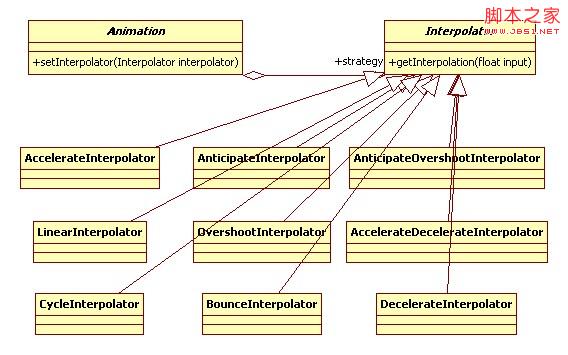
策略接口 Interpolator
package android.view.animation;

import android.content.Context;
import android.util.AttributeSet;

/**
 * A time interpolator defines the rate of change of an animation. This allows animations
 * to have non-linear motion, such as acceleration and deceleration.
 */
public interface Interpolator {

    /**
     * Maps a value representing the elapsed fraction of an animation to a value that
     * represents the interpolated fraction.
     *
     * @param input A value between 0 and 1.0 indicating our current point in the
     *              animation where 0 represents the start and 1.0 represents the end
     * @return The interpolation value. This value can be more than 1.0 for
     *         interpolators which overshoot their targets, or less than 0 for
     *         interpolators that undershoot their targets.
     */
    float getInterpolation(float input);
}
具體策略:AccelerateInterpolator
public class AccelerateInterpolator implements Interpolator {
    private final float mFactor;
    private final double mDoubleFactor;

    public AccelerateInterpolator() {
        mFactor = 1.0f;
        mDoubleFactor = 2.0;
    }

    /**
     * @param factor Degree to which the animation should be eased. Setting
     *               factor to 1.0f produces a y=x^2 parabola. Increasing factor above
     *               1.0f exaggerates the ease-in effect (starts even slower and ends
     *               even faster)
     */
    public AccelerateInterpolator(float factor) {
        mFactor = factor;
        mDoubleFactor = 2 * mFactor;
    }

    public AccelerateInterpolator(Context context, AttributeSet attrs) {
        TypedArray a = context.obtainStyledAttributes(attrs,
                com.android.internal.R.styleable.AccelerateInterpolator);
        mFactor = a.getFloat(
                com.android.internal.R.styleable.AccelerateInterpolator_factor, 1.0f);
        mDoubleFactor = 2 * mFactor;
        a.recycle();
    }

    public float getInterpolation(float input) {
        if (mFactor == 1.0f) {
            return input * input;
        } else {
            return (float) Math.pow(input, mDoubleFactor);
        }
    }
}
其他實現(DecelerateInterpolator、AccelerateDecelerateInterpolator、BounceInterpolator 等)結構完全一致,此處不再列舉。
要在動畫模塊中切換不同效果,需要把各個 Interpolator 以接口形式注入進去。常見注入方式有構造函數、setter 方法、注解、配置解析等。看看 Animation 是怎麼做的:
public abstract class Animation implements Cloneable {
    Interpolator mInterpolator;

    // 通過 set 方法注入
    public void setInterpolator(Interpolator i) {
        mInterpolator = i;
    }

    public boolean getTransformation(long currentTime, Transformation outTransformation) {
        // ...
        final float interpolatedTime = mInterpolator.getInterpolation(normalizedTime);
        applyTransformation(interpolatedTime, outTransformation);
        // ...
    }

    // 缺省實現:一個實用的小技巧
    protected void ensureInterpolator() {
        if (mInterpolator == null) {
            mInterpolator = new AccelerateDecelerateInterpolator();
        }
    }
}
值得留意的是 ensureInterpolator() 這個懶初始化:調用方即使完全不了解策略的存在,也能拿到一個合理的默認行為。策略模式說到底,就是多態的一次淋漓盡致的應用。
優點很明確:屬於行為型模式;消除了大量 if...else... 條件判斷;客戶可以自行選擇實現。
代價同樣存在:客戶需要了解各個具體策略的差異,存在學習成本;策略數量增多時類數量會膨脹。而通過提供缺省實現,可以在一定程度上緩解這個問題——不關心策略的使用者,直接用默認值即可。
 Android ListView 常見用法實戰:從默認布局到多選與點擊響應
ListView 是列表展示的首選控件(在 RecyclerView 普及之前更是如此)。本文用一套由淺入深的示例,把它的三要素、默認布局、多選模式與事件響應串起來講。
 Android 4.X 的 SIM 卡資訊初始化流程剖析
Phone 物件在初始化的過程中,會把 SIM 卡的部分資料載入並保存在 IccRecords 與 AdnRecordCache 裡。這一整套流程並不直觀,牽涉 RIL、
 Android Framework 開發實戰:新增字串與圖片等資源的完整流程
在 Framework 層級開發時,經常需要往系統裡補充新的字串或圖片資源。本文以實際案例,帶你走一遍在 Android 原始碼中新增資源的標準步驟。 一、新增 Stri
 動手做 Android 本地化:以英文與義大利文為例
App 的下一個使用者,可能住在米蘭、大阪或首爾。要讓他們覺得這個 App 是為自己做的,最基本的一步就是讓介面說他們的語言。Android 的資源系統把這件事變得相當直