

編輯:Android 開發實例
ToggleButton 是一個只有兩種狀態的開關按鈕:選中與未選中。它最大的特點是可以為這兩種狀態分別指定顯示文字,因此非常適合用來表達「開/關」「是/否」這類二元選擇。
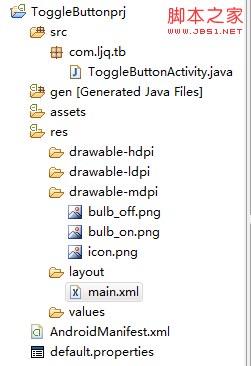
界面上放一個 ImageView 作為指示燈,下方放一個 ToggleButton,並通過 android:textOn 與 android:textOff 分別指定兩種狀態下顯示的文字。
<?xml version="1.0" encoding="utf-8"?>
<LinearLayout xmlns:android="https://schemas.android.com/apk/res/android"
    android:orientation="vertical"
    android:layout_width="fill_parent"
    android:layout_height="fill_parent">
    <ImageView android:id="@+id/imageView"
        android:layout_width="wrap_content"
        android:layout_height="wrap_content"
        android:src="@drawable/bulb_off"
        android:layout_gravity="center_horizontal" />
    <ToggleButton android:id="@+id/toggleButton"
        android:layout_width="140dip"
        android:layout_height="wrap_content"
        android:textOn="開燈"
        android:textOff="關燈"
        android:layout_gravity="center_horizontal" />
</LinearLayout>
package com.ljq.tb;

import android.app.Activity;
import android.os.Bundle;
import android.widget.CompoundButton;
import android.widget.ImageView;
import android.widget.ToggleButton;
import android.widget.CompoundButton.OnCheckedChangeListener;

public class ToggleButtonActivity extends Activity {
    private ImageView imageView=null;
    private ToggleButton toggleButton=null;

    @Override
    public void onCreate(Bundle savedInstanceState) {
        super.onCreate(savedInstanceState);
        setContentView(R.layout.main);

        imageView=(ImageView) findViewById(R.id.imageView);
        toggleButton=(ToggleButton)findViewById(R.id.toggleButton);
        toggleButton.setOnCheckedChangeListener(new OnCheckedChangeListener(){

            public void onCheckedChanged(CompoundButton buttonView,
                                        boolean isChecked) {
                toggleButton.setChecked(isChecked);
                imageView.setImageResource(isChecked?R.drawable.bulb_on:R.drawable.bulb_off);
            }

        });
    }
}
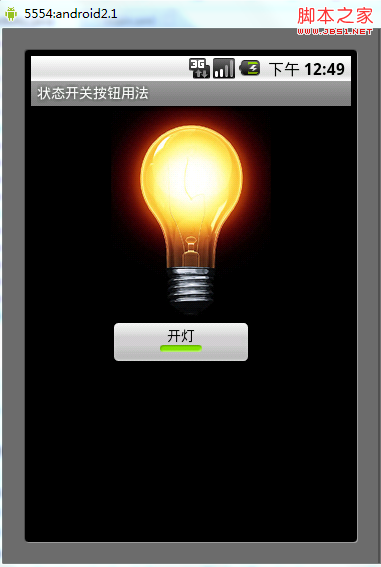
CompoundButton.OnCheckedChangeListener,回調方法 onCheckedChanged 會帶回一個布爾值 isChecked。setChecked() 造成遞歸觸發,本例中這樣寫是安全的,但複雜場景下建議先判斷狀態是否真的發生變化。運行效果:
 Android 登入頁面教學:帳密驗證與剩餘次數提示
登入頁是許多 App 的第一道門。它向使用者索取一組憑證,換取進入的權限——不論是社群平台、雲端硬碟還是公司内部系统,邏輯都相同。 本章要動手做一個登入介面,並一併處理實
 以百度地圖 SDK 實現 Android 定位功能:完整流程解析
LBS 位置服務是 Android 應用中愈來愈常見的能力,從定位、地圖顯示到導航,都建立在它之上。本文以百度地圖定位 SDK 為例,逐步示範如何完成一次定位並把結果回傳
 Android 示例程式剖析之 Snake 貪吃蛇(二:FrameLayout 與 RelativeLayout)
本文以 Snake 專案為例,說明 FrameLayout 與 RelativeLayout 的差異,並示範如何用 merge 標籤減少多餘的版面節點。FrameLayo
 Android RSS閱讀器實作(三):把 RSS 清單呈現在介面上
前兩篇說明了 RSS 的概念與 XML 解析,本篇要把解析後的資料真正放進 Android 介面。目標很簡單:抓取下來的新聞標題與時間,顯示在 ListView,點選後再