

編輯:Android 開發實例
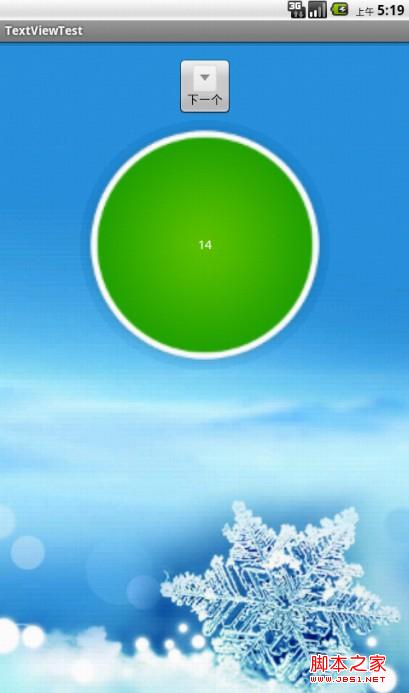
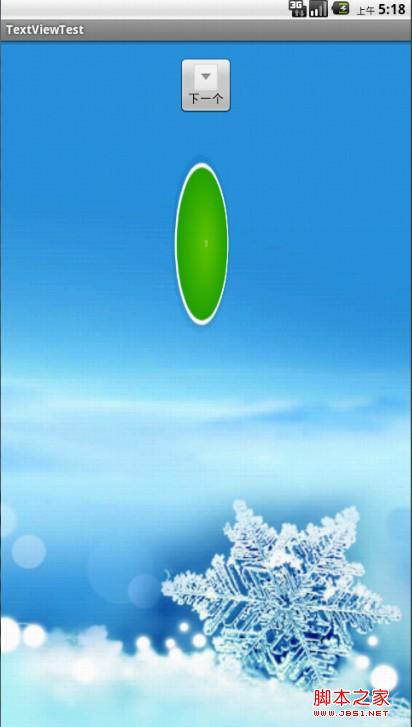
上圖就是最終的翻轉效果。由於 Android 並未提供現成的 3D 翻轉動畫,我們得自己動手實作。先來分析 Animation 與 Transformation 這兩個關鍵類別。
Animation 是動畫的主要介面,定義了開始時間、持續時間、是否重複播放等屬性;Transformation 則包含一個矩陣與一個 alpha 值,矩陣負責平移、旋轉、縮放,alpha 則負責透明度變化。要做 3D 旋轉,我們必須繼承 Animation 類別並重載 getTransformation 與 applyTransformation:getTransformation 會依動畫屬性產生一系列差值點,再傳給 applyTransformation,由後者據此生成不同的 Transformation。
package com.example.textviewtest;
import android.graphics.Camera;
import android.graphics.Matrix;
import android.view.animation.Animation;
import android.view.animation.Transformation;
public class Rotate3dAnimation extends Animation {
// 開始角度
private final float mFromDegrees;
// 結束角度
private final float mToDegrees;
// 中心點
private final float mCenterX;
private final float mCenterY;
private final float mDepthZ;
// 是否需要扭曲
private final boolean mReverse;
// 攝像頭
private Camera mCamera;
public Rotate3dAnimation(float fromDegrees, float toDegrees, float centerX,
float centerY, float depthZ, boolean reverse) {
mFromDegrees = fromDegrees;
mToDegrees = toDegrees;
mCenterX = centerX;
mCenterY = centerY;
mDepthZ = depthZ;
mReverse = reverse;
}
@Override
public void initialize(int width, int height, int parentWidth,
int parentHeight) {
super.initialize(width, height, parentWidth, parentHeight);
mCamera = new Camera();
}
// 生成Transformation
@Override
protected void applyTransformation(float interpolatedTime, Transformation t) {
final float fromDegrees = mFromDegrees;
// 生成中間角度
float degrees = fromDegrees
+ ((mToDegrees - fromDegrees) * interpolatedTime);
final float centerX = mCenterX;
final float centerY = mCenterY;
final Camera camera = mCamera;
final Matrix matrix = t.getMatrix();
camera.save();
if (mReverse) {
camera.translate(0.0f, 0.0f, mDepthZ * interpolatedTime);
} else {
camera.translate(0.0f, 0.0f, mDepthZ * (1.0f - interpolatedTime));
}
camera.rotateY(degrees);
// 取得變換後的矩陣
camera.getMatrix(matrix);
camera.restore();
matrix.preTranslate(-centerX, -centerY);
matrix.postTranslate(centerX, centerY);
}
}
這個類別記錄了旋轉的起止角度、中心點、是否扭曲,以及一個 Camera。重點在 applyTransformation:第一個參數是由 getTransformation 傳入的差值點,我們據此以線性插值算出中間角度 degrees。Camera 類別能實現繞 Y 軸旋轉後的透視投影,因此先以 t.getMatrix() 取得當前矩陣,再用 camera.translate 做平移、camera.rotateY 做旋轉,如此就能輕鬆完成 3D 旋轉。
<LinearLayout xmlns:android="https://schemas.android.com/apk/res/android"
xmlns:tools="https://schemas.android.com/tools"
android:layout_width="match_parent"
android:layout_height="match_parent"
android:background="@drawable/main_screen_bg"
android:gravity="center_horizontal"
android:orientation="vertical"
tools:context=".MainActivity" >
<Button
android:id="@+id/next_btn"
android:layout_width="wrap_content"
android:layout_height="wrap_content"
android:layout_marginTop="20dip"
android:drawableTop="@drawable/qiangpiao_dropdown"
android:text="下一個" />
<TextView
android:id="@+id/tv"
android:layout_width="300dip"
android:layout_height="300dip"
android:layout_gravity="center"
android:background="@drawable/call_show_frame_safe"
android:gravity="center"
android:textColor="#ffffff"
android:textSize="15sp" />
</LinearLayout>
package com.example.textviewtest;
import android.app.Activity;
import android.os.Bundle;
import android.view.Menu;
import android.view.View;
import android.view.animation.AccelerateInterpolator;
import android.view.animation.Animation;
import android.view.animation.DecelerateInterpolator;
import android.widget.Button;
import android.widget.TextView;
public class MainActivity extends Activity {
private TextView tv;
private Button btn;
private int count = 1;
@Override
protected void onCreate(Bundle savedInstanceState) {
super.onCreate(savedInstanceState);
setContentView(R.layout.activity_main);
tv = (TextView) findViewById(R.id.tv);
tv.setText(String.valueOf(count));
btn = (Button) findViewById(R.id.next_btn);
applyRotation(0, 90);
btn.setOnClickListener(new View.OnClickListener() {
@Override
public void onClick(View v) {
applyRotation(0, 90);
}
});
}
private void applyRotation(float start, float end) {
// 計算中心點
final float centerX = tv.getWidth() / 2.0f;
final float centerY = tv.getHeight() / 2.0f;
final Rotate3dAnimation rotation = new Rotate3dAnimation(start, end,
centerX, centerY, 310.0f, true);
rotation.setDuration(500);
rotation.setFillAfter(true);
rotation.setInterpolator(new AccelerateInterpolator());
// 設置監聽
rotation.setAnimationListener(new DisplayNextView());
tv.startAnimation(rotation);
}
private final class DisplayNextView implements Animation.AnimationListener {
public void onAnimationStart(Animation animation) {
}
// 動畫結束
public void onAnimationEnd(Animation animation) {
tv.post(new SwapViews());
}
public void onAnimationRepeat(Animation animation) {
}
}
private final class SwapViews implements Runnable {
public void run() {
final float centerX = tv.getWidth() / 2.0f;
final float centerY = tv.getHeight() / 2.0f;
Rotate3dAnimation rotation = null;
tv.requestFocus();
rotation = new Rotate3dAnimation(90, 0, centerX, centerY, 310.0f,
false);
rotation.setDuration(500);
rotation.setFillAfter(true);
rotation.setInterpolator(new DecelerateInterpolator());
// 開始動畫
tv.startAnimation(rotation);
tv.setText(String.valueOf(count++));
}
}
@Override
public boolean onCreateOptionsMenu(Menu menu) {
getMenuInflater().inflate(R.menu.activity_main, menu);
return true;
}
}
看懂了嗎?透過自訂 Animation 搭配 Camera 的透視投影,就能做出以假亂真的 3D 翻牌效果。
 Android 網路編程之 UDP 通信模型實例
什麼是 Android UDP? UDP 是 User Datagram Protocol 的簡稱,中文名為使用者資料包協議,是 OSI 參考模型中一種無連線的傳輸層協議
 Android MediaPlayer 範例:建立可控制音訊的播放器
這個範例會建立一個可播放、暫停、快轉與快退的音訊播放器。畫面中會包含播放控制按鈕、時間顯示與 SeekBar 進度條。 使用 raw 資源 將 song.mp3 放入 r
 Android Fragment 入門完全指南(圖文)
Fragment 是什麼 Fragment 從 Android 3.0(API 11)開始引入。可以把 Fragment 想成 Activity 裡的一個模塊:它有自己的
 Android JSON 解析器使用教學
JSON 是 JavaScript Object Notation 的縮寫,是一種與程式語言無關的資料交換格式。憑藉著輕量、易讀的優勢,它成為 XML 以外相當主流的選擇