

編輯:Android 開發實例
Compose objects into tree structures to represent part-whole hierarchies. Composite lets clients treat individual objects and compositions of objects uniformly.
將物件組合成樹形結構以表示「部分—整體」的層次關係,使得使用者對單個物件與組合物件的使用有一致性。
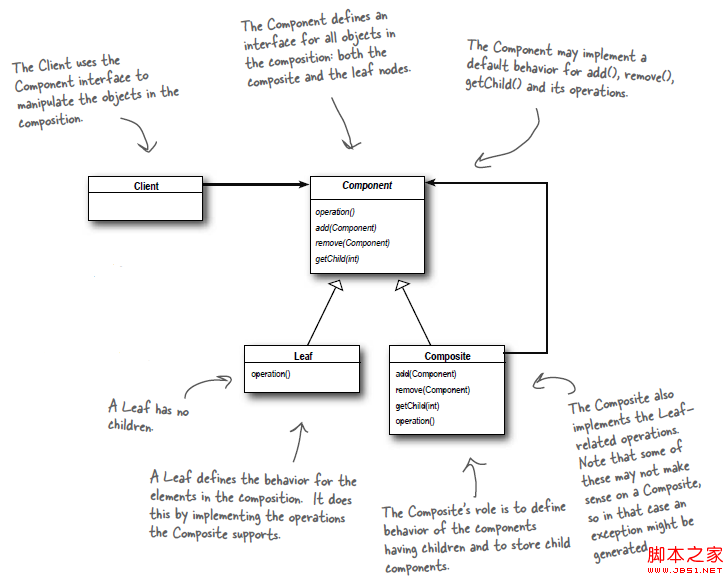
如上圖所示(擷取自《Head First Design Patterns》),主要包含三個角色:
Component 抽象組件:定義參與組合的物件所共有的方法與屬性,可以提供部分預設實作。
Leaf 葉子節點:構成組合樹的最小單元。
Composite 樹枝節點:負責把樹枝節點與葉子節點組合成樹形結構。
高層模組調用簡單。樹形結構中所有節點都是 Component,對呼叫者而言局部與整體別無二致,不必關心自己處理的是單一物件還是整個組合結構,高層程式碼因此大幅簡化。
節點擴充容易。想新增一個樹枝或葉子節點,只要找到它的父節點掛上去即可,完全符合開閉原則。
應用面廣。凡是要維護與展示「部分—整體」關係的場景都適用,例如樹形選單、檔案系統目錄管理等等。
Android 的檢視體系本身就是一個標準的組合模式。ViewGroup 繼承 View,並額外提供子節點的增刪查能力:
public abstract class ViewGroup extends View implements ViewParent, ViewManager {
ViewGroup 提供了一整組 addView() 多載,最終都會收斂到同一個實作:
/** 加入子檢視,若未設定 layout params 則套用本 ViewGroup 的預設值 */
public void addView(View child) {
    addView(child, -1);
}

public void addView(View child, int index) {
    LayoutParams params = child.getLayoutParams();
    if (params == null) {
        params = generateDefaultLayoutParams();
        if (params == null) {
            throw new IllegalArgumentException(
                    "generateDefaultLayoutParams() cannot return null");
        }
    }
    addView(child, index, params);
}

public void addView(View child, int width, int height) {
    final LayoutParams params = generateDefaultLayoutParams();
    params.width = width;
    params.height = height;
    addView(child, -1, params);
}

public void addView(View child, LayoutParams params) {
    addView(child, -1, params);
}

public void addView(View child, int index, LayoutParams params) {
    if (DBG) {
        System.out.println(this + " addView");
    }
    // addViewInner() 在設定新的 LayoutParams 時會呼叫 child.requestLayout(),
    // 因此這裡先對自己呼叫 requestLayout(),讓子元件的請求在本層就被阻擋下來
    requestLayout();
    invalidate(true);
    addViewInner(child, index, params, false);
}
這個多載收斂的設計很值得學:對外提供多種便利寫法,對內只有一條真正的實作路徑,行為不會因為入口不同而分歧。
有增加自然有移除,removeView() 系列同樣是一組多載:
public void removeView(View view) {
    removeViewInternal(view);
    requestLayout();
    invalidate(true);
}

/** 在版面配置期間移除,適合在 onLayout() 中需要移除更多檢視時使用 */
public void removeViewInLayout(View view) {
    removeViewInternal(view);
}

/** 在版面配置期間移除一段範圍的檢視 */
public void removeViewsInLayout(int start, int count) {
    removeViewsInternal(start, count);
}

/** 移除指定位置的檢視 */
public void removeViewAt(int index) {
    removeViewInternal(index, getChildAt(index));
    requestLayout();
    invalidate(true);
}

/** 移除指定範圍的檢視 */
public void removeViews(int start, int count) {
    removeViewsInternal(start, count);
    requestLayout();
    invalidate(true);
}

private void removeViewInternal(View view) {
    final int index = indexOfChild(view);
    if (index >= 0) {
        removeViewInternal(index, view);
    }
}

private void removeViewInternal(int index, View view) {
    if (mTransition != null) {
        mTransition.removeChild(this, view);
    }

    boolean clearChildFocus = false;
    if (view == mFocused) {
        view.clearFocusForRemoval();
        clearChildFocus = true;
    }

    if (view.getAnimation() != null
            || (mTransitioningViews != null && mTransitioningViews.contains(view))) {
        addDisappearingView(view);
    } else if (view.mAttachInfo != null) {
        view.dispatchDetachedFromWindow();
    }

    onViewRemoved(view);
    needGlobalAttributesUpdate(false);
    removeFromArray(index);

    if (clearChildFocus) {
        clearChildFocus(view);
    }
}
這段實作藏著不少細節:移除時要處理焦點轉移、要判斷該子檢視是否正在播放動畫(若是則放入 disappearing views 讓動畫播完),還要通知 layout transition。這些都是組合結構在實務上必須面對的複雜度。
批次移除與全部移除的版本:
private void removeViewsInternal(int start, int count) {
    final View focused = mFocused;
    final boolean detach = mAttachInfo != null;
    View clearChildFocus = null;

    final View[] children = mChildren;
    final int end = start + count;

    for (int i = start; i < end; i++) {
        final View view = children[i];

        if (mTransition != null) {
            mTransition.removeChild(this, view);
        }
        if (view == focused) {
            view.clearFocusForRemoval();
            clearChildFocus = view;
        }
        if (view.getAnimation() != null
                || (mTransitioningViews != null && mTransitioningViews.contains(view))) {
            addDisappearingView(view);
        } else if (detach) {
            view.dispatchDetachedFromWindow();
        }

        needGlobalAttributesUpdate(false);
        onViewRemoved(view);
    }

    removeFromArray(start, count);

    if (clearChildFocus != null) {
        clearChildFocus(clearChildFocus);
    }
}

/** 移除所有子檢視 */
public void removeAllViews() {
    removeAllViewsInLayout();
    requestLayout();
    invalidate(true);
}

/**
 * 由 ViewGroup 的子類呼叫,在必須先知道自身螢幕尺寸才能決定要渲染多少子檢視時使用。
 * 例如 Gallery 或 ListView 可能「擁有」50 個子項,實際上只渲染目前畫面放得下的數量。
 * 除非你正在擴充 ViewGroup 並理解檢視測量與版面配置流程,否則不要呼叫這個方法。
 */
public void removeAllViewsInLayout() {
    final int count = mChildrenCount;
    if (count <= 0) {
        return;
    }

    final View[] children = mChildren;
    mChildrenCount = 0;

    final View focused = mFocused;
    final boolean detach = mAttachInfo != null;
    View clearChildFocus = null;
    needGlobalAttributesUpdate(false);

    for (int i = count - 1; i >= 0; i--) {
        final View view = children[i];

        if (mTransition != null) {
            mTransition.removeChild(this, view);
        }
        if (view == focused) {
            view.clearFocusForRemoval();
            clearChildFocus = view;
        }
        if (view.getAnimation() != null
                || (mTransitioningViews != null && mTransitioningViews.contains(view))) {
            addDisappearingView(view);
        } else if (detach) {
            view.dispatchDetachedFromWindow();
        }

        onViewRemoved(view);
        view.mParent = null;
        children[i] = null;
    }

    if (clearChildFocus != null) {
        clearChildFocus(clearChildFocus);
    }
}
還有針對動畫中的 detach 做收尾的 removeDetachedView(),以及搭配使用的 setLayoutTransition()/getLayoutTransition(),讓子檢視的加入與移除可以套用轉場動畫。
/**
 * 取得群組中指定位置的檢視
 * @param index 要取得的位置
 * @return 該位置的檢視,若位置不存在於群組中則回傳 null
 */
public View getChildAt(int index) {
    if (index < 0 || index >= mChildrenCount) {
        return null;
    }
    return mChildren[index];
}
具體的葉子節點如 Button,它繼承自 TextView,而 TextView 又繼承自 View:
public class TextView extends View implements ViewTreeObserver.OnPreDrawListener {
    .....
}
而我們常用的容器類別都繼承自 ViewGroup:
public class LinearLayout extends ViewGroup {
    public static final int HORIZONTAL = 0;
    public static final int VERTICAL = 1;
    .....
}

public class FrameLayout extends ViewGroup {
    ...
}

public class RelativeLayout extends ViewGroup {
    private static final String LOG_TAG = "RelativeLayout";
    ...
}

public class AbsoluteLayout extends ViewGroup {
    public AbsoluteLayout(Context context) {
        super(context);
    }
}
最後附上基本控制項的繼承關係圖:
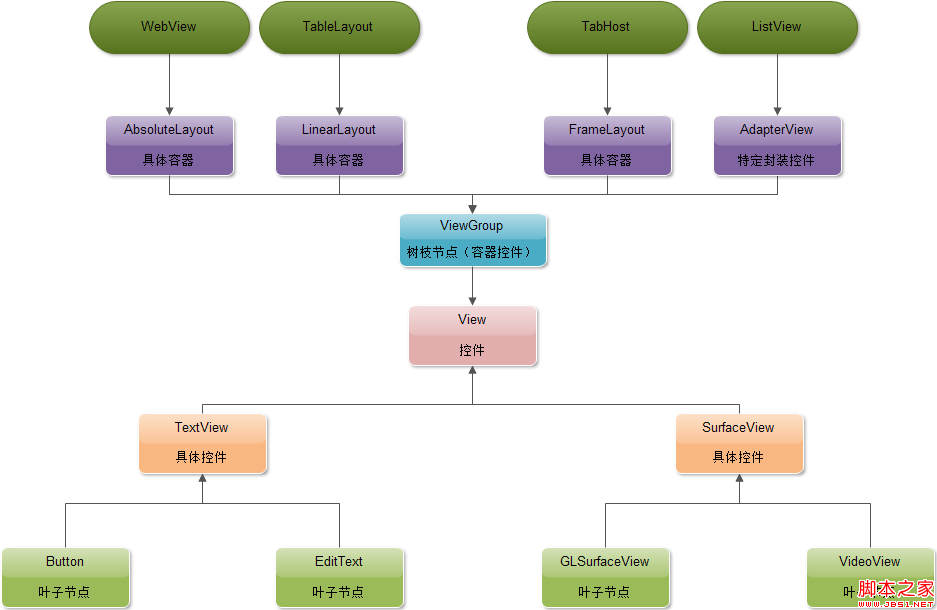
把這個結構看懂,就能理解為什麼 findViewById() 可以不管層級深淺一律回傳 View、setVisibility() 對容器與單一控制項的呼叫方式完全相同——這正是組合模式「讓呼叫者一致對待個別物件與組合物件」的價值所在。
 用 JSONObject 拆解天氣資料:Android JSON 解析教學
行動應用要顯示即時資訊,幾乎都得跟遠端伺服器要資料,而 JSON 就是最普遍的那種「通用語言」。它源自 JavaScript 的物件語法,但早已獨立成為一種跨平台的資料交
 Android 短信驗證碼注冊功能全流程實現與手機號正則校驗
注冊賬號時「填手機號 → 收驗證碼 → 提交注冊」這條路徑,幾乎每個 App 都有。本文以一個注冊頁為例,把網絡請求分層、驗證碼倒計時、Handler 線程通信、弱引用防
 Android 實作:兩個 ScrollView 互相聯動的同步滾動效果
本文為大家分享 Android 中兩個 ScrollView 互相聯動、同步滾動的效果程式碼,值得參考,具體如下:最近在做一个專案,用到了兩個 ScrollView 互相
 Android 登錄實例:建立登入介面並管理錯誤嘗試
登入應用程式的畫面會要求使用者輸入憑證,才能登入某個特定的應用,例如 Facebook、微博等服務。 本章介紹如何建立一個登入介面,以及如何管理安全問題與錯誤嘗試次數。