

編輯:Android 開發實例
把寫死的中文或英文字串丟進 App,短期很快,長期很痛。Android 早就提供了答案:所有顯示文字都放進資源檔,再依語言準備對應版本,系統會依裝置設定自動挑選。本章從建立資源目錄開始,做出一個能隨系統語言切換的 App。
規則很單純:在 res 底下開一個 values- 加語言代碼的資料夾。以義大利為例,就是 values-it:
接著把預設的 strings.xml 複製一份進去,只替換需要翻譯的文字,key 名稱維持不變。
<?xml version="1.0" encoding="utf-8"?> <resources> <string name="hello_world">Ciao mondo!</string> </resources>
<?xml version="1.0" encoding="utf-8"?> <resources> <string name="hello_world">Hola Mundo!</string> </resources>
<?xml version="1.0" encoding="utf-8"?> <resources> <string name="hello_world">Bonjour le monde !</string> </resources>
其他常用語言的代碼與資料夾名稱:
| 語言 | 代碼/資料夾 |
|---|---|
| Afrikaans | af/values-af |
| Arabic | ar/values-ar |
| Bengali | bn/values-bn |
| Czech | cs/values-cs |
| Chinese | zh/values-zh |
| German | de/values-de |
| French | fr/values-fr |
| Japanese | ja/values-ja |
| 步驟 | 要做的事 |
|---|---|
| 1 | 用 Android Studio 建立專案 Locals,Target SDK 選新版。 |
| 2 | 修改 MainActivity.java(本例無額外邏輯)。 |
| 3 | 修改 activity_main.xml 加入一個 TextView。 |
| 4 | 修改 res/values/string.xml 加入英文預設字串。 |
| 5 | 新增 res/values-it/string.xml 加入義大利文翻譯。 |
| 6 | 執行並切換系統語言驗證。 |
MainActivity.java:
package com.example.locals; import android.os.Bundle; import android.app.Activity; public class MainActivity extends Activity { @Override protected void onCreate(Bundle savedInstanceState) { super.onCreate(savedInstanceState); setContentView(R.layout.activity_main); } }
activity_main.xml:
<RelativeLayout xmlns:android="https://schemas.android.com/apk/res/android" android:layout_width="match_parent" android:layout_height="match_parent"> <TextView android:id="@+id/textV1" android:layout_centerHorizontal="true" android:text="@string/hello_world" android:textAppearance="?android:attr/textAppearanceLarge" /> </RelativeLayout>
兩份字串資源:
 <!-- res/values/string.xml --> <resources> <string name="app_name">Locals</string> <string name="hello_world">Hello world!</string> </resources>

<!-- res/values-it/string.xml --> <resources> <string name="app_name">Locals</string> <string name="hello_world">Ciao mondo!</string> </resources>
AndroidManifest.xml:
<manifest xmlns:android="https://schemas.android.com/apk/res/android" package="com.yiibai.locals"> <application android:label="@string/app_name"> <activity android:name=".MainActivity"> <intent-filter> <action android:name="android.intent.action.MAIN" /> <category android:name="android.intent.category.LAUNCHER" /> </intent-filter> </activity> </application> </manifest>
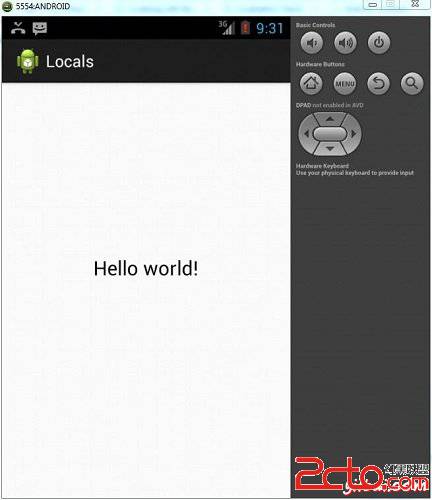
英文環境下啟動 App:
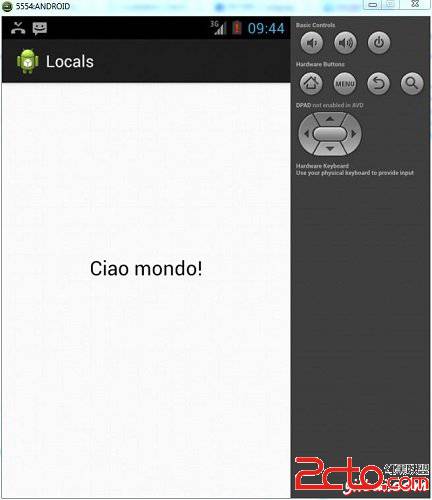
到系統設定把語言改為義大利文,再回來開啟 App,同一行字已經換成當地的問候語:
想把 App 內的語言強制切換(不受系統設定影響),可以在建立 Locale 物件後呼叫 updateConfiguration(),並記得重建 Activity 讓版面重新載入資源。不過多數情況下,遵循系統設定才是對使用者友善的做法。
 Android 本地化實作演練:從英文預設值到義大利文翻譯
把寫死的中文或英文字串丟進 App,短期很快,長期很痛。Android 早就提供了答案:所有顯示文字都放進資源檔,再依語言準備對應版本,系統會依裝置設定自動挑選。本章從建
 Android 下拉刷新控制項 RTPullListView 範例
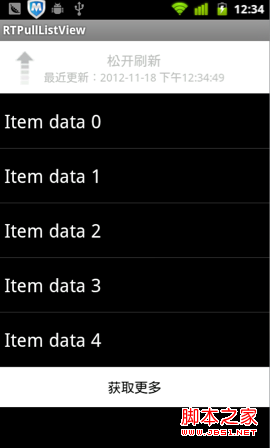
RTPullListView 可用於下拉刷新與載入更多。頂部樣式可改 pulllist_head.xml,底部可改 list_footview.xml。Activity
 Android SlidingDrawer 抽屜效果的實現
SlidingDrawer 可以隱藏畫面外的內容,並讓使用者透過 handle 拉出或收起。它通常由兩個主要部分組成:可拖動的手柄,以及被隱藏的內容區域。在布局中必須明確
 Android 教學:用 RadioButton 實作圖文上下或左右排列
在 Android 開發中,經常會需要用到同時帶有圖片與文字的按鈕。本文就來示範如何利用 RadioButton,輕鬆做出圖片與文字「上下排列」或「左右排列」的效果。程式