

編輯:Android 開發實例
在 Android 開發中,經常會需要用到同時帶有圖片與文字的按鈕。本文就來示範如何利用 RadioButton,輕鬆做出圖片與文字「上下排列」或「左右排列」的效果。程式碼非常簡單,就不多作解釋了。
版面配置如下,主要用來展示 RadioButton 的用法:
<?xml version="." encoding="utf-"?> <RelativeLayout xmlns:android="https://schemas.android.com/apk/res/android" android:layout_width="match_parent" android:layout_height="match_parent" android:orientation="vertical" > <RadioButton android:layout_width="wrap_content" android:layout_height="wrap_content" android:layout_centerInParent="true" android:button="@null" android:drawableTop="@drawable/ic_launcher" android:text="Test Button" /> </RelativeLayout>
成品效果如下圖:
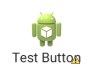
這裡的關鍵屬性是 android:drawableTop,它會把圖片放在文字上方;如果想改成左右排列,只要換成 android:drawableLeft 或 android:drawableRight 即可。搭配 android:button="@null" 隱藏原本的圓形選擇鈕,就能得到乾淨的圖文按鈕。
以上程式碼沒有特別寫註解,相信大家都能看懂。若有任何問題,歡迎留言討論。
 Android 載入 Spinner 進度指示實作
在 Android 裡,當某項工作正在進行、想讓使用者知道「系統還在忙」,就可以用進度條來表達。進度條大致有兩種形式:帶有進度的水平進度列,以及持續旋轉的載入轉圈(Spi
 Android 開發自學筆記(三):打造第一個像樣的 App 版面(上)
本文示範如何從零做出一個視覺上過得去的 Android 畫面。市面上那些質感出眾的應用,拆解開來其實都是一個個基礎元件堆出來的。 先談談設計是怎麼來的 在行動網路公司裡
 Android MediaPlayer 影音播放核心教學
Android 提供 MediaPlayer 類別,可播放音訊與影片。最簡單的方式是透過靜態 create 方法建立物件,再指定要播放的資源。 MediaPlayer m
 Android 加載 Spinner:用進度條顯示未知時長的任務
在 Android 中,可以透過加載進度條來顯示任務的進展。進度條有兩種形狀:加載欄與加載微調(spinner)。本章我們將討論 spinner。 Spinner 用於顯