

編輯:Android 開發實例
在 Android 開發中,常需要在 Bitmap、Drawable 與 byte[] 之間轉換。例如從資源取得圖片、將圖片顯示到 ImageView、上傳圖片到伺服器,或將圖片存入資料庫時,都會用到這些型別。
若要從資源取得 Bitmap,可直接使用:
Resources res = getResources();
Bitmap bmp = BitmapFactory.decodeResource(res, R.drawable.sample_0);
若手上已有 Drawable,也可自行繪製到 Bitmap:
Bitmap bitmap = Bitmap.createBitmap(
    drawable.getIntrinsicWidth(),
    drawable.getIntrinsicHeight(),
    Bitmap.Config.ARGB_8888
);

Canvas canvas = new Canvas(bitmap);
drawable.setBounds(0, 0, drawable.getIntrinsicWidth(), drawable.getIntrinsicHeight());
drawable.draw(canvas);Drawable drawable = new BitmapDrawable(bmp);ByteArrayOutputStream baos = new ByteArrayOutputStream();
bm.compress(Bitmap.CompressFormat.PNG, 100, baos);
byte[] bytes = baos.toByteArray();Bitmap bitmap = BitmapFactory.decodeByteArray(bytes, 0, bytes.length);Bitmap 會佔用較多記憶體,若處理大量圖片,建議使用 sampledBitmap、物件池或圖片載入框架。此外,PNG 是無失真壓縮,JPEG 則不支援透明背景,選擇格式時需依需求決定。
 Android 應用調試必備命令與實戰分析
寫代碼時我們習慣用斷點單步跟蹤,但上線之後遇到的問題往往沒那麼客氣:CPU 佔用莫名飆高、內存緩慢洩露、某個頁面偶發卡死……這些問題無法靠調試器復現,只能依靠系統日誌與性
 Android WebView 網頁載入與回退處理
WebView 的基本用法 WebView 可在應用程式中顯示網頁。使用 new WebView 建立物件,再以 loadUrl 載入線上網址或 assets 中的本機檔
 Android MediaPlayer 多媒體播放:API 用法與播放器範例
Android 提供多種控制音訊與影片播放的方式,其中最常被直接使用的一條路徑,是名為 MediaPlayer 的類別。它讓你能播放音訊、影片與串流內容,而不必自行處理編
 Android XML 解析實戰:SAX 機制與 ContentHandler 的使用
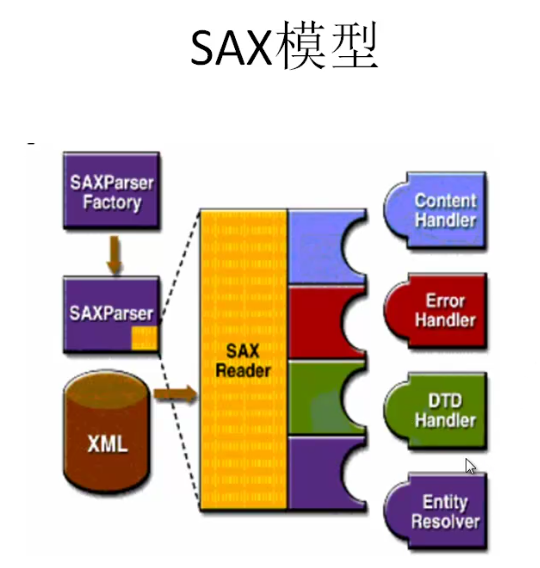
Android 中解析 XML 主要有兩條路:DOM 與 SAX。 DOM 需要先把整個文檔讀入內存並構建樹結構,操作直觀,但文檔過大時內存吃不消。SAX 則是逐行流式解