

編輯:Android 開發實例
在加載網絡圖片時,如果網絡較慢,往往會出現下載不成功的問題。經過一番排查與搜索,這裡總結出兩種更為可靠的方案。
通常我們會用這樣的代碼:
// 獲取 connection,方法略
conn = getURLConnection(url);
is = conn.getInputStream();

// 獲取 Bitmap 的引用
Bitmap bitmap = BitmapFactory.decodeStream(is);
問題就在於:網絡狀況不佳時,這種「邊讀邊解碼」的方式很可能拿不到完整數據,導致圖片加載失敗。
更穩妥的做法是先把圖片數據全部讀入內存,再進行解碼:
// 獲取長度
int length = (int) conn.getContentLength();
if (length != -1) {
    byte[] imgData = new byte[length];
    byte[] temp = new byte[512];
    int readLen = 0;
    int destPos = 0;

    while ((readLen = is.read(temp)) > 0) {
        System.arraycopy(temp, 0, imgData, destPos, readLen);
        destPos += readLen;
    }

    bitmap = BitmapFactory.decodeByteArray(imgData, 0, imgData.length);
}
這樣做的好處是:即使網速不佳,也能確保把圖片數據完整下載下來,再解碼生成 Bitmap 對象,從而有針對性地保證「只要圖片存在就能下載成功」。當然,讀取時也可以採用 java.nio.ByteBuffer,這樣便無需事先知道數據長度,既規避了 http 返回 length 偶爾不準確的問題,也省去了數組拷貝的開銷。
把上述思路封裝一下,便得到一個健壯的圖片加載方法:
public synchronized Bitmap getBitMap(Context c, String url) {
    URL myFileUrl = null;
    Bitmap bitmap = null;
    try {
        myFileUrl = new URL(url);
    } catch (MalformedURLException e) {
        bitmap = BitmapFactory.decodeResource(c.getResources(),
                com.jixuzou.moko.R.drawable.defaultimg);
        return bitmap;
    }

    try {
        HttpURLConnection conn = (HttpURLConnection) myFileUrl.openConnection();
        conn.setDoInput(true);
        conn.connect();
        InputStream is = conn.getInputStream();
        int length = (int) conn.getContentLength();
        if (length != -1) {
            byte[] imgData = new byte[length];
            byte[] temp = new byte[512];
            int readLen = 0;
            int destPos = 0;
            while ((readLen = is.read(temp)) > 0) {
                System.arraycopy(temp, 0, imgData, destPos, readLen);
                destPos += readLen;
            }
            bitmap = BitmapFactory.decodeByteArray(imgData, 0, imgData.length);
        }
    } catch (IOException e) {
        bitmap = BitmapFactory.decodeResource(c.getResources(),
                com.jixuzou.moko.R.drawable.defaultimg);
        return bitmap;
    }
    return bitmap;
}
這段代碼還貼心地加入了異常兜底——一旦下載失敗,便回退顯示一張默認圖片,避免界面出現空白,用戶體驗更為友好。
 Android 載入 Spinner:實作不確定模式的進度提示
在 Android 裡要讓使用者知道「系統正在忙」,最直接的方式就是拉一個進度條出來。進度條大致分成兩種形態:一種是進度明碼標示的 Loading Bar,另一種則是只轉
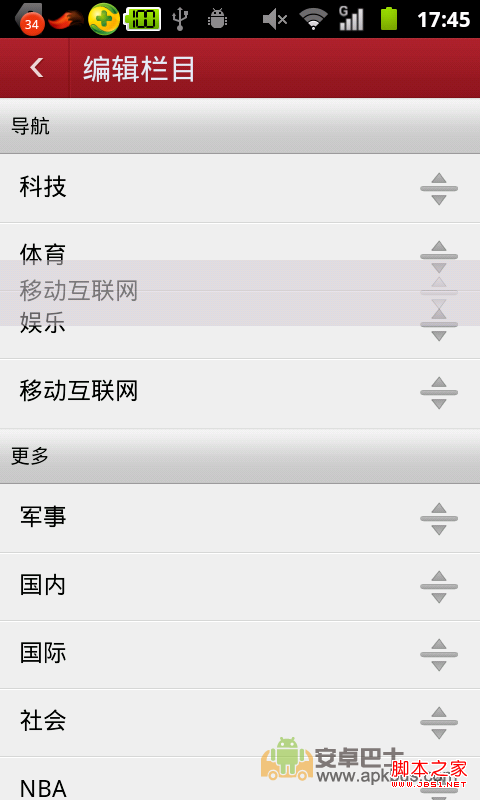 Android ListView與GridView拖拽移位完整實現代碼
說到 ListView 拖拽移位,大家應該都不陌生,不少優秀的應用都用到了這個功能,比如搜狐、網易、百度等。不過說實話,三者之中還是百度的用戶體驗最佳。先看幾個示例:先談
 Android 檔案搜尋實作:在 SD 卡中遞迴查找指定檔名
做檔案管理器或需要掃描外部儲存空間時,「找出所有符合關鍵字的檔案」幾乎是必備功能。本文示範一個簡潔的實作:使用者輸入搜尋目錄與關鍵字,程式遞迴走訪底下所有子目錄,把命中的
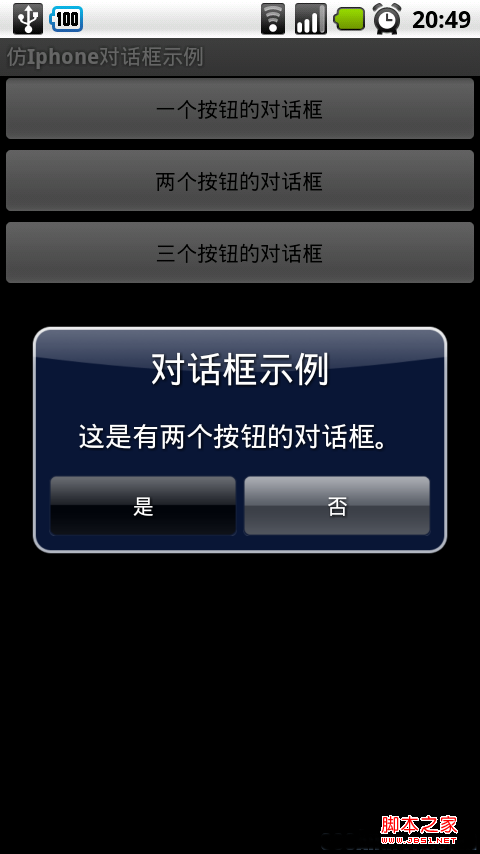 仿 iPhone 風格對話框:元件、jar 包與用法一次提供
效果圖如下: 這個對話框完全繼承並仿照 AlertDialog,只是換上自訂的外觀。由於 iPhone 的對話框大多沒有圖示,因此這裡沒有實作 setIcon。 附件包