

編輯:Android 開發實例
Android 的界面控件大多可以在 XML 布局中直接聲明,屬性配置直觀,改動後無需重編代碼即可預覽效果。下面梳理幾個最常用的基礎組件。
最基礎的文本展示控件,其他多個組件都由它派生而來。
<?xml version="1.0" encoding="utf-8"?>
<TextView xmlns:android="https://schemas.android.com/apk/res/android"
android:layout_width="fill_parent"
android:layout_height="wrap_content"
android:text="Hello, my name is TextView, I am maily show some text."
/>
常用附加屬性還有 android:typeface(字體)、android:textStyle(粗體/斜體)、android:textColor(文字顏色)、android:textSize(字號)等。
Button 是 TextView 的子類,因此 TextView 的所有顯示屬性它都能用,只是外觀被換成了可點擊的樣式。
<?xml version="1.0" encoding="utf-8"?>
<Button xmlns:android="https://schemas.android.com/apk/res/android"
android:text="Hello, my name Button, I am the subclass of TextView"
android:layout_width="fill_parent"
android:layout_height="fill_parent"/>
點擊事件則需要在代碼中透過 setOnClickListener() 綁定。
這兩者分別是 TextView 與 Button 的圖像版本,核心屬性是 android:src,用於指定圖片資源;android:adjustViewBounds 則控制是否按圖片實際比例調整邊界,避免圖形被拉伸變形。
<?xml version="1.0" encoding="utf-8"?>
<ImageView xmlns:android="https://schemas.android.com/apk/res/android"
android:id="@+id/icon"
android:layout_width="fill_parent"
android:layout_height="fill_parent"
android:adjustViewBounds="true"
android:src="@drawable/ffffgggg"
/>
同樣是 TextView 的子類,專門用於接收用戶輸入。除了繼承來的屬性,它還有一批控制輸入行為的關鍵屬性:android:autoText(自動補全)、android:capitalize(首字母大寫)、android:digits(限定可輸入字符)、android:singleLine(是否單行)、android:inputType(鍵盤類型)等。
<?xml version="1.0" encoding="utf-8"?>
<EditText xmlns:android="https://schemas.android.com/apk/res/android"
android:id="@+id/field"
android:layout_width="fill_parent"
android:layout_height="fill_parent"
android:text="You can type words here..."
android:singleLine="false"
/>
實際項目中更推薦用 android:hint 代替 android:text 來給出提示文字,因為 hint 在用戶開始輸入後會自動消失,而 text 會一直留在輸入框裡需要手動清空。
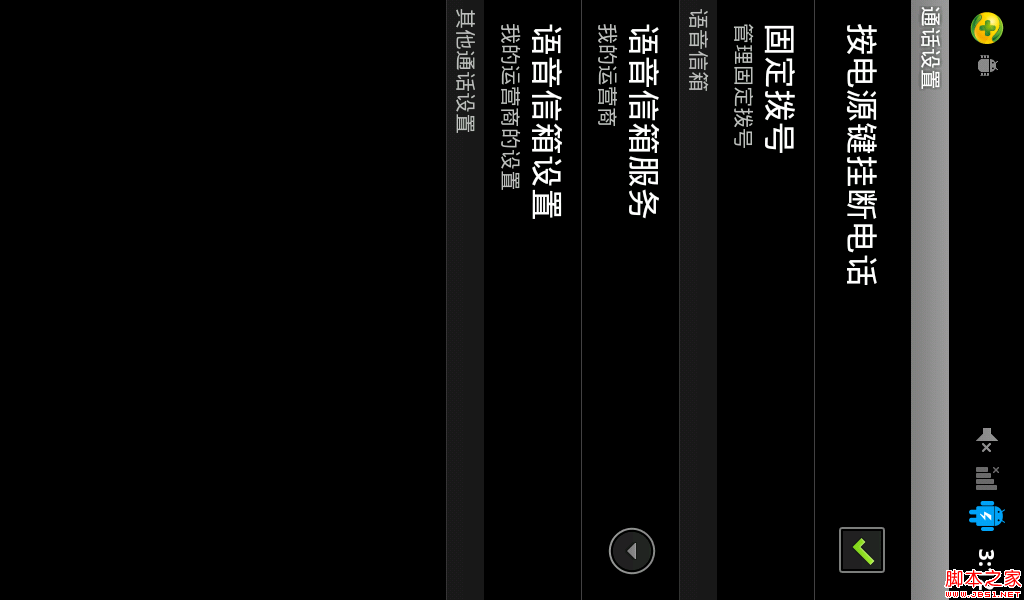 為 Android 系統加入「按電源鍵掛斷電話」功能
現在多數 Android 手機都內建了「按電源鍵結束通話」的選項,通常放在通話設定裡。但在原生原始碼中,這一項並不存在,得自己加。以下記錄我在學習過程中改動原生碼的完整思
 Android 開機自啟實作:攔截 BOOT_COMPLETED 廣播
我們有時會希望 App 能在 Android 裝置開機完成後自動啟動,就像 Windows 裡那些常駐程式一樣——例如某些背景 Service 需要定期從網路上更新內容。
 Android 在地化實務:從 strings.xml 到語言切換
在地化的意義在地化不只是翻譯文字,也包括讓應用符合不同地區使用者的閱讀習慣。最常見的做法,是將畫面文字集中管理,並依語言提供不同資源。資源資料夾結構預設字串通常放在 re
 Android JSON 剖析教學:JSONObject 與天氣資料
在 Android 開發中,JSON 解析是取得遠端資料的關鍵步驟。相較於 XML,JSON 更精簡,也更容易與 Web API 搭配。 先找出需要的欄位 解析前,先確認