

編輯:Android 開發實例
前言
本章介紹 android.widget.ExpandableListAdapter,對應版本為 Android 3.0 r1。
正文
public interface ExpandableListAdapter
間接實作類別包括:BaseExpandableListAdapter、CursorTreeAdapter、ResourceCursorTreeAdapter、SimpleCursorTreeAdapter 與 SimpleExpandableListAdapter。
這個適配器在 ExpandableListView 與底層資料之間扮演銜接的角色。其實作類別負責提供以「群組」分類的子元素資料存取,同時也負責為群組與子元素建立對應的視圖。
public abstract boolean areAllItemsEnabled()
判斷所有條目是否都可用(可選取、可點擊),全部可用時回傳 true。
public abstract Cursor getChild(int groupPosition, int childPosition)
取得指定群組中指定子元素的資料。
public abstract long getChildId(int groupPosition, int childPosition)
取得指定子元素的 ID,該 ID 在同群組內唯一;經由 getCombinedChildId 合成的 ID 則在所有條目中唯一。
public abstract View getChildView(int groupPosition, int childPosition, boolean isLastChild, View convertView, ViewGroup parent)
取得顯示指定子元素資料的視圖物件。參數中 isLastChild 表示是否為群組中最後一個子元素;convertView 為可重用的既有視圖,使用前應先檢查是否為 null 及型別是否合適;parent 為傳回視圖永遠依附的父視圖組。
public abstract int getChildrenCount(int groupPosition)
取得指定群組的子元素數量。
public abstract long getCombinedChildId(long groupId, long childId)
從所有條目(群組或子項)中產生唯一的子 ID。可折疊列表要求每個元素都擁有唯一 ID,本方法依據子 ID 與群組 ID 回傳唯一值;若 hasStableIds() 為 true,還必須回傳穩定的 ID。
public abstract Cursor getGroup(int groupPosition)
取得指定群組的資料。
public abstract int getGroupCount()
取得群組的數量。
public abstract long getGroupId(int groupPosition)
取得指定群組的 ID,該 ID 必須唯一;經由 getCombinedGroupId 合成的 ID 在所有條目中亦唯一。
public abstract View getGroupView(int groupPosition, boolean isExpanded, View convertView, ViewGroup parent)
取得顯示指定群組的視圖物件;若要取得子元素的視圖,則需呼叫 getChildView。參數 isExpanded 表示該群組是展開還是收合狀態。
public abstract boolean hasStableIds()
判斷群組與子元素是否持有穩定的 ID,也就是底層資料變動不會影響到它們;回傳 true 代表相同的 ID 永遠參照同一物件。
public abstract boolean isChildSelectable(int groupPosition, int childPosition)
判斷指定位置的子元素是否可被選取。
public abstract boolean isEmpty()
若目前適配器不含任何資料則回傳 true,常用來決定是否顯示空視圖。
public abstract void onGroupCollapsed(int groupPosition)
當某群組收合時呼叫。
public abstract void onGroupExpanded(int groupPosition)
當某群組展開時呼叫。
public abstract void registerDataSetObserver(DataSetObserver observer)
註冊一個觀察者,於適配器資料變動時收到通知。
public abstract void unregisterDataSetObserver(DataSetObserver observer)
取消先前透過 registerDataSetObserver 註冊的觀察者。
OnChildClickListener:定義子元素被點擊時的回呼。其 onChildClick(ExpandableListView parent, View v, int groupPosition, int childPosition, long id) 會傳入點擊的群組位置、子元素位置與行 ID,事件處理完成時回傳 true。
OnGroupClickListener:定義群組被點擊時的回呼。其 onGroupClick(ExpandableListView parent, View v, int groupPosition, long id) 傳入被點擊群組的位置與行 ID。
OnGroupCollapseListener:其 onGroupCollapse(int groupPosition) 會在群組收合時呼叫,參數為收合群組的位置。
OnGroupExpandListener:其 onGroupExpand(int groupPosition) 會在群組展開時呼叫,參數為展開群組的位置。
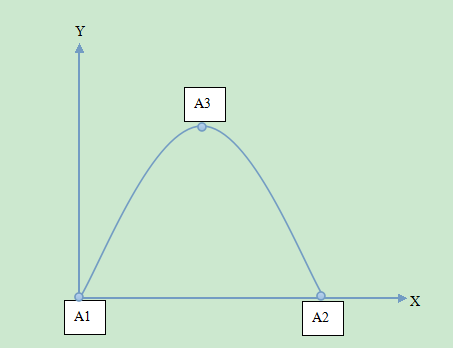 用 ObjectAnimator 讓 ImageView 沿著拋物線飛行的完整做法
想要讓一張圖片沿著弧形軌跡飛出去(例如購物車拋物線加入動畫),關鍵其實回到高中數學:先求出拋物線方程,再把 x 與 y 的關係拆成兩組 keyframe 交給 Objec
 Android JSON 解析器:從 JSON 結構到天氣資料讀取
JSON(JavaScript Object Notation)是一種輕量、易讀的資料交換格式。相較於 XML,它更適合行動裝置與網路 API,因為結構簡單、解析速度快,
 Android JSON 解析教學:用 JSONObject 讀懂天氣 API 回傳的資料
JSON(JavaScript Object Notation,JavaScript 物件符號法)是一種以純文字為基礎、與程式語言無關的資料交換格式。因為結構輕量、可讀性
 Android MediaPlayer 範例:播放、暫停與快轉
範例功能這個範例會示範如何使用 MediaPlayer 建立一個簡單的音訊播放器,包含播放、暫停、快轉與倒轉功能。建立 MediaPlayer將音訊檔放在 raw 資料夾