

編輯:Android 開發實例
Android 的觸控事件傳遞機制,一直是新手最容易卡住的一段。onInterceptTouchEvent() 是 ViewGroup 專屬的方法,目的在事件往下傳給子 View 之前先攔一次;而 onTouchEvent() 則是最終的處理者。兩者的回傳值如何互動,決定了整串 DOWN/MOVE/UP 的流向。
因為 ViewGroup 裡可能包著好幾個子 View,它需要一個統一的機會來監看所有觸控事件,必要時接管手勢。純粹不能容納子 View 的控制項自然不需要這個方法——所以 LinearLayout 有,TextView 就沒有。
規則本身很簡單:回傳 true 代表「我消費了這個事件」,回傳 false 代表「我沒處理完,請繼續往下傳」。複雜的是 DOWN 事件的處理結果會直接影響後續 MOVE 與 UP 的走向。SDK 文件的原始說明整理如下:
onInterceptTouchEvent()。onTouchEvent()。若希望後續手勢都由自己接手,onTouchEvent() 就應該回傳 true;一旦如此,onInterceptTouchEvent() 便不會再收到任何事件。onInterceptTouchEvent() 持續回傳 false,後續每個事件(含最後的 UP)都會先送到這裡,再往下交給目標的 onTouchEvent()。ACTION_CANCEL,之後所有事件都只往你的 onTouchEvent() 走。onInterceptTouchEvent()。onTouchEvent()。onInterceptTouchEvent(),而是直接交給該 ViewGroup 的 onTouchEvent();此時目標 View 收不到任何事件。onTouchEvent() 若回傳 false,事件會往上一層的 View 的 onTouchEvent() 遞交。onTouchEvent() 處理。我們搭一個由下而上共三層的視圖:LayoutView1 與 LayoutView2 都是 LinearLayout,最內層是 MyTextView:
<?xml version="1.0" encoding="utf-8"?>
<com.touchstudy.LayoutView1 xmlns:android="https://schemas.android.com/apk/res/android"
    android:orientation="vertical"
    android:layout_width="fill_parent"
    android:layout_height="fill_parent" >
    <com.touchstudy.LayoutView2
        android:orientation="vertical"
        android:layout_width="fill_parent"
        android:layout_height="fill_parent"
        android:gravity="center">
        <com.touchstudy.MyTextView
            android:layout_width="wrap_content"
            android:layout_height="wrap_content"
            android:id="@+id/tv"
            android:text="AB"
            android:textSize="40sp"
            android:textStyle="bold"
            android:background="#FFFFFF"
            android:textColor="#0000FF"/>
    </com.touchstudy.LayoutView2>
</com.touchstudy.LayoutView1>LayoutView1: onInterceptTouchEvent action:ACTION_DOWN
LayoutView2: onInterceptTouchEvent action:ACTION_DOWN
MyTextView : onTouchEvent action:ACTION_DOWN
LayoutView1: onInterceptTouchEvent action:ACTION_MOVE
LayoutView2: onInterceptTouchEvent action:ACTION_MOVE
MyTextView : onTouchEvent action:ACTION_MOVE
……
LayoutView1: onInterceptTouchEvent action:ACTION_UP
LayoutView2: onInterceptTouchEvent action:ACTION_UP
MyTextView : onTouchEvent action:ACTION_UP這是最常見的情況,效果等同於沒有覆寫 onInterceptTouchEvent()。事件自底向上依序為 LayoutView1 → LayoutView2 → MyTextView。特別注意:當攔截方法都回傳 false 時,LayoutView1 與 LayoutView2 的 onTouchEvent() 並不會收到事件,事件最終是由 MyTextView 處理的。
LayoutView1: onInterceptTouchEvent action:ACTION_DOWN
LayoutView1: onTouchEvent        action:ACTION_DOWN
LayoutView1: onTouchEvent        action:ACTION_MOVE
LayoutView1: onTouchEvent        action:ACTION_MOVE
……
LayoutView1: onTouchEvent        action:ACTION_UP
最外層在第一次 DOWN 就回傳 true,於是包含 DOWN 在內的所有事件都由 LayoutView1 自己處理,事件不再往下傳遞。
設定為:兩個 Layout 的 onInterceptTouchEvent() 都回 false,MyTextView.onTouchEvent() 回 false,而 LayoutView2.onTouchEvent() 回 true。
LayoutView1: onInterceptTouchEvent action:ACTION_DOWN
LayoutView2: onInterceptTouchEvent action:ACTION_DOWN
MyTextView : onTouchEvent        action:ACTION_DOWN
LayoutView2: onTouchEvent        action:ACTION_DOWN
LayoutView1: onInterceptTouchEvent action:ACTION_MOVE
LayoutView2: onTouchEvent        action:ACTION_MOVE
……
LayoutView1: onInterceptTouchEvent action:ACTION_UP
LayoutView2: onTouchEvent        action:ACTION_UP
MyTextView 回傳 false,DOWN 事件因此上傳給父層 LayoutView2 處理;由於 LayoutView2 回傳 true,事件沒有再往 LayoutView1 遞。後續的 MOVE 與 UP 都交給 LayoutView2 的 onTouchEvent(),不會再回到 MyTextView。這正是「手勢被父層接管」的標準樣貌,也是 scroll 容器與內部可點擊元件衝突時最常見的成因。
為了觀察事件流向,三個類別都只在 onInterceptTouchEvent() 與 onTouchEvent() 中依 action 印出 log,其餘方法維持預設。以下以 LayoutView1 為例:
public class LayoutView1 extends LinearLayout {

    private final String TAG = "LayoutView1";

    public LayoutView1(Context context, AttributeSet attrs) {
        super(context, attrs);
        Log.d(TAG, TAG);
    }

    @Override
    public boolean onInterceptTouchEvent(MotionEvent ev) {
        switch (ev.getAction()) {
            case MotionEvent.ACTION_DOWN:
                Log.d(TAG, "onInterceptTouchEvent action:ACTION_DOWN");
                // return true;   ← 把這行取消註解,就會變成情況二
                break;
            case MotionEvent.ACTION_MOVE:
                Log.d(TAG, "onInterceptTouchEvent action:ACTION_MOVE");
                break;
            case MotionEvent.ACTION_UP:
                Log.d(TAG, "onInterceptTouchEvent action:ACTION_UP");
                break;
            case MotionEvent.ACTION_CANCEL:
                Log.d(TAG, "onInterceptTouchEvent action:ACTION_CANCEL");
                break;
        }
        return false;
    }

    @Override
    public boolean onTouchEvent(MotionEvent ev) {
        switch (ev.getAction()) {
            case MotionEvent.ACTION_DOWN:
                Log.d(TAG, "onTouchEvent action:ACTION_DOWN");
                break;
            case MotionEvent.ACTION_MOVE:
                Log.d(TAG, "onTouchEvent action:ACTION_MOVE");
                break;
            case MotionEvent.ACTION_UP:
                Log.d(TAG, "onTouchEvent action:ACTION_UP");
                break;
            case MotionEvent.ACTION_CANCEL:
                Log.d(TAG, "onTouchEvent action:ACTION_CANCEL");
                break;
        }
        return true;
    }
}
LayoutView2 的內容完全相同,只把 TAG 換成 "LayoutView2"。MyTextView 則繼承 TextView,只覆寫 onTouchEvent() 印出 log 並回傳 false(沒有覆寫 onInterceptTouchEvent(),因為 TextView 不是 ViewGroup)。主 Activity 只需 setContentView(R.layout.layers_touch_pass_test),其餘交給版面配置即可。
把三個類別的 return 值排列組合、跑一遍 logcat,這套規則很快就能內化成直覺——比起死記流程圖有效得多。
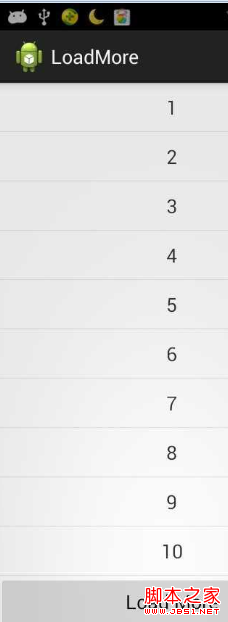 ListView 分頁加載實作:滚动到底自動載入更多資料
ListView 是 Android 最常用的控件之一。實務上如果一次把幾千筆資料塞進去,畫面會卡、記憶體會爆,因此分頁加載幾乎是必備技巧。 本範例把「載入更多」的觸發點
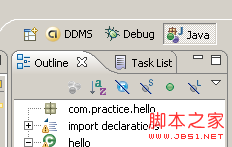 Android 調試工具 DDMS 使用詳解
DDMS 全稱 Dalvik Debug Monitor Service,是 Android 開發中最基礎的一套診斷工具。官方文檔見 developer.android.
 Android JSON 解析器使用教學
JSON 是 JavaScript Object Notation 的縮寫,一種與程式語言無關的資料交換格式,普遍被視為 XML 的理想替代品。本章將說明如何在 Andr
 Android JSON 解析入門
JSON 是一種輕量級的資料交換格式,常用於應用程式與伺服器之間傳輸資料。相比 XML,JSON 結構更簡潔,也更容易在 Android 中解析。本文說明 JSON 的基