

編輯:Android 開發實例
Android 自定義軟鍵盤主要使用 Keyboard 與 KeyboardView。Keyboard 描述按鍵排列,KeyboardView 負責繪製與觸摸事件。
常用初始化:
keyboardView.setKeyboard(k);
keyboardView.setEnabled(true);
keyboardView.setPreviewEnabled(true);
keyboardView.setOnKeyboardActionListener(listener);在 res/xml/symbols.xml 建立 Keyboard 定義。每個 Key 都有 codes,程式可透過 codes 監聽:
<Keyboard xmlns:android="https://schemas.android.com/apk/res/android"
    android:keyWidth="20%p"
    android:horizontalGap="0px"
    android:verticalGap="0px"
    android:keyHeight="@dimen/key_height">

    <Row>
        <Key android:codes="49" android:keyLabel="1" />
        <Key android:codes="50" android:keyLabel="2" />
        <Key android:codes="51" android:keyLabel="3" />
        <Key android:codes="52" android:keyLabel="4" />
        <Key android:codes="-5" android:keyIcon="@drawable/sym_keyboard_delete" />
    </Row>
</Keyboard>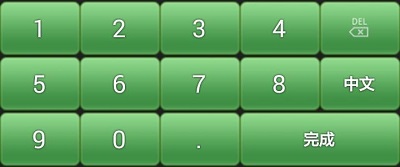
常用屬性包括 codes、keyLabel、keyIcon、keyWidth、keyHeight、horizontalGap、isRepeatable、keyEdgeFlags 等。Keyboard 類別也定義了 KEYCODE_DELETE、KEYCODE_CANCEL、KEYCODE_MODE_CHANGE 等特殊值。
中文鍵盤可將每個漢字的 UTF-16 編碼作為 codes。例如「一」的 codes 是 19968。可用程式快速產生:
String[] strings = { "一", "二", "三", "四", "五", "六", "年", "級", "班", "." };
for (String str : strings) {
    char c = str.toCharArray()[0];
    int i = c;
    Log.i("key", "<Key android:codes=\"" + i + "\" android:keyLabel=\"" + c + "\" />");
}
將 logcat 輸出整理後,可得到中文 keys.xml:
<Keyboard android:keyWidth="25.000002%p" android:keyHeight="@dimen/key_height"
    android:horizontalGap="0.0px" android:verticalGap="0.0px"
    xmlns:android="https://schemas.android.com/apk/res/android">

    <Row>
        <Key android:codes="19968" android:keyLabel="一" />
        <Key android:codes="20108" android:keyLabel="二" />
        <Key android:codes="19977" android:keyLabel="三" />
        <Key android:codes="-5" android:isRepeatable="true"
            android:keyIcon="@drawable/sym_keyboard_delete" />
    </Row>
</Keyboard>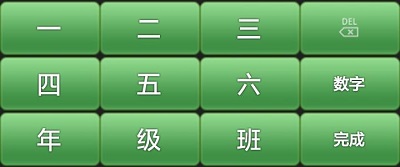
建立 KeyboardUtil,負責切換中文與數字鍵盤,並處理輸入:
if (primaryCode == Keyboard.KEYCODE_CANCEL) {
    hideKeyboard();
} else if (primaryCode == Keyboard.KEYCODE_DELETE) {
    if (editable != null && editable.length() > 0) {
        if (start > 0) {
            editable.delete(start - 1, start);
        }
    }
} else if (primaryCode == Keyboard.KEYCODE_MODE_CHANGE) {
    isNumber = !isNumber;
    keyboardView.setKeyboard(isNumber ? k2 : k1);
} else {
    editable.insert(start, Character.toString((char) primaryCode));
}在 activity_main.xml 中加入 KeyboardView,並在 Activity 中禁止系統軟鍵盤彈出。Android 2.3 以下可用 setInputType(InputType.TYPE_NULL),較新版本可設定 SOFT_INPUT_STATE_ALWAYS_HIDDEN,或呼叫 setShowSoftInputOnFocus(false)。
edit_class.setOnTouchListener(new View.OnTouchListener() {
    public boolean onTouch(View v, MotionEvent event) {
        new KeyboardUtil(act, ctx, edit_class).showChinese();
        return false;
    }
});
數字輸入框則呼叫 showNumber()。完成後,自定義鍵盤會在點擊輸入框時顯示。
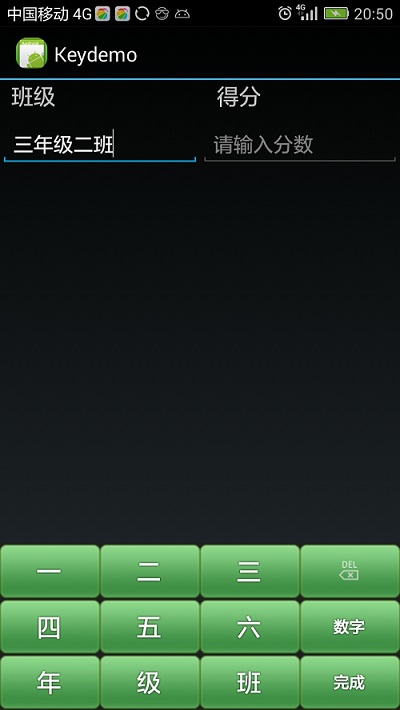
Demo 下載:https://download.csdn.net/detail/lintax/9577994
 Android LayoutInflater 的使用介紹
LayoutInflater 常用來將 XML 布局實例化成 View 物件。它與 findViewById 不同,後者是用來查找已經存在的控制項,而前者則是把布局檔案轉
 Android 進階:藍牙傳感應用實例
前文介紹過 Android 利用麥克風采集並顯示模擬信號的方法,這種方式適用於沒有 IO 控制、單純讀取信號的場景。但如果傳感器本身還需要控制電路(例如採集血氧信號時要紅
 Android TabWidget 切換卡片的實現應用
TabWidget 常用於實作多標籤切換畫面,類似傳統電話簿的分頁效果。它的核心容器是 TabHost,每個 Tab 都可以對應自己的內容布局,並透過 addTab 加入
 Android 頂部導航菜單左右滑動的兩種實作方案
本文示範在 Android 中實作頂部導航菜單的左右滑動效果,提供兩種方案:以 ViewPager 分頁切換,以及以 HorizontalScrollView 做連續滑動