

編輯:Android 開發實例
在 Android 上把遠端伺服器的圖片抓下來放進畫面,是幾乎每個 App 都會遇到的需求。實作時真正需要處理的不是「下載」本身,而是三件附帶的事:網路不能跑在主執行緒、下載完要回到 UI 執行緒更新畫面、以及圖片進記憶體之後要怎麼避免 OutOfMemoryError。以下用兩種寫法把這些問題逐一解掉。
最直觀的方式是發一個 GET 請求,把回應串流交給 BitmapFactory 解碼。以下範例使用 AndroidHttpClient,它自 SDK 2.2(API Level 8)起提供,使用完畢必須呼叫 close();若你的 minSdk 較低,改用 Apache HttpClient 或 HttpURLConnection/URLConnection 都能達到同樣效果。
static Bitmap downloadBitmap(String url) {
    final AndroidHttpClient client = AndroidHttpClient.newInstance("agent");
    final HttpGet getRequest = new HttpGet(url);
    try {
        HttpResponse response = client.execute(getRequest);
        final int statusCode = response.getStatusLine().getStatusCode();
        if (statusCode != HttpStatus.SC_OK) {
            Log.e("download", "Error " + statusCode + " while retrieving " + url);
            return null;
        }
        final HttpEntity entity = response.getEntity();
        if (entity != null) {
            InputStream inputStream = null;
            try {
                inputStream = entity.getContent();
                return BitmapFactory.decodeStream(inputStream);
            } finally {
                if (inputStream != null) {
                    inputStream.close();
                }
                entity.consumeContent();
            }
        }
    } catch (Exception e) {
        getRequest.abort();
        Log.e("download", "Error while retrieving " + url, e);
    } finally {
        if (client != null) {
            client.close();
        }
    }
    return null;
}
這段程式碼在實機上會遇到一個不容易察覺的問題:decodeStream 在網路較慢或逾時的情況下,有時會拿到不完整的資料而回傳 null。原因是串流的 skip() 在某些實作下不會真的把資料推到底,解碼器於是在資料還沒到齊時就放棄了。解法是包一層自訂的 FilterInputStream,強制把 skip 做到位:
static class FlushedInputStream extends FilterInputStream {
    public FlushedInputStream(InputStream inputStream) {
        super(inputStream);
    }

    @Override
    public long skip(long n) throws IOException {
        long totalBytesSkipped = 0L;
        while (totalBytesSkipped < n) {
            long bytesSkipped = in.skip(n - totalBytesSkipped);
            if (bytesSkipped == 0L) {
                int byte = read();
                if (byte < 0) {
                    break;          // 已達檔尾
                }
                bytesSkipped = 1;   // 讀掉一個位元組
            }
            totalBytesSkipped += bytesSkipped;
        }
        return totalBytesSkipped;
    }
}
使用時把 entity.getContent() 的結果包一層即可:new FlushedInputStream(entity.getContent())。它的邏輯很單純——skip 回傳 0 就改用 read() 逐位元組前進,直到讀到檔尾為止。
從 Android 1.5 起,平台提供了 AsyncTask,讓你可以在同一個類別裡同時描述背景工作與完成後的 UI 更新。它本質上是對 java.util.concurrent 的一層封裝,寫起來比手動開 Thread 加 Handler 簡潔得多,代價是物件本身資源佔用稍高,不適合建立成千上萬個實例。
public class ImageDownloader {

    public void download(String url, ImageView imageView) {
        BitmapDownloaderTask task = new BitmapDownloaderTask(imageView);
        task.execute(url);
    }
}
任務本體如下。這裡有個關鍵設計:用 WeakReference 持有 ImageView。圖片通常偏大,若以強引用被背景任務拉住,當 Activity 在異動時被重建,舊的 ImageView 與其整棵視圖樹就無法被回收,很容易演變成記憶體洩漏。
class BitmapDownloaderTask extends AsyncTask<String, Void, Bitmap> {

    private final WeakReference<ImageView> imageViewReference;

    public BitmapDownloaderTask(ImageView imageView) {
        imageViewReference = new WeakReference<ImageView>(imageView);
    }

    @Override
    protected Bitmap doInBackground(String... params) {
        return downloadBitmap(params[0]);   // 背景執行緒
    }

    @Override
    protected void onPostExecute(Bitmap bitmap) {   // UI 執行緒
        if (isCancelled()) {
            bitmap = null;
        }
        if (imageViewReference != null) {
            ImageView imageView = imageViewReference.get();
            if (imageView != null) {
                imageView.setImageBitmap(bitmap);
            }
        }
    }
}
doInBackground 跑在工作執行緒,onPostExecute 保證回到主執行緒,所以 setImageBitmap 放在後者是安全的。三個泛型參數的意義分別是輸入型別(字串 URL)、進度型別(這裡不需要,寫 Void)、結果型別(Bitmap)。
第一,權限。AndroidManifest.xml 裡必須有 android.permission.INTERNET,否則連線會在執行期才被拒絕。
第二,執行緒。Android 3.0 以後,主執行緒若被用來做網路 I/O 會直接丟出 NetworkOnMainThreadException。也就是說下載一定要交給背景執行緒,做法二的 AsyncTask 天生就符合這個要求;做法一則需要自己包一層執行緒。
第三,記憶體。把原圖直接解碼成 Bitmap,在列表裡滾幾下就會 OOM。實務上會搭配兩件事:用 BitmapFactory.Options 的 inSampleSize 先做降採樣,只解出符合顯示尺寸所需的像素;再加一層記憶體或磁碟快取(LruCache 是最常見的選擇),讓同一張圖不必重複下載。若頁面可能隨時被銷毀,也建议在 onPostExecute 更新前確認 ImageView 是否仍然有效——上面的 WeakReference 判空就是在做這件事。
兩種做法的取捨:只需要一張圖、流程單純,用 AsyncTask 最省事;需要自訂連線設定、要精細控制快取與重試,直接操作 HTTP 客戶端搭配自己的執行緒與回呼介面會更合適。
 Android JSON 解析實戰:從回應中取出你要的那幾個欄位
JSON(JavaScript Object Notation)早已成為應用程式之間交換資料的通用語言。相較於 XML,它沒有大量冗餘的封閉標籤,結構輕量、可讀性高,行動
 Android JSON 解析器:解析 JSON 並提取所需資訊
JSON 代表 JavaScript Object Notation。它是一種獨立的資料交換格式,也是 XML 的最佳替代品。本章介紹如何解析 JSON 檔案,並從中提取
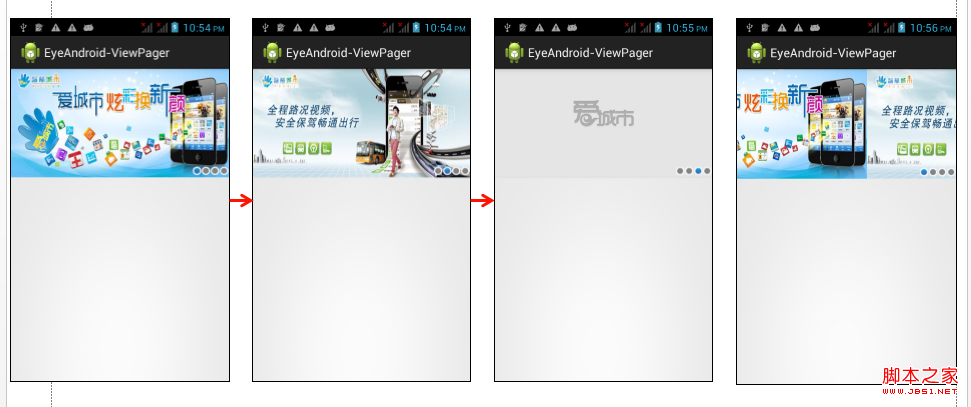 用 ViewPager 打造自動輪播廣告板:完整源碼分享
android-support-v4.jar 是 Google 官方為相容低版本裝置所提供的套件,裡面包含了原本只有 Android 3.0 以上才支援的 API,而 V
 用 JSONObject 拆解 API 回傳:Android JSON 解析的分層取值邏輯
JSON 這個名稱來自 JavaScript,但它早已脫離該語言,成為一門獨立的資料交換格式,也是 XML 最常被替換的對象。對 Android 開發者而言,理解 JSO