編輯:Android開發教程
<RelativeLayout xmlns:android="http://schemas.android.com/apk/res/android"
    xmlns:tools="http://schemas.android.com/tools"
    android:layout_width="match_parent"
    android:layout_height="match_parent" >


    <LinearLayout
        android:layout_width="match_parent"
        android:layout_height="match_parent"
        android:background="@drawable/background"
        android:orientation="vertical" >


        <LinearLayout
            android:id="@+id/header_bar"
            android:layout_width="match_parent"
            android:layout_height="0dp"
            android:layout_weight="1"
            android:orientation="horizontal"
            android:paddingLeft="5dp"
            android:paddingRight="5dp" >


            <Button
                android:id="@+id/back_btn"
                android:layout_width="0dp"
                android:layout_height="match_parent"
                android:layout_weight="1"  />


            <TextView
                android:layout_width="0dp"
                android:layout_height="match_parent"
                android:layout_weight="1.5"  />


            <TextView
                android:id="@+id/stage_num"
                android:layout_width="0dp"
                android:layout_height="match_parent"
                android:layout_weight="0.9"
                android:gravity="center"
                android:textColor="#ffffff"
                android:textSize="10sp"  />


            <TextView
                android:layout_width="0dp"
                android:layout_height="match_parent"
                android:layout_weight="1"  />


            <LinearLayout
                android:layout_width="0sp"
                android:layout_height="match_parent"
                android:layout_marginBottom="5sp"
                android:layout_marginTop="5sp"
                android:layout_weight="1.4"
                android:background="#1D338A"
                android:orientation="horizontal"
                android:paddingLeft="5sp" >


                <ImageView
                    android:id="@+id/coin_img"
                    android:layout_width="0sp"
                    android:layout_height="match_parent"
                    android:layout_weight="1"  />


                <TextView
                    android:id="@+id/coin_text"
                    android:layout_width="0sp"
                    android:layout_height="match_parent"
                    android:layout_weight="2"
                    android:gravity="center"
                    android:textColor="#ffffff"
                    android:textSize="10sp"  />
            </LinearLayout>
        </LinearLayout>


        <LinearLayout
            android:layout_width="match_parent"
            android:layout_height="0sp"
            android:layout_weight="6.5"
            android:orientation="horizontal" >


            <LinearLayout
                android:layout_width="0sp"
                android:layout_height="match_parent"
                android:layout_weight="1"
                android:orientation="vertical"
                android:paddingLeft="5sp" >


                <TextView
                    android:layout_width="match_parent"
                    android:layout_height="0sp"
                    android:layout_weight="1.5"  />


                <Button
                    android:id="@+id/delete_text_btn"
                    android:layout_width="match_parent"
                    android:layout_height="0sp"
                    android:layout_marginBottom="10sp"
                    android:text="30"
                    android:textSize="10sp"
                    android:gravity="center_horizontal"
                    android:paddingTop="30sp"
                    android:layout_weight="1.2"  />


                <Button
                    android:id="@+id/propt_text_btn"
                    android:layout_width="match_parent"
                    android:layout_height="0sp"
                    android:text="90"
                    android:textSize="10sp"
                    android:paddingTop="30sp"
                     android:gravity="center_horizontal"
                    android:layout_weight="1.2"  />


                <TextView
                    android:layout_width="match_parent"
                    android:layout_height="0sp"
                    android:layout_weight="0.5"  />
            </LinearLayout>


            <RelativeLayout
                android:layout_width="0dp"
                android:layout_height="match_parent"
                android:layout_weight="3.5" >


                <LinearLayout
                    android:layout_width="match_parent"
                    android:layout_height="match_parent"
                    android:orientation="vertical"
                    android:paddingLeft="5dp"
                    android:paddingRight="5dp" >


                    <TextView
                        android:layout_width="match_parent"
                        android:layout_height="0sp"
                        android:layout_weight="1"  />


                    <ImageView
                        android:id="@+id/main_image"
                        android:layout_width="match_parent"
                        android:layout_height="0sp"
                        android:layout_weight="3.5"  />
                    <!-- relative中圖片可以疊加,這個LinearLayout在下面 -->
                </LinearLayout>


                <LinearLayout
                    android:layout_width="match_parent"
                    android:layout_height="match_parent"
                    android:orientation="horizontal" >


                    <TextView
                        android:layout_width="0dp"
                        android:layout_height="match_parent"
                        android:layout_weight="1"  />


                    <LinearLayout
                        android:layout_width="0dp"
                        android:layout_height="match_parent"
                        android:layout_weight="3"
                        android:orientation="vertical" >


                        <TextView
                            android:layout_width="match_parent"
                            android:layout_height="0sp"
                            android:layout_weight="0.7"  />


                        <TextView
                            android:id="@+id/answer_type"
                            android:layout_width="match_parent"
                            android:layout_height="0dp"
                            android:layout_weight="0.4"
                            android:gravity="center_horizontal"
                            android:textColor="#ffffff"
                            android:textSize="10sp"  />
 <!-- relative中圖片可以疊加,這個LinearLayout在上面 -->

                        <TextView
                            android:layout_width="match_parent"
                            android:layout_height="0sp"
                            android:layout_weight="3.6"  />

                    </LinearLayout>


                    <TextView
                        android:layout_width="0sp"
                        android:layout_height="match_parent"
                        android:layout_weight="1"  />
                </LinearLayout>
            </RelativeLayout>


            <LinearLayout
                android:layout_width="0sp"
                android:layout_height="match_parent"
                android:layout_weight="1"
                android:orientation="vertical" >
            </LinearLayout>
        </LinearLayout>


        <com.kane.crazyneedkane.view.AnswerView
            android:id="@+id/answer_view"
            android:layout_width="match_parent"
            android:layout_height="0dp"
            android:layout_weight="2.5" >
        </com.kane.crazyneedkane.view.AnswerView>


        <GridView
            android:id="@+id/select_text_grid"
            android:layout_width="match_parent"
            android:layout_height="0sp"
            android:layout_weight="4"
            android:numColumns="8" >
        </GridView>


        <TextView
            android:layout_width="match_parent"
            android:layout_height="0sp"
            android:layout_weight="0.3"  />
    </LinearLayout>

    <!-- 默認隱藏,答案正確後顯示 ,android:background="#dd000000"半透明 ,八個0是全透明 -->
    <LinearLayout
        android:id="@+id/winLayout"
        android:layout_width="match_parent"
        android:layout_height="match_parent"
        android:background="#dd000000"
        android:orientation="horizontal"
        android:visibility="invisible" >


        <TextView
            android:layout_width="0sp"
            android:layout_height="match_parent"
            android:layout_weight="1"  />


        <LinearLayout
            android:layout_width="0dp"
            android:layout_height="match_parent"
            android:layout_weight="1"
            android:orientation="vertical" >


            <TextView
                android:layout_width="match_parent"
                android:layout_height="0sp"
                android:layout_weight="2"  />


            <TextView
                android:layout_width="match_parent"
                android:layout_height="0dp"
                android:layout_weight="1"
                android:gravity="center"
                android:text="答案正確"
                android:textColor="#ffffff"
                android:textSize="22dp"  />


            <TextView
                android:layout_width="match_parent"
                android:layout_height="0sp"
                android:layout_weight="1.5"  />


            <LinearLayout
                android:layout_width="match_parent"
                android:layout_height="0sp"
                android:layout_marginBottom="20dp"
                android:layout_weight="1"
                android:orientation="horizontal" >


                <TextView
                    android:layout_width="0sp"
                    android:layout_height="match_parent"
                    android:layout_weight="1"  />


                <TextView
                    android:id="@+id/win_stage_num"
                    android:layout_width="0sp"
                    android:layout_height="match_parent"
                    android:layout_weight="1"
                    android:gravity="center"
                    android:textColor="#ffffff"
                    android:textSize="10dp"  />


                <TextView
                    android:layout_width="0sp"
                    android:layout_height="match_parent"
                    android:layout_weight="1"  />
            </LinearLayout>
             <TextView
                    android:id="@+id/win_answer_text"
                    android:layout_width="match_parent"
                    android:layout_height="0dp"
                    android:layout_weight="0.5"
                    android:gravity="center"
                    android:textColor="#ffffff"
                    android:textSize="10dp"  />
              <TextView
                android:layout_width="match_parent"
                android:layout_height="0sp"
                android:layout_weight="2"  />
              <Button android:id="@+id/next_btn"
                  android:layout_width="match_parent"
                  android:layout_height="0dp"
                  android:layout_weight="1" />
               <TextView
                   android:id="@+id/game_over"
                android:layout_width="match_parent"
                android:layout_height="0sp"
                android:layout_weight="1"
                android:text="未完待續"
                android:visibility="invisible"
                android:textColor="#ffffff"
                android:textSize="20dp"
                android:gravity="center"  />

            <TextView
                android:layout_width="match_parent"
                android:layout_height="0sp"
                android:layout_weight="2.5"  />
        </LinearLayout>


        <TextView
            android:layout_width="0sp"
            android:layout_height="match_parent"
            android:layout_weight="1"  />
    </LinearLayout>


</RelativeLayout>
作者:csdn博客 青春張開
返回欄目頁:http://www.bianceng.cn/OS/extra/
 Android基於Openfire開發即時通訊工具(4)獲取好友列表
上節已經在openfire服務器中建立了組,這節繼續看怎樣獲取好友列表,通過connection對象得到roster,從而可以使用roster.getGroups()得到
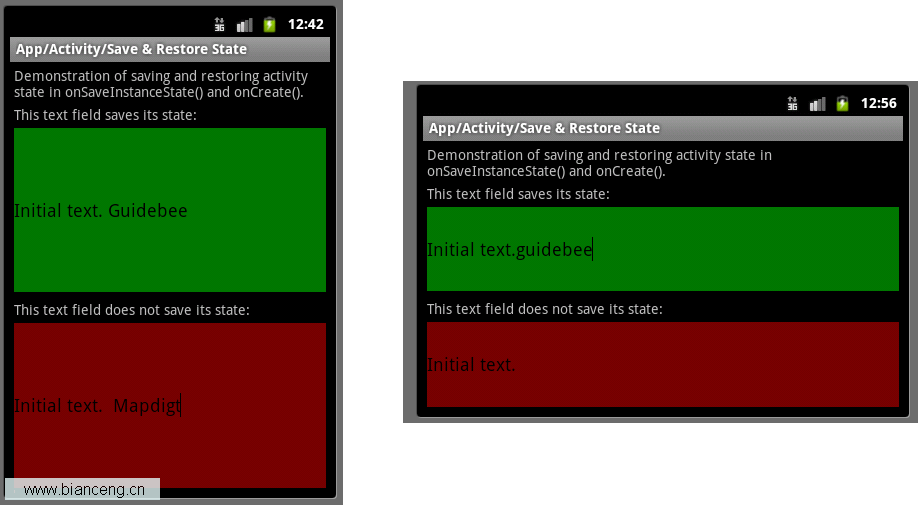 Android ApiDemos示例解析(14) App->Activity->Save & Restore State
Save & Restore State與之前的例子Android ApiDemo示例解析(9):App->Activity->Persistent
 Android APK反編譯詳解
這段時間在學Android應用開發,在想既然是用Java開發的應該很好反編譯從而得到源代碼吧,google了一下,確實很簡單, 以下是我的實踐過程。在此鄭重聲明,貼出來的
 Android開機自啟動應用
Android啟動時,會發出一個系統廣播 ACTION_BOOT_COMPLETED,它的字符串常量表示為 “android.intent.action.BO