編輯:Android開發教程
有些情況需要將同一類型映射到不同的類實現,還是使用繪圖的例 子.
IShape, Rectangle, MyRectangle, MySquare,有如下繼承關系:
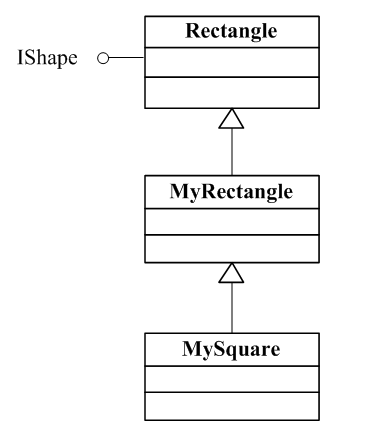
我們可能需要將IShape 同時映射到 MyRectangle 和MySquare ,這時可以使用Binding Annotation 來實現。 這時使 用類型和annotation (標注)可以唯一確定一個Binding。Type 和annotation 對 稱為Key(鍵)。
為了同時使用MyRectangle和MySequare,我們定義兩個 annotation,如下
import com.google.inject.BindingAnnotation;


import java.lang.annotation.Target;
import java.lang.annotation.Retention;
import static java.lang.annotation.RetentionPolicy.RUNTIME;
import static java.lang.annotation.ElementType.PARAMETER;
import static java.lang.annotation.ElementType.FIELD;
import static java.lang.annotation.ElementType.METHOD;

...
@BindingAnnotation
@Target({ FIELD, PARAMETER, METHOD })
@Retention(RUNTIME)
public @interface Rectangle {
}
...

@BindingAnnotation
@Target({ FIELD, PARAMETER, METHOD })
@Retention(RUNTIME)
public @interface Square {
}
定義了兩個標注 @Rectangle, @Square, 至於@BindingAnnotation,@Target ,@Retention你並不需要詳細了解,有興趣的可以參見Java Annotation tutorial:
http://download.oracle.com/javase/tutorial/java/javaOO/annotations.h tml
簡單的說明如下:
@BindingAnnotation 通知這是一個 Binding Annotation,如果將多個個標注應用到同一個元素時,Guice會報錯。
@Target({FIELD, PARAMETER, METHOD}) 表示這個標注可以應 用到類成員變量,函數的參數或時方法。
@Retention(RUNTIME) 表示這個標注在程序運行時可以使用Reflection讀取。
創建一 個BindingAnnotationsDemo 用來繪制兩個圖形:
public class

BindingAnnotationsDemo extends Graphics2DActivity{

 @Inject @Rectangle IShape  shape1;
 @Inject @Square IShape  shape2;

 protected void drawImage(){

 /**
 * The semi-opaque blue color in
 * the ARGB space (alpha is 0x78)
 */
 Color blueColor = new Color(0x780000ff,true);
 /**
 * The semi-opaque green color in the ARGB space (alpha is 0x78)
 */
 Color greenColor = new Color(0x7800ff00,true);

 graphics2D.clear(Color.WHITE);
 graphics2D.Reset();

 SolidBrush brush=new SolidBrush(blueColor);

 graphics2D.fill(brush,shape1);
 AffineTransform at = new AffineTransform();
 at.translate(20, 20);
 graphics2D.setAffineTransform(at);
 brush=new SolidBrush(greenColor);
 graphics2D.fill(brush,shape2);

 }

}
使用標注將shape1 綁定到MyRectangle, shape2綁定到MySquare,對 應的Module 定義如下:
public class Graphics2DModule extends

AbstractAndroidModule{

 @Override
 protected void configure() {

 bind(IShape.class)
 .annotatedWith(Rectangle.class)
 .to(MyRectangle.class);

 bind(IShape.class)
 .annotatedWith(Square.class)
 .to(MySquare.class);

 }
}
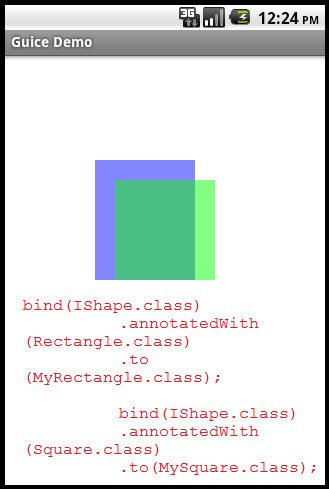
Inject 可以應用到Field (成員變量),Parameter (參 數)或Method(方法),前面的例子都是應用到Field上,如果應用到參數可以有 如下形式:
@Inject
public IShape getShape(@Rectangle IShape shape){
...
}
如果你不想自定義Annotation,可以使用Guice自帶的@Name標注來解 決同一類型綁定到不同實現的問題。
修改上面代碼:
[java]

view plaincopyprint?

    //@Inject @Rectangle IShape  shape1;
    //@Inject @Square IShape  shape2;

    @Inject @Named("Rectangle") IShape shape1;
    @Inject @Named("Square") IShape shape2;
修改綁定如下:
//bind(IShape.class)
//.annotatedWith(Rectangle.class)
//.to(MyRectangle.class);

//bind(IShape.class)
//.annotatedWith(Square.class)
//.to(MySquare.class);

bind(IShape.class)
 .annotatedWith(Names.named("Rectangle"))
 .to(MyRectangle.class);
bind(IShape.class)
 .annotatedWith(Names.named("Square"))
 .to(MySquare.class);
這種方法簡單,但編譯器無法檢測字符串,比 如將”Square”錯寫為”Sqare”,編譯器無法查出這個錯誤,此時到運行時才可 能發現 shape2 無法注入,因此建議盡量少用Named.
本例下載: http://www.imobilebbs.com/download/android/roboguice/BindingAnnotations Demo.zip
查看全套文章:http://www.bianceng.cn/OS/extra/201301/34950.htm
 Android與iPhone的使用感受對比
注1:以下這些功能都是本人以MIUI ROM為例來講述的,如果你的Android沒有類似功能,可能是版本關系。部分功能需要安裝App來實現。注2:以下所述的優/缺點,全部
 android 4.3操作源碼實現系統截屏
1.背景android系統的系統截屏功能是google封裝起來的,也是大家都很想獲得的,經過一個多月的漫長研究,博主終於成功的在android新版本也就是4.3以上版本實
 Android屬性動畫之實現布局的下拉展開
前段時間,我們做了一下Android的幾個動畫(http://blog.csdn.net/qq_25193681/article/details/51777248),對A
 Android RoboGuice使用指南(2) 第一個例子Hello World
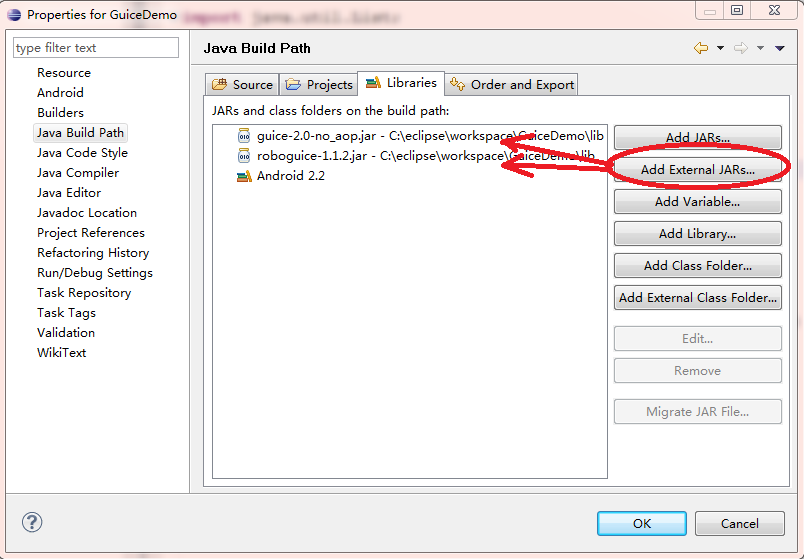
首先介紹一下如果將Guice 和RoboGuice 的庫添加到項目中。下載RoboGuice和guice-2.0-no_aop.jar(not guice-3.0),或者