編輯:Android開發教程
使用一個例子,來總結一下ListView的基本使用。
1. 新建一個工程:ListViewDemo。
2. main.xml中的代碼。
<?xml version="1.0" encoding="utf-8"?>
<LinearLayout xmlns:android="http://schemas.android.com/apk/res/android"
    android:layout_width="fill_parent"
    android:layout_height="fill_parent"
    android:orientation="vertical" >

<Button android:id="@+id/btn"
    android:layout_width="fill_parent"
    android:layout_height="wrap_content"
    android:text="Show selected items"
    android:onClick="onClick"/>

<ListView
    android:id="@+id/android:list"
    android:layout_width="wrap_content"
    android:layout_height="wrap_content" />

</LinearLayout>
3. Strings.xml中的代碼。
<?xml version="1.0" encoding="utf-8"?>
<resources>
    <string name="hello">Hello World, BasicViews5Activity!</string>
    <string name="app_name">BasicViews5</string>
    <string-array name="presidents_array">
        <item>Dwight D. Eisenhower</item>
        <item>John F. Kennedy</item>
        <item>Lyndon B. Johnson</item>
        <item>Richard Nixon</item>
        <item>Gerald Ford</item>
        <item>Jimmy Carter</item>
        <item>Ronald Reagan</item>
        <item>George H. W. Bush</item>
        <item>Bill Clinton</item>
        <item>George W. Bush</item>
        <item>Barack Obama</item>
    </string-array>
</resources>
4. ListViewDemo中的代碼。
public class ListViewDemo extends ListActivity  {

    String[] presidents;

    /** Called when the activity is first created. */
    @Override
    public void onCreate(Bundle savedInstanceState) {
        super.onCreate(savedInstanceState);

        setContentView(R.layout.main);

        ListView lstView = getListView();

        //lstView.setChoiceMode(ListView.CHOICE_MODE_NONE);
        //lstView.setChoiceMode(ListView.CHOICE_MODE_SINGLE);
        lstView.setChoiceMode(ListView.CHOICE_MODE_MULTIPLE);
        lstView.setTextFilterEnabled(true);

        presidents =
                getResources().getStringArray(R.array.presidents_array);

        setListAdapter(new ArrayAdapter<String>(this,
            android.R.layout.simple_list_item_checked, presidents));
    }

    public void onListItemClick(
    ListView parent, View v, int position, long id)
    {
        Toast.makeText(this,
            "You have selected " + presidents[position],
            Toast.LENGTH_SHORT).show();
    }

    // for button click event
    public void onClick(View view) {
        ListView lstView = getListView();

        String itemsSelected = "Selected items: \n";
        for (int i=0; i<lstView.getCount(); i++) {
            if (lstView.isItemChecked(i)) {
                itemsSelected += lstView.getItemAtPosition(i) + "\n";
            }
        }
        Toast.makeText(this, itemsSelected, Toast.LENGTH_LONG).show();
    }

}
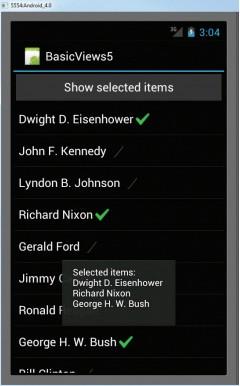
5. 按F11在模擬器上面調試。在ListView中選擇一些物件,然後點擊上面的Button,就會顯示出哪些物件 被選擇了。
查看本欄目更多精彩內容:http://www.bianceng.cn/OS/extra/
 Android設備上的解壓縮工具:RAR for Android
RAR for Android 是老牌解壓縮工具 WinRAR 推出的免費 Android 工具,可以讓你在 Android 設備上壓縮、解壓縮文件。via @Xang
 關於添加Android的OpenCV依賴庫(Android Dependencies) 的問題
如果想要添加OpenCV的依賴庫, 則需要把OpenCV的"D:\OpenCV-2.4.9-android-sdk\sdk\java"文件夾復制到An
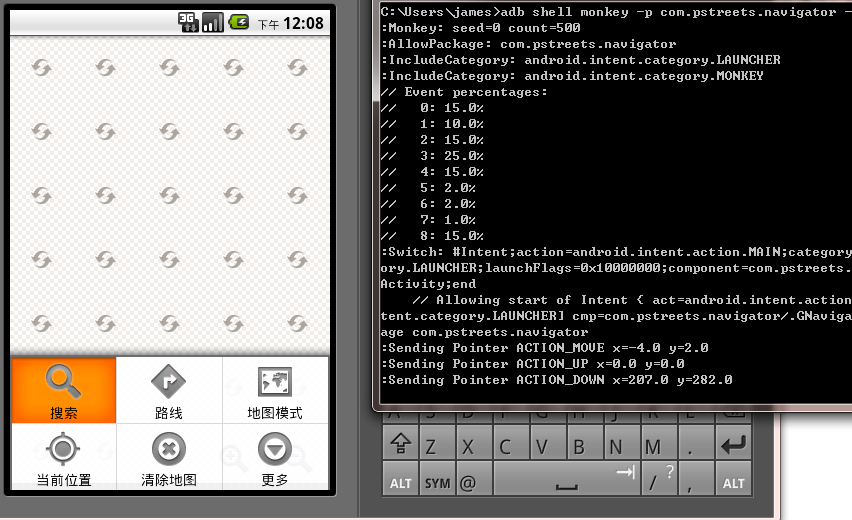 Android測試教程(17):Monkey 命令行工具
寫完應用之後,作完單元測試和功能測試,有必要對應用的抗打擊能力做個測試,最好的方法是雇個“猴子”在測試,猴子 可以胡亂瞎按鍵,在這種情況下,你的應
 繪制幾何圖形 - 使用android.graphics類
范例說明“如何在和機上繪制2D圖形呢?”這是許多android游戲開發都是常提到的問題,在android SDK 當中,並沒有Java Graph