編輯:Android開發教程
package xiao.fuyan.particle;

/**
 * Created by xiao on 2017/2/10.
 */
public class Particle {
    //粒子半徑
    int r;
    //粒子顏色
    int color;
    //垂直速度
    double v_v;
    //水平速度
    double h_v;
    //初始坐標
    int startX;
    int startY;
    //實時坐標
    int x, y;
    //起始時間
    double startTime;

    //構造器
    public Particle(int color, int r, double v_v, double h_v, int x, int y, double startTime){
        //初始化各個變量
        this.color = color;
        this.r = r;
        this.v_v = v_v;
        this.h_v = h_v;
        this.startX = x;
        this.startY = y;
        this.x = x;
        this.y = y;
        this.startTime = startTime;
    }
} 2、開發粒子集合ParticleSet類:package xiao.fuyan.particle;
import android.graphics.Color;
import java.util.ArrayList;
/**
* Created by xiao on 2017/2/10.
*/
public class ParticleSet {
//用於存放Particle對象的集合
ArrayList<Particle> particleSet;
//構造器,
public ParticleSet(){
particleSet = new ArrayList<Particle>();
}
//向粒子集合中添加指定個數的粒子對象
public void add(int count, double startTime){
for(int i =0; i < count; i++){
//該段代碼是開發焰火粒子
//獲取粒子對象的顏色
int tempColor = this.getColor(i);
//設置粒子半徑
int tempR = 3;
//隨機產生粒子豎直方向上的速度
double tempv_v = -30 + 10 * (Math.random());
//同上獲取水平方向上的速度
double temph_v = 10 - 20 * (Math.random());
//粒子的X坐標是固定的
int tempX = 160;
//隨機產生Y坐標,90 - 100之間
int tempY = (int) (100 - 10 * (Math.random()));
Particle particle = new Particle(tempColor, tempR, tempv_v, temph_v, tempX, tempY, startTime);
//將創建好的Particle對象添加到列表中
particleSet.add(particle);
//下面代碼是將焰火粒子變為瀑布粒子
// int tempColor = this.getColor(i);
// //粒子半徑
// int tempR = 3;
// //豎直方向速度為零
// double tempv_v = 0;
// double temph_v = 20 + 10 * (Math.random());
//
// int tempX = 50;
// int tempY = (int) (50 - 10 * (Math.random()));
//
// //創建Particle對象
// Particle particle = new Particle(tempColor, tempR, tempv_v, temph_v, tempX, tempY, startTime);
// //將創建好的Particle對象加入列表
// particleSet.add(particle);
}
}
//獲取指定索引的顏色
public int getColor(int i){
int color = Color.RED;
switch (i % 8){
case 0:
color = Color.RED;
break;
case 1:
color = Color.BLUE;
break;
case 2:
color = Color.GRAY;
break;
case 3:
color = Color.GREEN;
break;
case 4:
color = Color.CYAN;
break;
case 5:
color = Color.YELLOW;
break;
case 6:
color = Color.MAGENTA;
break;
case 7:
color = Color.LTGRAY;
break;
}
return color;
}
} 3、開發物理引擎ParticleThread類:package xiao.fuyan.particle;
import java.util.ArrayList;
/**
* Created by xiao on 2017/2/10.
*/
public class ParticleThread extends Thread {
//線程執行標志位
boolean flag;
//ParticleView對象的引用
ParticleView father;
//線程休眠的時間
int sleepSpan = 80;
//物理引擎的時間軸
double time = 0;
//每次計算粒子的位移時采用的時間間隔
double span = 0.15;
//構造器
public ParticleThread(ParticleView father){
this.father = father;
this.flag = true;
}
//線程執行的方法
@Override
public void run() {
while(flag){
//每次添加五個粒子
father.ps.add(15, time);
//獲取粒子集合
ArrayList<Particle> tempSet = father.ps.particleSet;
//記錄粒子集合的大小
int count = tempSet.size();
for(int i = 0; i < count; i++){ //遍歷粒子集合,修改其軌跡
Particle particle = tempSet.get(i);
//計算從程序開始到現在的時間
double timeSpan = time - particle.startTime;
//計算出粒子的X坐標
int tempX = (int) (particle.startX + particle.h_v * timeSpan);
//計算Y坐標
int tempY = (int) (particle.startY + 4.9 * timeSpan * timeSpan + particle.v_v * timeSpan);
//如果粒子超出屏幕下邊沿
if(tempY > 1920){
tempSet.remove(particle);
//重新設置粒子的個數
count = tempSet.size();
}
//修改粒子的坐標
particle.x = tempX;
particle.y = tempY;
}
//將時間延長
time += span;
try{
Thread.sleep(sleepSpan);//休眠一段時間
}catch (Exception e){
e.printStackTrace();
}
}
}
} 4、開發視圖ParticleView類:package xiao.fuyan.particle;
import android.content.Context;
import android.graphics.Canvas;
import android.graphics.Color;
import android.graphics.Paint;
import android.graphics.RectF;
import android.view.SurfaceHolder;
import android.view.SurfaceView;
import java.util.ArrayList;
/**
* Created by xiao on 2017/2/10.
*/
public class ParticleView extends SurfaceView implements SurfaceHolder.Callback {
//粒子的Y坐標超過該值就會從粒子集合中移出
public static final int DIE_OUT_LINE = 1920;
//後台刷新屏幕的線程
DrawThread dt = null;
//ParticleSet對象的引用
ParticleSet ps;
//ParticleThread對象的引用
ParticleThread pt;
//聲明幀速率字符串
String fps = "FPS:N/A";
//構造器
public ParticleView(Context context){
super(context);
//添加callback接口
this.getHolder().addCallback(this);
//創建DrawThread對象
dt = new DrawThread(this, getHolder());
//創建ParticleSet對象
ps = new ParticleSet();
//創建ParticleThread對象
pt = new ParticleThread(this);
}
//繪制屏幕
public void doDraw(Canvas canvas){
//清除屏幕
canvas.drawColor(Color.BLACK);
//獲取ParticleSet對象中的粒子
ArrayList<Particle> particleSet = ps.particleSet;
Paint paint = new Paint();
for(int i = 0; i < particleSet.size(); i++){
Particle p = particleSet.get(i);
paint.setColor(p.color);
//獲取粒子坐標和半徑
int tempX = p.x;
int tempY = p.y;
int tempR = p.r;
//繪制該粒子
RectF oval = new RectF(tempX, tempY, tempX + 2 * tempR, tempY + 2 * tempR);
canvas.drawOval(oval, paint);
}
//設置畫筆顏色
paint.setColor(Color.WHITE);
paint.setTextSize(60);
paint.setAntiAlias(true);
//畫出幀速率字符串
canvas.drawText(fps, 900, 80, paint);
}
@Override
public void surfaceChanged(SurfaceHolder holder, int format, int width, int height) {
}
@Override
public void surfaceCreated(SurfaceHolder holder) {
//啟動線程
if(!dt.isAlive()){
dt.start();
}
if(!pt.isAlive()){
pt.start();
}
}
@Override
public void surfaceDestroyed(SurfaceHolder holder) {
//停止線程
dt.flag = false;
dt = null;
pt.flag = false;
pt = null;
}
} 5、開發DrawThread類:package xiao.fuyan.particle;
import android.graphics.Canvas;
import android.view.SurfaceHolder;
/**
* Created by xiao on 2017/2/10.
*/
public class DrawThread extends Thread {
//ParticleView對象
ParticleView particleView;
//SurfaceHolder對象的引用
SurfaceHolder surfaceHolder;
//線程執行的標志位
boolean flag = false;
//休眠時間
int sleepSpan = 30;
//記錄起始時間,用於計算幀速率
long start = System.nanoTime();
//記錄幀數,
int count = 0;
//構造器
public DrawThread(ParticleView particleView, SurfaceHolder surfaceHolder){
this.particleView = particleView;
this.surfaceHolder = surfaceHolder;
this.flag = true;
}
@Override
//線程執行的方法,用於重繪屏幕和計算幀速率
public void run() {
Canvas canvas = null;
while(flag){
try{
//獲取ParticleView的畫布
canvas = surfaceHolder.lockCanvas(null);
//加鎖並且繪制
synchronized (surfaceHolder){
particleView.doDraw(canvas);
}
}catch (Exception e){
e.printStackTrace();
}finally {
if(canvas != null){ //如果canvas不為空
//surfaceHolder解鎖,並將畫布對象傳回
surfaceHolder.unlockCanvasAndPost(canvas);
}
}
//如果計滿20幀,計算幀速率
this.count++;
if(count == 20){
count = 0;
//獲取當前時間
long tempStamp = System.nanoTime();
//獲取時間間隔
long span = tempStamp - start;;
//為start重新賦值
start = tempStamp;
//計算幀速率
double fps = Math.round(10000000000.0 / span * 20) / 100.0;
//設置實時幀速率
particleView.fps = "FPS" + fps;
}
}
try{
Thread.sleep(sleepSpan);
}catch (Exception e){
e.printStackTrace();
}
}
} 6、開發程序MainActivity類:package xiao.fuyan.particle;
import android.app.Activity;
import android.os.Bundle;
import android.view.Window;
import android.view.WindowManager;
public class MainActivity extends Activity {
@Override
protected void onCreate(Bundle savedInstanceState) {
super.onCreate(savedInstanceState);
//設置不顯示標題
requestWindowFeature(Window.FEATURE_NO_TITLE);
//設置全屏顯示模式
getWindow().setFlags(WindowManager.LayoutParams.FLAG_FULLSCREEN,
WindowManager.LayoutParams.FLAG_FULLSCREEN);
//創建一個ParticleView對象
ParticleView particleView = new ParticleView(this);
setContentView(particleView);
}
}
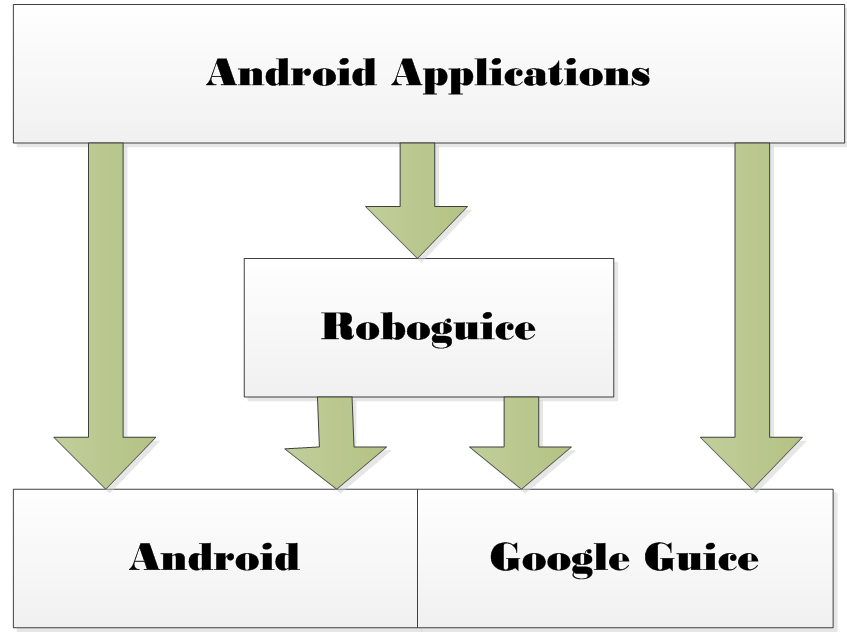 Android RoboGuice使用指南(13) RoboGuice功能描述
前面在Android RoboGuice 使用指南(1):概述 對應Roboguice做了簡要的介紹 ,之後介紹了Google Guice的基本用法,Roboguice是
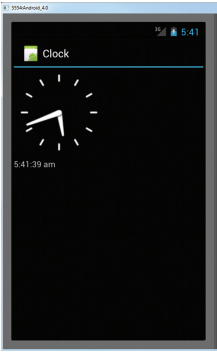 Android開發入門(十六)其他視圖 16.1 AnalogClock和DigitalClock
AnalogClock視圖顯示了一個模擬的時鐘,其中有一個時針和一個分針。與其相對的是DigitalClock視圖 ,它可以顯示數字模擬時鐘。這兩個視圖只能顯示系統時間,
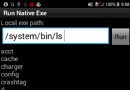 android技巧:如何在android程序中執行adb shell命令
package net.gimite.nativeexe; import java.io.BufferedReader; import java.io.F
 Android 4.3 Jelly Bean的更新內容
上周谷歌版Galaxy S4(GT-I9505)的Android 4.3 Jelly Bean刷機包流出,也讓我們初步了解了Android 4.3的一些新特性。那麼,An