編輯:Android開發教程
本文將告訴你如何讓你的應用程序支持各種不同屏幕大小,主要通過以下幾種辦法:
讓你的布局 能充分的自適應屏幕
根據屏幕的配置來加載合適的UI布局
確保正確的布局應用在正確的設備屏幕上
提供可以根據屏幕大小自動伸縮的圖片
使用 "wrap_content" 和 "match_parent"
為了確保你的布局能夠自適應各種不同屏幕大小,你應該在布局的視圖 中使用"wrap_content"和"match_parent"來確定它的寬和高。如果你使用了 "wrap_content",相應視圖的寬和高就會被設定成剛好能夠包含視圖中內容的最小值。而如果你 使用了"match_parent"(在Android API 8之前叫作"fill_parent"),就會讓視圖的寬 和高延伸至充滿整個父布局。
通過使用"wrap_content"和"match_parent"來替 代硬編碼的方式定義視圖大小,你的視圖要麼僅僅使用了需要的那邊一點空間,要麼就會充滿所有可用的空 間。例如:
<LinearLayout xmlns:android="http://schemas.android.com/apk/res/android"
    android:orientation="vertical"
    android:layout_width="match_parent"
    android:layout_height="match_parent">
    <LinearLayout android:layout_width="match_parent"
                  android:id="@+id/linearLayout1"
                  android:gravity="center"
                  android:layout_height="50dp">
        <ImageView android:id="@+id/imageView1"
                   android:layout_height="wrap_content"
                   android:layout_width="wrap_content"
                   android:src="@drawable/logo"
                   android:paddingRight="30dp"
                   android:layout_gravity="left"
                   android:layout_weight="0" />
        <View android:layout_height="wrap_content"
              android:id="@+id/view1"
              android:layout_width="wrap_content"
              android:layout_weight="1" />
        <Button android:id="@+id/categorybutton"
                android:background="@drawable/button_bg"
                android:layout_height="match_parent"
                android:layout_weight="0"
                android:layout_width="120dp"
                style="@style/CategoryButtonStyle"/>
    </LinearLayout>

    <fragment android:id="@+id/headlines"
              android:layout_height="fill_parent"
              android:name="com.example.android.newsreader.HeadlinesFragment"
              android:layout_width="match_parent" />
</LinearLayout>
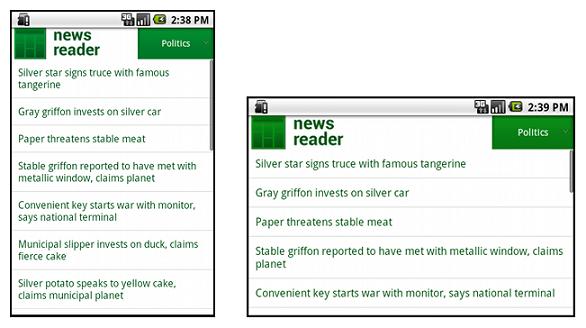
注意上面的例子中是如何使用"wrap_content"和 "match_parent"來給控件定義寬高的,這讓整個布局可以正確地適應不同屏幕的大小,甚至是橫 屏。
下圖是這個布局分別在豎屏和橫屏時顯示的結果,注意控件的寬和高是根據屏幕自適應的。
 Android開發入門(十一)選擇控件 11.1 TimePicker
使用TimePicker,可以讓用戶去選擇一天中的事件,包括24小時制和AM/PM制。下面的例子將會展示如何 使用TimePicker。1. 創建一個工程:BasicVi
 Android碎片化圖表:果凍豆(Jelly Bean)領銜
又到了再一次審視Google家的移動操作系統"碎片化"到如何程度的時候了。OpenSignal背後的開發人員們,通過他們從用戶所下載的應用那裡收集來的
 Android ApiDemos示例解析(25) App->Menu->Inflate from XML
本例演示了如何從Menu 資源(XML 定義)展開菜單項。這個例子的onCreate 采用了使用代碼來創建Activity 界面的方法 而通常的方法是采用Layout資源
 在Android應用中使用HTML Parser便捷的解析html內容
概述隨著移動互聯網的發展,更多的內容需要從傳統互聯網延伸到移動終端呈現。一般的做法有三 種:1. Web APP:利用 HTML5 技術,例如 JQuery mobil