編輯:Android開發教程
轉載請注明:http://www.cnblogs.com/igoslly/p/6959108.html
ListFragment
ListFragment是繼承於Fragment的類,專門用於包含ListView的布局文件設置。
當然如果你不想了解ListFragment,通過使用普通Fragment進行setAdapter設置亦是可以的,普通ListView設置參見前章:http://www.cnblogs.com/igoslly/p/6947225.html
配置ListFragment通常涉及3個Layout文件:
1、包含Fragment的主Activity Layout:activity_main.xml (可直接靜態添加fragment,或設置framelayout動態添加)
2、應用ListFragment的 Layout:history_list.xml
ListFragment的布局默認包含一個listVew,命名為:“@id/android:id” (和普通命名語法不同)
還可另設 TextView 用於無數據時顯示,命名為:“@id/android:empty”
3、布局中ListView每個item的設置Layout:history_list_competition.xml
以下我實際應用所寫的實例,使用的是動態添加fragment,自定義BaseAdapter的方法。
—— ArrayAdapter & SimpleAdapter的設置更為簡單,可參考前章
—— 靜態添加fragment的方法,即是一個函數findViewById 和 findViewByTag的區別,也可詳見蘇白的專欄:http://blog.csdn.net/kakaxi1o1/article/details/29368645
activity_main.xml
<LinearLayout xmlns:android="http://schemas.android.com/apk/res/android"
    android:layout_width="match_parent"
    android:layout_height="match_parent"
    android:orientation="vertical">
    <LinearLayout
            android:layout_width="match_parent"
            android:layout_height="0dp"
            android:layout_weight="1"
            android:id="@+id/history_list"
            android:orientation="vertical">
    </LinearLayout>
</LinearLayout>
historyFragment.java
在 onCreateView()中,調用 history_list.xml 作為該ListFragment的布局文件。
fragmentTranscation.replace(R.id.history_list, historyListFragment).commit();
動態添加historyListFragment,並替換原有fragment
public class HistoryFragment extends Fragment {
    private FragmentManager fragmentManager;

    public HistoryFragment() {
    }

    @Override
    public View onCreateView(LayoutInflater inflater, ViewGroup container,
                             Bundle savedInstanceState) {
        View rootView = inflater.inflate(R.layout.history_list, container, false);
        return rootView;
    }

    @Override
    public void onActivityCreated(Bundle savedInstanceState) {
        super.onActivityCreated(savedInstanceState);
        Button competition_selected = (Button) getActivity().findViewById(R.id.history_competition);
        competition_selected.setOnClickListener(new View.OnClickListener() {
            @Override
            public void onClick(View v) {
                fragmentManager = getFragmentManager();
                fragmentTranscation = fragmentManager.beginTransaction();
                HistoryListFragment historyListFragment = new HistoryListFragment();
                fragmentTranscation.replace(R.id.history_list, historyListFragment).commit();
            }}
        );
    }
}
history_list.xml
<LinearLayout xmlns:android="http://schemas.android.com/apk/res/android"
    android:layout_width="match_parent"
    android:layout_height="match_parent"
    android:orientation="vertical"
    android:id="@+id/list_content">
    <ListView
        android:id="@id/android:list"
        android:layout_width="match_parent"
        android:layout_height="match_parent"
        android:padding="8dp"/>

    <TextView android:id="@id/android:empty"
        android:layout_width="match_parent"
        android:layout_height="match_parent"
        android:text=""/>
</LinearLayout>
history_list_competition.xml
設置ListView的每個item的布局格式
<LinearLayout xmlns:android="http://schemas.android.com/apk/res/android"
    android:layout_width="match_parent"
    android:layout_height="wrap_content"
    android:orientation="horizontal">
    <LinearLayout
        android:layout_width="0dp"
        android:layout_weight="8"
        android:layout_height="match_parent"
        android:orientation="vertical">
        <TextView
            android:layout_width="match_parent"
            android:layout_height="0dp"
            android:layout_weight="1"
            android:text="Null"
            android:textSize="20sp"
            android:padding="2dp"
            android:textColor="@color/black"
            android:id="@+id/list_competition_player"/>
        <TextView
            android:layout_width="match_parent"
            android:layout_height="0dp"
            android:layout_weight="1"
            android:text="Null"
            android:textSize="16sp"
            android:padding="2dp"
            android:id="@+id/list_competition_date"/>
    </LinearLayout>
    <LinearLayout
        android:layout_width="0dp"
        android:layout_weight="3"
        android:layout_height="match_parent">
        <TextView
            android:layout_width="match_parent"
            android:layout_height="match_parent"
            android:text="100"
            android:gravity="center"
            android:textSize="24sp"
            android:textColor="@color/black"
            android:id="@+id/list_competition_scoreA"/>
    </LinearLayout>
    <LinearLayout
        android:layout_width="0dp"
        android:layout_weight="1"
        android:layout_height="match_parent">
        <TextView
            android:layout_width="match_parent"
            android:layout_height="match_parent"
            android:text="—"
            android:gravity="center"
            android:textSize="28sp"/>
    </LinearLayout>
    <LinearLayout
        android:layout_width="0dp"
        android:layout_weight="3"
        android:layout_height="match_parent">
        <TextView
            android:layout_width="match_parent"
            android:layout_height="match_parent"
            android:text="100"
            android:gravity="center"
            android:textSize="24sp"
            android:textColor="@color/black"
            android:id="@+id/list_competition_scoreB"/>
    </LinearLayout>
</LinearLayout>
HistoryListFragment.java
在 onCreate()中,通過setListAdapter() 設置R.layout.history_list_competition。或者使用系統的默認的R.layout.simple_list_item_1;
添加ListView的點擊事件;自定義BaseAdapter;
注意! 如需使用本Java代碼,請另行添加具體List<Map<String,Object>>值,否則會報錯。
public class HistoryListFragment extends ListFragment {

    private CompetitionListAdapter adapter;
    private List<Map<String,Object>> competitionlist;

    // 構造函數
    public HistoryListFragment(){}
    @Override
    public void onCreate(Bundle savedInstanceState) {
        super.onCreate(savedInstanceState);
        competitionlist = new ArrayList<Map<String,Object>>();
        adapter = new CompetitionListAdapter(getActivity());
        //綁定適配器時,必須通過ListFragment.setListAdapter()接口,而不是ListView.setAdapter()或其它方法
        this.setListAdapter(adapter);
    }

    // 創建窗口
    @Override
    public View onCreateView(LayoutInflater inflater, ViewGroup container,
                             Bundle savedInstanceState) {
        return inflater.inflate(R.layout.history_list, container, false);
    }

    // 設置點擊事件
    @Override
    public void onListItemClick(ListView l, View v, int position, long id) {
        super.onListItemClick(l, v, position, id);

        HashMap<String, Object> item =(HashMap<String, Object>) adapter.getItem(position);
        String scoreA = (String)item.get("scoreA");
        String scoreB= (String)item.get("scoreB");
        String log = (String)item.get("log");
    }

    // 自定義 CompetitionListAdapter 繼承於BaseAdapter
    public class CompetitionListAdapter extends BaseAdapter {
        private LayoutInflater mInflater=null;
        public CompetitionListAdapter(Context context){
            this.mInflater=LayoutInflater.from(context);
        }
        @Override
        public int getCount(){
            return  competitionlist.size();
        }
        @Override
        public Object getItem(int position){
            return competitionlist.get(position);
        }
        @Override
        public long getItemId(int position){
            return position;
        }
        @Override
        public View getView(int position, View convertView, ViewGroup parent){
            ViewHolder holder = null;
            if (convertView ==null){
                holder = new ViewHolder();
                convertView = mInflater.inflate(R.layout.history_list_competition,null);
                holder.date=(TextView)convertView.findViewById(R.id.list_competition_date);
                holder.scoreA=(TextView)convertView.findViewById(R.id.list_competition_scoreA);
                holder.scoreB=(TextView) convertView.findViewById(R.id.list_competition_scoreB);
                holder.player=(TextView)convertView.findViewById(R.id.list_competition_player);
                convertView.setTag(holder);
            }else {
                holder = (ViewHolder)convertView.getTag();
            }
            holder.date.setText((String)competitionlist.get(position).get("date"));
            holder.scoreA.setText((String)competitionlist.get(position).get("scoreA"));
            holder.scoreB.setText((String)competitionlist.get(position).get("scoreB"));
            holder.player.setText((String)competitionlist.get(position).get("player"));
            return convertView;
        }

        private class ViewHolder{
            public TextView date;
            public TextView player;
            public TextView scoreB;
            public TextView scoreA;
        }
    }
}
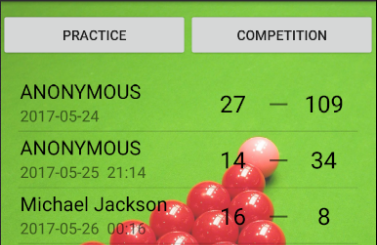
總體效果圖如下:
 React Native Android gradle下載慢有關問題解決
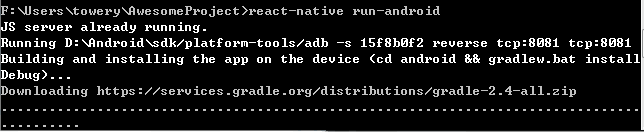
React Native Android gradle下載慢問題解決很多人會遇到 初次運行 react-native run android的時候 gradle下載極慢,
 Android ApiDemos示例解析 (27)
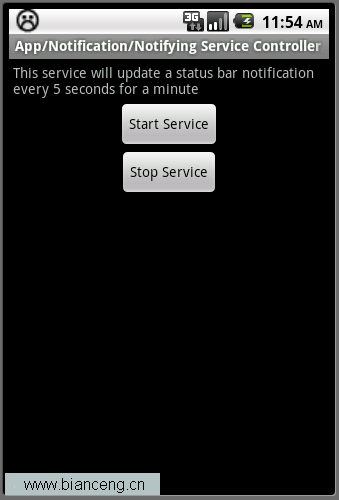
App->Notification->Notifying Service Controller這個例子介紹了如何在Service中使用Notification
 Android測試教程(15):AndroidTestCase示例
AndroidTestCase 為一Android平台下通用的測試類,它支持所有JUnit的Assert方法和標准的setUp 和tearDown 方法。如果 你的測試需
 Android簡明開發教程二十一:訪問Internet 繪制在線地圖
在例子Android簡明開發教程十七:Dialog 顯示圖像 中我們留了一個例子DrawMap()沒有實現,這個例子顯示在線地圖,目前大部分地圖服務器都是將地圖以圖片存儲