

編輯:Android 資訊
Android 中的異步消息處理主要由四部分組成:Message、Handler、MessageQueue 和 Looper。它們的關係如圖所示:
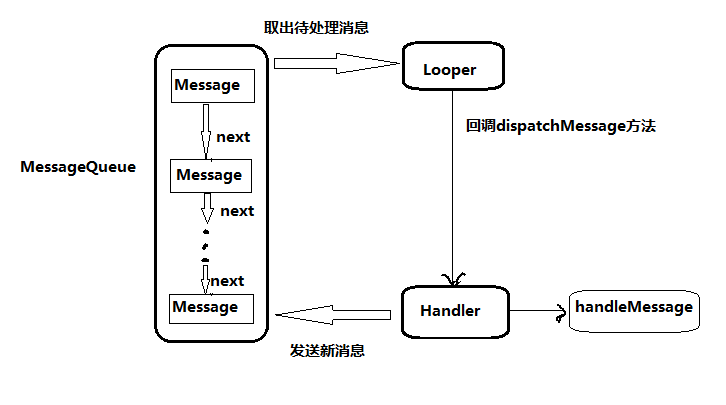
1. Message 是線程之間傳遞的消息,可以在內部攜帶少量信息,用於在不同線程間交換數據。
2. MessageQueue 是消息隊列,用於存放所有由 Handler 發送過來的消息,這些消息會一直排隊等待被處理。每個線程中只有一個 MessageQueue 對象。
3. Handler 是處理者,負責發送和處理消息。發送一般用 sendMessage(),處理則調用 handleMessage()。
4. Looper 是每個線程中 MessageQueue 的管家。調用 loop() 後便進入一個無限循環,每當發現隊列中有消息就取出,交給 handleMessage() 處理。每個線程中也只有一個 Looper 對象。
Looper 主要是 prepare() 和 loop() 兩個方法。
public static final void prepare() { if (sThreadLocal.get() != null) { throw new RuntimeException("Only one Looper may be created per thread"); } sThreadLocal.set(new Looper(true)); }sThreadLocal 是一個 ThreadLocal 對象,可以在一個線程中存儲變量,Looper 就存在這裡面。這個方法被調用後,會先判斷當前線程有沒有 Looper:沒有就創建一個,有就拋異常。可見 prepare() 不能被調用兩次,這就保證了一個線程只有一個 Looper。
再看 Looper 的構造函數:
private Looper(boolean quitAllowed) { mQueue = new MessageQueue(quitAllowed); mRun = true; mThread = Thread.currentThread(); }構造函數裡創建了 MessageQueue 對象,這也保證了一個線程只有一個 MessageQueue。
然後看 loop() 方法:
public static void loop() { final Looper me = myLooper(); if (me == null) { throw new RuntimeException("No Looper; Looper.prepare() wasn't called on this thread."); } final MessageQueue queue = me.mQueue; // Make sure the identity of this thread is that of the local process, // and keep track of what that identity token actually is. Binder.clearCallingIdentity(); final long ident = Binder.clearCallingIdentity(); for (;;) { Message msg = queue.next(); // might block if (msg == null) { // No message indicates that the message queue is quitting. return; } // This must be in a local variable, in case a UI event sets the logger Printer logging = me.mLogging; if (logging != null) { logging.println(">>>>> Dispatching to " + msg.target + " " + msg.callback + ": " + msg.what); } msg.target.dispatchMessage(msg); if (logging != null) { logging.println("<<<<< Finished to " + msg.target + " " + msg.callback); } // Make sure that during the course of dispatching the // identity of the thread wasn't corrupted. final long newIdent = Binder.clearCallingIdentity(); if (ident != newIdent) { Log.wtf(TAG, "Thread identity changed from 0x" + Long.toHexString(ident) + " to 0x" + Long.toHexString(newIdent) + " while dispatching to " + msg.target.getClass().getName() + " " + msg.callback + " what=" + msg.what); } msg.recycle(); } }這個方法先調用 myLooper() 拿到 sThreadLocal 裡保存的 Looper,再拿到它對應的 MessageQueue,然後進入無限循環。循環主要做兩件事:取出一條消息(沒有就阻塞);調用 msg.target.dispatchMessage(msg),把消息交給 msg 的 target 去處理。
Looper 的主要作用:
1、與當前線程綁定,保證一個線程只有一個 Looper 實例,同時一個 Looper 也只有一個 MessageQueue。
2、loop() 方法不斷從 MessageQueue 取消息,交給消息 target 屬性的 dispatchMessage 去處理。
用 Handler 之前,我們都會先初始化一個實例。比如用於更新 UI 時,我們會在聲明處直接初始化,或在 onCreate 中初始化:
private Handler mHandler = new Handler() { public void handleMessage(android.os.Message msg) { switch (msg.what) { case value: break; default: break; } }; };1、首先 Looper.prepare() 在本線程保存一個 Looper 實例,該實例裡又保存一個 MessageQueue;因為 prepare() 在一個線程只能調用一次,所以 MessageQueue 在一個線程也只會有一個。可能有人會問:Activity 裡我們並沒顯式調用 Looper.prepare() 和 Looper.loop(),為何 Handler 還能成功創建?這是因為在 Activity 的啟動代碼裡,已經在當前 UI 線程調用過這兩個方法了。
2、Looper.loop() 讓當前線程進入一個無限循環,不斷從 MessageQueue 讀取消息,然後回調 msg.target.dispatchMessage(msg)。
3、Handler 的構造方法會先拿到當前線程保存的 Looper 實例,並與它裡面的 MessageQueue 關聯起來。
4、Handler 的 sendMessage 方法會把 msg 的 target 賦值為 handler 自身,然後加入 MessageQueue。
5、構造 Handler 實例時,我們會重寫 handleMessage 方法,也就是 msg.target.dispatchMessage(msg) 最終調用的那個方法。
 Android 桌面快捷方式原理與多 ROM 適配全解
桌面快捷方式是 Android 設備上極具價值的流量入口,也正因如此,各種應用都在爭奪這塊陣地,甚至不惜以「流氓」手段佔據用戶桌面。 疊加上國內各大定制 ROM 與第三方
 優雅地用 Kotlin 開發 Android:Anko 實戰與對照 Java 的寫法
寫在前面 上一篇我們看過 Kotlin 的優勢與基本語法,這次直接進到實作:如何在 Android 專案裡把 Kotlin 用起來,並與傳統 Java 寫法並排對照,你會
 2015 年十大熱門 Android 開源新項目盤點
2015 即將收官,又到了大家喜聞樂見的年終盤點時刻。今天來盤點一下 2015 年 Android 開發領域新出現的 10 大熱門開源項目。數據來自 GitHub 搜索,
 Android Dialog 對話框使用與原理解析
Dialog 的定位 Dialog 是用於提示用戶、確認操作或收集額外信息的窗口。它通常不會佔滿整個屏幕,而是出現在當前界面之上,引導用戶完成某個明確動作。 為何推薦