

編輯:Android 資訊
RelativeLayout 是一個以相對位置排列子 View 的 ViewGroup。一個檢視的位置可以相對於同層的其他元素來指定(例如位於某個指定元素的左側或下方),也可以相對於 RelativeLayout 區域本身來指定(例如與底部對齊、置中)。
RelativeLayout 是一個非常強大且實用的版面配置,因為它能消除巢狀的 ViewGroup。如果你發現自己用了好幾層巢狀的 LinearLayout,就可以改用單一層 RelativeLayout 來取代。
1、開始一個新工程,命名為 HelloRelativeLayout。
2、打開 res/layout/main.xml 並插入以下內容。
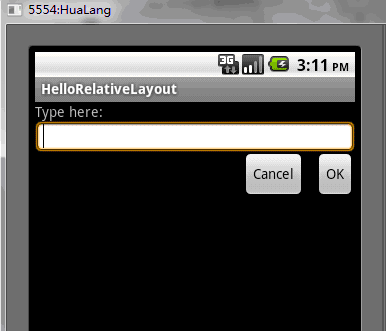
<?xml version="1.0" encoding="utf-8"?> <RelativeLayout xmlns:android="https://schemas.android.com/apk/res/android" android:orientation="vertical" android:layout_width="fill_parent" android:layout_height="fill_parent" > <TextView android:id="@+id/label" android:layout_width="fill_parent" android:layout_height="wrap_content" android:text="Type here:" /> <EditText android:id="@+id/entry" android:layout_width="fill_parent" android:layout_height="wrap_content" android:background="@android:drawable/editbox_background" android:layout_below="@id/label" /> <Button android:id="@+id/ok" android:layout_width="wrap_content" android:layout_height="wrap_content" android:layout_below="@id/entry" android:layout_alignParentRight="true" android:layout_marginLeft="10dip" android:text="OK" /> <Button android:layout_width="wrap_content" android:layout_height="wrap_content" android:layout_toLeftOf="@id/ok" android:layout_alignTop="@id/ok" android:text="Cancel" /> </RelativeLayout>
3、請留意每一個 android:layout_* 屬性,例如 layout_below、layout_alignParentRight 與 layout_toLeftOf。使用 RelativeLayout 時,你可以用這些屬性來描述每個 View 想要的位置,每個屬性都定義了一種不同的相對關係,其中部分屬性會用到同層檢視的資源 ID 來定義自己的相對位置。例如最後一個 Button 被定義為位於 ID 為 ok 的檢視左側並與其頂部對齊。所有版面屬性都定義在 RelativeLayout.LayoutParams 中。
4、現在打開 HelloRelativeLayout.java,確認它已在 onCreate() 方法中載入 res/layout/main.xml 版面配置檔。
public void onCreate(Bundle savedInstanceState) { super.onCreate(savedInstanceState); setContentView(R.layout.main);
5、你可以看到如下的版面配置。
 Android 三大網絡通信方式詳解
Android 平台有三種網絡接口可以使用,分別是:java.net.*(標準 Java 接口)、Org.apache 接口和 Android.net.*(Android
 優雅地用 Kotlin 開發 Android:Anko 實戰與對照 Java 的寫法
寫在前面 上一篇我們看過 Kotlin 的優勢與基本語法,這次直接進到實作:如何在 Android 專案裡把 Kotlin 用起來,並與傳統 Java 寫法並排對照,你會
 Android MVVM 應用框架構建完全指南
概述 一提到 Android MVVM,相信很多人第一時間都會想到 Google 在 2015 年推出的 DataBinding 框架。但必須強調的是,兩者的概念並不相同
 Android UI 元件系列:ProgressBar 進度條
當 Android 執行一些背景作業時,例如載入遊戲、播放音樂,使用者往往無法得知目前的執行進度。這時就能透過進度條來即時呈現這些資訊。 Android 系統提供兩種進度