

編輯:進階開發
對開發者而言,Android 是相當實用的平台,可以自行開發各種應用程式滿足需求。其中「安裝與解除安裝」是最基礎卻常被忽略的能力,本文說明如何透過 Intent 呼叫系統的安裝器。
從 Android 安裝/解除安裝程式的原始碼可以看到,系統用兩個 Activity 分別處理這兩件事:
<activity android:name=".PackageInstallerActivity">
    <intent-filter>
        <action android:name="android.intent.action.VIEW" />
        <category android:name="android.intent.category.DEFAULT" />
        <data android:scheme="content" />
        <data android:scheme="file" />
        <data android:mimeType="application/vnd.android.package-archive" />
    </intent-filter>
</activity>

<activity android:name=".UninstallerActivity">
    <intent-filter>
        <action android:name="android.intent.action.VIEW" />
        <action android:name="android.intent.action.DELETE" />
        <category android:name="android.intent.category.DEFAULT" />
        <data android:scheme="package" />
    </intent-filter>
</activity>
重點在 MIME type 與 scheme:安裝用 file / content scheme 搭配 application/vnd.android.package-archive;解除安裝則用 package scheme。理解這個對應關係,我們就能在自己的程式中觸發同樣的流程。
String fileName = Environment.getExternalStorageDirectory() + "/myApp.apk";
Intent intent = new Intent(Intent.ACTION_VIEW);
intent.setDataAndType(Uri.fromFile(new File(fileName)),
        "application/vnd.android.package-archive");
startActivity(intent);
這段程式碼會叫出系統安裝介面,由使用者確認後完成安裝。
Uri packageURI = Uri.parse("package:com.android.myapp");
Intent uninstallIntent = new Intent(Intent.ACTION_DELETE, packageURI);
startActivity(uninstallIntent);
把套件名稱組進 package: URI,交給 ACTION_DELETE 即可。
Android 預設不允許安裝非官方市集取得的程式,因此安裝前最好先檢查這項設定:
int result = Settings.Secure.getInt(getContentResolver(),
        Settings.Secure.INSTALL_NON_MARKET_APPS, 0);
if (result == 0) {
    // 這裡可以顯示提示對話框說明情況
    // 並視需要直接開啟應用程式設定頁讓使用者自行開啟
    Intent intent = new Intent();
    intent.setAction(Settings.ACTION_APPLICATION_SETTINGS);
    startActivity(intent);
}
第一,從 Android 7.0 起,Uri.fromFile() 這類直接暴露 file:// URI 的寫法會引發 FileUriExposedException,必須改用 FileProvider 產生 content:// URI,並在 AndroidManifest 中設定對應的 <provider> 與 grantUriPermissions。
第二,静默安裝(不經使用者確認)需要系統簽章層級的權限,一般應用程式無法取得,因此上述做法都是「叫出安裝介面」而非真正靜默安裝。
第三,若要判斷某程式是否已安裝,可用 PackageManager.getPackageInfo() 並捕捉 NameNotFoundException,比直接嘗試安裝再處理錯誤更乾淨。
 實戰教學:用 PhoneGap Build 把 Sencha Touch 2 專案線上打包成 Android APK
動手之前,先準備這些東西 想把用 Sencha Touch 2 寫好的行動版網站變成可以安裝的 APK,其實不必在本地架設整套 Android 開發環境。整個流程可以拆成
 Android 發送電子郵件:用 Intent 呼叫系統郵件客戶端
稍早已经熟悉 Intent 的概念——它是元件之間傳遞訊息的載體,可以用來在應用內部,或跨應用、跨程序地調度功能。既然 Gmail、K9mail 這類郵件客戶端已經存在,
 解析 Android 樣式:布局是根本
如果你曾經是一名 Web 前台設計師,如果你曾有過設計功底,那麼你很幸運——一旦轉到 Android 平台,過去的知識和經驗都能很好地移植過來。我始終認為,學習是一個長期
 Android 遠端圖片載入與本地快取實作
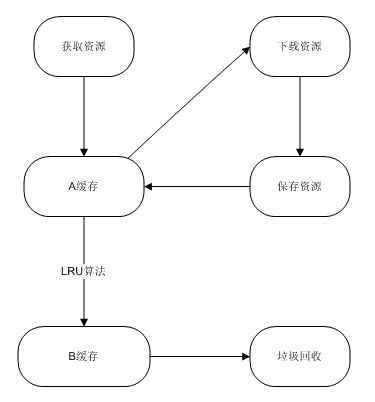
載入速度同樣是個問題。如果應用裡的圖片總要等上老半天,使用者一樣會等到崩潰。那麼圖片資源的取得與管理該怎麼處理?兩個關鍵word:非同步下載、本地快取。 非同步下載 大家