

編輯:進階開發
每個 Android 應用通常運行在自己的進程中,擁有獨立的 Dalvik 虛擬機實例。在這樣的隔離架構下,組件之間該如何溝通?答案就是 Intent。本文完整拆解 Intent 的組成欄位與匹配機制。
Intent 負責描述一次操作要執行的動作、動作涉及的資料以及附加資訊。Android 依據這份描述,找出對應的組件、把 Intent 傳遞過去,並完成呼叫。因此 Intent 在這裡扮演媒體中介的角色,專門提供組件互相呼叫所需的資訊,實現呼叫者與被呼叫者之間的解耦。
以聯絡人維護應用為例:使用者在聯絡人列表畫面(假設對應 listActivity)點擊某個聯絡人,希望跳到詳細資訊畫面(假設為 detailActivity)。
listActivity 需要構造一個 Intent,告訴系統「我要執行查看動作,對象是這位聯絡人」,然後呼叫 startActivity(Intent) 把它傳入。系統依據 Intent 中的描述,到 AndroidManifest.xml 中找到符合條件的 Activity,由它接收 Intent 並執行相應操作。
官方文件把 Intent 定義為「對某操作的抽象描述」。具體包含以下幾個部分。
對要執行動作的簡要描述。Android 預定義了一整套標準動作:
MAIN_ACTION            VIEW_ACTION           EDIT_ACTION
PICK_ACTION            GET_CONTENT_ACTION    DIAL_ACTION
CALL_ACTION            SENDTO_ACTION         ANSWER_ACTION
INSERT_ACTION          DELETE_ACTION         RUN_ACTION
LOGIN_ACTION           CLEAR_CREDENTIALS_ACTION
SYNC_ACTION            PICK_ACTIVITY_ACTION  WEB_SEARCH_ACTION
此外,你也可以依應用需求自訂動作,並定義對應的應用來處理這些自訂動作。
動作所要操作的資料,在 Android 中以一個 URI 表示。例如在聯絡人應用中,指向某位聯絡人的 URI 會長得像這樣:
content://com.android.contacts/contacts/1
下面是一段典型的 AndroidManifest.xml 宣告,展示了 activity 與 intent-filter 如何搭配:
<manifest xmlns:android="https://schemas.android.com/apk/res/android"
    package="com.android.notepad">
    <application android:icon="@drawable/app_notes"
        android:label="@string/app_name">
        <provider class=".NotePadProvider"
            android:authorities="com.google.provider.NotePad" />
        <activity class=".NotesList"
            android:label="@string/title_notes_list">
            <intent-filter>
                <action android:value="android.intent.action.MAIN" />
                <category android:value="android.intent.category.LAUNCHER" />
            </intent-filter>
            <intent-filter>
                <action android:value="android.intent.action.VIEW" />
                <action android:value="android.intent.action.EDIT" />
                <action android:value="android.intent.action.PICK" />
                <category android:value="android.intent.category.DEFAULT" />
                <type android:value="vnd.android.cursor.dir/vnd.google.note" />
            </intent-filter>
        </activity>
    </application>
</manifest>
用於補充說明。例如 LAUNCHER_CATEGORY 表示 Intent 的接收者應在啟動器中作為頂層應用出現;ALTERNATIVE_CATEGORY 則表示當前 Intent 是一系列可選動作之一,這些動作可在同一份資料上執行。
顯式指定 Intent 的資料型別(MIME)。一般情況下 Intent 的型別能依資料本身推導,但透過這個屬性可以強制採用顯式指定的型別,跳過推導。
指定 Intent 目標組件的類別名稱。通常 Android 會依 Intent 中的其他屬性(action、data/type、category)進行查找,最終匹配出一個目標組件;但若 Component 已有指定,系統會直接使用它,不再執行查找。一旦指定了這個屬性,Intent 的其他所有屬性都變成可選。
理解這五個欄位,你就掌握了 Android 組件之間溝通的全部語彙。
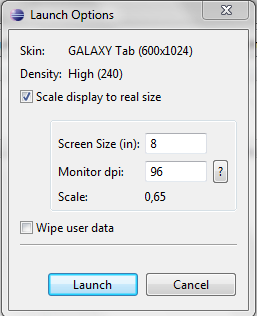 如何為 Android 平板電腦開發應用程式
Android 2.3 SDK 發布時,SDK 裡加入了第三方 add-ons,其中就包含針對平板設計的 Galaxy Tab Addon。想為平板開發,第一步是建立平板
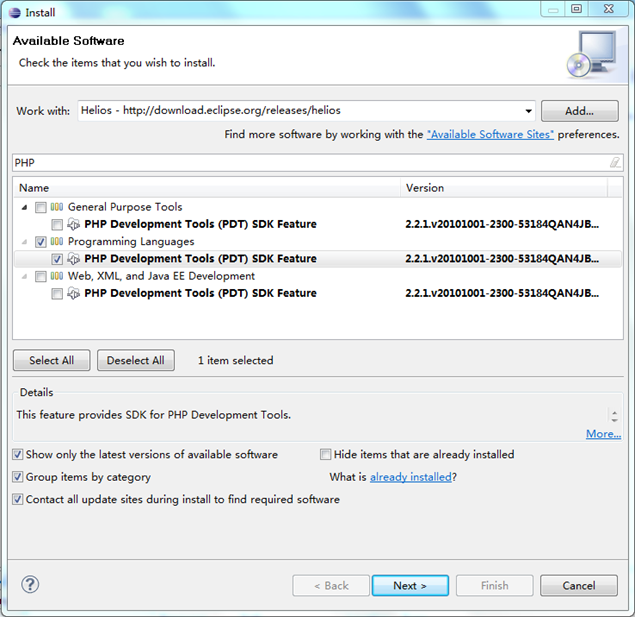 Win7 建置 Android 開發環境(5):JDK 版本與安裝 ADT
在 Eclipse 的 Help → Install New Software 開啟的介面中,選擇 Helios 站台(download.eclipse.org/rele
 動手把 Android 源碼匯入 Eclipse:完整操作步驟
想把 Android 平台源碼放進 Eclipse 裡閱讀與除錯,光有原始碼是不夠的,還需要一份對應的編譯產物。本文用圖文並茂的方式,示範從取得源碼到成功掛上除錯器的完整
 Android手機系統細節全解析:從核心到x86移植
Google藉由與營運商、設備製造商、開發商及其他各方建立深層合作,希望以標準化、開放式的手機軟體平台,在產業內形塑開放的生態系統。那麼,Android手機系統在同行之中