

編輯:關於 Android 程式設計
Promoted Action 指的是一種「主要操作」按鈕,它不放在 ActionBar 裡,而是直接浮在可見的 UI 版面之上(也就是 setContentView 所管的範圍)。這種設計有個好處:程式碼裡要取得它容易得多——試想若要從 ActionBar 抓一個選單項,那才真的麻煩。
Promoted Action 通常肩負單一畫面裡最重要的動作,例如郵件列表頁的「寫新信」。外觀上它就是一個懸浮按鈕,最常見的形式是漂在右下角的圓形按鈕,一般簡稱為 FAB(Floating Action Button,不是 FBI)。
系統原生的 FAB 也會隨頁面捲動,但進出時的淡出、淡入顯得生硬。這裡記錄一個小技巧:讓 FAB 依 RecyclerView 的捲動方向做自然的漸變。
 <?xml version="1.0" encoding="utf-8"?>
 <android.support.design.widget.CoordinatorLayout xmlns:android="https://schemas.android.com/apk/res/android"
 xmlns:app="https://schemas.android.com/apk/res-auto"
 xmlns:tools="https://schemas.android.com/tools"
 android:layout_width="match_parent"
 android:layout_height="match_parent"
 tools:context=".view.activity.MainActivity">

 <android.support.design.widget.AppBarLayout
 android:layout_width="match_parent"
 android:layout_height="wrap_content"
 android:theme="@style/AppTheme.AppBarOverlay">

 <android.support.v7.widget.Toolbar
 android:id="@+id/toolbar"
 android:layout_width="match_parent"
 android:layout_height="?attr/actionBarSize"
 android:background="?attr/colorPrimary"
 app:layout_scrollFlags="scroll|enterAlways"
 app:popupTheme="@style/AppTheme.PopupOverlay" />

 <android.support.design.widget.TabLayout
 android:id="@+id/tab_layout"
 app:tabIndicatorColor="#FFFFFF"
 android:layout_width="match_parent"
 android:layout_height="wrap_content">
 </android.support.design.widget.TabLayout>
 </android.support.design.widget.AppBarLayout>

 <include layout="@layout/content_main" />

 <android.support.design.widget.FloatingActionButton
 android:id="@+id/fab"
 android:layout_width="wrap_content"
 android:layout_height="wrap_content"
 android:layout_margin="@dimen/fab_margin"
 android:src="@android:drawable/ic_dialog_email"
 app:layout_behavior="com.wu.allen.zhuanlan.util.ScrollAwareFABBehavior"/>
 </android.support.design.widget.CoordinatorLayout>
重點是最後那行 layout_behavior,它把我們自訂的 Behavior 掛到 FAB 上。
 public class ScrollAwareFABBehavior extends FloatingActionButton.Behavior {
 private static final Interpolator INTERPOLATOR = new FastOutSlowInInterpolator();
 private boolean mIsAnimatingOut = false;

 public ScrollAwareFABBehavior(Context context, AttributeSet attrs) {
 super();
 }

 @Override
 public boolean onStartNestedScroll(final CoordinatorLayout coordinatorLayout, final FloatingActionButton child,
 final View directTargetChild, final View target, final int nestedScrollAxes) {
 // 只關心垂直方向的捲動
 return nestedScrollAxes == ViewCompat.SCROLL_AXIS_VERTICAL
 || super.onStartNestedScroll(coordinatorLayout, child, directTargetChild, target, nestedScrollAxes);
 }

 @Override
 public void onNestedScroll(final CoordinatorLayout coordinatorLayout, final FloatingActionButton child,
 final View target, final int dxConsumed, final int dyConsumed,
 final int dxUnconsumed, final int dyUnconsumed) {
 super.onNestedScroll(coordinatorLayout, child, target, dxConsumed, dyConsumed, dxUnconsumed, dyUnconsumed);
 if (dyConsumed > 0 && !this.mIsAnimatingOut && child.getVisibility() == View.VISIBLE) {
 // 往下捲且 FAB 目前可見 → 淡出
 animateOut(child);
 } else if (dyConsumed < 0 && child.getVisibility() != View.VISIBLE) {
 // 往上捲且 FAB 目前不可見 → 淡入
 animateIn(child);
 }
 }

 // 與 FloatingActionButton.Behavior 相同的淡出動畫
 private void animateOut(final FloatingActionButton button) {
 if (Build.VERSION.SDK_INT >= 14) {
 ViewCompat.animate(button).scaleX(0.0F).scaleY(0.0F).alpha(0.0F)
 .setInterpolator(INTERPOLATOR).withLayer()
 .setListener(new ViewPropertyAnimatorListener() {
 public void onAnimationStart(View view) {
 ScrollAwareFABBehavior.this.mIsAnimatingOut = true;
 }
 public void onAnimationCancel(View view) {
 ScrollAwareFABBehavior.this.mIsAnimatingOut = false;
 }
 public void onAnimationEnd(View view) {
 ScrollAwareFABBehavior.this.mIsAnimatingOut = false;
 view.setVisibility(View.GONE);
 }
 }).start();
 } else {
 Animation anim = AnimationUtils.loadAnimation(button.getContext(), R.anim.fab_out);
 anim.setInterpolator(INTERPOLATOR);
 anim.setDuration(200L);
 anim.setAnimationListener(new Animation.AnimationListener() {
 public void onAnimationStart(Animation animation) {
 ScrollAwareFABBehavior.this.mIsAnimatingOut = true;
 }
 public void onAnimationEnd(Animation animation) {
 ScrollAwareFABBehavior.this.mIsAnimatingOut = false;
 button.setVisibility(View.GONE);
 }
 @Override
 public void onAnimationRepeat(final Animation animation) { }
 });
 button.startAnimation(anim);
 }
 }

 // 與 FloatingActionButton.Behavior 相同的淡入動畫
 private void animateIn(FloatingActionButton button) {
 button.setVisibility(View.VISIBLE);
 if (Build.VERSION.SDK_INT >= 14) {
 ViewCompat.animate(button).scaleX(1.0F).scaleY(1.0F).alpha(1.0F)
 .setInterpolator(INTERPOLATOR).withLayer().setListener(null).start();
 } else {
 Animation anim = AnimationUtils.loadAnimation(button.getContext(), R.anim.fab_in);
 anim.setDuration(200L);
 anim.setInterpolator(INTERPOLATOR);
 button.startAnimation(anim);
 }
 }
 }
這裡刻意用 mIsAnimatingOut 旗標,避免動畫進行中被重複觸發而導致狀態錯亂。
fab_in.xml(fab_out.xml 只需把起訖值對調):
 <?xml version="1.0" encoding="utf-8"?>
 <set xmlns:android="https://schemas.android.com/apk/res/android">
 <alpha android:fromAlpha="0.0" android:toAlpha="1.0"/>
 <scale android:fromXScale="0.0" android:fromYScale="0.0"
 android:toXScale="1.0" android:toYScale="1.0"
 android:pivotX="50%" android:pivotY="50%"/>
 </set>
 <?xml version="1.0" encoding="utf-8"?>
 <set xmlns:android="https://schemas.android.com/apk/res/android">
 <alpha android:fromAlpha="1.0" android:toAlpha="0.0"/>
 <scale android:fromXScale="1.0" android:fromYScale="1.0"
 android:toXScale="0.0" android:toYScale="0.0"
 android:pivotX="50%" android:pivotY="50%"/>
 </set>
想調整淡入淡出的節奏與幅度,改這兩個 XML 就夠了。

大致效果如上圖。
 Android 密碼顯示與隱藏功能實例
密碼輸入框的顯示與隱藏是常見的表單功能。Android 中可透過切換 TransformationMethod,讓密碼在明文與掩碼之間切換,提升輸入便利性。 佈局設計
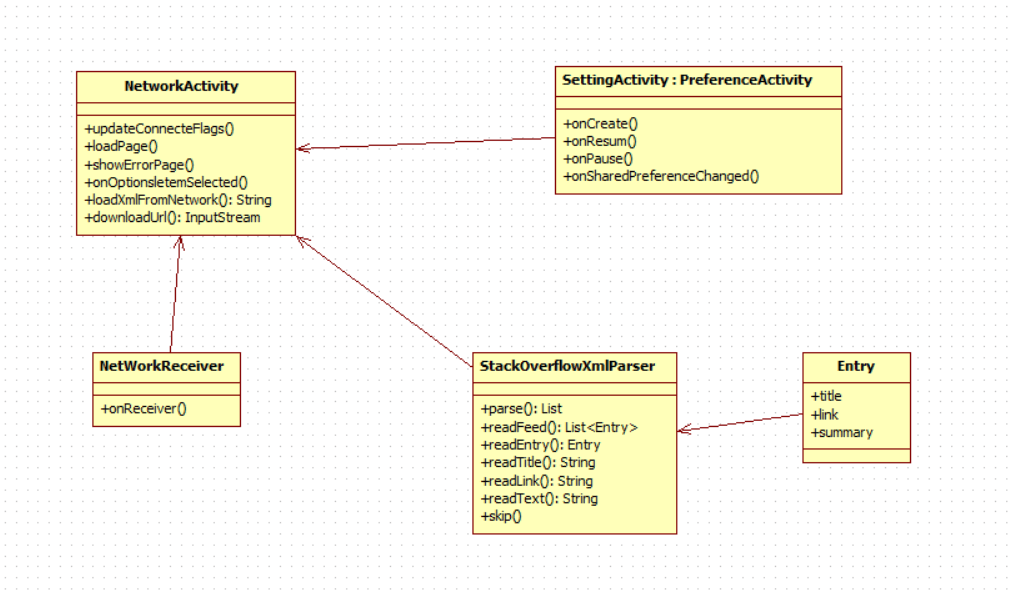 跟 Google 學寫 App:Building Apps with Connectivity & the Cloud(Web App 篇)
本文整理自 Google 官方課程 Building Apps with Connectivity & the Cloud 第二節 Performing Netw
 Android Lint 使用指南:用靜態檢查做資源清理
做資源清理時,Android Lint 幾乎是必備工具。本文記錄 Lint 的用法,以及實戰中踩到的幾個坑。 Lint 是 SDK Tools 16(ADT 16)之後才
 Android BroadcastReceiver 廣播接收器詳解
BroadcastReceiver 是什麼BroadcastReceiver 是 Android 四大元件之一,本質上是一個全域監聽器,用來接收系統或應用送出的廣播訊息。