

編輯:關於 Android 程式設計
需要知道軟鍵盤此刻是否顯示,聽起來簡單,實作起來卻意外棘手。以下記錄幾種嘗試過的方案,以及最後採用的解法。
網路上常見的寫法:
getWindow().getAttributes().softInputMode == WindowManager.LayoutParams.SOFT_INPUT_STATE_UNSPECIFIED
實測後發現它只對系統內建鍵盤有效,裝了第三方輸入法就完全抓不到。
 InputMethodManager imm = (InputMethodManager) getSystemService(Context.INPUT_METHOD_SERVICE);
 boolean isOpen = imm.isActive(); // true 代表輸入法處於啟用狀態
這個方法回傳的是「輸入法是否啟用」,並無法即時反映鍵盤的顯示與隱藏,因此同樣滿足不了需求。
最可靠的做法是監聽根 View 的版面變化,用可見區域高度的差值推斷鍵盤狀態:
 import android.app.Activity;
 import android.content.Context;
 import android.graphics.Rect;
 import android.os.Build;
 import android.util.Log;
 import android.util.TypedValue;
 import android.view.View;
 import android.view.ViewGroup;
 import android.view.ViewTreeObserver;

 /** 軟鍵盤的監聽 */
 public class KeyBoardShowListener {
 private Context ctx;

 public KeyBoardShowListener(Context ctx) {
 this.ctx = ctx;
 }

 OnKeyboardVisibilityListener keyboardListener;

 public OnKeyboardVisibilityListener getKeyboardListener() {
 return keyboardListener;
 }

 public interface OnKeyboardVisibilityListener {
 void onVisibilityChanged(boolean visible);
 }

 public void setKeyboardListener(final OnKeyboardVisibilityListener listener, Activity activity) {
 final View activityRootView = ((ViewGroup) activity.findViewById(android.R.id.content)).getChildAt(0);
 activityRootView.getViewTreeObserver().addOnGlobalLayoutListener(new ViewTreeObserver.OnGlobalLayoutListener() {
 private boolean wasOpened;
 private final int DefaultKeyboardDP = 100;
 // Lollipop 之後根節點會把按鈕列算進來,因此補上 48dp
 private final int EstimatedKeyboardDP = DefaultKeyboardDP
 + (Build.VERSION.SDK_INT >= Build.VERSION_CODES.LOLLIPOP ? 48 : 0);
 private final Rect r = new Rect();

 @Override
 public void onGlobalLayout() {
 int estimatedKeyboardHeight = (int) TypedValue.applyDimension(
 TypedValue.COMPLEX_UNIT_DIP, EstimatedKeyboardDP,
 activityRootView.getResources().getDisplayMetrics());

 activityRootView.getWindowVisibleDisplayFrame(r);
 int heightDiff = activityRootView.getRootView().getHeight() - (r.bottom - r.top);
 boolean isShown = heightDiff >= estimatedKeyboardHeight;

 if (isShown == wasOpened) {
 Log.e("Keyboard state", "Ignoring global layout change...");
 return;
 }
 wasOpened = isShown;
 listener.onVisibilityChanged(isShown);
 }
 });
 }
 }
wasOpened 這個旗標很重要,它能過濾掉無意義的重複回呼。使用方式:
 new KeyBoardShowListener(Activity.this).setKeyboardListener(
 new KeyBoardShowListener.OnKeyboardVisibilityListener() {
 @Override
 public void onVisibilityChanged(boolean visible) {
 if (visible) {
 // 軟鍵盤已彈出
 } else {
 // 軟鍵盤已收起
 }
 }
 }, Activity.this);
讓 EditText 取得焦點並彈出鍵盤
 edit.setFocusable(true);
 edit.setFocusableInTouchMode(true);
 edit.requestFocus();
 InputMethodManager inputManager = (InputMethodManager) edit.getContext().getSystemService(Context.INPUT_METHOD_SERVICE);
 inputManager.showSoftInput(edit, 0);
收起鍵盤並清除焦點
 editMsgView.setText("");
 editMsgView.clearFocus();
 InputMethodManager imm = (InputMethodManager) getSystemService(Context.INPUT_METHOD_SERVICE);
 imm.hideSoftInputFromWindow(editMsgView.getWindowToken(), 0);
永遠不彈出鍵盤
 EditText edit = (EditText) findViewById(R.id.edit);
 edit.setInputType(InputType.TYPE_NULL);
或者在需要時主動收起:
 InputMethodManager imm = (InputMethodManager) v.getContext().getSystemService(Context.INPUT_METHOD_SERVICE);
 if (imm.isActive()) {
 imm.hideSoftInputFromWindow(v.getApplicationWindowToken(), 0);
 }
 一加3和樂視max2哪個好?一加3與樂MAX2對比評測
一加3與樂MAX2對比 一加3與樂MAX2都採用金屬機身與驍龍820平台,但設計語言、屏幕尺寸、快充與價格略有不同。 一加3 一加3採用5.5英寸AMOLED屏幕,10
 從零做一個彈跳小球:SurfaceView 與物理引擎的入門實作
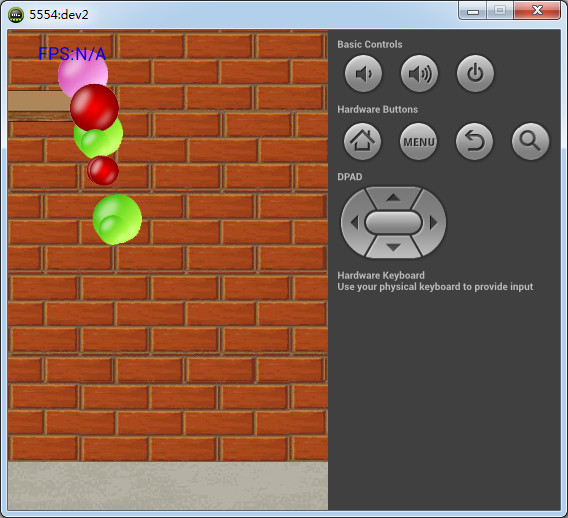
這是 Android 遊戲開發系列的第一篇。目標很小:讓幾顆大小不一的球從一塊木板右端滾落,受重力加速下墜、撞地反彈、能量逐次衰減直到靜止。看似簡單,卻涵蓋了遊戲開發的四
 UI 組件之 ImageView 及其子類(一):ImageView 顯示圖片
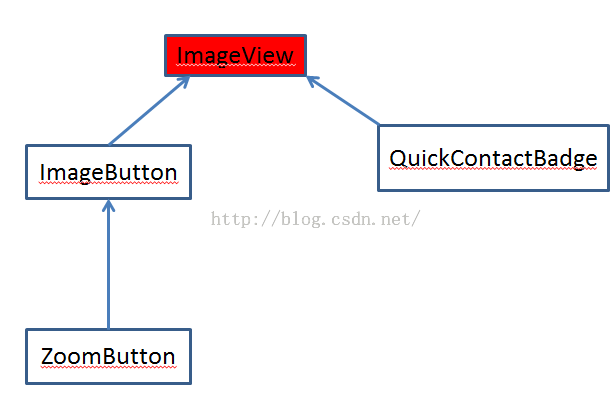
先來看看 ImageView 家族的繼承關系: ImageView 繼承自 View 組件,主要功能是顯示圖片,也可以顯示 Drawable 對象。它的直接子類是 Im
 Android 測試入門:測試結構與專案組織
Android 的測試體系看似龐大,但只要理解它的組成結構,上手比想像中容易。本文從框架概況一路談到專案該怎麼組織。 1. Testing 概覽 官方入口:https: