

編輯:關於 Android 程式設計
Android 中大量系統功能都是靠「Uri + Action」組合喚起的。以下整理實務上最常翻閱的幾種寫法,直接複製即可使用。
// 開啟網頁
Uri myBlogUri = Uri.parse("https://xxxxx.com");
Intent it = new Intent(Intent.ACTION_VIEW, myBlogUri);

// 地圖座標(經度,緯度順序為 緯度,經度)
Uri mapUri = Uri.parse("geo:38.899533,-77.036476");
it = new Intent(Intent.ACTION_VIEW, mapUri);
// 撥號面板(不立即撥出,較安全)
Uri telUri = Uri.parse("tel:100861");
Intent it = new Intent(Intent.ACTION_DIAL, telUri);

// 直接撥打(需 CALL_PHONE 權限,且 6.0 起屬執行期權限)
Uri callUri = Uri.parse("tel:100861");
it = new Intent(Intent.ACTION_CALL, callUri);
// 移除
Uri uninstallUri = Uri.fromParts("package", "xxx", null);
Intent it = new Intent(Intent.ACTION_DELETE, uninstallUri);

// 安裝(較新版本建議改用 ACTION_VIEW 搭配 file:// 或 FileProvider)
Uri installUri = Uri.fromParts("package", "xxx", null);
it = new Intent(Intent.ACTION_PACKAGE_ADDED, installUri);
Uri playUri = Uri.parse("file:///sdcard/download/everything.mp3");
Intent it = new Intent(Intent.ACTION_VIEW, playUri);
// 喚起郵件撰寫
Uri emailUri = Uri.parse("mailto:xxxx@gmail.com");
Intent it = new Intent(Intent.ACTION_SENDTO, emailUri);

// 帶入完整欄位,並讓使用者挑選郵件客戶端
Intent mail = new Intent(Intent.ACTION_SEND);
String[] tos = { "xxxx@gmail.com" };
String[] ccs = { "xxxx@gmail.com" };
mail.putExtra(Intent.EXTRA_EMAIL, tos);
mail.putExtra(Intent.EXTRA_CC, ccs);
mail.putExtra(Intent.EXTRA_TEXT, "body");
mail.putExtra(Intent.EXTRA_SUBJECT, "subject");
mail.setType("message/rfc882");
startActivity(Intent.createChooser(mail, "Choose Email Client"));
// 開啟簡訊撰寫
Uri smsUri = Uri.parse("tel:100861");
Intent it = new Intent(Intent.ACTION_VIEW, smsUri);
it.putExtra("sms_body", "yyyy");
it.setType("vnd.android-dir/mms-sms");

// 直接指定收件人
Uri smsToUri = Uri.parse("smsto://100861");
it = new Intent(Intent.ACTION_SENDTO, smsToUri);
it.putExtra("sms_body", "yyyy");

// 附加圖片(彩信)
Uri mmsUri = Uri.parse("content://media/external/images/media/23");
it = new Intent(Intent.ACTION_SEND);
it.putExtra("sms_body", "yyyy");
it.putExtra(Intent.EXTRA_STREAM, mmsUri);
it.setType("image/png");
直接撥號(ACTION_CALL)與讀寫聯絡人等,在 Android 6.0 之後都屬於執行期危險權限,必須動態申請;argetSdk 30 以上已禁止以 file:// URI 分享檔案,安裝與播放請改用 FileProvider 搭配 content:// URI 並授予 FLAG_GRANT_READ_URI_PERMISSION;smsto: 與 mailto: 這類未指定 Action 的寫法,建議統一改用 ACTION_SENDTO,系統才會過濾出真正能處理該協定的應用。另外,任何 startActivity 之前最好包一層 try-catch,避免裝置上沒有可處理的應用時直接崩潰。
 Android自定義下拉刷新控件(下):為RefreshListView添加加載更多
本篇在自定義下拉刷新控件的基礎上,進一步為它加上「加載更多」的能力,讓列表在滑到底部時能自動觸發加載。先看最終的樣式效果: 1. 創建底部布局layout_foote
 Android 中搭建 FTP 伺服器的入門指南
先簡單介紹一下 FTP:FTP(File Transfer Protocol)即檔案傳輸協定。它的作用是讓使用者連上一台運行著 FTP 伺服器程式的遠端電腦,瀏覽遠端有哪
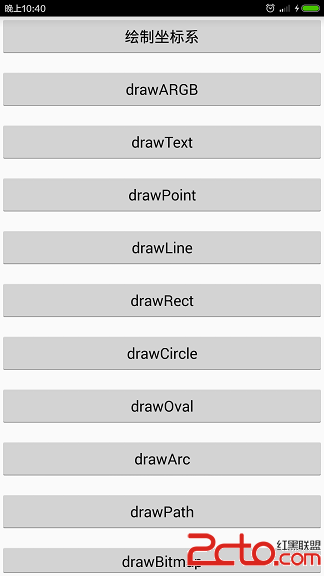 Android 中 Canvas 繪圖基礎詳解(附源碼下載)
在 Android 中,若我們想繪製複雜的自定義 View 或遊戲,就需要熟悉繪圖 API。Android 透過 Canvas 類暴露了許多 drawXXX 方法,我們可
 Android View 事件體系與滑動衝突處理
在 Android 開發中,View 的滑動與事件分發是常見但容易出錯的知識點。本文整理六種常見滑動方式,並說明同方向與不同方向滑動衝突的处理思路。 六種滑動方式 一、透