

編輯:關於 Android 程式設計
本文將說明如何以程式實作仿易信風格的精美彈出框效果,分享給大家參考。
截圖:

動畫效果介紹:
1. 點擊 ActionBar 上的「+」按鈕,選單從上方彈出(帶反彈效果);
2. 再次點擊「+」、點擊空白區域或按返回鍵,選單向上方收起;
3. 點擊彈出框上的按鈕時,該按鈕放大,其他按鈕縮小,選單整體漸變退出。
主體程式碼:
1. Activity
 /**
 * 仿易信動畫彈出框
 */
 public class MainActivity extends ActionBarActivity {
 //用於標記頁面頂端位置
 private View topView;
 @Override protected void onCreate(Bundle savedInstanceState) {
 super.onCreate(savedInstanceState);
 setContentView(R.layout.activity_main);
 topView = findViewById(R.id.main_top);
 }
 private PopupWindow popupWindow;
 private int line1DeltaY, line2DeltaY;
 //仿易信更多彈出框
 private void showPopup() {
 if (popupWindow == null) {
 View contentView = LayoutInflater.from(this).inflate(R.layout.yixin_pop_layout, null);
 //點擊空白區域關閉
 View blankView = contentView.findViewById(R.id.yixin_more_blank);
 View blankView2 = contentView.findViewById(R.id.yixin_more_blank2);
 initItems(contentView);
 //測量高度
 int line2Height = ViewUtils.getViewMeasuredHeight(itemViews[0]);
 line1DeltaY = -getActionBarHeight() - 40;
 line2DeltaY = line1DeltaY - line2Height;
 blankView.setOnClickListener(new View.OnClickListener() {
 @Override public void onClick(View v) {
 dismissPopup();
 }
 });
 blankView2.setOnClickListener(new View.OnClickListener() {
 @Override public void onClick(View v) {
 dismissPopup();
 }
 });
 popupWindow = new PopupWindow(contentView, ScreenUtils.getScreenW(this), ScreenUtils.getScreenH(this));
 //隨便設置一個drawable作為背景
 popupWindow.setBackgroundDrawable(new ColorDrawable());
 }
 if (!popupWindow.isShowing()) {
 popupWindow.showAsDropDown(topView, 0, 0);
 for (int i = 0; i < itemViews.length; i++) {
 if (i < 3) {
 //第一行
 itemViews[i].startAnimation(AnimationHelper.createPopupAnimIn(this, line1DeltaY));
 } else {
 //第二行
 itemViews[i].startAnimation(AnimationHelper.createPopupAnimIn(this, line2DeltaY));
 }
 }
 popupWindow.getContentView().startAnimation(AnimationHelper.createPopupBgFadeInAnim());
 }
 }
 private void dismissPopup() {
 if (popupWindow == null || !popupWindow.isShowing()) {
 return;
 }
 ViewGroup contentView = (ViewGroup) popupWindow.getContentView();
 contentView.startAnimation(AnimationHelper.createPopupBgFadeOutAnim(AnimationHelper.TIME_OUT));
 for (int i = 0; i < itemViews.length; i++) {
 if (i < 3) {
 //第一行
 itemViews[i].startAnimation(AnimationHelper.createPopupAnimOut(this, line1DeltaY));
 } else {
 //第二行
 itemViews[i].startAnimation(AnimationHelper.createPopupAnimOut(this, line2DeltaY));
 }
 }
 //動畫結束時隱藏popupWindow
 contentView.postDelayed(new Runnable() {
 @Override public void run() {
 popupWindow.dismiss();
 }
 }, AnimationHelper.TIME_OUT + 10);
 }
 private View[] itemViews;
 //初始化popupWindow上的按鈕
 private void initItems(View parent) {
 int[] viewIds = new int[]{R.id.yixin_more_item1, R.id.yixin_more_item2, R.id.yixin_more_item3, R.id.yixin_more_item4, R.id.yixin_more_item5, R.id.yixin_more_item6};
 itemViews = new View[viewIds.length];
 int itemWidth = ScreenUtils.getScreenW(this) / 3;
 OnClickImpl l = new OnClickImpl();
 for (int i = 0; i < viewIds.length; i++) {
 int id = viewIds[i];
 itemViews[i] = parent.findViewById(id);
 GridLayout.LayoutParams p = (GridLayout.LayoutParams) itemViews[i].getLayoutParams();
 p.width = itemWidth;
 itemViews[i].setLayoutParams(p);
 itemViews[i].setOnClickListener(l);
 }
 }
 private class OnClickImpl implements View.OnClickListener {
 @Override public void onClick(View v) {
 final int viewId = v.getId();
 //背景動畫
 popupWindow.getContentView().startAnimation(AnimationHelper.createPopupBgFadeOutAnim(AnimationHelper.TIME_OUT_CLICK));
 //動畫結束時隱藏popupWindow
 v.postDelayed(new Runnable() {
 @Override public void run() {
 popupWindow.dismiss();
 //動畫結束時響應點擊事件
 handleEvent(viewId);
 }
 }, AnimationHelper.TIME_OUT_CLICK + 10);
 //按鈕動畫
 for (View item : itemViews) {
 if (item.getId() == v.getId()) {
 //點擊的按鈕,放大
 item.startAnimation(AnimationHelper.createPopupItemBiggerAnim(MainActivity.this));
 } else {
 //其它按鈕,縮小
 item.startAnimation(AnimationHelper.createPopupItemSmallerAnim(MainActivity.this));
 }
 }
 }
 }
 //popupWindow上按鈕的點擊事件
 private void handleEvent(int viewId) {
 Toast.makeText(this, "點擊了按鈕:" + viewId, Toast.LENGTH_SHORT).show();
 }
 private int getActionBarHeight() {
 return getSupportActionBar().getHeight();
 }
 @Override public boolean onCreateOptionsMenu(Menu menu) {
 getMenuInflater().inflate(R.menu.menu_main, menu);
 return true;
 }
 @Override public boolean onOptionsItemSelected(MenuItem item) {
 int id = item.getItemId();
 if (id == R.id.action_more) {
 if (popupWindow == null || !popupWindow.isShowing()) {
 showPopup();
 } else {
 dismissPopup();
 }
 return true;
 }
 return super.onOptionsItemSelected(item);
 }
 //點擊返回鍵時,如果popupWindow是顯示狀態,則關閉它
 @Override public void onBackPressed() {
 if (popupWindow != null && popupWindow.isShowing()) {
 dismissPopup();
 return;
 }
 super.onBackPressed();
 }
 }
2. 動畫工具類
 /**
 * AnimationHelper
 */
 public class AnimationHelper {
 /** 進入動畫的時間 */
 public static final int TIME_IN = 300;
 /** 進入動畫之後的反彈動畫時間 */
 public static final int TIME_IN_BACK = 100;
 /** 退出動畫的時間 */
 public static final int TIME_OUT = 300;
 /** 點擊PopupWindow上菜單後退出動畫的時間 */
 public static final int TIME_OUT_CLICK = 500;
 /** PopupWindow上菜單進入動畫 */
 public static Animation createPopupAnimIn(Context context, int fromYDelta) {
 AnimationSet animationSet = new AnimationSet(context, null);
 // animationSet.setInterpolator(new BounceInterpolator()); //結束時彈跳
 animationSet.setFillAfter(true);
 //移動
 TranslateAnimation translateAnim = new TranslateAnimation(0, 0, fromYDelta, 20);
 translateAnim.setDuration(TIME_IN);
 animationSet.addAnimation(translateAnim);
 //回彈效果
 TranslateAnimation translateAnim2 = new TranslateAnimation(0, 0, 0, -20);
 translateAnim2.setStartOffset(TIME_IN);
 translateAnim2.setDuration(TIME_IN_BACK);
 animationSet.addAnimation(translateAnim2);
 return animationSet;
 }
 /** PopupWindow上菜單離開動畫 */
 public static Animation createPopupAnimOut(Context context, int toYDelta) {
 AnimationSet animationSet = new AnimationSet(context, null);
 animationSet.setFillAfter(true);
 TranslateAnimation translateAnim = new TranslateAnimation(0, 0, 0, toYDelta);
 translateAnim.setDuration(TIME_OUT);
 animationSet.addAnimation(translateAnim);
 return animationSet;
 }
 /** PopupWindow背景進入動畫(透明度漸變) */
 public static Animation createPopupBgFadeInAnim() {
 AlphaAnimation anim = new AlphaAnimation(0, 1.0f);
 anim.setDuration(TIME_IN);
 anim.setFillAfter(true);
 return anim;
 }
 /** PopupWindow背景離開動畫(透明度漸變) */
 public static Animation createPopupBgFadeOutAnim(int duration) {
 AlphaAnimation anim = new AlphaAnimation(1.0f, 0);
 anim.setDuration(duration);
 anim.setFillAfter(true);
 return anim;
 }
 /** PopupWindow按鈕點擊動畫 */
 public static Animation createPopupItemBiggerAnim(Context context) {
 AnimationSet animationSet = new AnimationSet(context, null);
 animationSet.setFillAfter(true);
 //放大(設置縮放的中心點為自己的中心)
 ScaleAnimation scaleAnim = new ScaleAnimation(1.0f, 2.0f, 1.0f, 2.0f, Animation.RELATIVE_TO_SELF, 0.5f, Animation.RELATIVE_TO_SELF, 0.5f);
 scaleAnim.setDuration(TIME_OUT_CLICK);
 animationSet.addAnimation(scaleAnim);
 //漸變
 AlphaAnimation alphaAnim = new AlphaAnimation(1.0f, 0);
 alphaAnim.setInterpolator(new AccelerateInterpolator());
 alphaAnim.setDuration(TIME_OUT_CLICK);
 animationSet.addAnimation(alphaAnim);
 return animationSet;
 }
 /** PopupWindow按鈕點擊時其它按鈕的動畫 */
 public static Animation createPopupItemSmallerAnim(Context context) {
 //放大(設置縮放的中心點為自己的中心)
 ScaleAnimation scaleAnim = new ScaleAnimation(1.0f, 0, 1.0f, 0, Animation.RELATIVE_TO_SELF, 0.5f, Animation.RELATIVE_TO_SELF, 0.5f);
 scaleAnim.setDuration(TIME_OUT_CLICK);
 scaleAnim.setFillAfter(true);
 return scaleAnim;
 }
 }
這個彈出框的精髓在於將多組動畫組合運用:選單項以 TranslateAnimation 搭配反彈效果完成彈出,背景以 AlphaAnimation 做透明度漸變,而點擊時被選中的按鈕放大、其餘按鈕縮小,營造出層次分明的互動回饋。完整實例程式碼可於本站下載。
希望本文所述能對大家的 Android 程式設計有所幫助。
 Android 開發 Tips(3):10 個提升效率的工具與寫法
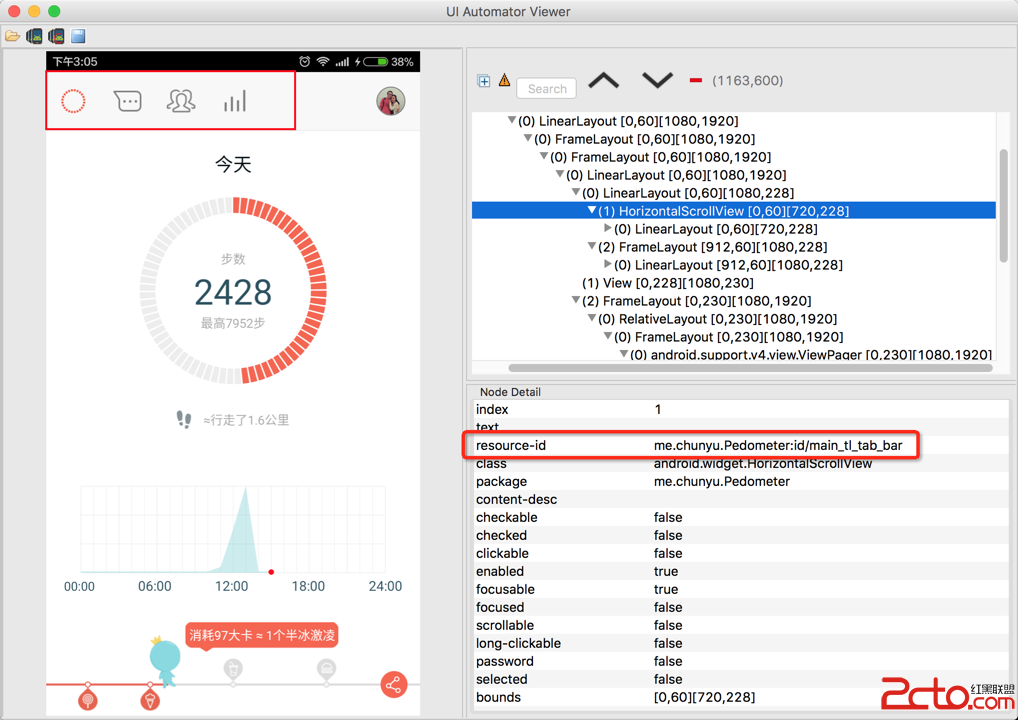
這一則是零碎但實用的小技巧合集,涵蓋測試工具、Android Studio 插件、網路層寫法與效能優化,每一項都拿去就能用。 1. UIAutomatorViewer:
 魅藍 note3 一鍵 root 教學
魅藍 note3 價格親民,若想取得系統更高權限,可嘗試一鍵 root。 準備 安裝奇兔刷機或類似工具,讓電腦可辨識手機,並開啟 USB 調試。 Root 流程 1.
 RxJava zip 操作符在 Android 中的實際應用場景
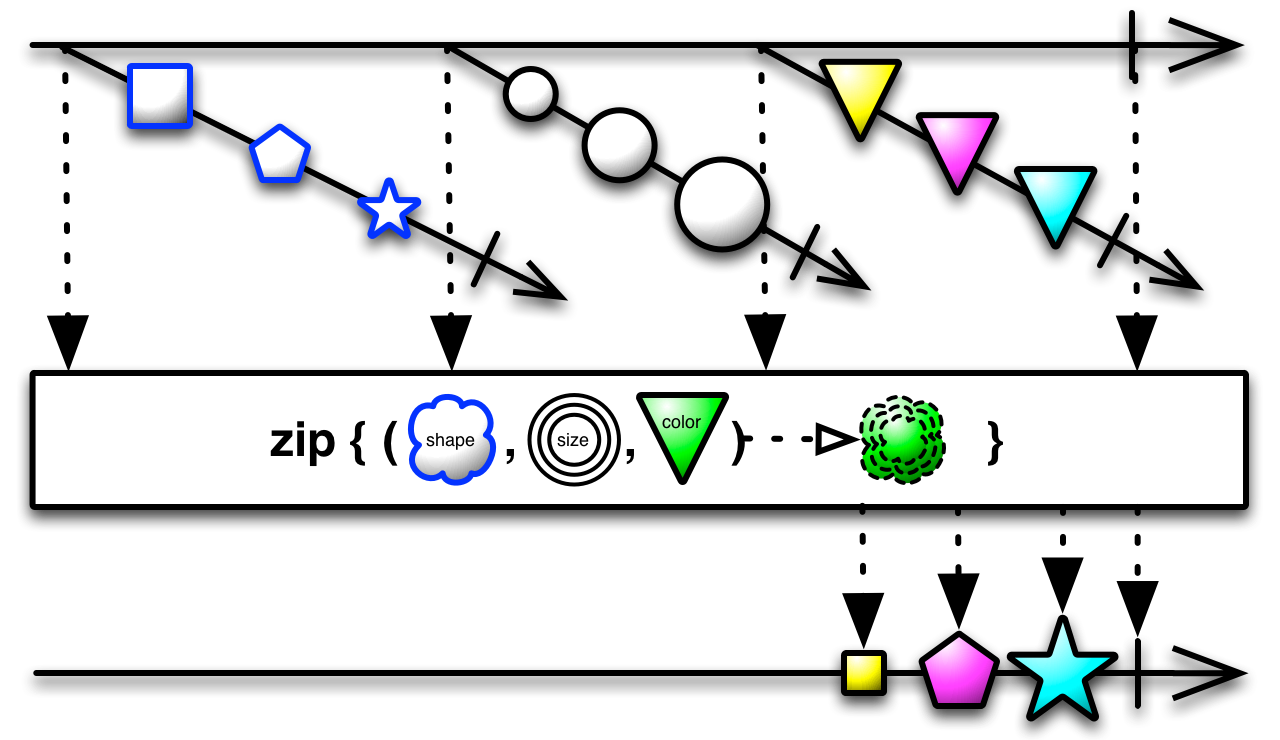
一、zip 操作符是什麼 官方文件的描述是: Returns an Observable that emits the results of a specified co
 2014 年值得關注的 10 款行動 Web 開發框架
這幾年行動網際網路蓬勃發展,市場潛力無窮。繼電腦與網際網路之後,行動網際網路正掀起第三波資訊革命的浪潮,新技術與新應用層出不窮。本文精選 10 個優秀的行動 Web 開發