

編輯:關於 Android 程式設計
360 桌面、金山清理大師等都提供了一鍵清理、一鍵加速等功能,其實就是透過結束一些背景行程來達到釋放記憶體的目的。
基本思路是:列出所有運行的行程,查看其重要值(RunningAppProcessInfo.importance,數值越大代表行程的重要程度越低),可以設定一個閾值,若某行程的重要值大於該閾值,就可以將它結束。
行程的重要值有以下幾個等級:
 /**
 * Constant for {@link #importance}: this is a persistent process.
 * Only used when reporting to process observers.
 * @hide
 */
 public static final int IMPORTANCE_PERSISTENT = 50;
 /**
 * Constant for {@link #importance}: this process is running the
 * foreground UI.
 */
 public static final int IMPORTANCE_FOREGROUND = 100;
 /**
 * Constant for {@link #importance}: this process is running something
 * that is actively visible to the user, though not in the immediate
 * foreground.
 */
 public static final int IMPORTANCE_VISIBLE = 200;
 /**
 * Constant for {@link #importance}: this process is running something
 * that is considered to be actively perceptible to the user. An
 * example would be an application performing background music playback.
 */
 public static final int IMPORTANCE_PERCEPTIBLE = 130;
 /**
 * Constant for {@link #importance}: this process is running an
 * application that can not save its state, and thus can't be killed
 * while in the background.
 * @hide
 */
 public static final int IMPORTANCE_CANT_SAVE_STATE = 170;
 /**
 * Constant for {@link #importance}: this process is contains services
 * that should remain running.
 */
 public static final int IMPORTANCE_SERVICE = 300;
 /**
 * Constant for {@link #importance}: this process process contains
 * background code that is expendable.
 */
 public static final int IMPORTANCE_BACKGROUND = 400;
 /**
 * Constant for {@link #importance}: this process is empty of any
 * actively running code.
 */
 public static final int IMPORTANCE_EMPTY = 500;
需要的權限:
<uses-permission android:name="android.permission.KILL_BACKGROUND_PROCESSES"/>
具體操作程式碼如下:
 package com.example.demo;
 import java.util.List;
 import android.app.Activity;
 import android.app.ActivityManager;
 import android.app.ActivityManager.MemoryInfo;
 import android.app.ActivityManager.RunningAppProcessInfo;
 import android.content.Context;
 import android.content.pm.PackageManager;
 import android.content.pm.PackageManager.NameNotFoundException;
 import android.os.Bundle;
 import android.util.Log;
 import android.view.Menu;
 import android.view.MenuItem;
 import android.view.View;
 import android.widget.Toast;
 public class CleanProcessActivity extends Activity {
 private static final String TAG = "Clean";
 @Override protected void onCreate(Bundle savedInstanceState) {
 super.onCreate(savedInstanceState);
 setContentView(R.layout.activity_clean_process);
 }
 public void clean(View v){
 //To change body of implemented methods use File | Settings | File Templates.
 ActivityManager am = (ActivityManager) getSystemService(Context.ACTIVITY_SERVICE);
 List<RunningAppProcessInfo> infoList = am.getRunningAppProcesses();
 List<ActivityManager.RunningServiceInfo> serviceInfos = am.getRunningServices(100);
 long beforeMem = getAvailMemory(this);
 Log.d(TAG, "-----------before memory info : " + beforeMem);
 int count = 0;
 PackageManager pm = getPackageManager();
 if (infoList != null) {
 for (int i = 0; i < infoList.size(); ++i) {
 RunningAppProcessInfo appProcessInfo = infoList.get(i);
 Log.d(TAG, "process name : " + appProcessInfo.processName);
 //importance 該進程的重要程度 分為幾個級別,數值越低就越重要。
 Log.d(TAG, "importance : " + appProcessInfo.importance);
 // 一般數值大於RunningAppProcessInfo.IMPORTANCE_SERVICE的進程都長時間沒用或者空進程了
 // 一般數值大於RunningAppProcessInfo.IMPORTANCE_VISIBLE的進程都是非可見進程,也就是在後台運行著
 if (appProcessInfo.importance > RunningAppProcessInfo.IMPORTANCE_VISIBLE) {
 String[] pkgList = appProcessInfo.pkgList;
 for (int j = 0; j < pkgList.length; ++j) {//pkgList 得到該進程下運行的包名
 String appName = null;
 try {
 appName = (String) pm.getApplicationLabel(pm.getApplicationInfo(pkgList[j], 0));
 } catch (NameNotFoundException e) {
 // TODO Auto-generated catch block
 e.printStackTrace();
 }
 Log.d(TAG, "It will be killed, package name : " + pkgList[j]+" -- "+appName );
 am.killBackgroundProcesses(pkgList[j]);
 count++;
 }
 }
 }
 }
 long afterMem = getAvailMemory(this);
 Log.d(TAG, "----------- after memory info : " + afterMem);
 Toast.makeText(this, "clear " + count + " process, " + (afterMem - beforeMem) + "M", Toast.LENGTH_LONG).show();
 }
 private long getAvailMemory(CleanProcessActivity cleanProcessActivity) {
 // 獲取android當前可用內存大小
 ActivityManager am = (ActivityManager) getSystemService(Context.ACTIVITY_SERVICE);
 MemoryInfo mi = new MemoryInfo();
 am.getMemoryInfo(mi);
 //mi.availMem; 當前系統的可用內存
 //return Formatter.formatFileSize(context, mi.availMem);// 將獲取的內存大小規格化
 Log.d(TAG, "可用內存---->>>" + mi.availMem / (1024 * 1024));
 return mi.availMem / (1024 * 1024);
 }
 }
注意:
這裡選擇的閾值是 IMPORTANCE_VISIBLE 級別,也就是非可見的背景行程與服務會被結束(部分系統行程當然除外)。清理效果與金山清理大師、360 桌面的一鍵清理大致相當。
如果不想清殺得太徹底,可以選擇 IMPORTANCE_SERVICE 級別,結束那些長時間沒用或空閒的行程;不過這個級別的清理力度不夠大,達不到金山清理大師的效果。
值得留意的是,隨著 Android 系統版本的不斷演進,越來越多的後台限制機制被引入,部分行程可能無法被如願結束,實際清理效果會依裝置與系統版本而有所差異。希望這份分享能對大家有所幫助。
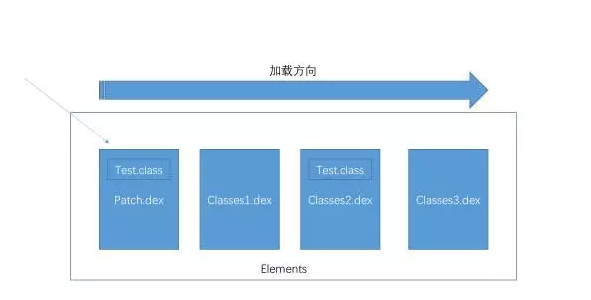 主流 Android 熱修復技術比較:超級補丁、Tinker 與 HotFix
熱修復的核心問題 Android 熱修復的目標,是在不重新發版的情況下修復線上問題。常見方案包括類加載、DEX 合併與 Native 方法替換。不同方案在生效速度、相容性
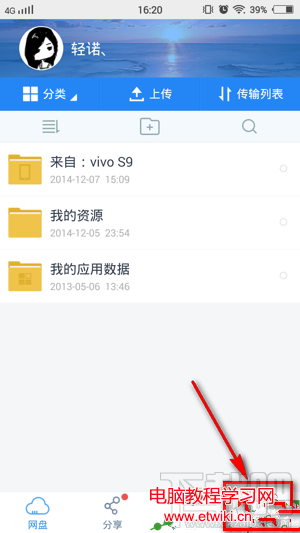 手機百度雲怎麼修改默認下載位置
如果一直把文件下載到百度雲客戶端的默認目錄,手機內存遲早會亮紅燈。把下載位置改到容量更寬裕的存儲上,是個非常實際的小調整。下面說明操作步驟。 首先打開百度雲 App。 點
 安卓引導頁實作:讓底部紅點隨 ViewPager 滑動移動
做了一個簡單的引導頁,重點其實在於引導頁下方的小紅點能隨著頁面滑動而移動。先看效果圖:畫面上共有三個點固定不動,只有一個紅點會滑動。做法是先算出每個點之間的間隔距離,再透
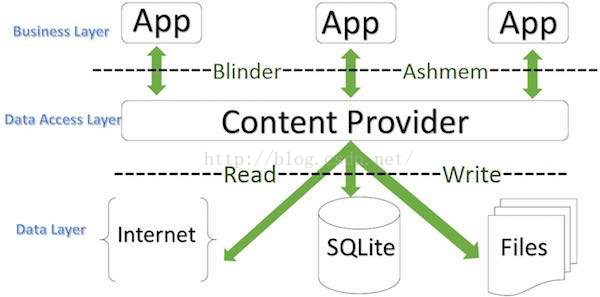 Android 安全開發實戰:Content Provider 組件的風險與防禦
在 Android 的四大組件裡,Content Provider 是唯一專為「跨應用共享數據」而生的角色。它與 Activity、Service 最大的不同在於:它天生