

編輯:關於 Android 程式設計
Socket 是 Android 上歷史悠久、也相當可靠的通訊方式。它不像 HTTP 那樣有著「一问一答」的限制,伺服器可以主動推送資料給客戶端,因此非常適合即時通訊、長連線通知等場景。代價是你要自己處理連線管理、訊息邊界、心跳偵測等細節。
以下整理一套可運行的骨架,大致分為五個部分。
public class SocketOutputThread extends Thread {

    private volatile boolean isStart = true;
    private static final String TAG = "socketOutputThread";

    // CopyOnWriteArrayList:讀取時不需要鎖,適合「少量寫入、頻繁遍歷」的佇列
    private final List<MsgEntity> sendMsgList = new CopyOnWriteArrayList<>();

    public void setStart(boolean isStart) {
        this.isStart = isStart;
        synchronized (this) { notify(); }
    }

    /** 把訊息放進佇列並喚醒送訊息線程 */
    public void addMsgToSendList(MsgEntity msg) {
        synchronized (this) {
            sendMsgList.add(msg);
            notify();
        }
    }

    private boolean sendMsg(byte[] msg) throws Exception {
        if (msg == null) {
            CLog.e(TAG, "sendMsg is null");
            return false;
        }
        TCPClient.instance().sendMsg(msg);
        return true;
    }

    @Override
    public void run() {
        while (isStart) {
            synchronized (sendMsgList) {
                for (MsgEntity msg : sendMsgList) {
                    Handler handler = msg.getHandler();
                    try {
                        sendMsg(msg.getBytes());
                        sendMsgList.remove(msg);
                        notifyResult(handler, msg.getBytes(), 1);   // 1 = 成功
                    } catch (Exception e) {
                        e.printStackTrace();
                        CLog.e(TAG, e.toString());
                        notifyResult(handler, msg.getBytes(), 0);   // 0 = 失敗
                    }
                }
            }
            synchronized (this) {
                try { wait(); } catch (InterruptedException e) { e.printStackTrace(); }
            }
        }
    }

    private void notifyResult(Handler handler, byte[] payload, int what) {
        if (handler != null) {
            Message message = new Message();
            message.obj = payload;
            message.what = what;
            handler.sendMessage(message);
        }
    }
}
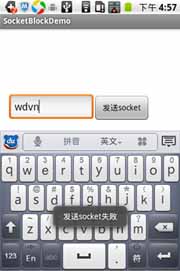
這個設計的優點是:呼叫方只要把訊息丟進佇列並傳入一個 Handler,就能非同步地收到「送出去了」或「失敗了」的通知,完全不必關心底層何時真正寫入 socket。
public class SocketInputThread extends Thread {

    private volatile boolean isStart = true;
    private static final String TAG = "socket";

    public void setStart(boolean isStart) { this.isStart = isStart; }

    @Override
    public void run() {
        while (isStart) {
            if (NetManager.instance().isNetworkConnected()) {
                if (!TCPClient.instance().isConnect()) {
                    // 連線斷了就先睡一會兒,避免空轉
                    try {
                        sleep(Const.SOCKET_SLEEP_SECOND * 1000);
                    } catch (InterruptedException e) {
                        e.printStackTrace();
                    }
                }
                readSocket();
            }
        }
    }

    public void readSocket() {
        Selector selector = TCPClient.instance().getSelector();
        if (selector == null) { return; }

        try {
            // 沒有資料時會阻塞在這裡,不佔用 CPU
            while (selector.select() > 0) {
                for (SelectionKey sk : selector.selectedKeys()) {
                    if (!sk.isReadable()) { continue; }

                    SocketChannel sc = (SocketChannel) sk.channel();
                    ByteBuffer buffer = ByteBuffer.allocate(1024);
                    try {
                        sc.read(buffer);
                    } catch (IOException e) {
                        e.printStackTrace();
                    }
                    buffer.flip();

                    String received = "";
                    try {
                        received = Charset.forName("UTF-8")
                                .newDecoder().decode(buffer).toString();
                        CLog.e(TAG, received);

                        // 收到資料後用廣播丟給需要的地方
                        Intent i = new Intent(Const.BC);
                        i.putExtra("response", received);
                        MainActivity.s_context.sendBroadcast(i);
                    } catch (CharacterCodingException e) {
                        e.printStackTrace();
                    } finally {
                        buffer.clear();
                    }

                    try {
                        sk.interestOps(SelectionKey.OP_READ);
                        selector.selectedKeys().remove(sk);   // 必須手動移除
                    } catch (CancelledKeyException e) {
                        e.printStackTrace();
                    }
                }
            }
        } catch (IOException | ClosedSelectorException e) {
            e.printStackTrace();
        }
    }
}
selector.select() 是這裡的核心:它會在沒有資料可讀時讓線程進入等待,直到有事件才返回。相比「每隔 500 毫秒 read 一次」的輪詢寫法,這在待機模式下幾乎不消耗 CPU 與電量。另外別忘了每次處理完 SelectionKey 都要從 selectedKeys() 中移除,否則下次迴圈會重複處理同一筆。
class SocketHeartThread extends Thread {

    private volatile boolean isStop = false;
    private static SocketHeartThread s_instance;

    static synchronized SocketHeartThread instance() {
        if (s_instance == null) {
            s_instance = new SocketHeartThread();
        }
        return s_instance;
    }

    public void stopThread() { isStop = true; }

    @Override
    public void run() {
        isStop = false;
        while (!isStop) {
            // 發一個心跳看伺服器是否還在
            if (!TCPClient.instance().canConnectToServer()) {
                TCPClient.instance().reConnect();
            }
            try {
                Thread.sleep(Const.SOCKET_HEART_SECOND * 1000);
            } catch (InterruptedException e) {
                e.printStackTrace();
            }
        }
    }
}
public class SocketThreadManager {

    private static SocketThreadManager s_manager;

    private SocketInputThread mInputThread;
    private SocketOutputThread mOutThread;
    private SocketHeartThread mHeartThread;

    public static SocketThreadManager sharedInstance() {
        if (s_manager == null) {
            s_manager = new SocketThreadManager();
            s_manager.startThreads();
        }
        return s_manager;
    }

    private SocketThreadManager() {
        mHeartThread = SocketHeartThread.instance();
        mInputThread = new SocketInputThread();
        mOutThread = new SocketOutputThread();
    }

    private void startThreads() {
        mHeartThread.start();
        mInputThread.setStart(true);
        mInputThread.start();
        mOutThread.setStart(true);
        mOutThread.start();
    }

    public void stopThreads() {
        mHeartThread.stopThread();
        mInputThread.setStart(false);
        mOutThread.setStart(false);
    }

    public static void releaseInstance() {
        if (s_manager != null) {
            s_manager.stopThreads();
            s_manager = null;
        }
    }

    /** 對外統一的送訊息入口 */
    public void sendMsg(byte[] buffer, Handler handler) {
        mOutThread.addMsgToSendList(new MsgEntity(buffer, handler));
    }
}
public class TCPClient {

    private Selector selector;
    private SocketChannel socketChannel;

    private String hostIp;
    private int hostListenningPort;

    private static TCPClient s_tcp;
    public boolean isInitialized = false;

    public static synchronized TCPClient instance() {
        if (s_tcp == null) {
            s_tcp = new TCPClient(Const.SOCKET_SERVER, Const.SOCKET_PORT);
        }
        return s_tcp;
    }

    private TCPClient(String hostIp, int port) {
        this.hostIp = hostIp;
        this.hostListenningPort = port;
        try {
            initialize();
            isInitialized = true;
        } catch (Exception e) {
            isInitialized = false;
            e.printStackTrace();
        }
    }

    public void initialize() throws IOException {
        boolean done = false;
        try {
            socketChannel = SocketChannel.open(
                    new InetSocketAddress(hostIp, hostListenningPort));
            if (socketChannel != null) {
                socketChannel.socket().setTcpNoDelay(false);
                socketChannel.socket().setKeepAlive(true);
                socketChannel.socket().setSoTimeout(Const.SOCKET_READ_TIMOUT);
                socketChannel.configureBlocking(false);

                selector = Selector.open();
                if (selector != null) {
                    socketChannel.register(selector, SelectionKey.OP_READ);
                    done = true;
                }
            }
        } finally {
            if (!done && selector != null) { selector.close(); }
            if (!done && socketChannel != null) { socketChannel.close(); }
        }
    }

    public void sendMsg(byte[] bytes) throws IOException {
        if (socketChannel == null) { throw new IOException(); }
        socketChannel.write(ByteBuffer.wrap(bytes));
    }

    public synchronized Selector getSelector() { return selector; }

    public boolean isConnect() {
        return isInitialized && socketChannel != null && socketChannel.isConnected();
    }

    public boolean reConnect() {
        closeTCPSocket();
        try {
            initialize();
            isInitialized = true;
        } catch (Exception e) {
            isInitialized = false;
            e.printStackTrace();
        }
        return isInitialized;
    }

    /** 以 urgent data 做輕量探活,比送完整心跳包便宜 */
    public boolean canConnectToServer() {
        try {
            if (socketChannel != null) {
                socketChannel.socket().sendUrgentData(0xff);
            }
        } catch (Exception e) {
            return false;
        }
        return true;
    }

    public void closeTCPSocket() {
        try { if (socketChannel != null) { socketChannel.close(); } } catch (IOException ignored) { }
        try { if (selector != null) { selector.close(); } } catch (IOException ignored) { }
    }
}
// 傳入自訂 Handler,就能收到送出的成功/失敗回報
SocketThreadManager.sharedInstance().sendMsg(str.getBytes(), handler);
訊息邊界問題。TCP 是串流協定,不代表一次 read 剛好對應一筆完整訊息。上面範例為求簡潔直接以 UTF-8 解碼,實務上必須自訂協定——常見做法是「4 位元組標頭記錄長度 + 訊息本文」,接收端先讀標頭再決定要收幾個位元組,並用緩衝區處理黏包與拆包的情況。這一點沒做好,長訊息或高頻訊息一定出錯。
線程與 Activity 生命週期。SocketThreadManager 是單例,必須在onCleared() 或 onDestroy() 中呼叫 releaseInstance(),否則 Activity 銷毀後線程仍在跑,會造成記憶體洩漏。
主執行緒禁止網路操作。Android 4.0 之後在新執行緒外執行 socket 連線會直接拋出 NetworkOnMainThreadException,因此 initialize() 一定要放在背景執行緒。
完整 Demo 下載:demo
 從 setContentView 源碼看 Android 是怎麼把你的 XML 掛上螢幕的
先提一句:當初你選擇繞開的問題,總會在未来的某一天原封不動地回到你面前。所以第一次遇到它的時候,別逃。 很多剛入門的朋友都很好奇一件事——寫在 XML 裡的布局,究竟是經
 安卓實戰:JNI 深入解析(Java 與 C/C++ 雙向呼叫)
重新認識 JNI 的兩個基礎概念 頭檔 1. 頭檔存放的是對某個函式庫中已定義的函式、巨集(define)、型別、全域變數等所做的宣告,形同一份倉庫清單。使用者程式若要
 Android Activity、Service 與 BroadcastReceiver 三方通訊實作
三個問題,三種溝通方式在 Android 中,Activity 負責介面,Service 負責背景工作,BroadcastReceiver 則負責接收廣播。若 Servi
 Android 自訂註解:概念、元註解與兩個實戰案例
前言 註解的使用頻率一直很高。ButterKnife 這類注入框架、ActiveAndroid 這類資料庫框架,都是靠註解把開發效率拉起來的。因此理解註解的運作方式並能熟