

編輯:關於 Android 程式設計
我們都知道,Android 不允許在子線程中更新 UI,否則會直接拋出異常:
Only the original thread that created a view hierarchy can touch its views.
那麼這個檢查機制究竟是在哪裡、如何發生的?我們帶著疑問一起來看系統源碼。
Android 中 View 的更新(大小、位置、內容)最終都交給了 WindowManager。我們先來看它的實現類 WindowManagerImpl 是如何控制 View 更新的。
WindowManager 有三個常用方法:addView()、removeView() 與 updateViewLayout(),這裡只分析 updateViewLayout():
public void updateViewLayout(@NonNull View view, @NonNull ViewGroup.LayoutParams params) {
    applyDefaultToken(params);
    mGlobal.updateViewLayout(view, params);
}
其中 applyDefaultToken 與 Window 層級有關,與本文探討的更新無關,可跳過。可以看到,更新實際上委託給了 mGlobal 來操作:
private final WindowManagerGlobal mGlobal = WindowManagerGlobal.getInstance();
mGlobal 是 WindowManagerImpl 的成員變量,而且是單例,WindowManagerImpl 的更新實際委託給了 WindowManagerGlobal。
public void updateViewLayout(View view, ViewGroup.LayoutParams params) {
    if (view == null) {
        throw new IllegalArgumentException("view must not be null");
    }
    if (!(params instanceof WindowManager.LayoutParams)) {
        throw new IllegalArgumentException("Params must be WindowManager.LayoutParams");
    }
    final WindowManager.LayoutParams wparams = (WindowManager.LayoutParams) params;
    view.setLayoutParams(wparams);
    synchronized (mLock) {
        int index = findViewLocked(view, true);
        ViewRootImpl root = mRoots.get(index);
        mParams.remove(index);
        mParams.add(index, wparams);
        root.setLayoutParams(wparams, false);
    }
}
前半部分是異常判斷,可跳過。核心邏輯是:先給 view 設置新的布局參數,再找到對應的 ViewRootImpl,為 root 重新設置布局參數。
ViewRootImpl 是 Android 系統中 View 與 WindowManager 溝通的橋梁,測量、布局、繪製、時間分發都在這裡傳遞給 View。
root.setLayoutParams 內部會調用 requestLayout():
public void requestLayout() {
    if (!mHandlingLayoutInLayoutRequest) {
        checkThread();
        mLayoutRequested = true;
        scheduleTraversals();
    }
}
重點就在 checkThread(),它判斷當前更新 UI 的線程是否與創建 ViewRootImpl 的線程相同,若不同則拋出異常:
void checkThread() {
    if (mThread != Thread.currentThread()) {
        throw new CalledFromWrongThreadException(
            "Only the original thread that created a view hierarchy can touch its views.");
    }
}
mThread 是在 ViewRootImpl 的構造方法中初始化的:
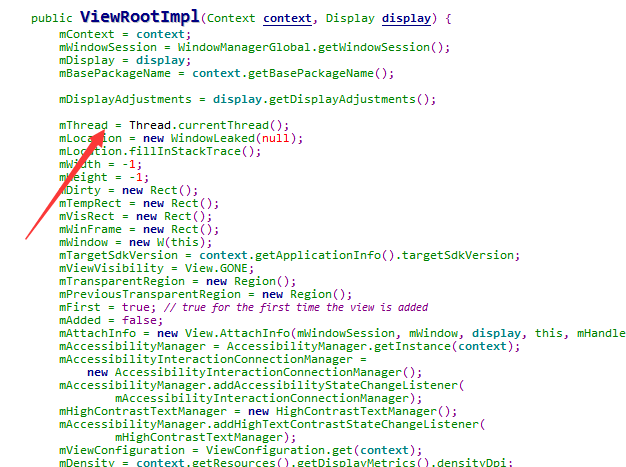
而 ViewRootImpl 對象是在 WindowManagerImpl 的 addView 中,透過調用 WindowManagerGlobal 的 addView 時創建的:
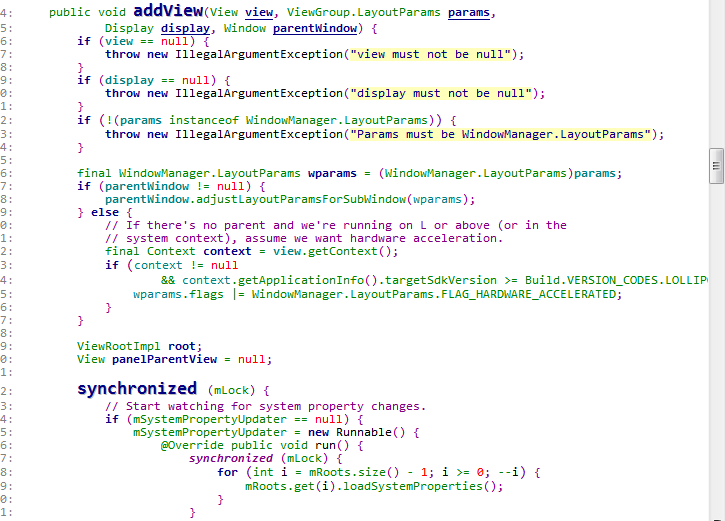
至此我們終於理清了:不能在子線程中更新 UI,是因為 ViewRootImpl 在創建時記錄了創建線程,而更新 UI 時會檢查當前線程是否與之相同,不同就直接拋出異常。
既然檢查依據是「ViewRootImpl 在哪個線程創建」,那麼如果我們手動在子線程中創建一個 ViewRootImpl,是否就能在該子線程更新 UI 呢?下面用一個 Demo 來驗證,先看初始效果圖:
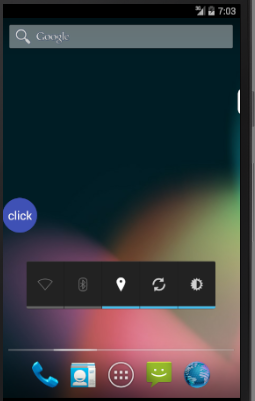
點擊之後,在子線程中更新 UI 的效果圖:
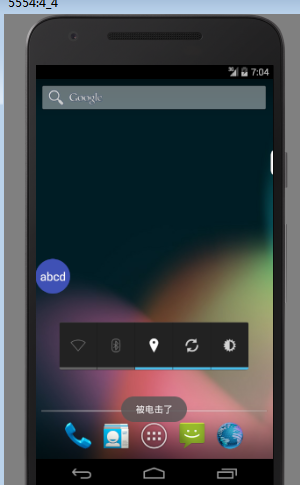
核心原理是:我們在子線程中透過 WindowManager 添加一個系統層級的 View,由於它是直接在子線程中創建的、沒有父 window,因此會單獨創建一個 ViewRootImpl 對象,而這個對象正好是在子線程中創建的,所以在該子線程中更新 UI 就能成功。
new Thread() {
    @Override
    public void run() {
        Looper.prepare();
        wm = (WindowManager) MyApplication.ctx.getSystemService(WINDOW_SERVICE);
        view = View.inflate(MainActivity.this, R.layout.item, null);
        tv = (TextView) view.findViewById(R.id.tv);
        params = new WindowManager.LayoutParams();
        params.type = WindowManager.LayoutParams.TYPE_SYSTEM_ERROR; // 設置最高層級,顯示在其他應用之上
        params.flags = WindowManager.LayoutParams.FLAG_NOT_FOCUSABLE | WindowManager.LayoutParams.FLAG_NOT_TOUCH_MODAL;
        params.width = (int) (60 * getResources().getDisplayMetrics().density);
        params.height = (int) (60 * getResources().getDisplayMetrics().density);
        params.gravity = Gravity.LEFT | Gravity.TOP; // 左上角坐標系
        params.format = PixelFormat.TRANSPARENT;
        width = wm.getDefaultDisplay().getWidth();
        height = wm.getDefaultDisplay().getHeight();
        params.y = height / 2 - params.height / 2;
        wm.addView(view, params);
        view.setOnTouchListener(new View.OnTouchListener() {
            private int y;
            private int x;
            @Override
            public boolean onTouch(View v, MotionEvent event) {
                switch (event.getAction()) {
                    case MotionEvent.ACTION_DOWN:
                        x = (int) event.getRawX();
                        y = (int) event.getRawY();
                        break;
                    case MotionEvent.ACTION_MOVE:
                        int minX = (int) (event.getRawX() - x);
                        int minY = (int) (event.getRawY() - y);
                        params.x = Math.min(width - params.width, Math.max(0, minX + params.x));
                        params.y = Math.min(height - params.height, Math.max(0, minY + params.y));
                        wm.updateViewLayout(view, params);
                        x = (int) event.getRawX();
                        y = (int) event.getRawY();
                        break;
                    case MotionEvent.ACTION_UP:
                        if (params.x > 0 && params.x < width - params.width) {
                            if (params.x > (width - params.width) / 2) {
                                params.x = width - params.width;
                            } else {
                                params.x = 0;
                            }
                            wm.updateViewLayout(view, params);
                        } else if (params.x == 0 || params.x == (width - params.width)) {
                            tv.setText("abcd");
                        }
                        break;
                }
                return true;
            }
        });
        Looper.loop();
    }
}.start();
逐段解析:首先準備 Looper 並開啟 loop,因為更新 View 時會在當前子線程使用 Handler,而使用 Handler 必須有 Looper。接著取得 WindowManager、填充 View,並透過 params.type 設置 window 層級,使其能顯示在其他 window 之上。params.flags 設置 window 透傳,讓底層 window 仍能獲得觸摸事件。params.format 設為透明,否則圓形 View 後面會顯示一層黑色。最後透過 gravity 配合修改 LayoutParams 的 x、y 值,實現懸浮窗的拖拽效果。
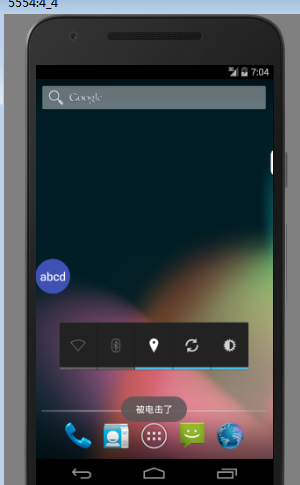
能否在子線程中更新 UI,取決於 ViewRootImpl 在哪個線程中創建。因此,我們更應該把「能更新 UI 的線程」稱為 UI 線程,而不是主線程。
 Android 多媒體框架總結:音視頻基礎概念一次搞懂
多媒體開發涉及許多名詞,例如分辨率、幀率、碼率、編碼、封裝格式等。若沒有系統整理,很容易混淆。本文將常見概念拆成視頻與音頻兩部分,並說明 Android 多媒體相關元件。
 Android 軟鍵盤遮擋輸入框的四種解決方案
當使用者點擊輸入框時,系統會彈出軟鍵盤。若頁面沒有做好配置,鍵盤可能會遮擋輸入框或底部按鈕。以下整理了四種常見解法。 問題效果如下: 方法一:使用 adjustPan
 基於百度地圖 SDK 實現 Android 定位功能詳解
LBS 位置服務是 Android 應用中的重要功能,應用日益廣泛。本文將逐步講解如何基於百度地圖 SDK 實現定位功能,涵蓋環境配置、封裝定位邏輯與界面展示。 一、問
 Android 捕獲並攔截 TextView 超連結點擊的方法
本文分享如何捕獲 TextView 中的超連結點擊事件,希望能對大家有所幫助。所謂捕獲 TextView 超連結,指的是當一段文字裡含有網址時,TextView 會把它以