

編輯:關於 Android 程式設計
京東早期首頁有個很有意思的交互:一個可以上下拖動的「畫軸」,往下拉就把一幅畫徐徐展開。當時我的第一想法是動態改變 ImageView 的高度,效果基本能出來,但滑動部分的細節處理當時沒深究。新版京東已經把這個效果去掉了,只能憑記憶復刻一遍,順便把 Scroller 和滑動衝突這塊知識鞏固一下。

拆下來其實就兩件事:
因為需要滑動空間,容器必須是 ViewGroup,所以新建 ScrollPaintView extends RelativeLayout。
public class ScrollPaintView extends RelativeLayout {

    private static final String TAG = "ScrollPaintView";

    /** 默认滚轴高度 */
    private final int DEFAULT_PAINT_SCROLL_HEIGHT = 25;
    /** 默认滚动速度 */
    private final int DEFAULT_SCROLL_SPEED = 1000;
    /** 默认分割点高度 */
    private final int DEFAULT_PARTITION_NODE = 150;
    /** 默认画轴文字大小 */
    private final int DEFAULT_PAINT_SCROLL_TXT_SIZE = 16;

    private Scroller mScroller;
    private ImageView mPaintScrollImageView;   // 滚轴
    private TextView mPaintScrollTextView;     // 滚轴文字
    private ImageView mPaintView;              // 图画
    private Bitmap mPaintScrollBp;             // 画轴图
    private int mPaintIvHeight;                // 画轴高度
    private String mPaintScrollTxt;
    private float mPaintScrollTxtSize;
    private int mPaintScrollTxtColor;
    private int mPaintStartHeight;             // 图画初始高度
    private int mLastY;
    private int mScrollSpeed;
    private int partitionNode;                 // 分隔节点
    private boolean isScrllerTop = false;      // 是否向上滚动
    private boolean isClick = false;
    private LayoutParams lpp;
    private int screenHeight;
    private int screenWidth;
    private ScrollPaintCompleteListener listener;
    private int lastScrollY;

    public ScrollPaintView(Context context, AttributeSet attrs, int defStyleAttr) {
        super(context, attrs, defStyleAttr);
        TypedArray ta = context.obtainStyledAttributes(attrs, R.styleable.ScrollPaintView);
        mPaintIvHeight = (int) ta.getDimension(
                R.styleable.ScrollPaintView_paintScrollHeight,
                TypedValue.applyDimension(TypedValue.COMPLEX_UNIT_DIP,
                        DEFAULT_PAINT_SCROLL_HEIGHT,
                        getResources().getDisplayMetrics()));
        mScrollSpeed = ta.getInteger(
                R.styleable.ScrollPaintView_scrollSpeed, DEFAULT_SCROLL_SPEED);
        partitionNode = ta.getInteger(
                R.styleable.ScrollPaintView_scrollPartitionNode, DEFAULT_PARTITION_NODE);
        mPaintScrollBp = drawableToBitamp(
                ta.getDrawable(R.styleable.ScrollPaintView_paintScrollSrc));
        mPaintScrollTxt = ta.getString(R.styleable.ScrollPaintView_paintScrollTxt);
        mPaintScrollTxtColor = ta.getColor(
                R.styleable.ScrollPaintView_paintScrollTxtColor, Color.BLACK);
        mPaintScrollTxtSize = px2sp(ta.getDimensionPixelSize(
                R.styleable.ScrollPaintView_paintScrollTxtSize,
                DEFAULT_PAINT_SCROLL_TXT_SIZE));
        ta.recycle();
    }
}
用一個 ImageView 加一個 TextView 疊放組成初始畫軸。若外部沒傳圖片,就默認生成一張純色底圖兜底:
/** 创建滚轴 */
private void makePaintScroll() {
    if (null != mPaintScrollImageView || null != mPaintScrollTextView) {
        return;
    }
    mPaintScrollImageView = new ImageView(getContext());
    LayoutParams lp = new LayoutParams(LayoutParams.MATCH_PARENT,
            LayoutParams.MATCH_PARENT);
    lp.height = mPaintIvHeight;
    mPaintScrollImageView.setLayoutParams(lp);
    mPaintScrollImageView.setScaleType(ImageView.ScaleType.FIT_XY);
    mPaintScrollImageView.setImageBitmap(
            null == mPaintScrollBp ? makeDefaultScroll() : mPaintScrollBp);
    addView(mPaintScrollImageView);

    mPaintScrollTextView = new TextView(getContext());
    LayoutParams lpt = new LayoutParams(LayoutParams.MATCH_PARENT,
            LayoutParams.MATCH_PARENT);
    lpt.height = mPaintIvHeight;
    mPaintScrollTextView.setLayoutParams(lpt);
    mPaintScrollTextView.setText(null == mPaintScrollTxt ? "" : mPaintScrollTxt);
    mPaintScrollTextView.setTextSize(mPaintScrollTxtSize);
    mPaintScrollTextView.setTextColor(mPaintScrollTxtColor);
    mPaintScrollTextView.setGravity(Gravity.CENTER);
    addView(mPaintScrollTextView);
}

/** 默认滚轴:一张纯色位图 */
private Bitmap makeDefaultScroll() {
    Bitmap defaultBp = Bitmap.createBitmap(screenWidth, mPaintIvHeight,
            Bitmap.Config.ARGB_8888);
    defaultBp.eraseColor(Color.parseColor("#FF0000"));
    return defaultBp;
}
Scroller 的用法是固定套路:触摸時 scrollBy 跟手,抬手時 startScroll 計算目標位置並 invalidate,然後在 computeScroll 裡逐幀 scrollTo。
/** 处理触摸 */
private void handleView() {
    mScroller = new Scroller(getContext());
    mPaintScrollImageView.setOnTouchListener(new OnTouchListener() {
        @Override
        public boolean onTouch(View view, MotionEvent event) {
            int y = (int) event.getRawY();
            switch (event.getAction()) {
                case MotionEvent.ACTION_DOWN:
                    isClick = true;
                    mLastY = y;
                    if (!mScroller.isFinished()) {
                        mScroller.abortAnimation();
                    }
                    return true;
                case MotionEvent.ACTION_MOVE:
                    int dy = y - mLastY;
                    mLastY = y;
                    scrollBy(0, -dy);
                    return true;
                case MotionEvent.ACTION_UP:
                    mScroller.startScroll(getScrollX(), getScrollY(),
                            -getScrollX(), -getScrollY(), 1000);
                    invalidate();
                    return true;
            }
            return false;
        }
    });
}

/** 滑动处理 */
@Override
public void computeScroll() {
    if (mScroller.computeScrollOffset()) {
        scrollTo(mScroller.getCurrX(), mScroller.getCurrY());
        invalidate();
    }
}
<RelativeLayout xmlns:android="https://schemas.android.com/apk/res/android"
    xmlns:app="https://schemas.android.com/apk/res-auto"
    android:layout_width="match_parent"
    android:layout_height="match_parent"
    android:background="#eeeeee">

    <com.example.junweiliu.scrollpaintdemo.widget.ScrollPaintView
        android:id="@+id/spv_paint"
        android:layout_width="match_parent"
        android:layout_height="match_parent"
        app:paintScrollHeight="25dp"
        app:paintScrollSrc="@mipmap/paint_scroll_img"
        app:paintScrollTxt="拉我看看"
        app:paintScrollTxtColor="#FF000000"
        app:paintScrollTxtSize="16sp" />
</RelativeLayout>
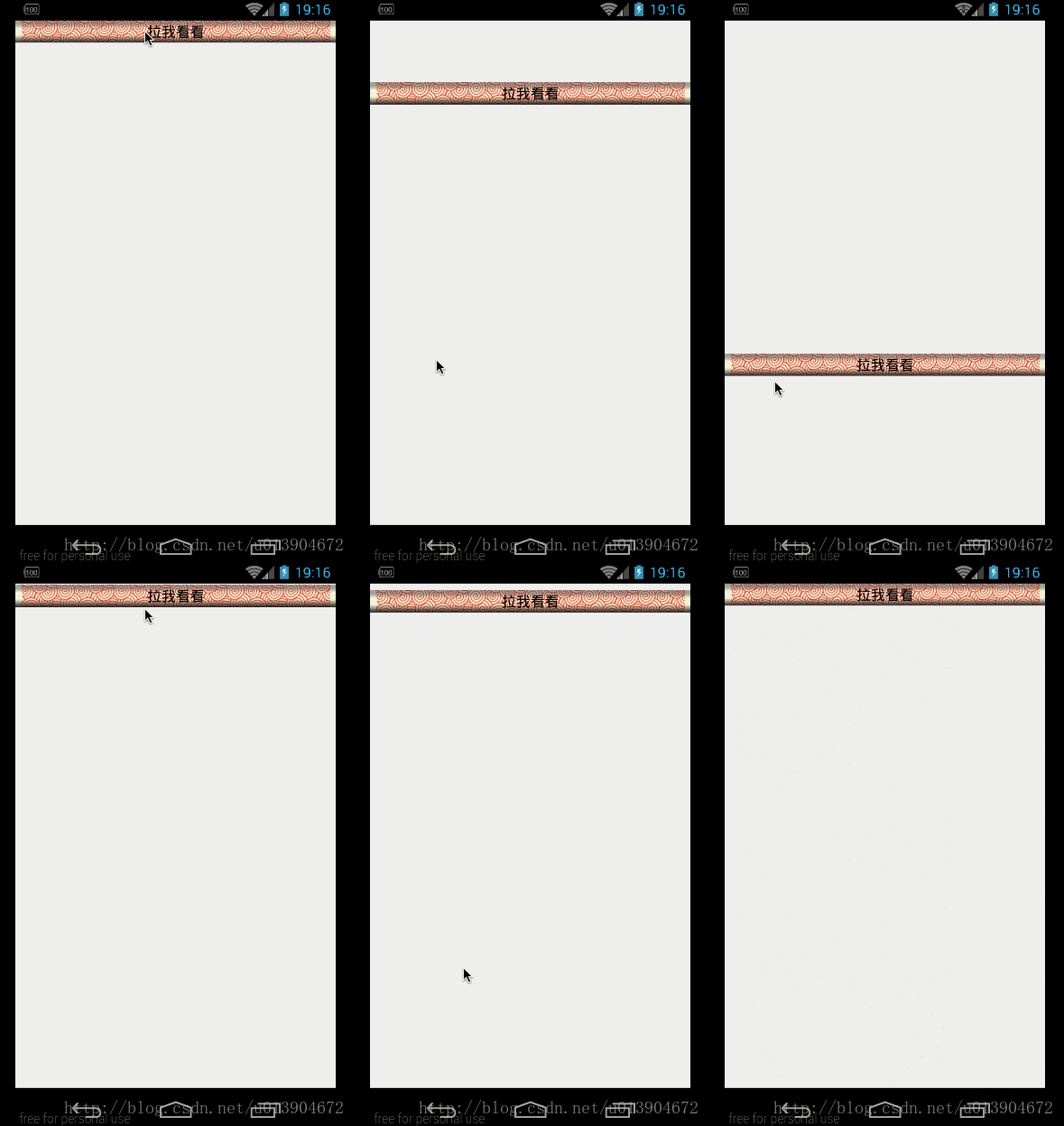
接下來要讓圖畫隨畫軸拉開。需求關鍵是「圖整體不變形,一點一點露出來」,那就得試 scaleType。
先提供一個注入 ImageView 的入口:
/** 设置 paintView */
public void setPaintView(ImageView paintView) {
    if (null == paintView) {
        Log.e(TAG, "設置的View為空");
        return;
    }
    mPaintView = paintView;
}
拖動時同步改高度:
// ACTION_MOVE 分支内
if (Math.abs(getScrollY()) > 0) {
    lpp.height = mPaintStartHeight + Math.abs(getScrollY());
    mPaintView.setLayoutParams(lpp);
}
慣性滑動時也一樣:
@Override
public void computeScroll() {
    if (mScroller.computeScrollOffset()) {
        requestDisallowInterceptTouchEvent(true);
        scrollTo(mScroller.getCurrX(), mScroller.getCurrY());
        if (0 < Math.abs(mScroller.getCurrY())) {
            lpp.height = isScrllerTop
                    ? mPaintStartHeight + Math.abs(mScroller.getCurrY()) - mPaintIvHeight / 2
                    : mPaintStartHeight + Math.abs(mScroller.getCurrY()) + mPaintIvHeight / 2;
        } else {
            lpp.height = mPaintStartHeight;
        }
        mPaintView.setLayoutParams(lpp);
        invalidate();
    }
}
fitXY:圖被拉伸變形,不行。
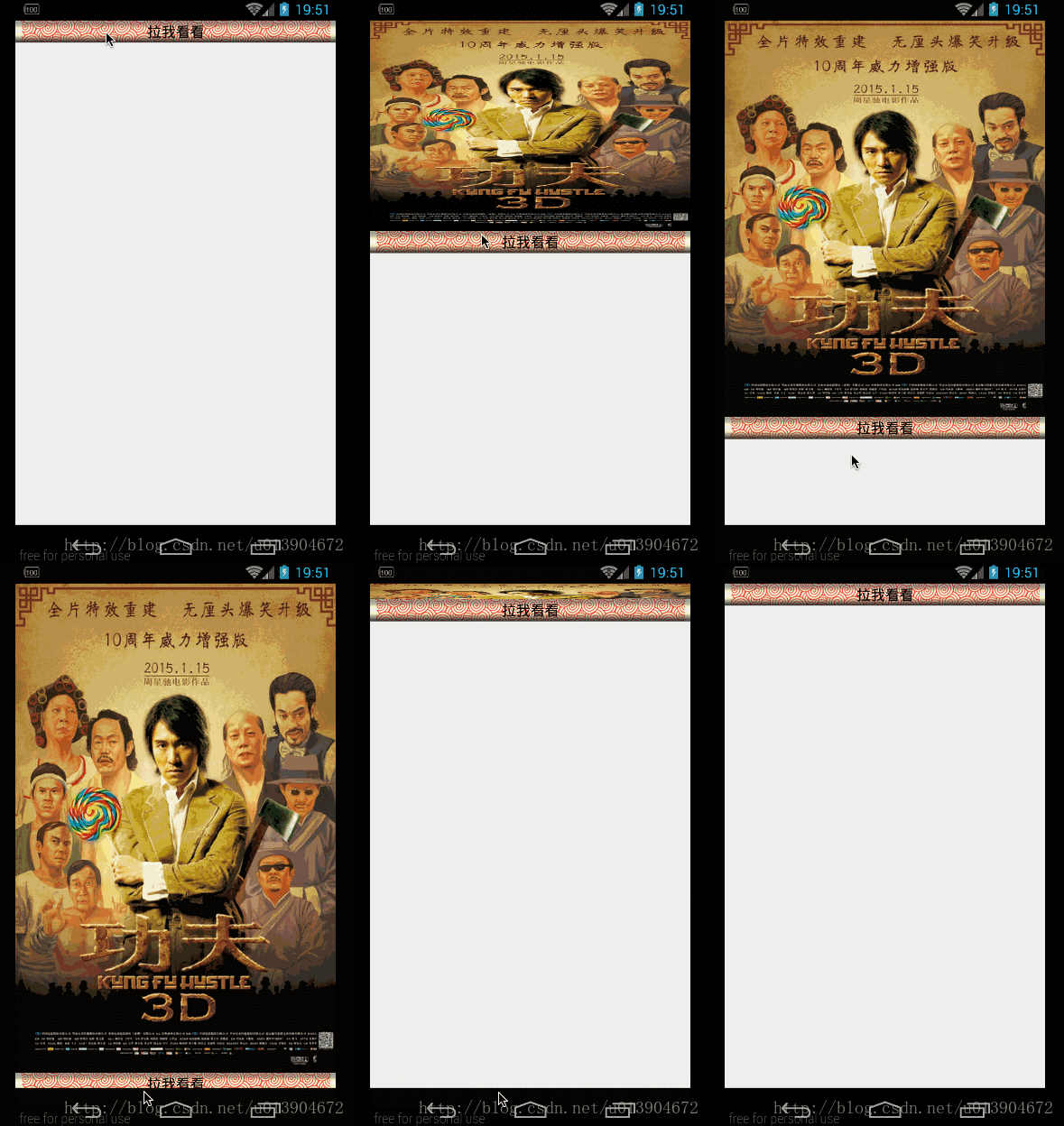
centerCrop:裁切比例奇怪,展開過程不自然。
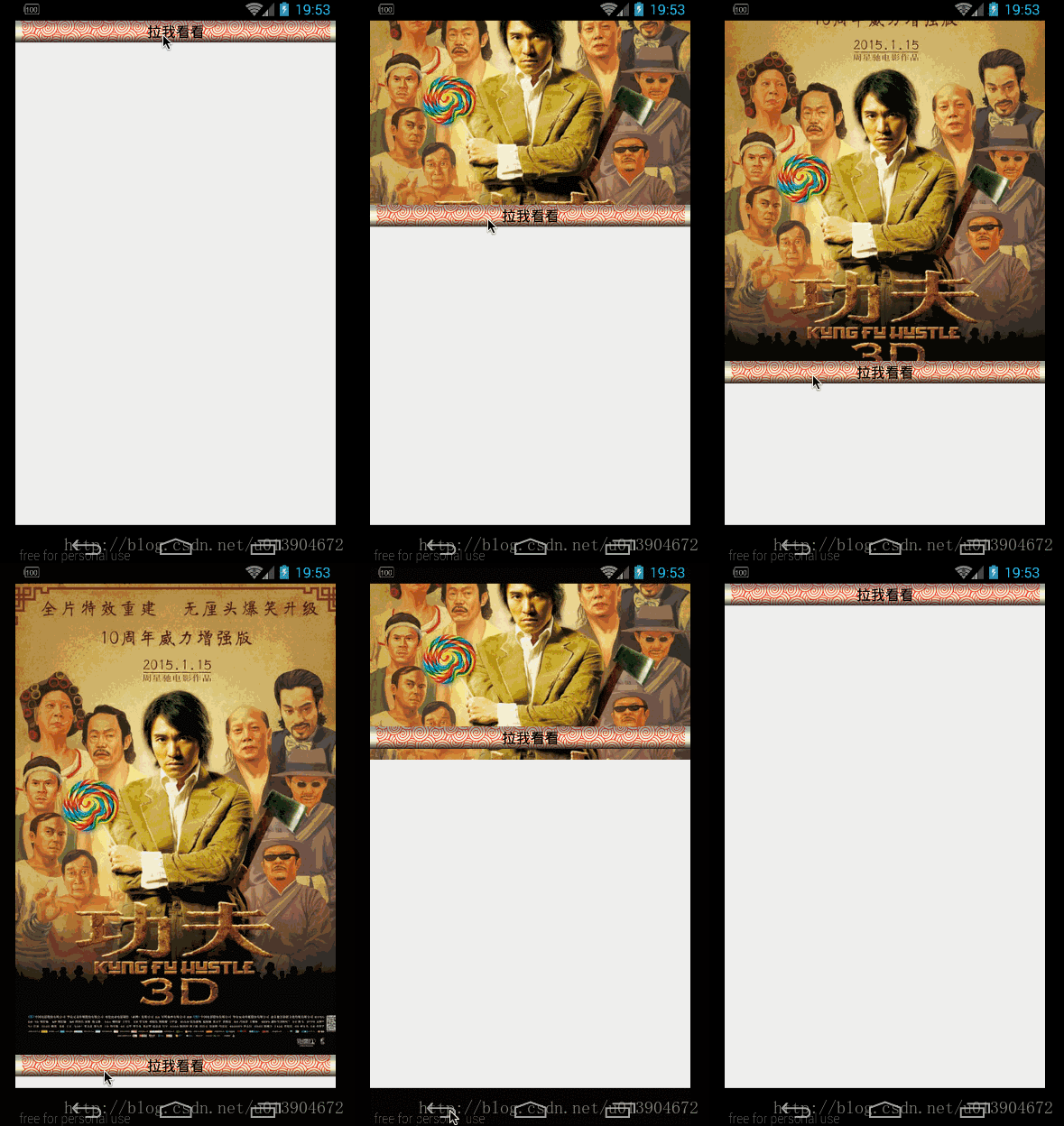
matrix:展開效果正是想要的!但問題是用了 matrix 就沒法再做其他縮放設置了。
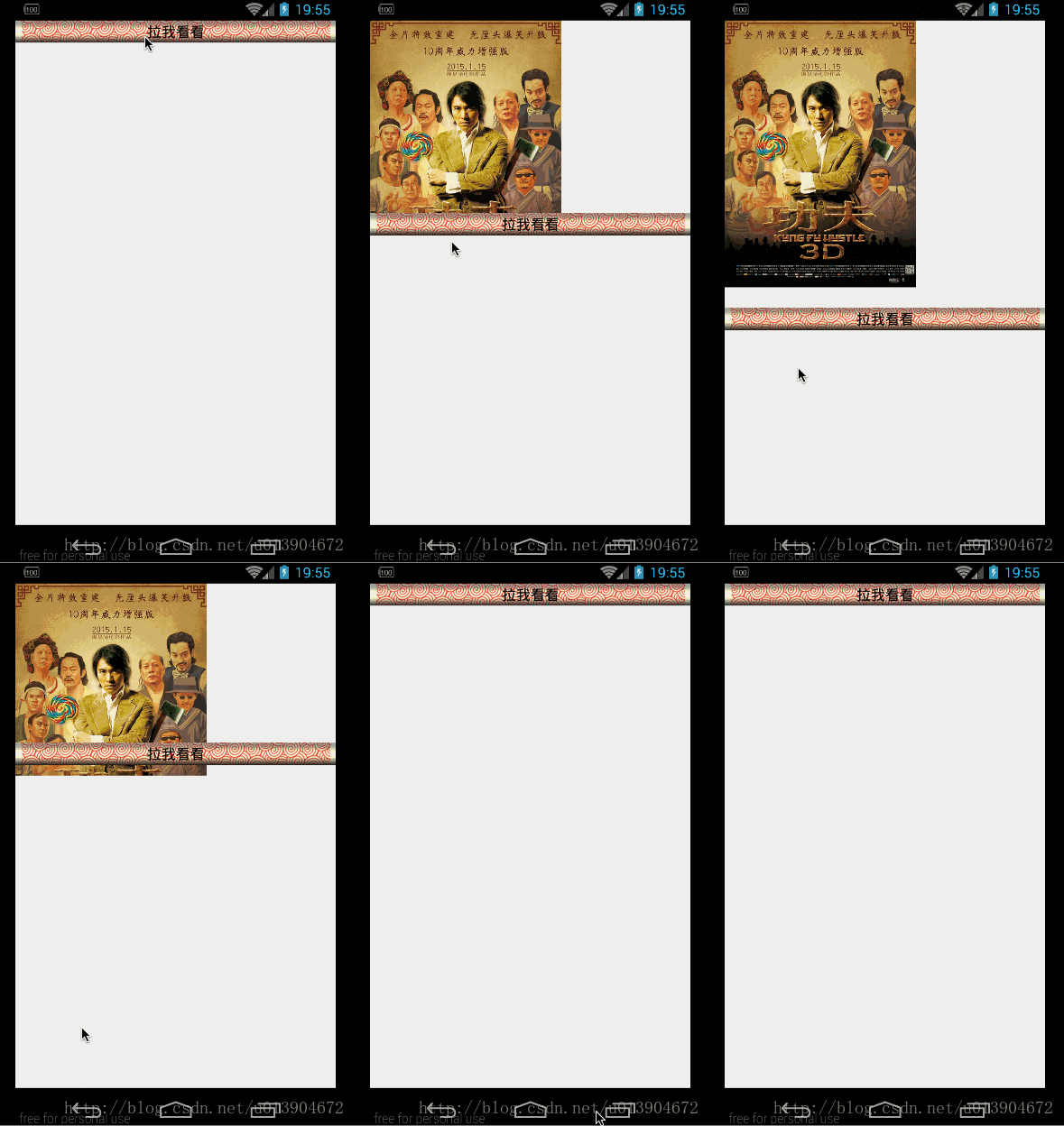
解法並不難:既然不能讓系統縮放,那就提前把圖片按屏幕比例縮好再塞進去。
/** 设置 paintView:先缩放图片,再指定 MATRIX */
public void setPaintView(ImageView paintView) {
    if (null == paintView) {
        Log.e(TAG, "設置的View為空");
        return;
    }
    Bitmap bp = drawableToBitamp(paintView.getDrawable());
    paintView.setImageBitmap(scaleBitmal(bp));
    paintView.setScaleType(ImageView.ScaleType.MATRIX);
    mPaintView = paintView;
}

/** drawable 转 bitmap */
private Bitmap drawableToBitamp(Drawable drawable) {
    if (null == drawable) {
        return null;
    }
    if (drawable instanceof BitmapDrawable) {
        return ((BitmapDrawable) drawable).getBitmap();
    }
    int w = drawable.getIntrinsicWidth();
    int h = drawable.getIntrinsicHeight();
    Bitmap bitmap = Bitmap.createBitmap(w, h, Bitmap.Config.ARGB_8888);
    Canvas canvas = new Canvas(bitmap);
    drawable.setBounds(0, 0, w, h);
    drawable.draw(canvas);
    return bitmap;
}

/** 按屏幕宽高缩放图片 */
private Bitmap scaleBitmal(Bitmap bp) {
    float scaleW = (float) screenWidth / (float) bp.getWidth();
    float scaleH = (float) screenHeight / (float) bp.getHeight();
    Matrix matrix = new Matrix();
    matrix.postScale(scaleW, scaleH);
    return Bitmap.createBitmap(bp, 0, 0, bp.getWidth(), bp.getHeight(), matrix, true);
}
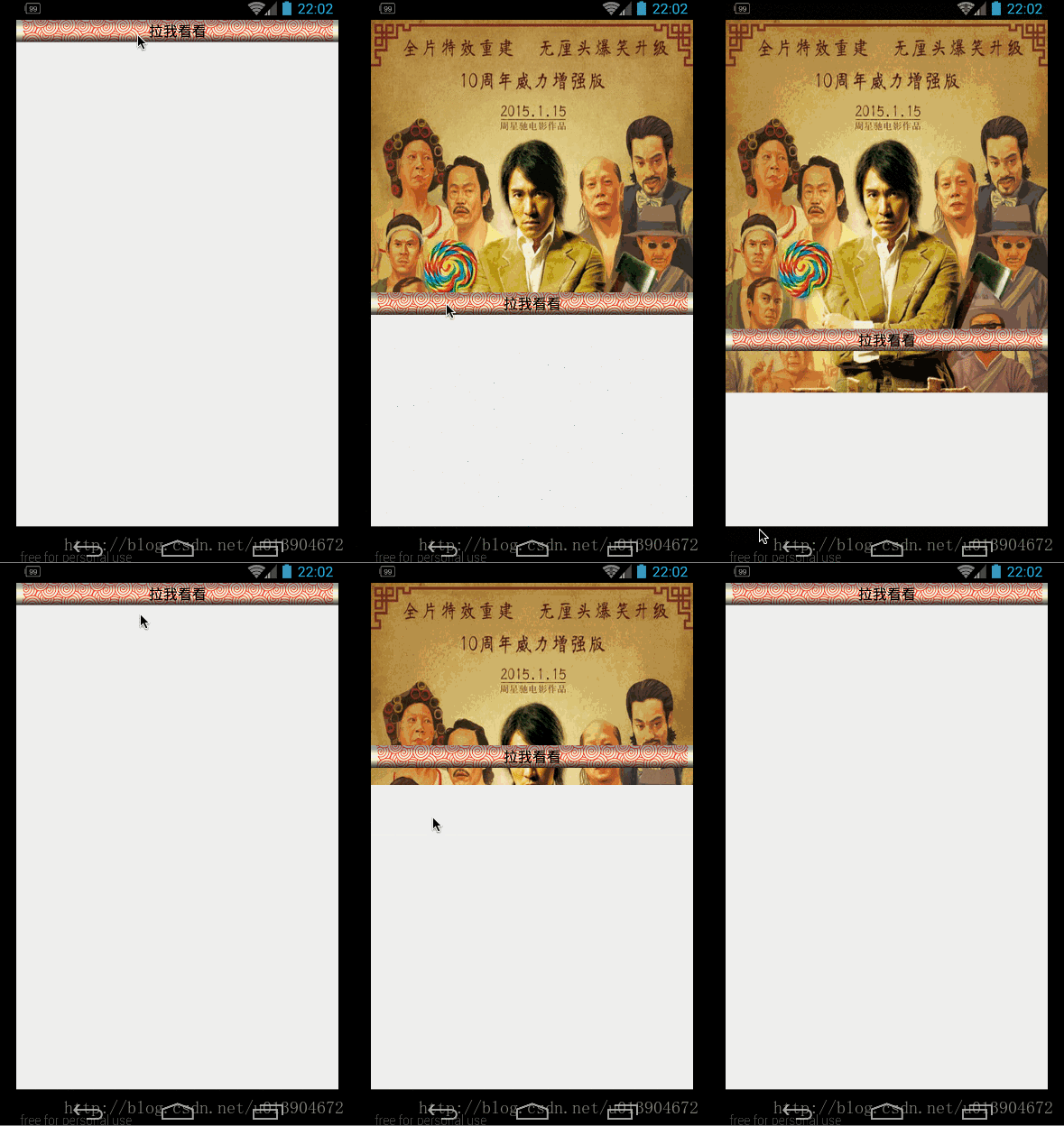
效果出來了,剩下的都是邊界與細節:臨界點判定(小於閾值回彈、大於閾值展開)、上下邊界鉗制(不越界)、與父容器 ScrollView 的事件衝突處理,以及重寫 onMeasure——不然在 ScrollView 裡會出現高度異常、顯示不全的問題(和 ScrollView 嵌套 ListView 顯示不全同源)。
<resources>
    <attr name="paintScrollHeight" format="dimension"/>
    <attr name="paintScrollSrc" format="reference"/>
    <attr name="paintScrollTxt" format="string"/>
    <attr name="paintScrollTxtColor" format="color"/>
    <attr name="paintScrollTxtSize" format="dimension"/>
    <attr name="scrollSpeed" format="integer"/>
    <attr name="scrollPartitionNode" format="integer"/>

    <declare-styleable name="ScrollPaintView">
        <attr name="paintScrollHeight"/>
        <attr name="paintScrollSrc"/>
        <attr name="paintScrollTxt"/>
        <attr name="paintScrollTxtColor"/>
        <attr name="paintScrollTxtSize"/>
        <attr name="scrollSpeed"/>
        <attr name="scrollPartitionNode"/>
    </declare-styleable>
</resources>
把前面拆解的部件拼起來,關鍵在 ACTION_UP 的臨界點判定、computeScroll 的逐幀高度同步,以及 replaceScroll 的重置邏輯:
package com.example.junweiliu.scrollpaintdemo.widget;

import android.app.Activity;
import android.content.Context;
import android.content.res.TypedArray;
import android.graphics.Bitmap;
import android.graphics.Canvas;
import android.graphics.Color;
import android.graphics.Matrix;
import android.graphics.Rect;
import android.graphics.drawable.BitmapDrawable;
import android.graphics.drawable.Drawable;
import android.util.AttributeSet;
import android.util.DisplayMetrics;
import android.util.Log;
import android.util.TypedValue;
import android.view.Gravity;
import android.view.MotionEvent;
import android.view.View;
import android.widget.ImageView;
import android.widget.RelativeLayout;
import android.widget.Scroller;
import android.widget.TextView;
import com.example.junweiliu.scrollpaintdemo.R;

public class ScrollPaintView extends RelativeLayout {

    private static final String TAG = "ScrollPaintView";

    private final int DEFAULT_PAINT_SCROLL_HEIGHT = 25;
    private final int DEFAULT_SCROLL_SPEED = 1000;
    private final int DEFAULT_PARTITION_NODE = 150;
    private final int DEFAULT_PAINT_SCROLL_TXT_SIZE = 16;

    private Scroller mScroller;
    private ImageView mPaintScrollImageView;
    private TextView mPaintScrollTextView;
    private ImageView mPaintView;
    private Bitmap mPaintScrollBp;
    private int mPaintIvHeight;
    private String mPaintScrollTxt;
    private float mPaintScrollTxtSize;
    private int mPaintScrollTxtColor;
    private int mPaintStartHeight;
    private int mLastY;
    private int mScrollSpeed;
    private int partitionNode;
    private boolean isScrllerTop = false;
    private boolean isClick = false;
    private LayoutParams lpp;
    private int screenHeight;
    private int screenWidth;
    private ScrollPaintCompleteListener listener;
    private int lastScrollY;

    /** 回调接口 */
    public interface ScrollPaintCompleteListener {
        void onScrollTouch(TextView tv);   // 点击
        void onScrollTop(TextView tv);     // 收缩
        void onScrollBottom(TextView tv);  // 展开
        void onScrollMove(TextView tv);    // 滚动中
    }

    public ScrollPaintView(Context context) {
        this(context, null);
    }

    public ScrollPaintView(Context context, AttributeSet attrs) {
        this(context, attrs, 0);
    }

    public ScrollPaintView(Context context, AttributeSet attrs, int defStyleAttr) {
        super(context, attrs, defStyleAttr);
        TypedArray ta = context.obtainStyledAttributes(attrs, R.styleable.ScrollPaintView);
        mPaintIvHeight = (int) ta.getDimension(
                R.styleable.ScrollPaintView_paintScrollHeight,
                TypedValue.applyDimension(TypedValue.COMPLEX_UNIT_DIP,
                        DEFAULT_PAINT_SCROLL_HEIGHT,
                        getResources().getDisplayMetrics()));
        mScrollSpeed = ta.getInteger(
                R.styleable.ScrollPaintView_scrollSpeed, DEFAULT_SCROLL_SPEED);
        partitionNode = ta.getInteger(
                R.styleable.ScrollPaintView_scrollPartitionNode, DEFAULT_PARTITION_NODE);
        mPaintScrollBp = drawableToBitamp(
                ta.getDrawable(R.styleable.ScrollPaintView_paintScrollSrc));
        mPaintScrollTxt = ta.getString(R.styleable.ScrollPaintView_paintScrollTxt);
        mPaintScrollTxtColor = ta.getColor(
                R.styleable.ScrollPaintView_paintScrollTxtColor, Color.BLACK);
        mPaintScrollTxtSize = px2sp(ta.getDimensionPixelSize(
                R.styleable.ScrollPaintView_paintScrollTxtSize,
                DEFAULT_PAINT_SCROLL_TXT_SIZE));
        ta.recycle();

        init();
        makePaintScroll();
        handleView();
    }

    public void setPaintView(ImageView paintView) {
        if (null == paintView) {
            Log.e(TAG, "設置的View為空");
            return;
        }
        Bitmap bp = drawableToBitamp(paintView.getDrawable());
        paintView.setImageBitmap(scaleBitmal(bp));
        paintView.setScaleType(ImageView.ScaleType.MATRIX);
        mPaintView = paintView;
    }

    public void setScrollPaintCompleteListener(ScrollPaintCompleteListener listener) {
        if (null != listener) {
            this.listener = listener;
        }
    }

    private void init() {
        mScroller = new Scroller(getContext());
        lpp = new LayoutParams(LayoutParams.MATCH_PARENT, LayoutParams.MATCH_PARENT);
        DisplayMetrics displayMetrics = new DisplayMetrics();
        ((Activity) getContext()).getWindowManager().getDefaultDisplay()
                .getMetrics(displayMetrics);
        screenHeight = displayMetrics.heightPixels;
        screenWidth = displayMetrics.widthPixels;
    }

    /** 创建滚轴 */
    private void makePaintScroll() {
        if (null != mPaintScrollImageView || null != mPaintScrollTextView) {
            return;
        }
        mPaintScrollImageView = new ImageView(getContext());
        LayoutParams lp = new LayoutParams(LayoutParams.MATCH_PARENT,
                LayoutParams.MATCH_PARENT);
        lp.height = mPaintIvHeight;
        mPaintScrollImageView.setLayoutParams(lp);
        mPaintScrollImageView.setScaleType(ImageView.ScaleType.FIT_XY);
        mPaintScrollImageView.setImageBitmap(
                null == mPaintScrollBp ? makeDefaultScroll() : mPaintScrollBp);
        addView(mPaintScrollImageView);

        mPaintScrollTextView = new TextView(getContext());
        LayoutParams lpt = new LayoutParams(LayoutParams.MATCH_PARENT,
                LayoutParams.MATCH_PARENT);
        lpt.height = mPaintIvHeight;
        mPaintScrollTextView.setLayoutParams(lpt);
        mPaintScrollTextView.setText(null == mPaintScrollTxt ? "" : mPaintScrollTxt);
        mPaintScrollTextView.setTextSize(mPaintScrollTxtSize);
        mPaintScrollTextView.setTextColor(mPaintScrollTxtColor);
        mPaintScrollTextView.setGravity(Gravity.CENTER);
        addView(mPaintScrollTextView);
    }

    /** 测量:需要扣掉状态栏与自身 top */
    @Override
    protected void onMeasure(int widthMeasureSpec, int heightMeasureSpec) {
        super.onMeasure(widthMeasureSpec, heightMeasureSpec);
        if (null != mPaintView
                && getTop() + mPaintIvHeight != mPaintView.getHeight()) {
            mPaintStartHeight = getTop() + mPaintIvHeight / 2;
            lpp.height = mPaintStartHeight;
            mPaintView.setLayoutParams(lpp);
        }
        Rect frame = new Rect();
        ((Activity) getContext()).getWindow().getDecorView()
                .getWindowVisibleDisplayFrame(frame);
        int statusBarHeight = frame.top;
        setMeasuredDimension(screenWidth, screenHeight - getTop() - statusBarHeight);
    }

    /** 触摸处理 */
    private void handleView() {
        mPaintScrollImageView.setOnTouchListener(new OnTouchListener() {
            @Override
            public boolean onTouch(View view, MotionEvent event) {
                if (null == mPaintView) {
                    Log.e(TAG, "設置的View為空");
                    return true;
                }
                int y = (int) event.getRawY();
                switch (event.getAction()) {

                    case MotionEvent.ACTION_DOWN:
                        requestDisallowInterceptTouchEvent(true);
                        isClick = true;
                        mLastY = y;
                        if (!mScroller.isFinished()) {
                            mScroller.abortAnimation();
                        }
                        if (null != listener) {
                            listener.onScrollTouch(mPaintScrollTextView);
                        }
                        return true;

                    case MotionEvent.ACTION_MOVE:
                        int dy = y - mLastY;
                        mLastY = y;
                        scrollBy(0, -dy);

                        // 上边界:已回到初始位置且继续向上拖,钳制
                        if (getScrollY() >= 0 && dy <= 0) {
                            lpp.height = mPaintStartHeight;
                            mPaintView.setLayoutParams(lpp);
                            scrollTo(0, 0);
                            return true;
                        }
                        // 下边界:超过可展开高度,钳制
                        if (Math.abs(getScrollY()) >= getHeight() - mPaintIvHeight
                                && dy >= 0) {
                            lpp.height = mPaintStartHeight + getHeight() - mPaintIvHeight;
                            mPaintView.setLayoutParams(lpp);
                            scrollTo(0, -(getHeight() - mPaintIvHeight));
                            return true;
                        }
                        if (null != listener) {
                            listener.onScrollMove(mPaintScrollTextView);
                        }
                        if (Math.abs(getScrollY()) > 0) {
                            lpp.height = mPaintStartHeight + Math.abs(getScrollY());
                            mPaintView.setLayoutParams(lpp);
                        }
                        return true;

                    case MotionEvent.ACTION_UP:
                        requestDisallowInterceptTouchEvent(false);
                        isClick = false;
                        if (getScrollY() >= 0) {
                            if (null != listener) {
                                listener.onScrollTop(mPaintScrollTextView);
                            }
                            return true;
                        }
                        if (-getScrollY() < partitionNode) {
                            // 未越过临界点:回弹
                            isScrllerTop = true;
                            mScroller.startScroll(getScrollX(), getScrollY(),
                                    -getScrollX(), -getScrollY(), mScrollSpeed);
                        } else {
                            // 越过临界点:完全展开
                            isScrllerTop = false;
                            mScroller.startScroll(getScrollX(), getScrollY(),
                                    -getScrollX(),
                                    -(getHeight() - (-getScrollY()) - mPaintIvHeight),
                                    mScrollSpeed);
                        }
                        invalidate();
                        return true;
                }
                return false;
            }
        });
    }

    /** 滑动处理 */
    @Override
    public void computeScroll() {
        if (mScroller.computeScrollOffset()) {
            requestDisallowInterceptTouchEvent(true);
            scrollTo(mScroller.getCurrX(), mScroller.getCurrY());
            if (0 < Math.abs(mScroller.getCurrY())) {
                lpp.height = isScrllerTop
                        ? mPaintStartHeight + Math.abs(mScroller.getCurrY()) - mPaintIvHeight / 2
                        : mPaintStartHeight + Math.abs(mScroller.getCurrY()) + mPaintIvHeight / 2;
            } else {
                lpp.height = mPaintStartHeight;
            }
            mPaintView.setLayoutParams(lpp);
            invalidate();
        } else {
            // 防止高度异常
            if (mPaintView.getHeight() > mPaintStartHeight + Math.abs(mScroller.getCurrY())
                    && !isScrllerTop && mScroller.getStartY() > 0) {
                lpp.height = mPaintStartHeight + Math.abs(mScroller.getCurrY());
                mPaintView.setLayoutParams(lpp);
            }
        }
        // 防止多次回调
        if (lastScrollY != mScroller.getCurrY()) {
            if (mScroller.getCurrY() >= 0 && !isClick) {
                if (null != listener) {
                    listener.onScrollTop(mPaintScrollTextView);
                }
            }
            if (-mScroller.getCurrY() >= getHeight() - mPaintIvHeight && !isClick) {
                if (null != listener) {
                    listener.onScrollBottom(mPaintScrollTextView);
                }
            }
            lastScrollY = mScroller.getCurrY();
        }
    }

    /** 重置滚动 */
    public void replaceScroll() {
        scrollTo(0, 0);
        mScroller.setFinalY(0);
        lastScrollY = 0;
        lpp.height = mPaintStartHeight;
        mPaintView.setLayoutParams(lpp);
        if (null != listener) {
            listener.onScrollTop(mPaintScrollTextView);
        }
    }

    private Bitmap drawableToBitamp(Drawable drawable) {
        if (null == drawable) {
            return null;
        }
        if (drawable instanceof BitmapDrawable) {
            return ((BitmapDrawable) drawable).getBitmap();
        }
        int w = drawable.getIntrinsicWidth();
        int h = drawable.getIntrinsicHeight();
        Bitmap bitmap = Bitmap.createBitmap(w, h, Bitmap.Config.ARGB_8888);
        Canvas canvas = new Canvas(bitmap);
        drawable.setBounds(0, 0, w, h);
        drawable.draw(canvas);
        return bitmap;
    }

    private Bitmap scaleBitmal(Bitmap bp) {
        float scaleW = (float) screenWidth / (float) bp.getWidth();
        float scaleH = (float) screenHeight / (float) bp.getHeight();
        Matrix matrix = new Matrix();
        matrix.postScale(scaleW, scaleH);
        return Bitmap.createBitmap(bp, 0, 0, bp.getWidth(), bp.getHeight(), matrix, true);
    }

    private Bitmap makeDefaultScroll() {
        Bitmap defaultBp = Bitmap.createBitmap(screenWidth, mPaintIvHeight,
                Bitmap.Config.ARGB_8888);
        defaultBp.eraseColor(Color.parseColor("#FF0000"));
        return defaultBp;
    }

    /** px 转 sp,保证文字大小不随密度变化 */
    public int px2sp(float pxValue) {
        final float fontScale =
                getContext().getResources().getDisplayMetrics().scaledDensity;
        return (int) (pxValue / fontScale + 0.5f);
    }
}
Activity 側的調用,通過四個回調驅動文字提示與頁面跳轉:
public class MainActivity extends AppCompatActivity {

    private ImageView mPaintIv;
    private ScrollPaintView mScrollPaintView;

    @Override
    protected void onCreate(Bundle savedInstanceState) {
        super.onCreate(savedInstanceState);
        setContentView(R.layout.activity_main);

        mPaintIv = (ImageView) findViewById(R.id.iv_paint);
        mScrollPaintView = (ScrollPaintView) findViewById(R.id.spv_paint);
        mScrollPaintView.setPaintView(mPaintIv);

        mPaintIv.setOnClickListener(new View.OnClickListener() {
            @Override
            public void onClick(View view) {
                Toast.makeText(MainActivity.this, "功夫!", Toast.LENGTH_SHORT).show();
            }
        });

        mScrollPaintView.setScrollPaintCompleteListener(
                new ScrollPaintView.ScrollPaintCompleteListener() {
            @Override
            public void onScrollTouch(TextView tv) {
                mPaintIv.setVisibility(View.VISIBLE);
            }

            @Override
            public void onScrollTop(TextView tv) {
                tv.setText("拉我看看");
                if (View.VISIBLE == mPaintIv.getVisibility()) {
                    mPaintIv.setVisibility(View.GONE);
                }
            }

            @Override
            public void onScrollBottom(TextView tv) {
                tv.setText("到底了");
                startActivity(new Intent(MainActivity.this, DetailActivity.class));
                // 延迟 600ms 复位
                new Handler(new Handler.Callback() {
                    @Override
                    public boolean handleMessage(Message message) {
                        mScrollPaintView.replaceScroll();
                        return false;
                    }
                }).sendEmptyMessageDelayed(0, 600);
            }

            @Override
            public void onScrollMove(TextView tv) {
                tv.setText("請上下拖動");
            }
        });
    }
}
activity_main.xml 的主體是 ScrollView 包裹的內容區(頭圖、若干可點擊的圖片分區,這部分佈局重複度很高,這裡從略),關鍵只有兩個節點:一個 android:id="@+id/iv_paint" 且 scaleType="matrix"、visibility="gone" 的圖畫 ImageView,以及疊在它上方的 ScrollPaintView(layout_below="@+id/iv_banner")。
滾動時長不能設得太短。因為高度是在 computeScroll 裡逐幀動態設定的,如果 Scroller 跑得太快,繪製速度跟不上,就會出現圖畫與畫軸錯位。但設得太長又會失去那種跟手的滑動感,需要反覆調試找平衡點。
另一個值得記住的是 MATRIX + 預縮放 這個組合套路:當系統提供的 scaleType 都不滿足「保持比例逐步展開」時,自己先處理位圖,再交給 MATRIX 控制顯示區域,是通用解法。
以上就是整個畫軸效果的實現過程,核心知識點是 Scroller 的用法、動態改 LayoutParams 的高度、以及 scaleType 的取捨。
 第三方登入區塊的上拉展開、下拉隱藏:屬性動畫實作
UI 與交互直接決定了使用者對一款應用的第一印象,而動畫在其中扮演的角色越來越吃重。本文把專案登入頁中的一個小效果抽離出來:第三方登入區可上拉展開、下拉隱藏,讓畫面在安靜
 Android 網路應用入門:Socket 通訊完全解析
Socket 編程是所有網路通訊的基石,無論是行動裝置還是電腦端,只要涉及資料交換,幾乎都離不開 Socket 的身影。本文將從四個角度帶你走進 Socket 的世界:它
 Android ListView 物流追蹤時間軸實現
用 ListView 做出物流追蹤時間軸 物流追蹤頁面常以時間軸方式呈現節點。每個節點包含狀態圖示、物流說明、聯絡電話與時間,並以線段串連,讓使用者能快速掌握包裹進度。
 WoWoViewPager:讓 ViewPager 切換充滿動畫的開源庫
目錄 English READMEGradle備註Demo版本TodoLicense 動畫用法 基本動畫 位移動畫 縮放動畫 漸現、漸逝動畫 旋轉動畫 文字大小動畫