

編輯:關於 Android 程式設計
應用小掛件(App Widget,也叫窗口小掛件)最早出現在 Android 1.5,到 3.0、3.1 時獲得了大幅度的強化。它們能把應用的常用資訊直接呈現在桌面上,不必開 App 就能看。Android 標準系統映像中就內建了不少小掛件,例如時鐘、音樂播放器等。
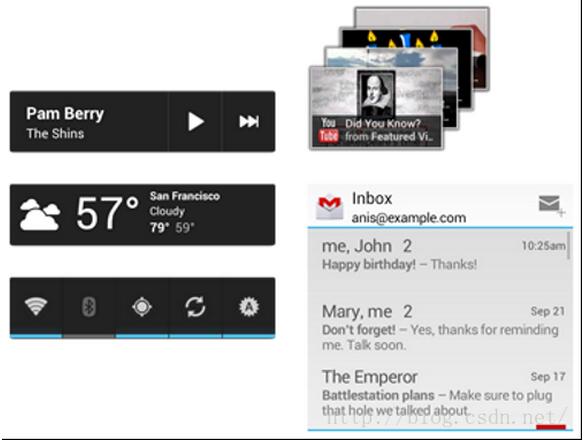
圖 1. Android 4.0 中的範例小掛件。
本文要談的是如何設計一個與其他掛件相處融洽的小掛件,並整理一些實務上的技巧。
一個典型的 Android 掛件由三部分構成:一個邊界框、一個掛件圖形控制項,以及其他元素。掛件能使用的只是 Android View 控制項中的一個子集,支援文字標籤、按鈕與圖片;完整的清單可參考 API Guide 中 Creating the app widget layout 那一節。
設計良好的掛件會在邊界框與框架之間留出外邊距(margin),並在框架與內部控制項之間留出內邊距(padding),如下圖所示:
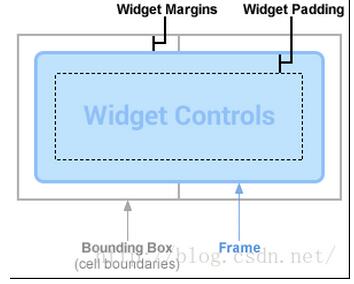
圖 2. 掛件與邊界框之間應留 margin,框架與控制項之間應留 padding。
注意:在 Android 4.0 中,系統會自動為掛件與邊框之間加上 margin。
每個掛件都必須指定 minWidth 與 minHeight,代表它至少需要多少空間才能正常顯示。使用者把掛件加到主螢幕時,實際占用的空間通常會大於這兩個值。
Android 主螢幕提供的是一種格狀的可用空間,用來排列 App 圖示與桌面掛件。這種矩陣格子在裝置間並不統一:一般手機提供 4 × 4 格,平板則可能是 8 × 7 格。掛件被加入時,系統會依 minWidth 與 minHeight 自動拉伸,占據最少需要的格子數。因此使用 .9.png 作為背景、並搭配可伸縮的版面配置,才能讓掛件在各式主螢幕格子上都呈現良好。
由於不同裝置的格子尺寸不一,你可以用每格約占 74dp(部分裝置為 70dp)這個粗略值來估算最小尺寸。
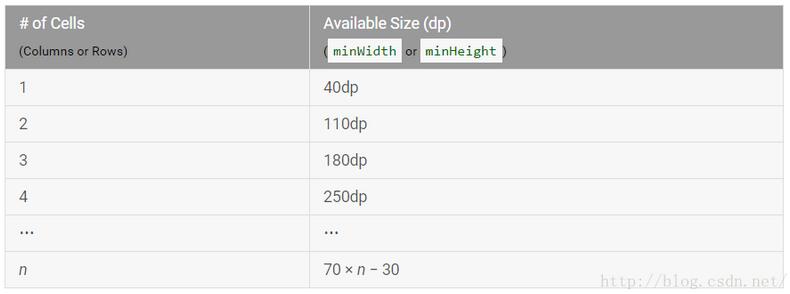
最佳實踐是把 minWidth 與 minHeight 設得保守一些,這樣掛件在預設狀態下的呈現會最理想。
舉個例子:假設你做的是音樂播放器掛件,需要顯示目前正在播放的專輯封面與歌名,加上播放鍵與下一首鍵。
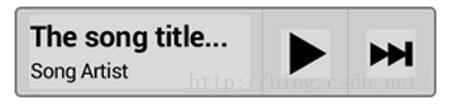
圖 3. 一個音樂播放器掛件的例子。
此時最小高度應該是「兩行文字高度 + 文字間距 + 內距」,最小寬度則是「播放鍵最小寬 + 下一首鍵最小寬 + 文字最小寬(例如容納 10 個字元)+ 水平方向的 margin 與 padding」。
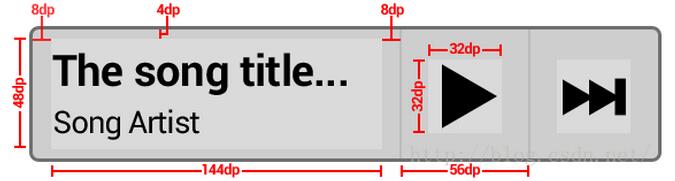
圖 4. minWidth/minHeight 的估算方式與 margin 範例(此處以 144dp 作為文字標籤的合適最小寬度)。
最後算出來:
minWidth = 144dp + (2 × 8dp) + (2 × 56dp) = 272dp
minHeight = 48dp + (2 × 4dp) = 56dp
如果你的 .9.png 背景本身自帶內距,這部分也要一并計入。
從 Android 3.1 起,掛件在水平與垂直方向都能被使用者調整大小。這意味著 minWidth 與 minHeight 變成了「預設大小」,而你可以用 minResizeWidth 與 minResizeHeight 定義真正的最小值——低於這個門檻時,控制項會擠到模糊甚至無法使用。
對於以 ListView 或 GridView 為基礎的集合型掛件,這一點尤其需要留意。
如前所述,Android 4.0 會自動為主螢幕上的掛件加上小尺寸、標準尺寸的外邊距。因此對 API Level 14 以上的版本,我們不建議再自行添加額外 margin,以免視覺間距被放大成兩倍。若需要支援更早的版本,則要自行處理,API Guide 中有相關說明。
很多掛件只有一個矩形或圓角矩形的背景。實作上最好的方式是用 .9.png 來定義,這樣能自適應不同尺寸的拉伸。
內容部分則應該使用可伸縮的版面配置,例如 RelativeLayout、LinearLayout 或 FrameLayout,讓配置檔能適應多種螢幕尺寸。
下面是一個音樂播放掛件的版面範例,包含一個文字域、暫停鍵與下一首鍵,margin 由系統決定:
<FrameLayout android:layout_width="match_parent" android:layout_height="match_parent" android:padding="@dimen/widget_margin"> <LinearLayout android:layout_width="match_parent" android:layout_height="match_parent" android:orientation="horizontal" android:background="@drawable/my_widget_background"> <TextView android:id="@+id/song_info" android:layout_width="0dp" android:layout_height="match_parent" android:layout_weight="1" /> <Button android:id="@+id/play_button" android:layout_width="@dimen/my_button_width" android:layout_height="match_parent" /> <Button android:id="@+id/skip_button" android:layout_width="@dimen/my_button_width" android:layout_height="match_parent" /> </LinearLayout> </FrameLayout>
照著上面的原則調整,你就能做出一份有彈性的掛件版面。
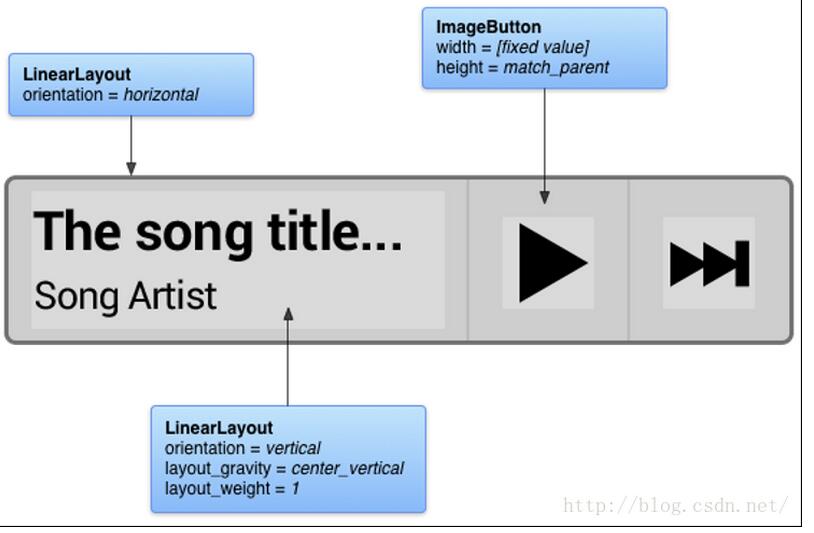
圖 6. 具彈性的版面與屬性設定示例。
開始設計新掛件或改版既有掛件之前,建議先下載官方的設計模板包。裡面包含了 .9.png 背景圖、XML 範例,以及針對不同像素密度的 PS 檔案,能省下不少切圖時間。
以下是一個簡易掛件的原始碼,它會顯示維基辭典的「每日一字」。為了避免 ANR,更新動作被放進背景 Service 中執行。
/* * Copyright (C) 2009 The Android Open Source Project * * Licensed under the Apache License, Version 2.0 (the "License"); * you may not use this file except in compliance with the License. * You may obtain a copy of the License at * * https://www.apache.org/licenses/LICENSE-2.0 * * Unless required by applicable law or agreed to in writing, software * distributed under the License is distributed on an "AS IS" BASIS, * WITHOUT WARRANTIES OR CONDITIONS OF ANY KIND, either express or implied. * See the License for the specific language governing permissions and * limitations under the License. */ package com.example.android.wiktionary; import com.example.android.wiktionary.SimpleWikiHelper.ApiException; import com.example.android.wiktionary.SimpleWikiHelper.ParseException; import android.app.PendingIntent; import android.app.Service; import android.appwidget.AppWidgetManager; import android.appwidget.AppWidgetProvider; import android.content.ComponentName; import android.content.Context; import android.content.Intent; import android.content.res.Resources; import android.net.Uri; import android.os.IBinder; import android.text.format.Time; import android.util.Log; import android.widget.RemoteViews; import java.util.regex.Matcher; import java.util.regex.Pattern; /** * Define a simple widget that shows the Wiktionary "Word of the day." To build * an update we spawn a background {@link Service} to perform the API queries. */ public class WordWidget extends AppWidgetProvider { /** * Regular expression that splits "Word of the day" entry into word * name, word type, and the first description bullet point. */ public static final String WOTD_PATTERN = "(?s)\\{\\{wotd\\|(.+?)\\|(.+?)\\|([^#\\|]+).*?\\}\\}"; @Override public void onUpdate(Context context, AppWidgetManager appWidgetManager, int[] appWidgetIds) { Log.d("WordWidget.UpdateService", "onUpdate()"); // To prevent any ANR timeouts, we perform the update in a service context.startService(new Intent(context, UpdateService.class)); } public static class UpdateService extends Service { @Override public void onStart(Intent intent, int startId) { Log.d("WordWidget.UpdateService", "onStart()"); // Build the widget update for today RemoteViews updateViews = buildUpdate(this); Log.d("WordWidget.UpdateService", "update built"); // Push update for this widget to the home screen ComponentName thisWidget = new ComponentName(this, WordWidget.class); AppWidgetManager manager = AppWidgetManager.getInstance(this); manager.updateAppWidget(thisWidget, updateViews); Log.d("WordWidget.UpdateService", "widget updated"); } @Override public IBinder onBind(Intent intent) { return null; } /** * Build a widget update to show the current Wiktionary * "Word of the day." Will block until the online API returns. */ public RemoteViews buildUpdate(Context context) { // Pick out month names from resources Resources res = context.getResources(); String[] monthNames = res.getStringArray(R.array.month_names); // Find current month and day Time today = new Time(); today.setToNow(); // Build the page title for today, such as "March 21" String pageName = res.getString(R.string.template_wotd_title, monthNames[today.month], today.monthDay); String pageContent = null; try { // Try querying the Wiktionary API for today's word SimpleWikiHelper.prepareUserAgent(context); pageContent = SimpleWikiHelper.getPageContent(pageName, false); } catch (ApiException e) { Log.e("WordWidget", "Couldn't contact API", e); } catch (ParseException e) { Log.e("WordWidget", "Couldn't parse API response", e); } RemoteViews views = null; Matcher matcher = null; Prefs prefs = new Prefs(this); if (pageContent == null) { // could not get content, use cache // could be null pageContent = prefs.getPageContent(); } if (pageContent != null) { // we have page content // is it valid? matcher = Pattern.compile(WOTD_PATTERN).matcher(pageContent); } if (matcher != null && matcher.find()) { // valid content, cache it // ensure that latest valid content is // always cached in case of failures prefs.setPageContent(pageContent); // Build an update that holds the updated widget contents views = new RemoteViews(context.getPackageName(), R.layout.widget_word); String wordTitle = matcher.group(1); views.setTextViewText(R.id.word_title, wordTitle); views.setTextViewText(R.id.word_type, matcher.group(2)); views.setTextViewText(R.id.definition, matcher.group(3).trim()); // When user clicks on widget, launch to Wiktionary definition page String definePage = String.format("%s://%s/%s", ExtendedWikiHelper.WIKI_AUTHORITY, ExtendedWikiHelper.WIKI_LOOKUP_HOST, wordTitle); Intent defineIntent = new Intent(Intent.ACTION_VIEW, Uri.parse(definePage)); PendingIntent pendingIntent = PendingIntent.getActivity(context, 0 /* no requestCode */, defineIntent, 0 /* no flags */); views.setOnClickPendingIntent(R.id.widget, pendingIntent); } else { // Didn't find word of day, so show error message views = new RemoteViews(context.getPackageName(), R.layout.widget_message); views.setTextViewText(R.id.message, context.getString(R.string.widget_error)); } return views; } } }
把這幾個原則記在手邊:尺寸保守、內距留白、版面可伸縮、背景用 .9.png、耗時工作丟到 Service。做到這五點,你的小掛件就能在各式桌面上都站得住腳。
 Android 開發系列(十九):為 SimpleAdapter 自訂樣式
Adapter 的核心作用,是把資料處理好之後再呈現到視圖上。對一般的 ArrayAdapter 來說,只要把一個陣列與一個樣式傳給它,就能用列表把這個字串陣列顯示出來。
 Android Camera 子系統之進程與文件解析
本文基於 Android 4.2.2,從進程與文件的角度審視 Android Camera 子系統的整體架構。 Android Camera 子系統的整體架構分為客戶端
 自定義 View 實現彈幕:垂直固定與隨機兩種模式
這次要實現兩種彈幕效果:一種是彈幕在垂直方向位置固定,另一種是垂直方向隨機分佈。 效果一:垂直方向固定 效果二:垂直方向隨機 效果圖中的白色背景就是彈幕容器本身。這
 Android 元件:Fragment 實作入門
Fragment 依附於 Activity 存在,但本身又相對獨立,可以把它理解為 Activity 裡的子 Activity。它最常被用在平板開發上:一個 Activi