

編輯:關於 Android 程式設計
在 Android 開發中,常需要從自家應用程式跳到系統內建的撥號、聯絡人、簡訊等介面。Android 透過 Intent 提供這些能力,但不同 Action 的行為與權限要求並不相同。以下整理常見用法,方便依需求選擇。
若只是把號碼帶到撥號鍵盤,建議使用 ACTION_DIAL。這種方式通常不需要直接撥號權限,也能降低誤觸風險。
Intent dialIntent = new Intent(Intent.ACTION_DIAL, Uri.parse("tel:" + phoneNumber));
startActivity(dialIntent);
若應用程式本身已取得通話權限,且要直接發起通話,可使用 ACTION_CALL。在 Android 6.0 以上,仍需於執行期動態請求 CALL_PHONE 權限。
Intent callIntent = new Intent(Intent.ACTION_CALL, Uri.parse("tel:" + phoneNumber));
startActivity(callIntent);開啟系統聯絡人清單,可使用 ACTION_PICK 搭配 Contacts Provider 的 URI。
Intent pickIntent = new Intent(Intent.ACTION_PICK, ContactsContract.Contacts.CONTENT_URI);
startActivity(pickIntent);
若要新增或編輯聯絡人,可使用 ACTION_INSERT_OR_EDIT,並透過 putExtra 帶入姓名、電話等資訊。
Intent insertIntent = new Intent(Intent.ACTION_INSERT_OR_EDIT);
insertIntent.setType(ContactsContract.Contacts.CONTENT_ITEM_TYPE);
insertIntent.putExtra(ContactsContract.Intents.Insert.NAME, "王小明");
insertIntent.putExtra(ContactsContract.Intents.Insert.PHONE, "0912345678");
startActivity(insertIntent);要開啟簡訊撰寫畫面並帶入收件者與內容,可使用 smsto URI,搭配 ACTION_SENDTO 或 ACTION_VIEW。
Intent smsIntent = new Intent(Intent.ACTION_SENDTO, Uri.parse("smsto:0912345678"));
smsIntent.putExtra("sms_body", "這是一段測試簡訊");
startActivity(smsIntent);
部分機型或系統版本對 setClassName 指定內建應用程式類別的相容性不佳,正式專案建議優先使用標準 Action,避免硬編碼套件名稱與 Activity 名稱。
 RxAndroid 使用方式完整解析:從鏈式表達式到執行緒安全與 RxBinding
RxAndroid 是 RxJava 的擴充套件,能用相當優雅的方式處理非同步請求。之前寫過一些相關內容,這次再補充,把 RxAndroid 的用法完整走一遍。 本文範例
 Android 屬性動畫入門:ObjectAnimator 與 AnimatorSet
屬性動畫是 Android 動畫系統中很靈活的一種方式。與傳統補間動畫相比,它能直接操作物件的屬性,例如位移、旋轉、透明度與縮放,讓動畫效果更自然,也更容易與互動結合。O
 Android Notification 的三種典型寫法與相容處理
收到新訊息時,即使我們沒有打開 App,手機最上方的狀態列也會出現一個小圖示提醒。這個效果靠的就是 Notification。本文整理了三種不同時期的 Notificat
 從零開始學 Android(三十九):Activity 生命週期全解
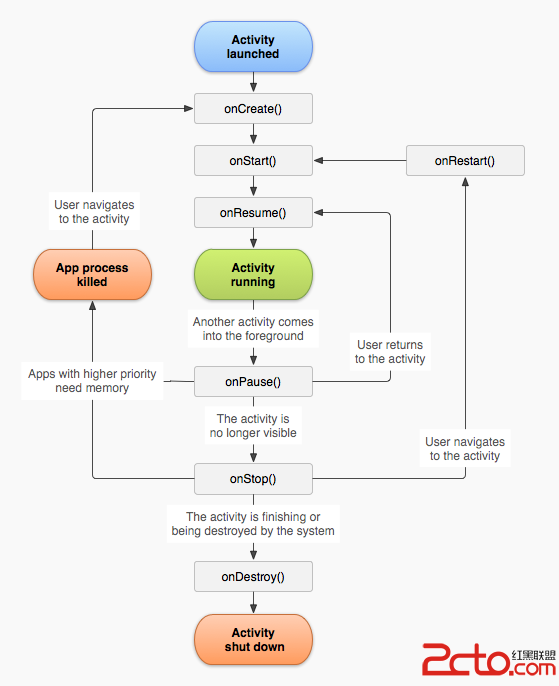
Intent 處理的是兩個 UI 介面之間的轉換,而想真正搞懂 Intent 背後發生什麼事,就必須先理解 Activity 的生命週期。 最簡單的認知是:顯示在螢幕上的