

編輯:關於 Android 程式設計
本實例實現每隔 5 秒上傳一次文件,服務器端接收手機上傳的文件資訊並做相應處理,技術棧採用 Android + Struts2。
1)新建 Android 專案 androidUpload,目錄結構如下:
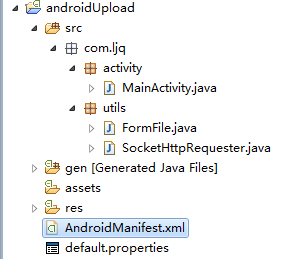
2)新建 FormFile 類,用來封裝文件資訊。
package com.ljq.utils; import java.io.File; import java.io.FileInputStream; import java.io.FileNotFoundException; import java.io.InputStream; /** * 上傳文件 */ public class FormFile { /* 上傳文件的數據 */ private byte[] data; private InputStream inStream; private File file; /* 文件名稱 */ private String filname; /* 請求參數名稱*/ private String parameterName; /* 內容類型 */ private String contentType = "application/octet-stream"; public FormFile(String filname, byte[] data, String parameterName, String contentType) { this.data = data; this.filname = filname; this.parameterName = parameterName; if(contentType!=null) this.contentType = contentType; } public FormFile(String filname, File file, String parameterName, String contentType) { this.filname = filname; this.parameterName = parameterName; this.file = file; try { this.inStream = new FileInputStream(file); } catch (FileNotFoundException e) { e.printStackTrace(); } if(contentType!=null) this.contentType = contentType; } public File getFile() { return file; } public InputStream getInStream() { return inStream; } public byte[] getData() { return data; } public String getFilname() { return filname; } public void setFilname(String filname) { this.filname = filname; } public String getParameterName() { return parameterName; } public void setParameterName(String parameterName) { this.parameterName = parameterName; } public String getContentType() { return contentType; } public void setContentType(String contentType) { this.contentType = contentType; } }
3)新建 SocketHttpRequester 類,封裝上傳文件的 Socket 通信邏輯。
package com.ljq.utils; import java.io.BufferedReader; import java.io.InputStreamReader; import java.io.OutputStream; import java.net.InetAddress; import java.net.Socket; import java.net.URL; import java.util.Map; /** * 上傳文件到服務器 * * @author Administrator * */ public class SocketHttpRequester { /** * 直接通過 HTTP 協議提交數據到服務器,實現如下面表單提交功能: * <FORM METHOD=POST ACTION="https://192.168.1.101:8083/upload/servlet/UploadServlet" enctype="multipart/form-data"> * <INPUT TYPE="text" NAME="name"> * <INPUT TYPE="text" NAME="id"> * <input type="file" name="imagefile"/> * <input type="file" name="zip"/> * </FORM> * @param path 上傳路徑(注:避免使用 localhost 或 127.0.0.1 這樣的路徑測試,因為它會指向手機模擬器) * @param params 請求參數 key 為參數名,value 為參數值 * @param file 上傳文件 */ public static boolean post(String path, Map<String, String> params, FormFile[] files) throws Exception{ final String BOUNDARY = "---------------------------7da2137580612"; //數據分隔線 final String endline = "--" + BOUNDARY + "--\r\n";//數據結束標志 int fileDataLength = 0; for(FormFile uploadFile : files){//得到文件類型數據的總長度 StringBuilder fileExplain = new StringBuilder(); fileExplain.append("--"); fileExplain.append(BOUNDARY); fileExplain.append("\r\n"); fileExplain.append("Content-Disposition: form-data;name=\""+ uploadFile.getParameterName()+"\";filename=\""+ uploadFile.getFilname() + "\"\r\n"); fileExplain.append("Content-Type: "+ uploadFile.getContentType()+"\r\n\r\n"); fileExplain.append("\r\n"); fileDataLength += fileExplain.length(); if(uploadFile.getInStream()!=null){ fileDataLength += uploadFile.getFile().length(); }else{ fileDataLength += uploadFile.getData().length; } } StringBuilder textEntity = new StringBuilder(); for (Map.Entry<String, String> entry : params.entrySet()){//構造文本類型參數的實體數據 textEntity.append("--"); textEntity.append(BOUNDARY); textEntity.append("\r\n"); textEntity.append("Content-Disposition: form-data; name=\""+ entry.getKey() + "\"\r\n\r\n"); textEntity.append(entry.getValue()); textEntity.append("\r\n"); } //計算傳輸給服務器的實體數據總長度 int dataLength = textEntity.toString().getBytes().length + fileDataLength + endline.getBytes().length; URL url = new URL(path); int port = url.getPort()==-1 ? 80 : url.getPort(); Socket socket = new Socket(InetAddress.getByName(url.getHost()), port); OutputStream outStream = socket.getOutputStream(); //下面完成 HTTP 請求頭的發送 String requestmethod = "POST "+ url.getPath()+" HTTP/1.1\r\n"; outStream.write(requestmethod.getBytes()); String accept = "Accept: image/gif, image/jpeg, image/pjpeg, image/pjpeg, application/x-shockwave-flash, application/xaml+xml, application/vnd.ms-xpsdocument, application/x-ms-xbap, application/x-ms-application, application/vnd.ms-excel, application/vnd.ms-powerpoint, application/msword, */*\r\n"; outStream.write(accept.getBytes()); String language = "Accept-Language: zh-CN\r\n"; outStream.write(language.getBytes()); String contenttype = "Content-Type: multipart/form-data; boundary="+ BOUNDARY+ "\r\n"; outStream.write(contenttype.getBytes()); String contentlength = "Content-Length: "+ dataLength + "\r\n"; outStream.write(contentlength.getBytes()); String alive = "Connection: Keep-Alive\r\n"; outStream.write(alive.getBytes()); String host = "Host: "+ url.getHost() +":"+ port +"\r\n"; outStream.write(host.getBytes()); //寫完 HTTP 請求頭後根據 HTTP 協議再寫一個回車換行 outStream.write("\r\n".getBytes()); //把所有文本類型的實體數據發送出來 outStream.write(textEntity.toString().getBytes()); //把所有文件類型的實體數據發送出來 for(FormFile uploadFile : files){ StringBuilder fileEntity = new StringBuilder(); fileEntity.append("--"); fileEntity.append(BOUNDARY); fileEntity.append("\r\n"); fileEntity.append("Content-Disposition: form-data;name=\""+ uploadFile.getParameterName()+"\";filename=\""+ uploadFile.getFilname() + "\"\r\n"); fileEntity.append("Content-Type: "+ uploadFile.getContentType()+"\r\n\r\n"); outStream.write(fileEntity.toString().getBytes()); if(uploadFile.getInStream()!=null){ byte[] buffer = new byte[1024]; int len = 0; while((len = uploadFile.getInStream().read(buffer, 0, 1024))!=-1){ outStream.write(buffer, 0, len); } uploadFile.getInStream().close(); }else{ outStream.write(uploadFile.getData(), 0, uploadFile.getData().length); } outStream.write("\r\n".getBytes()); } //下面發送數據結束標志,表示數據已經結束 outStream.write(endline.getBytes()); BufferedReader reader = new BufferedReader(new InputStreamReader(socket.getInputStream())); if(reader.readLine().indexOf("200")==-1){//讀取 web 服務器返回的數據,判斷請求碼是否為 200,如果不是 200,代表請求失敗 return false; } outStream.flush(); outStream.close(); reader.close(); socket.close(); return true; } /** * 提交數據到服務器 * @param path 上傳路徑 * @param params 請求參數 key 為參數名,value 為參數值 * @param file 上傳文件 */ public static boolean post(String path, Map<String, String> params, FormFile file) throws Exception{ return post(path, params, new FormFile[]{file}); } }
4)新建 MainActivity 類,實現每隔 5 秒上傳一次。
package com.ljq.activity; import java.io.File; import java.util.HashMap; import java.util.Map; import android.app.Activity; import android.os.Bundle; import android.os.Environment; import android.os.Handler; import android.util.Log; import com.ljq.utils.FormFile; import com.ljq.utils.SocketHttpRequester; public class MainActivity extends Activity { private File file; private Handler handler; private static final String TAG="MainActivity"; @Override public void onCreate(Bundle savedInstanceState) { super.onCreate(savedInstanceState); setContentView(R.layout.main); Log.i(TAG, "onCreate"); file = new File(Environment.getExternalStorageDirectory(), "123.rmvb"); Log.i(TAG, "照片文件是否存在:"+file); handler=new Handler(); handler.post(runnable); } Runnable runnable=new Runnable() { public void run() { Log.i(TAG, "runnable run"); uploadFile(file); handler.postDelayed(runnable, 5000); } }; /** * 上傳圖片到服務器 * * @param imageFile 包含路徑 */ public void uploadFile(File imageFile) { Log.i(TAG, "upload start"); try { String requestUrl = "https://192.168.1.101:8083/upload/upload/execute.do"; //請求普通信息 Map<String, String> params = new HashMap<String, String>(); params.put("username", "張三"); params.put("pwd", "zhangsan"); params.put("age", "21"); params.put("fileName", imageFile.getName()); //上傳文件 FormFile formfile = new FormFile(imageFile.getName(), imageFile, "image", "application/octet-stream"); SocketHttpRequester.post(requestUrl, params, formfile); Log.i(TAG, "upload success"); } catch (Exception e) { Log.i(TAG, "upload error"); e.printStackTrace(); } Log.i(TAG, "upload end"); } }
5)修改清單文件,記得加入網絡權限。
 <?xml version="1.0" encoding="utf-8"?>
<manifest xmlns:android="https://schemas.android.com/apk/res/android" package="com.ljq.activity" android:versionCode="1" android:versionName="1.0">
<application android:icon="@drawable/icon" android:label="@string/app_name">
<activity android:name=".MainActivity" android:label="@string/app_name">
<intent-filter>
<action android:name="android.intent.action.MAIN" />
<category android:name="android.intent.category.LAUNCHER" />
</intent-filter>
</activity>
</application>
<uses-sdk android:minSdkVersion="4" />
<uses-permission android:name="android.permission.INTERNET" />
</manifest>
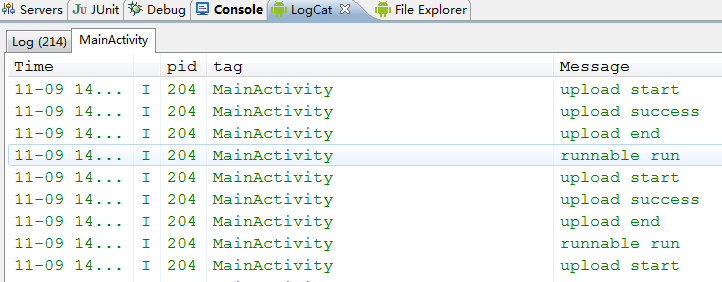
啟動模擬器運行,效果如下:
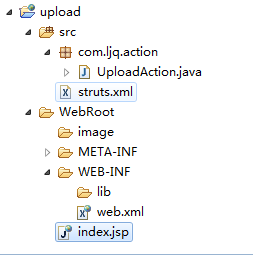
1)新建 Web 專案 upload,目錄結構如下:
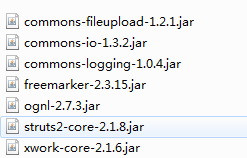
注意:記得加入 Struts2 相關 JAR 包:
2)新建 action 類 UploadAction。
package com.ljq.action; import java.io.File; import java.io.FileInputStream; import java.io.FileOutputStream; import java.io.IOException; import javax.servlet.http.HttpServletRequest; import org.apache.struts2.ServletActionContext; import com.opensymphony.xwork2.ActionSupport; /** * 獲取 Android 端上傳過來的信息 * * @author Administrator * */ @SuppressWarnings("serial") public class UploadAction extends ActionSupport { //上傳文件域 private File image; //上傳文件類型 private String imageContentType; //封裝上傳文件名 private String imageFileName; //接受依賴注入的屬性 private String savePath; @Override public String execute() { HttpServletRequest request=ServletActionContext.getRequest(); FileOutputStream fos = null; FileInputStream fis = null; try { System.out.println("獲取 Android 端傳過來的普通信息:"); System.out.println("用戶名:"+request.getParameter("username")); System.out.println("密碼:"+request.getParameter("pwd")); System.out.println("年齡:"+request.getParameter("age")); System.out.println("文件名:"+request.getParameter("fileName")); System.out.println("獲取 Android 端傳過來的文件信息:"); System.out.println("文件存放目錄: "+getSavePath()); System.out.println("文件名稱: "+imageFileName); System.out.println("文件大小: "+image.length()); System.out.println("文件類型: "+imageContentType); fos = new FileOutputStream(getSavePath() + "/" + getImageFileName()); fis = new FileInputStream(getImage()); byte[] buffer = new byte[1024]; int len = 0; while ((len = fis.read(buffer)) != -1) { fos.write(buffer, 0, len); } System.out.println("文件上傳成功"); } catch (Exception e) { System.out.println("文件上傳失敗"); e.printStackTrace(); } finally { close(fos, fis); } return SUCCESS; } /** * 文件存放目錄 * * @return */ public String getSavePath() throws Exception{ return ServletActionContext.getServletContext().getRealPath(savePath); } public void setSavePath(String savePath) { this.savePath = savePath; } public File getImage() { return image; } public void setImage(File image) { this.image = image; } public String getImageContentType() { return imageContentType; } public void setImageContentType(String imageContentType) { this.imageContentType = imageContentType; } public String getImageFileName() { return imageFileName; } public void setImageFileName(String imageFileName) { this.imageFileName = imageFileName; } private void close(FileOutputStream fos, FileInputStream fis) { if (fis != null) { try { fis.close(); fis=null; } catch (IOException e) { System.out.println("FileInputStream 關閉失敗"); e.printStackTrace(); } } if (fos != null) { try { fos.close(); fis=null; } catch (IOException e) { System.out.println("FileOutputStream 關閉失敗"); e.printStackTrace(); } } } }
3)配置 struts.xml。
 <?xml version="1.0" encoding="UTF-8" ?>
<!DOCTYPE struts PUBLIC "-//Apache Software Foundation//DTD Struts Configuration 2.0//EN" "https://struts.apache.org/dtds/struts-2.0.dtd">
<struts>
<!-- 該屬性指定需要 Struts2 處理的請求後綴,默認值是 action -->
<constant name="struts.action.extension" value="do"/>
<!-- 設置浏覽器是否緩存靜態內容,默認值為 true(生產環境),開發階段最好關閉 -->
<constant name="struts.serve.static.browserCache" value="false"/>
<!-- 當配置文件修改後系統是否自動重新加載,默認 false(生產環境),開發階段最好打開 -->
<constant name="struts.configuration.xml.reload" value="true"/>
<!-- 開發模式下使用,可以打印更詳細的錯誤信息 -->
<constant name="struts.devMode" value="true"/>
<!-- 默認的視圖主題 -->
<constant name="struts.ui.theme" value="simple"/>
<!-- 解決亂碼 -->
<constant name="struts.i18n.encoding" value="UTF-8"/>
<!-- 指定允許上傳的文件最大字節數,默認 2097152(2M) -->
<constant name="struts.multipart.maxSize" value="22097152"/>
<!-- 設置上傳文件的臨時文件夾,默認使用 javax.servlet.context.tempdir -->
<constant name="struts.multipart.saveDir " value="d:/tmp"/>
<package name="upload" namespace="/upload" extends="struts-default">
<action name="execute" class="com.ljq.action.UploadAction">
<!-- 動態設置 savePath 的屬性值 -->
<param name="savePath">/image</param>
<result name="success">/WEB-INF/page/message.jsp</result>
</action>
</package>
</struts>
4)配置 web.xml。
 <?xml version="1.0" encoding="UTF-8"?>
<web-app version="2.4" xmlns="https://java.sun.com/xml/ns/j2ee" xmlns:xsi="https://www.w3.org/2001/XMLSchema-instance" xsi:schemaLocation="https://java.sun.com/xml/ns/j2ee https://java.sun.com/xml/ns/j2ee/web-app_2_4.xsd">
<filter>
<filter-name>struts2</filter-name>
<filter-class> org.apache.struts2.dispatcher.ng.filter.StrutsPrepareAndExecuteFilter </filter-class>
</filter>
<filter-mapping>
<filter-name>struts2</filter-name>
<url-pattern>/*</url-pattern>
</filter-mapping>
<filter>
<filter-name>strutsCleanup</filter-name>
<filter-class> org.apache.struts2.dispatcher.ActionContextCleanUp </filter-class>
</filter>
<filter-mapping>
<filter-name>strutsCleanup</filter-name>
<url-pattern>/*</url-pattern>
</filter-mapping>
<welcome-file-list>
<welcome-file>index.jsp</welcome-file>
</welcome-file-list>
</web-app>
運行結果如下:
獲取 Android 端傳過來的普通信息:
用戶名:張三
密碼:zhangsan
年齡:21
文件名:123.rmvb
獲取 Android 端傳過來的文件信息:
文件存放目錄: D:\apache-tomcat-6.0.18\webapps\upload\image
文件名稱: 123.rmvb
文件大小: 3962649
文件類型: application/octet-stream
文件上傳成功
以上就是本文的全部內容,希望對你的學習有所幫助。
 Android 透過 WebService 存取 SQL Server:資料庫、伺服器端到客戶端的完整實作
開頭先把兩件事講清楚,免得又被說是標題黨。 第一,Android 沒辦法直接連上 SQL Server。SQL Server 裝完動輒好幾個 GB,而 App 跑在記憶體
 BLE 低功耗藍牙在 Android 開發中的應用實踐
最近一段時間都在開發支援 BLE 藍牙的 Android 應用,是時候做個總結了。 一、什麼是 BLE?~~~ Bluetooth Low Energy(低功耗藍牙),縮
 Android Studio 實戰導覽:介面面板、Gradle 設定與版本控制一次上手
為了降低 Android 的開發門檻,Google 很早便決定把資源集中投注在 Android Studio 這套工具上,並逐步停止對 Eclipse 等其他 IDE 的
 華為 Mate 9 與 Mate 9 Pro 差在哪?規格、售價一次對比
Mate 9 系列一次推出標準版、Pro 版與保時捷設計版,三兄弟長得有點像,價位卻差了快三倍。到底該買哪一隻?先把差異看清楚再決定。 華為 Mate 9 麒麟