

編輯:關於 Android 程式設計
做過應用管理類工具的人都知道,「這個 App 佔了多少空間」是繞不開的需求。本文以一個可運行的示例,說明如何列出設備上的第三方應用,並在點擊後彈出快取、數據、代碼與總大小四項資訊。
先把要展示的欄位收攏到一個 Model 裡,除了標籤、圖標、啟動 Intent 與包名,還預留了快取、數據與程序碼三個容量欄位。
package com.qin.appsize;

import android.content.Intent;
import android.graphics.drawable.Drawable;

// Model 類,用來存放應用程式資訊
public class AppInfo {
    private String appLabel;        // 應用程式標籤
    private Drawable appIcon;       // 應用程式圖示
    private Intent intent;          // 啟動用的 Intent
    private String pkgName;         // 對應的包名
    private long cachesize;         // 快取大小
    private long datasize;          // 數據大小
    private long codesieze;         // 應用程式本體大小

    public long getCachesize() { return cachesize; }
    public void setCachesize(long cachesize) { this.cachesize = cachesize; }

    public long getDatasize() { return datasize; }
    public void setDatasize(long datasize) { this.datasize = datasize; }

    public long getCodesieze() { return codesieze; }
    public void setCodesieze(long codesieze) { this.codesieze = codesieze; }

    public AppInfo() {}

    public String getAppLabel() { return appLabel; }
    public void setAppLabel(String appName) { this.appLabel = appName; }

    public Drawable getAppIcon() { return appIcon; }
    public void setAppIcon(Drawable appIcon) { this.appIcon = appIcon; }

    public Intent getIntent() { return intent; }
    public void setIntent(Intent intent) { this.intent = intent; }

    public String getPkgName() { return pkgName; }
    public void setPkgName(String pkgName) { this.pkgName = pkgName; }
}
列表項採用 ViewHolder 模式,避免 getView 中反覆 findViewById:
package com.qin.appsize;

import java.util.List;
import android.content.Context;
import android.view.LayoutInflater;
import android.view.View;
import android.view.ViewGroup;
import android.widget.BaseAdapter;
import android.widget.ImageView;
import android.widget.TextView;

// 提供給 ListView 使用的自定義 view
public class BrowseApplicationInfoAdapter extends BaseAdapter {
    private List<AppInfo> mlistAppInfo = null;
    LayoutInflater infater = null;

    public BrowseApplicationInfoAdapter(Context context, List<AppInfo> apps) {
        infater = (LayoutInflater) context.getSystemService(Context.LAYOUT_INFLATER_SERVICE);
        mlistAppInfo = apps;
    }

    @Override
    public int getCount() {
        return mlistAppInfo.size();
    }

    @Override
    public Object getItem(int position) {
        return mlistAppInfo.get(position);
    }

    @Override
    public long getItemId(int position) {
        return 0;
    }

    @Override
    public View getView(int position, View convertview, ViewGroup arg2) {
        View view = null;
        ViewHolder holder = null;
        if (convertview == null || convertview.getTag() == null) {
            view = infater.inflate(R.layout.browse_app_item, null);
            holder = new ViewHolder(view);
            view.setTag(holder);
        } else {
            view = convertview;
            holder = (ViewHolder) convertview.getTag();
        }
        AppInfo appInfo = (AppInfo) getItem(position);
        holder.appIcon.setImageDrawable(appInfo.getAppIcon());
        holder.tvAppLabel.setText(appInfo.getAppLabel());
        holder.tvPkgName.setText(appInfo.getPkgName());
        return view;
    }

    class ViewHolder {
        ImageView appIcon;
        TextView tvAppLabel;
        TextView tvPkgName;

        public ViewHolder(View view) {
            this.appIcon = (ImageView) view.findViewById(R.id.imgApp);
            this.tvAppLabel = (TextView) view.findViewById(R.id.tvAppLabel);
            this.tvPkgName = (TextView) view.findViewById(R.id.tvPkgName);
        }
    }
}
關鍵在 queryPacakgeSize:PackageManager 對外並沒有公開查容量的方法,實作上透過反射呼叫隱藏的 getPackageSizeInfo,結果由 IPackageStatsObserver.Stub 的回呼交付。
package com.qin.appsize;

import java.lang.reflect.Method;
import java.util.ArrayList;
import java.util.Collections;
import java.util.List;

import android.app.Activity;
import android.app.AlertDialog;
import android.content.ComponentName;
import android.content.Context;
import android.content.DialogInterface;
import android.content.Intent;
import android.content.pm.IPackageStatsObserver;
import android.content.pm.PackageManager;
import android.content.pm.PackageStats;
import android.content.pm.ResolveInfo;
import android.graphics.drawable.Drawable;
import android.os.Bundle;
import android.os.RemoteException;
import android.text.format.Formatter;
import android.util.Log;
import android.view.LayoutInflater;
import android.view.View;
import android.widget.AdapterView;
import android.widget.ListView;
import android.widget.TextView;
import android.widget.AdapterView.OnItemClickListener;

public class MainActivity extends Activity implements OnItemClickListener {
    private static String TAG = "APP_SIZE";
    private ListView listview = null;
    private List<AppInfo> mlistAppInfo = null;
    LayoutInflater infater = null;

    // 保存當前查詢到的容量資訊
    private long cachesize;   // 快取大小
    private long datasize;    // 數據大小
    private long codesize;    // 應用程式大小
    private long totalsize;   // 總大小

    @Override
    public void onCreate(Bundle savedInstanceState) {
        super.onCreate(savedInstanceState);
        setContentView(R.layout.browse_app_list);
        listview = (ListView) findViewById(R.id.listviewApp);
        mlistAppInfo = new ArrayList<AppInfo>();
        queryAppInfo(); // 查詢所有應用程式資訊
        BrowseApplicationInfoAdapter browseAppAdapter =
                new BrowseApplicationInfoAdapter(this, mlistAppInfo);
        listview.setAdapter(browseAppAdapter);
        listview.setOnItemClickListener(this);
    }

    // 點擊後彈出對話框,顯示該包的容量
    public void onItemClick(AdapterView<?> arg0, View view, int position, long arg3) {
        try {
            queryPacakgeSize(mlistAppInfo.get(position).getPkgName());
        } catch (Exception e) {
            e.printStackTrace();
        }
        infater = (LayoutInflater) MainActivity.this.getSystemService(Context.LAYOUT_INFLATER_SERVICE);
        View dialog = infater.inflate(R.layout.dialog_app_size, null);
        TextView tvcachesize = (TextView) dialog.findViewById(R.id.tvcachesize);
        TextView tvdatasize = (TextView) dialog.findViewById(R.id.tvdatasize);
        TextView tvcodesize = (TextView) dialog.findViewById(R.id.tvcodesize);
        TextView tvtotalsize = (TextView) dialog.findViewById(R.id.tvtotalsize);

        tvcachesize.setText(formateFileSize(cachesize));
        tvdatasize.setText(formateFileSize(datasize));
        tvcodesize.setText(formateFileSize(codesize));
        tvtotalsize.setText(formateFileSize(totalsize));

        AlertDialog.Builder builder = new AlertDialog.Builder(MainActivity.this);
        builder.setView(dialog);
        builder.setTitle(mlistAppInfo.get(position).getAppLabel() + "的大小資訊為:");
        builder.setPositiveButton("確定", new DialogInterface.OnClickListener() {
            @Override
            public void onClick(DialogInterface dialog, int which) {
                dialog.cancel();
            }
        });
        builder.create().show();
    }

    public void queryPacakgeSize(String pkgName) throws Exception {
        if (pkgName != null) {
            // 用反射取得 PackageManager 的隱藏函數 getPackageSizeInfo
            PackageManager pm = getPackageManager();
            try {
                Method getPackageSizeInfo = pm.getClass().getDeclaredMethod(
                        "getPackageSizeInfo", String.class, IPackageStatsObserver.class);
                // 呼叫完成後會回呼 PkgSizeObserver 的方法
                getPackageSizeInfo.invoke(pm, pkgName, new PkgSizeObserver());
            } catch (Exception ex) {
                Log.e(TAG, "NoSuchMethodException");
                ex.printStackTrace();
                throw ex;
            }
        }
    }

    // 由 aidl 形成的 Binder 機制服務類
    public class PkgSizeObserver extends IPackageStatsObserver.Stub {
        /***
         * 回呼函數
         * @param pStatus 返回數據封裝在 PackageStats 對象中
         * @param succeeded 代表回呼成功
         */
        @Override
        public void onGetStatsCompleted(PackageStats pStats, boolean succeeded) throws RemoteException {
            cachesize = pStats.cacheSize;
            datasize = pStats.dataSize;
            codesize = pStats.codeSize;
            totalsize = cachesize + datasize + codesize;
            Log.i(TAG, "cachesize--->" + cachesize + " datasize---->" + datasize
                    + " codeSize---->" + codesize);
        }
    }

    // 系統函數:位元組數轉為可讀字串
    private String formateFileSize(long size) {
        return Formatter.formatFileSize(MainActivity.this, size);
    }

    // 取得所有可啟動的 Activity,類似桌面列表
    public void queryAppInfo() {
        PackageManager pm = this.getPackageManager();
        Intent mainIntent = new Intent(Intent.ACTION_MAIN, null);
        mainIntent.addCategory(Intent.CATEGORY_LAUNCHER);
        List<ResolveInfo> resolveInfos = pm.queryIntentActivities(mainIntent, 0);
        // 依名稱排序,這步不可省,否則第三方應用可能排在系統應用之後甚至顯示不全
        Collections.sort(resolveInfos, new ResolveInfo.DisplayNameComparator(pm));
        if (mlistAppInfo != null) {
            mlistAppInfo.clear();
            for (ResolveInfo reInfo : resolveInfos) {
                String activityName = reInfo.activityInfo.name;
                String pkgName = reInfo.activityInfo.packageName;
                String appLabel = (String) reInfo.loadLabel(pm);
                Drawable icon = reInfo.loadIcon(pm);

                Intent launchIntent = new Intent();
                launchIntent.setComponent(new ComponentName(pkgName, activityName));

                AppInfo appInfo = new AppInfo();
                appInfo.setAppLabel(appLabel);
                appInfo.setPkgName(pkgName);
                appInfo.setAppIcon(icon);
                appInfo.setIntent(launchIntent);
                mlistAppInfo.add(appInfo);
            }
        }
    }
}
反射呼叫隱藏 API 屬於「灰色手段」:不同 ROM 與系統版本的方法簽名可能變動,一旦找不到就會拋異常,因此務必包好 try-catch 並準備降級方案。另外容量查詢是異步行為,正式專案中建議把回呼結果 post 回主線程再更新 UI,避免在回呼裡直接操作介面。
 效能優化實測:用 SparseArray 取代 HashMap 到底省多少
為什麼會有 SparseArray SparseArray 是 Android 框架獨有的類別,標準 JDK 裡並不存在。相比 HashMap,它在記憶體上更省,某些情境
 Android 短信發送器實作:輸入號碼與內容並完成發送
簡易短信發送器可由輸入框與按鈕組成。使用者輸入號碼與內容後,透過 SmsManager 取得短信管理器,再呼叫 sendTextMessage 發送。若內容過長,可先用
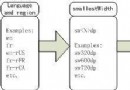 Android 螢幕適配規則:限定符優先級與資源匹配流程
要做多螢幕適配,第一步得先讓系統「認得出」不同螢幕。Android 提供了一組限定符(qualifier,也有人譯成限定詞),用來描述資源適用於哪一類裝置。 上圖列出常
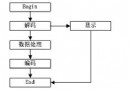 Android 視頻處理:為錄製影片加入動態時間水印
在部分影音應用中,需求不只是畫面上顯示時間,而是要把時間資訊直接燒錄進影片畫面。這代表影片在電腦或其他裝置播放時,也能看到每一段畫面的時間標記。本文整理在 Android