

編輯:關於 Android 程式設計
企業類應用裡經常會遇到「像 Excel 一樣的表格」需求:左側固定一列作行標題,頂部固定一行作列標題,中間區域可以橫向滾動,且所有行的橫向滾動必須同步。本文用一套完整代碼把這個效果做出來。
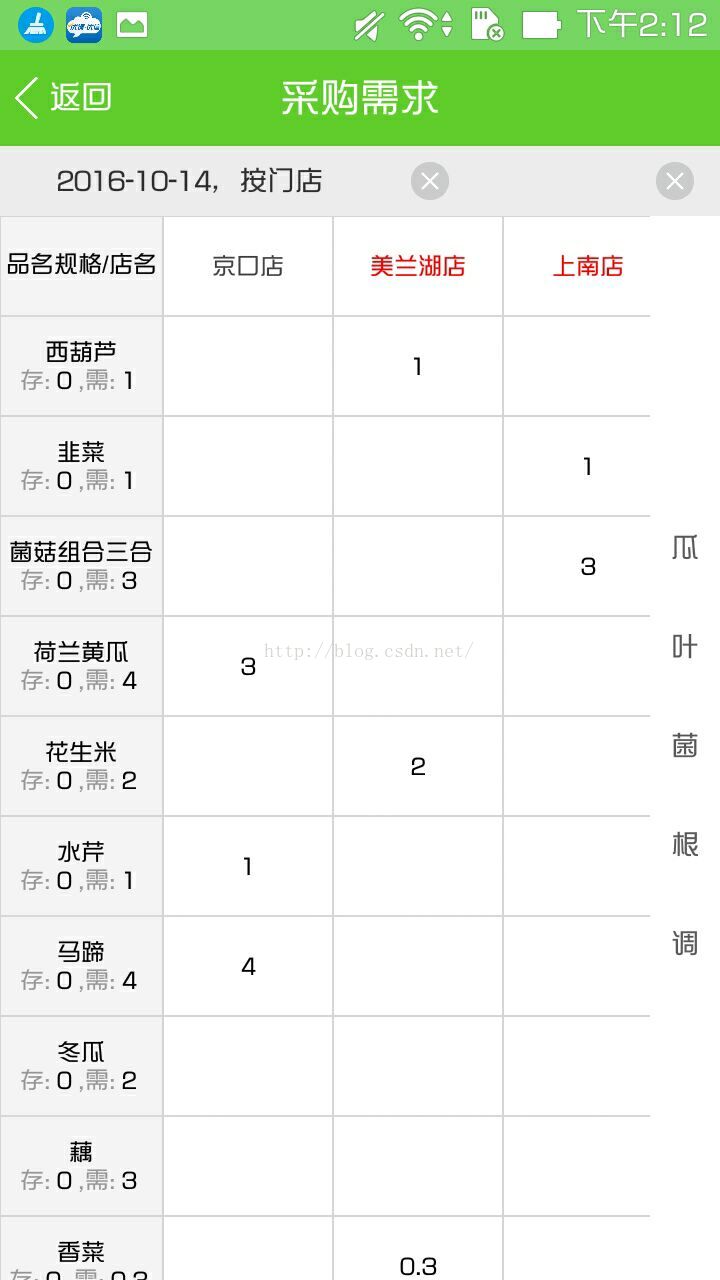
核心是自定義 CHTableScrollView:它繼承 HorizontalScrollView,在 onTouchEvent 中把自己記錄為「當前被觸摸的視圖」,在 onScrollChanged 中判斷——如果自己正在被觸摸,就通知 Activity 去同步其他所有滾動容器;否則說明是程式主動同步的,走父類邏輯即可。這一層判斷是避免「無限循環滑動」的關鍵。
/**
 * excel 布局
 */
public class CHTableScrollView extends HorizontalScrollView {
    PurchaseRequireActivity activity;

    public CHTableScrollView(Context context, AttributeSet attrs, int defStyle) {
        super(context, attrs, defStyle);
        activity = (PurchaseRequireActivity) context;
    }

    public CHTableScrollView(Context context, AttributeSet attrs) {
        super(context, attrs);
        activity = (PurchaseRequireActivity) context;
    }

    public CHTableScrollView(Context context) {
        super(context);
        activity = (PurchaseRequireActivity) context;
    }

    @Override
    public boolean onTouchEvent(MotionEvent ev) {
        // 進行觸摸賦值
        activity.mTouchView = this;
        return super.onTouchEvent(ev);
    }

    @Override
    protected void onScrollChanged(int l, int t, int oldl, int oldt) {
        // 當前的 CHScrollView 被觸摸時,才去同步其他
        if (activity.mTouchView == this) {
            activity.onScrollChanged(l, t);
        } else {
            super.onScrollChanged(l, t, oldl, oldt);
        }
    }
}
/**
 * 采購需求
 */
public class PurchaseRequireActivity extends BaseActivity implements PurchaseRequireView {
    @Bind(R.id.appTitle) TextView appTitle;
    @Bind(R.id.scrollLinearLayout) LinearLayout titleLinearLayout;
    @Bind(R.id.scroll_list) ListView mListView;
    @Bind(R.id.item_scroll_title) CHTableScrollView headerScroll;

    public HorizontalScrollView mTouchView;
    private List<CHTableScrollView> mHScrollViews = new ArrayList<>(); // 裝入所有的 HScrollView
    private HashMap<String, TextView> mColumnControls = new HashMap<>();
    private PPOrderRequirePresenter presenter;

    @Override
    protected void onCreate(Bundle savedInstanceState) {
        super.onCreate(savedInstanceState);
        try {
            setContentView(R.layout.activity_purchase_require);
            ButterKnife.bind(this);
            init(); // 初始化
        } catch (Exception e) {
            e.printStackTrace();
        }
    }

    private void init() {
        presenter = new PPOrderRequirePresenter(this, this);
        presenter.GetToday();
    }

    @OnClick({R.id.backRLot})
    public void onClick(View view) {
        switch (view.getId()) {
            case R.id.backRLot:
                finish();
                break;
        }
    }

    /** 全部列表滑動到起始位置 */
    public void scrollTo_0_0() {
        for (final CHTableScrollView hScrollView : mHScrollViews) {
            mListView.post(new Runnable() {
                @Override
                public void run() {
                    // 等 listView 刷新完成後,把該條移動到最終位置
                    hScrollView.scrollTo(0, 0);
                }
            });
        }
    }

    /** 把某次滑動同步給其他所有滾動容器 */
    public void onScrollChanged(int l, int t) {
        for (CHTableScrollView scrollView : mHScrollViews) {
            if (mTouchView != scrollView) {
                scrollView.smoothScrollTo(l, t); // 防止重複滑動
            }
        }
    }

    public void onClickText(String str, int position) {
        System.out.println(str + "-" + position);
    }

    @Override
    public void refreshLV(List<PPOrderRequireMobModel> newList) {
        list.clear();
        list.addAll(newList);
    }

    @Override
    public void initViews(String[] cols, List<Map<String, String>> datas) {
        scrollTo_0_0();                 // 全部列表回到起始位置
        titleLinearLayout.removeAllViews(); // 清空所有 view

        // 建立表頭
        for (int i = 0; i < cols.length; i++) {
            if (i != 0) {
                View linearLay = presenter.newView(
                        PurchaseRequireActivity.this, R.layout.row_title_edit_view, cols[i]);
                TextView et = (TextView) linearLay.findViewById(R.id.tevEditView);
                if (cols[i].contains("-")) {
                    // 末位為 2 表示專櫃(紅色),1 表示買斷(深灰)
                    if (cols[i].substring(cols[i].length() - 1).equals("2")) {
                        et.setTextColor(Color.RED);
                    } else {
                        et.setTextColor(Color.DKGRAY);
                    }
                } else {
                    et.setTextColor(Color.DKGRAY);
                }
                et.setText(cols[i].substring(0, cols[i].length() - 2)); // 去掉尾部的類型標記
                titleLinearLayout.addView(linearLay);
            }
        }

        // 添加頭滑動事件,先清空列表
        mHScrollViews.clear();
        mHScrollViews.add(headerScroll);
        mListView.setDividerHeight(0); // 去掉分割線
        mColumnControls.clear();

        for (int i = 0; i < cols.length; i++) {
            if (i != 0) { // 預留第一列作為行標題
                EditText etItem1 = new EditText(PurchaseRequireActivity.this);
                etItem1.setWidth(50);
                etItem1.setTextColor(Color.DKGRAY);
                etItem1.setGravity(Gravity.CENTER);
                mColumnControls.put(cols[i], etItem1);
            }
        }

        BaseAdapter adapter = new PurchaseRequireAdapter(this, datas, R.layout.row_item_edit,
                cols, mColumnControls, mHScrollViews, mListView);
        mListView.setAdapter(adapter);
    }
}
/**
 * 采購需求
 */
public interface PurchaseRequireView {
    void refreshLV(List<PPOrderRequireMobModel> newList);
    void initViews(String[] cols, List<Map<String, String>> datas);
}
這一層的工作是把嵌套的業務數據攤平成「二維表」:行是貨品,列是「門店 + 結算方式」。
/**
 * 采購需求
 */
public class PPOrderRequirePresenter {
    private PurchaseRequireView view;
    private Context context;

    public PPOrderRequirePresenter(Context context, PurchaseRequireView view) {
        this.context = context;
        this.view = view;
    }

    /** 獲取數據 */
    public void GetToday() {
        String billDate = getStartBillDate();
        int dimen = Integer.parseInt(getDimen()); // 默認條件:日期=當天,維度=按門店
        String url = InterfaceNameUtil.PPOrderRequireGetRequire(billDate, dimen);
        Log.e("url", url);

        final SweetAlertDialog dialog = AppUtil.showLoading(context, "正在發送請求,請稍後...");
        APIListTRequest<PPOrderRequireMobModel> request = new APIListTRequest<>(
                url, null, PPOrderRequireMobModel.class,
                new Response.Listener<List<PPOrderRequireMobModel>>() {
                    @Override
                    public void onResponse(List<PPOrderRequireMobModel> list) {
                        if (list != null) {
                            view.refreshLV(list);
                            doSomethingFroList(list);
                            view.refreshVerticalLV(getPNameFromDB(list)); // 刷新導航條
                        }
                        dialog.dismiss();
                    }
                }, new Response.ErrorListener() {
            @Override
            public void onErrorResponse(VolleyError error) {
                AppUtil.toError(dialog, error);
            }
        });
        request.setAddTokenToHeader(false);
        VolleyUtil.start(context, request);
    }

    /** 生成用於顯示 excel 的數據源 */
    public void doSomethingFroList(List<PPOrderRequireMobModel> newList) {
        ArrayList<String> nameList = new ArrayList<>();    // 貨品行標題
        ArrayList<Long> CargoIDList = new ArrayList<>();   // 貨品 ID
        ArrayList<String> colsList = new ArrayList<>();    // 門店名稱-結算方式

        for (PPOrderRequireMobModel bean : newList) {
            String cargoName = bean.getCargoName();
            if (bean.getCargoName().length() > 6) cargoName = cargoName.substring(0, 6);
            nameList.add(cargoName + "\n存:" + FreshRoadUtil.doubleTrans(bean.getQtyInventory())
                    + ",需:" + FreshRoadUtil.doubleTrans(bean.getQtyRequire()));
            CargoIDList.add(bean.getCargoID());

            for (PPOrderRequireItemMobModel itemBean : bean.getItems()) {
                if (!isHave(colsList, itemBean.getName(), itemBean.getNatureType())) {
                    colsList.add(itemBean.getName() + "-" + itemBean.getNatureType());
                }
            }
        }

        // 排序:先 1 買斷、再 2 專櫃
        Collections.sort(colsList, new Comparator<String>() {
            @Override
            public int compare(String left, String right) {
                return (left.substring(left.length() - 1))
                        .compareTo(right.substring(right.length() - 1));
            }
        });

        colsList.add(0, "品名規格/店名"); // 左上角那個「提示」單元格
        String[] cols = colsList.toArray(new String[colsList.size()]);
        String[] name = nameList.toArray(new String[nameList.size()]);

        List<Map<String, String>> datas = new ArrayList<>();
        Map<String, String> data;
        for (int i = 0; i < name.length; i++) {
            data = new HashMap<>();
            data.put(cols[0], name[i]); // 每行行頭
            for (int j = 1; j < cols.length; j++) {
                data.put(cols[j], getShowText(newList, CargoIDList.get(i), colsList.get(j)));
            }
            datas.add(data);
        }
        view.initViews(cols, datas);
    }

    /**
     * 判列表中是否已存在相應文本
     * 外層主鍵是 CargoID,內層唯一鍵是 Name + NatureType
     */
    public boolean isHave(ArrayList<String> colsList, String name, int NatureType) {
        for (String itemStr : colsList) {
            if (itemStr.equals(name + "-" + NatureType)) {
                return true;
            }
        }
        return false;
    }

    /** 取得要顯示的文本 */
    public String getShowText(List<PPOrderRequireMobModel> list, long CargoID, String name) {
        for (PPOrderRequireMobModel bean : list) {
            for (PPOrderRequireItemMobModel itemBean : bean.getItems()) {
                if (bean.getCargoID() == CargoID
                        && (itemBean.getName() + "-" + itemBean.getNatureType()).equals(name)) {
                    return FreshRoadUtil.doubleTrans(itemBean.getQtyRequire());
                }
            }
        }
        return " ";
    }

    /** 新增一個 view */
    public View newView(Context context, int res_id, String tag_name) {
        View itemView = LayoutInflater.from(context).inflate(res_id, null);
        itemView.setTag(tag_name);
        return itemView;
    }
}
注意 addHViews 的設計:每個列表項的橫向滾動容器是在 convertView 首次 inflate 時才註冊進 mHScrollViews 的,註冊時會把當前已同步的 scrollX 補上,這樣新滾進屏幕的行才不會「跳回原點」。
/**
 * 采購需求
 */
public class PurchaseRequireAdapter extends BaseAdapter {
    private List<? extends Map<String, ?>> datas;
    private int res;
    private String[] from;
    private Context context;
    protected List<CHTableScrollView> mHScrollViews = new ArrayList<>();
    private HashMap<String, TextView> mColumnControls;
    private ListView mListView;

    public PurchaseRequireAdapter(Context context, List<? extends Map<String, ?>> data, int resource,
                                  String[] from, HashMap<String, TextView> mColumnControls,
                                  List<CHTableScrollView> mHScrollViews, ListView mListView) {
        this.context = context;
        this.datas = data;
        this.res = resource;
        this.from = from;
        this.mColumnControls = mColumnControls;
        this.mHScrollViews = mHScrollViews;
        this.mListView = mListView;
    }

    @Override
    public int getCount() {
        return datas.size();
    }

    @Override
    public Object getItem(int position) {
        return datas.get(position);
    }

    @Override
    public long getItemId(int position) {
        return position;
    }

    @Override
    public View getView(int position, View convertView, ViewGroup parent) {
        View v = convertView;
        if (v == null) {
            v = LayoutInflater.from(context).inflate(res, null);
            // 第一次初始化時裝進來
            mColumnControls.put("title", (TextView) v.findViewById(R.id.item_title));
            View chsv = v.findViewById(R.id.item_scroll);
            LinearLayout ll = (LinearLayout) chsv.findViewById(R.id.item_scroll_layout);
            View[] views = new View[from.length];
            for (int i = 0; i < from.length; i++) {
                if (i == 0) {
                    views[0] = v.findViewById(R.id.item_title);
                    continue;
                }
                View linearLay = newView(context, R.layout.row_item_edit_view, from[i]);
                TextView td = (TextView) linearLay.findViewById(R.id.ievEditView);
                td.setTag(position);
                td.setOnClickListener(clickListener); // 文本點擊事件
                ll.addView(linearLay);
                views[i] = td;
            }
            v.setTag(views);
            addHViews((CHTableScrollView) chsv);
        }

        View[] holders = (View[]) v.getTag();
        int len = holders.length;
        for (int i = 0; i < len; i++) {
            if (i == 0) {
                // 形如「西瓜\n存:12,需:32」,拆成三個片段並用不同顏色渲染
                String oldStr = this.datas.get(position).get(from[i]).toString();
                String cargoStr = oldStr.substring(0, oldStr.indexOf("\n"));
                String numberStr_1 = oldStr.substring(oldStr.indexOf(":") + 1, oldStr.indexOf(","));
                String numberStr_2 = oldStr.substring(oldStr.lastIndexOf(":") + 1, oldStr.length());
                String sText = "<font color=\"#000000\">" + cargoStr + "</font>"
                        + "<br>"
                        + "<font color=\"#999999\">存:</font> "
                        + "<font color=\"#000000\">" + numberStr_1 + "</font> "
                        + "<font color=\"#999999\">,需:</font> "
                        + "<font color=\"#000000\">" + numberStr_2 + "</font> ";
                ((TextView) holders[i]).setText(Html.fromHtml(sText));
            } else {
                ((TextView) holders[i]).setText(this.datas.get(position).get(from[i]).toString());
            }
        }
        return v;
    }

    private View newView(Context context, int res_id, String tag_name) {
        View itemView = LayoutInflater.from(context).inflate(res_id, null);
        itemView.setTag(tag_name);
        return itemView;
    }

    /** 把新出現的滾動容器註冊進來,並補上當前已同步的位置 */
    public void addHViews(final CHTableScrollView hScrollView) {
        if (!mHScrollViews.isEmpty()) {
            int size = mHScrollViews.size();
            CHTableScrollView scrollView = mHScrollViews.get(size - 1);
            final int scrollX = scrollView.getScrollX();
            // 第一次滿屏後向下滑動,會有一條數據在開始時未加入
            if (scrollX != 0) {
                mListView.post(new Runnable() {
                    @Override
                    public void run() {
                        // 等 listView 刷新完成後,把該條移動到最終位置
                        hScrollView.scrollTo(scrollX, 0);
                    }
                });
            }
        }
        mHScrollViews.add(hScrollView);
    }

    private View.OnClickListener clickListener = new View.OnClickListener() {
        @Override
        public void onClick(View v) {
            ((PurchaseRequireActivity) context)
                    .onClickText(((TextView) v).getText().toString(), (int) v.getTag());
        }
    };
}
主佈局,左側固定列 + 右側可滾動區,最右側還有一條縱向導航:
 <?xml version="1.0" encoding="utf-8"?>
<LinearLayout xmlns:android="https://schemas.android.com/apk/res/android"
    android:layout_width="match_parent"
    android:layout_height="match_parent"
    android:background="#FFFFFF"
    android:orientation="vertical">

    <include layout="@layout/default_app_head3" />

    <LinearLayout
        android:layout_width="match_parent"
        android:layout_height="wrap_content"
        android:background="@color/bg_light_gray"
        android:baselineAligned="false"
        android:orientation="horizontal">

        <RelativeLayout
            android:id="@+id/shop_mission_ll"
            android:layout_width="0dp"
            android:layout_height="wrap_content"
            android:layout_weight="2">
            <RelativeLayout
                android:id="@+id/shop_mission_delete_ll"
                android:layout_width="50dp"
                android:layout_height="35dp"
                android:layout_alignParentRight="true">
                <ImageView
                    android:layout_width="wrap_content"
                    android:layout_height="wrap_content"
                    android:layout_centerInParent="true"
                    android:layout_marginRight="15dp"
                    android:contentDescription="@string/app_name"
                    android:src="@drawable/x_clear_icon" />
            </RelativeLayout>
            <TextView
                android:id="@+id/shop_mission_search_tv"
                android:layout_width="match_parent"
                android:layout_height="35dp"
                android:layout_toLeftOf="@id/shop_mission_delete_ll"
                android:gravity="center"
                android:text="點擊這裡,設置查詢條件"
                android:textColor="@color/black_text"
                android:textColorHint="@color/light_gray_text"
                android:textSize="@dimen/font_small" />
        </RelativeLayout>

        <RelativeLayout
            android:layout_width="0dp"
            android:layout_height="match_parent"
            android:layout_weight="1">
            <TextView
                android:id="@+id/purchase_select_tv"
                android:layout_width="wrap_content"
                android:layout_height="wrap_content"
                android:layout_centerVertical="true"
                android:singleLine="true"
                android:textSize="12sp" />
            <RelativeLayout
                android:id="@+id/purchase_tv_delete_ll"
                android:layout_width="45dp"
                android:layout_height="35dp"
                android:layout_alignParentRight="true">
                <ImageView
                    android:layout_width="wrap_content"
                    android:layout_height="wrap_content"
                    android:layout_centerInParent="true"
                    android:layout_marginRight="15dp"
                    android:contentDescription="@string/app_name"
                    android:src="@drawable/x_clear_icon" />
            </RelativeLayout>
        </RelativeLayout>
    </LinearLayout>

    <RelativeLayout
        android:layout_width="match_parent"
        android:layout_height="match_parent">

        <ListView
            android:id="@+id/order_vertical_lv"
            android:layout_width="35dp"
            android:layout_height="wrap_content"
            android:layout_alignParentRight="true"
            android:layout_centerVertical="true"
            android:divider="@null"
            android:scrollbars="none" />

        <LinearLayout
            android:layout_width="match_parent"
            android:layout_height="match_parent"
            android:layout_toLeftOf="@id/order_vertical_lv"
            android:orientation="vertical">

            <LinearLayout
                android:layout_width="match_parent"
                android:layout_height="wrap_content"
                android:gravity="fill_vertical"
                android:minHeight="40dip"
                android:orientation="horizontal">

                <TextView
                    android:layout_width="match_parent"
                    android:layout_height="match_parent"
                    android:layout_weight="3"
                    android:background="@drawable/bg_edittext_normal_s"
                    android:enabled="false"
                    android:gravity="center"
                    android:maxLines="1"
                    android:maxWidth="@dimen/scroll_tab_column_width"
                    android:minWidth="@dimen/scroll_tab_column_width"
                    android:singleLine="true"
                    android:text="品名規格/店名"
                    android:textColor="@android:color/black"
                    android:textSize="12sp" />

                <com.co_insight.freshroad.business.widget.CHTableScrollView
                    android:id="@+id/item_scroll_title"
                    android:layout_width="match_parent"
                    android:layout_height="match_parent"
                    android:layout_weight="1"
                    android:scrollbars="none">
                    <LinearLayout
                        android:id="@+id/scrollLinearLayout"
                        android:layout_width="match_parent"
                        android:layout_height="match_parent"
                        android:orientation="horizontal" />
                </com.co_insight.freshroad.business.widget.CHTableScrollView>
            </LinearLayout>

            <ListView
                android:id="@+id/scroll_list"
                android:layout_width="match_parent"
                android:layout_height="match_parent"
                android:cacheColorHint="@android:color/transparent"
                android:scrollbars="none" />
        </LinearLayout>

        <com.co_insight.freshroad.views.widgets.HorizontalListView
            android:id="@+id/shop_mission_item_hlv"
            android:layout_width="60dp"
            android:layout_height="40dp"
            android:layout_centerHorizontal="true"
            android:layout_marginTop="40dp"
            android:background="@drawable/fresh_road_bg_button_normal"
            android:visibility="gone" />
    </RelativeLayout>
</LinearLayout>
表頭單元格:
 <?xml version="1.0" encoding="utf-8"?>
<LinearLayout xmlns:android="https://schemas.android.com/apk/res/android"
    android:layout_width="@dimen/scroll_tab_column_width"
    android:layout_height="match_parent"
    android:minHeight="50dip"
    android:orientation="vertical">
    <TextView
        android:id="@+id/tevEditView"
        android:layout_width="match_parent"
        android:layout_height="match_parent"
        android:layout_weight="1"
        android:background="@drawable/bg_edittext_normal_title"
        android:enabled="false"
        android:gravity="center"
        android:maxLines="2"
        android:maxWidth="@dimen/scroll_tab_column_width"
        android:minWidth="@dimen/scroll_tab_column_width"
        android:paddingLeft="3dp"
        android:paddingRight="3dp"
        android:textColor="@android:color/black"
        android:textSize="12sp" />
</LinearLayout>
數據單元格:
 <?xml version="1.0" encoding="utf-8"?>
<LinearLayout xmlns:android="https://schemas.android.com/apk/res/android"
    android:layout_width="@dimen/scroll_tab_column_width"
    android:layout_height="match_parent"
    android:minHeight="50dip"
    android:orientation="vertical">
    <TextView
        android:id="@+id/ievEditView"
        android:layout_width="match_parent"
        android:layout_height="match_parent"
        android:layout_weight="1"
        android:background="@drawable/bg_edittext"
        android:gravity="center"
        android:maxLines="2"
        android:maxWidth="@dimen/scroll_tab_column_width"
        android:minWidth="@dimen/scroll_tab_column_width"
        android:textSize="12sp"
        android:textColor="@android:color/black" />
</LinearLayout>
列表行佈局,左側標題固定、右側放滾動容器:
 <?xml version="1.0" encoding="utf-8"?>
<LinearLayout xmlns:android="https://schemas.android.com/apk/res/android"
    android:layout_width="match_parent"
    android:layout_height="20dp"
    android:maxHeight="20dp"
    android:minHeight="20dp"
    android:orientation="horizontal">

    <TextView
        android:id="@+id/item_title"
        android:layout_width="match_parent"
        android:layout_height="match_parent"
        android:layout_weight="3"
        android:background="@drawable/bg_edittext_normal_s"
        android:enabled="false"
        android:gravity="center"
        android:maxLines="2"
        android:maxWidth="@dimen/scroll_tab_column_width"
        android:minWidth="@dimen/scroll_tab_column_width"
        android:text="測試"
        android:textColor="@android:color/black"
        android:textSize="12sp" />

    <com.co_insight.freshroad.business.widget.CHTableScrollView
        android:id="@+id/item_scroll"
        android:layout_width="match_parent"
        android:layout_height="match_parent"
        android:layout_weight="1"
        android:scrollbars="none">
        <LinearLayout
            android:id="@+id/item_scroll_layout"
            android:layout_width="match_parent"
            android:layout_height="match_parent"
            android:orientation="horizontal" />
    </com.co_insight.freshroad.business.widget.CHTableScrollView>
</LinearLayout>
三個背景 shape:普通單元格、焦點態、表頭(透明填充)。
 <?xml version="1.0" encoding="utf-8"?>
<selector xmlns:android="https://schemas.android.com/apk/res/android">
    <item android:drawable="@drawable/bg_edittext_normal" android:state_window_focused="false"/>
    <item android:drawable="@drawable/bg_edittext_focused" android:state_focused="true"/>
</selector>
 <?xml version="1.0" encoding="utf-8"?>
<shape xmlns:android="https://schemas.android.com/apk/res/android">
    <solid android:color="#FFFFFF" />
    <corners android:radius="0dip" />
    <stroke android:width="0.1dp" android:color="@color/nav_selected" />
</shape>
 <?xml version="1.0" encoding="utf-8"?>
<shape xmlns:android="https://schemas.android.com/apk/res/android">
    <!-- 表頭填充色設為全透明,讓底色透上來 -->
    <solid android:color="#00FFFFFF" />
    <corners android:radius="0dip" />
    <stroke android:width="0.1dp" android:color="@color/nav_selected" />
</shape>
package com.co_insight.freshroad.business.bean;

import java.util.ArrayList;
import java.util.List;

/**
 * 采購需求
 */
public class PPOrderRequireMobModel {
    private long CargoID;        // 貨物 ID
    private String CargoName;    // 貨物名稱
    private long UnitID;         // 單位 ID
    private String UnitName;     // 單位
    private long PNameID;        // 小類
    private long CategoryID;     // 品名屬性 ID
    private String CategoryName; // 品名屬性
    private double QtyRequire;   // 需求量
    private double QtyInventory; // 庫存量
    private long ID;
    private String CreateDate;
    private String UpdateDate;
    private List<PPOrderRequireItemMobModel> Items = new ArrayList<>(); // 需求明細

    public long getCargoID() { return CargoID; }
    public void setCargoID(long CargoID) { this.CargoID = CargoID; }

    public String getCargoName() { return CargoName; }
    public void setCargoName(String CargoName) { this.CargoName = CargoName; }

    public long getUnitID() { return UnitID; }
    public void setUnitID(long UnitID) { this.UnitID = UnitID; }

    public String getUnitName() { return UnitName; }
    public void setUnitName(String UnitName) { this.UnitName = UnitName; }

    public long getPNameID() { return PNameID; }
    public void setPNameID(long PNameID) { this.PNameID = PNameID; }

    public long getCategoryID() { return CategoryID; }
    public void setCategoryID(long CategoryID) { this.CategoryID = CategoryID; }

    public String getCategoryName() { return CategoryName; }
    public void setCategoryName(String CategoryName) { this.CategoryName = CategoryName; }

    public double getQtyRequire() { return QtyRequire; }
    public void setQtyRequire(double QtyRequire) { this.QtyRequire = QtyRequire; }

    public double getQtyInventory() { return QtyInventory; }
    public void setQtyInventory(double QtyInventory) { this.QtyInventory = QtyInventory; }

    public long getID() { return ID; }
    public void setID(long ID) { this.ID = ID; }

    public String getCreateDate() { return CreateDate; }
    public void setCreateDate(String CreateDate) { this.CreateDate = CreateDate; }

    public String getUpdateDate() { return UpdateDate; }
    public void setUpdateDate(String UpdateDate) { this.UpdateDate = UpdateDate; }

    public List<PPOrderRequireItemMobModel> getItems() { return Items; }
    public void setItems(List<PPOrderRequireItemMobModel> items) { Items = items; }
}
整套方案的四個支點:一是用 mTouchView 記錄「誰在被手指操作」,只有它觸發的 onScrollChanged 才去同步其他容器,從根本上避免循環;二是新列表項入場時透過 mListView.post 補上當前 scrollX,保證滾動位置連續;三是把 mHScrollViews 交給 Adapter 持有,讓「註冊」與「渲染」解耦;四是把行標題固定在 ListView 外部,天然不會隨橫向滾動移動。
需要提醒的是,這種方案為每個可見行都維護一個 HorizontalScrollView,行數多時內存與測量開銷都不小。若表格規模較大,更合適的做法是整個表格只用一個橫向滾動容器包裹(表頭與 body 共用同一個 scrollX),或改用 RecyclerView 搭配自定義 LayoutManager 實現真正的單軸滾動。
 Android 自定義 View 實戰:打造圓形進度條風格的下載按鈕
需求是這樣來的 同事問怎麼做一個「按鈕形式的進度條」,下載中顯示進度,未開始時中間是個播放三角形,進行中則變成兩條暫停線。外圈的圓形進度其實已經有現成做法,真正要處理的是
 Android Studio 初體驗:AVD 模擬器啟動失敗「cannot set up guest memory 'pc.ram'」排查記
啟動 AVD 模擬器時出現 Cannot set up guest memory pc.ram 剛接觸 Android Studio,準備跑起第一個專案時,卻在啟動模擬器
 小米平板開啟開發者選項與 USB 偵錯的方法
幾乎所有 Android 手機管理工具都要用到 USB 偵錯。小米平板的「開發者選項」預設是藏起來的,但解鎖方式跟小米/紅米手機完全一致。受限於手邊的設備,下面以小米手機
 Android 透過 ksoap2 呼叫 CXF Web Service 完整實作教學
前言 Android 要與後端的 Java Web Service 溝通,最常見的組合就是 ksoap2 搭配 Apache CXF。本文以一個可運行的完整範例,示範如何