

編輯:關於 Android 程式設計
在 Android 中,若需要讓 TextView 的文字帶有下劃線,可透過資源字串、HTML 轉換或 Paint 設定來完成。
可在 strings.xml 直接放入 u 標籤:
<resources>
    <string name="hello"><u>phone:0123456</u></string>
    <string name="app_name">MyLink</string>
</resources>
TextView textView = (TextView) findViewById(R.id.tv_test);
textView.setText(Html.fromHtml("<u>" + "0123456" + "</u>"));
也可以直接對 TextView 的 Paint 設定下劃線旗標:
tvTest.getPaint().setFlags(Paint.UNDERLINE_TEXT_FLAG);
tvTest.getPaint().setAntiAlias(true);
這三種方式各有適用情境:資源檔適合固定文字,Html.fromHtml 適合動態組字串,Paint 則適合直接控制繪製樣式。
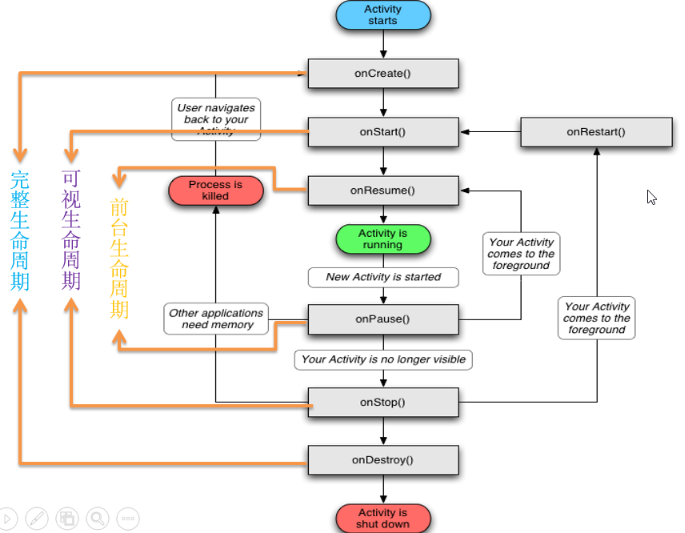 Activity 完全入門:創建、啟動、傳值與生命週期
一、Activity 是什麼 官方定義:Activity 是一個應用組件,用戶可與其提供的屏幕進行交互,以執行撥打電話、拍攝照片、發送電子郵件或查看地圖等操作。每個 A
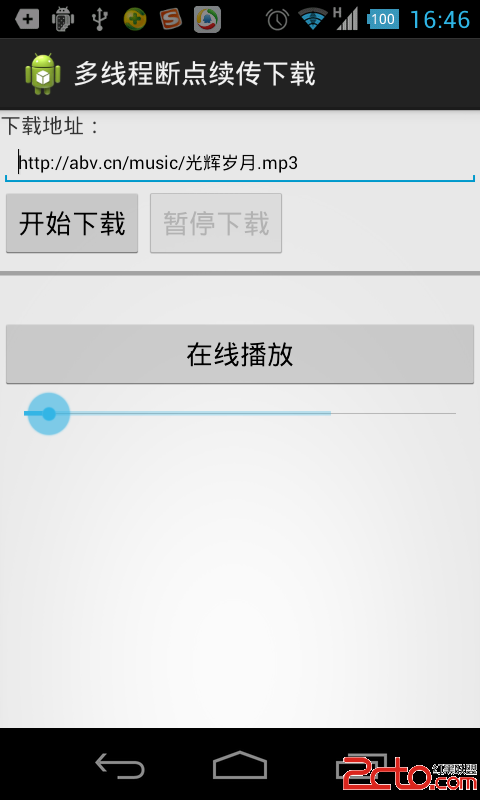 Android 實現在線音樂播放:MediaPlayer 與緩衝進度
在 Android 中播放網路音樂,通常會使用 MediaPlayer。若希望使用者看到緩衝情形,可搭配 SeekBar 的次要進度與 MediaPlayer 的緩衝更新
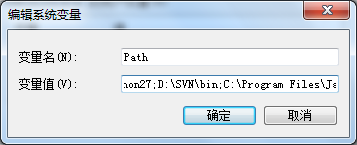 Java 4 Android 開發教程(一):JDK 安裝與環境變數設定
開發 Android 的第一步是把 Java 開發環境架起來。以下以 Windows 為例,說明 JDK 的安裝與 path、classpath 的設定流程。 一、下載
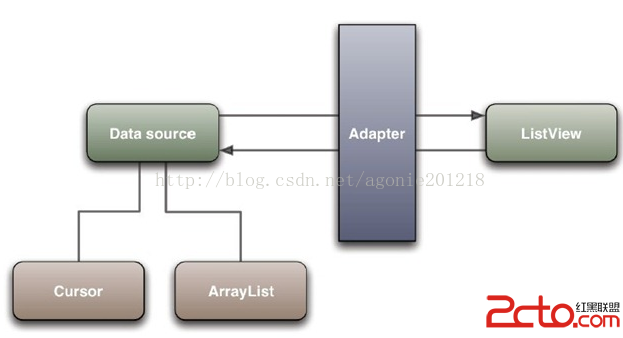 Android Adapter 用法總整理:從 ArrayAdapter 到自訂 BaseAdapter
一、Adapter 是什麼 Adapter 是「把一個既有介面轉換成呼叫端期待的介面」的設計手法。放到 Android 的語境裡,它是連接後端資料與前端顯示的適配器,是資