

編輯:關於 Android 程式設計
Android 內建搜索框架可以協助開發者管理搜索對話框的生命週期。開發者不需要自行設計搜索框位置,也不需要處理它與目前畫面的互動,這些都可以交由 SearchManager 負責。
當使用者執行搜索時,系統會透過特定的 Intent 把關鍵字傳給負責處理搜索結果的 Activity。整體需要準備:
搜索設定檔通常命名為 searchable.xml,並放在 res/xml/ 目錄。
<searchable xmlns:android="https://schemas.android.com/apk/res/android"
    android:label="@string/searchLabel"
    android:hint="@string/searchHint" />
其中 android:label 是必要屬性,通常對應應用程式名稱;android:hint 則是輸入提示文字,建議一定要設定。
負責處理搜索的 Activity 需要在 AndroidManifest.xml 中宣告,並加入 intent-filter 與 meta-data。
<activity android:name=".MySearchableActivity">
    <intent-filter>
        <action android:name="android.intent.action.SEARCH" />
    </intent-filter>
    <meta-data
        android:name="android.app.searchable"
        android:resource="@xml/searchable" />
</activity>
若希望整個 App 都能使用同一個搜索 Activity,可以在 application 層級加入:
<meta-data
    android:name="android.app.default_searchable"
    android:value=".MySearchableActivity" />
當搜索對話框送出請求後,Activity 會收到 ACTION_SEARCH Intent,可以從中取出查詢字串。
@Override
protected void onCreate(Bundle savedInstanceState) {
    super.onCreate(savedInstanceState);
    setContentView(R.layout.search);

    Intent intent = getIntent();
    if (Intent.ACTION_SEARCH.equals(intent.getAction())) {
        String query = intent.getStringExtra(SearchManager.QUERY);
        doMySearch(query);
    }
}
可以透過 onSearchRequested() 開啟搜索框,例如在選單或按鈕中觸發。
@Override
public boolean onSearchRequested() {
    return super.onSearchRequested();
}
若希望使用者按下實體鍵盤按鍵時自動開啟搜索,可以在 onCreate 中設定:
setDefaultKeyMode(DEFAULT_KEYS_SEARCH_LOCAL);
若搜索 Activity 設定為 singleTop,新的搜索 Intent 會透過 onNewIntent 傳入,而不是重新建立 Activity。
@Override
protected void onNewIntent(Intent intent) {
    setIntent(intent);
    handleIntent(intent);
}

private void handleIntent(Intent intent) {
    if (Intent.ACTION_SEARCH.equals(intent.getAction())) {
        String query = intent.getStringExtra(SearchManager.QUERY);
        doMySearch(query);
    }
}
只要修改搜索設定檔,就能啟用語音搜索按鈕。
<searchable xmlns:android="https://schemas.android.com/apk/res/android"
    android:label="@string/searchLabel"
    android:hint="@string/searchHint"
    android:voiceSearchMode="showVoiceSearchButton|launchRecognizer" />
透過 Android 原生搜索框架,開發者可以快速建立一致的搜索體驗,也能在需要時擴充語音輸入與搜索建議。
 Android Dialog 對話框使用詳解
常見 Dialog 形式一次整理 Dialog 是 Android 中常見的互動元件,可用於確認、輸入、選擇與自定義提示。透過 AlertDialog.Builder,可
 手機看NBA直播用什麼App?三個可用的體育轉播選擇
出門在外遇上比賽時間,手機就是唯一的電視。以下整理幾款能用手機收看 NBA 與其他體育賽事的應用,各有側重,依需求挑就好。Dopool 手機電視畫面流暢度與畫質表現不錯,
 SwipeListView 實現微信、QQ 風格的列表滑動刪除
微信和 QQ 的最近联系人列表都支持左滑唤出刪除按鈕,操作直覺、反饋順滑,是很值得借鑒的交互。自己實現並不難,開源庫 SwipeListView 已經把大部分工作封裝好了
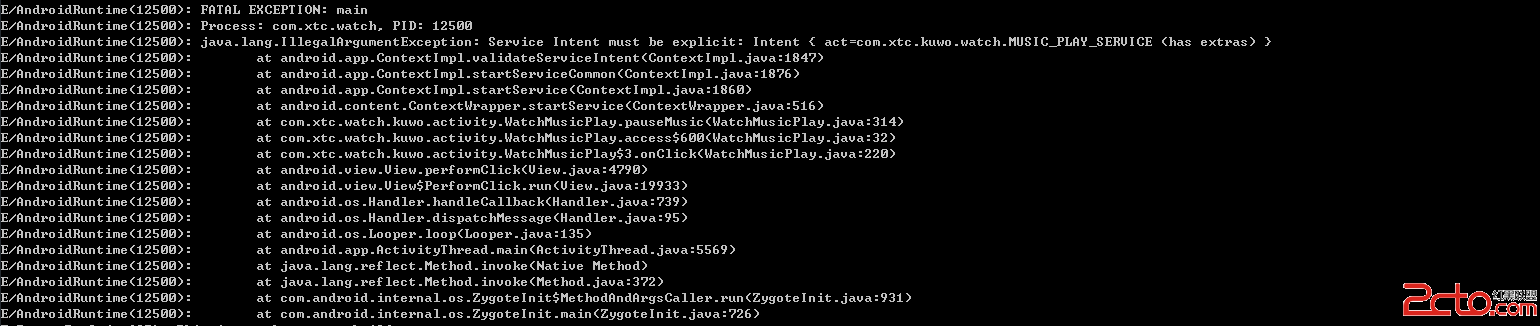 我的 Android 進階之旅:解決 Android 5.0 的「Service Intent must be explicit」崩潰
1. 錯誤描述 同一份程式碼,在 Android 4.4 的小米 4 上跑得好好的,換到 Android 5.1 的華為 P7 上卻直接閃退。Logcat 給出的訊息是: