

編輯:關於 Android 程式設計
這篇文章整理常見的遞迴與二分查找練習,包含有序陣列查找、陣列轉鏈表,以及兩個有序鏈表的合併。這些題目很適合用來理解遞迴、迴圈與指標操作。
在一個有序整數陣列中查找指定值,若找到則回傳索引,找不到則回傳 -1。遞迴版本的重點是每次把搜尋範圍縮小一半。
public static int findIndex(int[] arr, int left, int right, int target) {
    if (arr == null || arr.length == 0) {
        return -1;
    }

    if (left > right) {
        return -1;
    }

    int mid = left + (right - left) / 2;

    if (arr[mid] == target) {
        return mid;
    } else if (arr[mid] > target) {
        return findIndex(arr, left, mid - 1, target);
    } else {
        return findIndex(arr, mid + 1, right, target);
    }
}
也可以改寫成迴圈版本,避免遞迴呼叫帶來的額外堆疊:
public int find(int[] array, int target) {
    if (array == null) {
        return -1;
    }

    int left = 0;
    int right = array.length - 1;

    while (left <= right) {
        int mid = left + (right - left) / 2;

        if (array[mid] == target) {
            return mid;
        } else if (array[mid] < target) {
            left = mid + 1;
        } else {
            right = mid - 1;
        }
    }

    return -1;
}
若不使用集合類別,可以手動建立節點,把陣列元素依序轉成單向鏈表。
public static class Node {
    Node next;
    int data;
}

public Node convert(int[] array) {
    if (array == null || array.length == 0) {
        return null;
    }

    Node head = new Node();
    head.data = array[0];

    Node end = head;

    for (int i = 1; i < array.length; i++) {
        Node node = new Node();
        node.data = array[i];
        end.next = node;
        end = node;
    }

    return head;
}
將兩個有序鏈表合併成一個有序鏈表,且不建立新節點。這題可以用迴圈,也可以用遞迴。
public Node merge(Node a, Node b) {
    Node dummy = new Node();
    Node tail = dummy;

    while (a != null && b != null) {
        if (a.data <= b.data) {
            tail.next = a;
            a = a.next;
        } else {
            tail.next = b;
            b = b.next;
        }
        tail = tail.next;
    }

    if (a != null) {
        tail.next = a;
    } else {
        tail.next = b;
    }

    return dummy.next;
}
public Node mergeRecursive(Node a, Node b) {
    if (a == null) {
        return b;
    }

    if (b == null) {
        return a;
    }

    if (a.data <= b.data) {
        a.next = mergeRecursive(a.next, b);
        return a;
    } else {
        b.next = mergeRecursive(a, b.next);
        return b;
    }
}
這些範例看似簡單,但很適合練習邊界條件、空節點處理與遞迴返回值的正確使用。在 Android 開發中,這類資料結構與算法能力也能幫助工程師更扎實地處理列表、快取與背景任務。
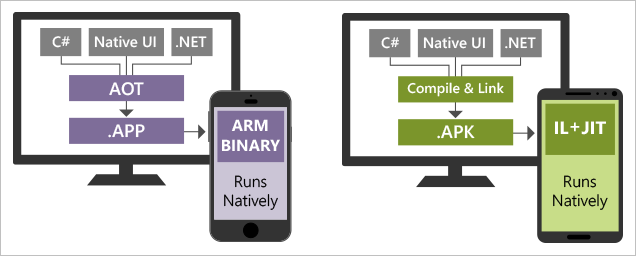 為什麼我選擇用 C# 開發手機 App?Xamarin 跨平台開發入門
Android 在全球行動市場大約握有七成五的占有率,在華人圈甚至更高。可一旦談到手機開發,大家往往得先煩惱:Android 要學 Java、iOS 要學 Objecti
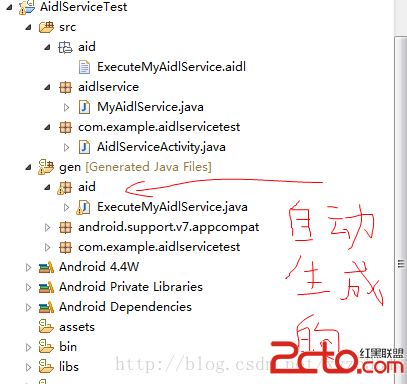 Android AIDL 入門:最簡單的跨進程服務通訊
為什麼使用 AIDLAIDL 主要用於不同進程之間的通訊。若某個 Service 需要被其他應用程式呼叫,或需要在多執行緒環境下處理跨進程請求,就可以使用 AIDL。若只
 Android WiFi 連接功能實作全解析(附完整源碼)
做專案的時候,常常會冒出這麼一個需求:讓使用者直接在 App 裡挑一個 Wi-Fi 熱點,輸入密碼完成連接,還要即時反映目前的連線狀態。看似簡單,實際動手會發現牽涉到掃描
 自訂 TextView 連結的單擊行為:用 ClickableSpan 觸發任意 Activity
先前介紹過 <a> 標籤,以及 TextView 自動辨識的特殊文字(網址、電話號碼、Email 等),這些都能透過單擊觸發對應動作。這些預設行為已能滿足大多