

編輯:關於 Android 程式設計
微信和 QQ 的最近联系人列表都支持左滑唤出刪除按鈕,操作直覺、反饋順滑,是很值得借鑒的交互。自己實現並不難,開源庫 SwipeListView 已經把大部分工作封裝好了。

SwipeListView 的使用方式與普通 ListView 幾乎一致,只是在佈局標籤上多了一些可配置屬性:
<com.fortysevendeg.swipelistview.SwipeListView
    xmlns:swipe="https://schemas.android.com/apk/res-auto"
    android:id="@+id/example_lv_list"
    android:listSelector="#00000000"
    android:layout_width="fill_parent"
    android:layout_height="wrap_content"
    swipe:swipeFrontView="@+id/front"
    swipe:swipeBackView="@+id/back"
    swipe:swipeActionLeft="reveal"
    swipe:swipeActionRight="reveal"
    swipe:swipeMode="both"
    swipe:swipeCloseAllItemsWhenMoveList="true"
    swipe:swipeOpenOnLongPress="true"
    swipe:swipeAnimationTime="200"
    swipe:swipeOffsetLeft="120dp"
    swipe:swipeOffsetRight="120dp" />
swipeFrontView:item 平時展示的那層佈局的 id,必須與 item 佈局文件中的控件 id 一致。
swipeBackView:藏在 front 背後、滑動時才露出來的那層,同樣要與 item 佈局中的 id 對應。
swipeActionLeft / swipeActionRight:左右滑動的行為,reveal 表示展露 back 層,dismiss 表示直接移除該項,choice 則走選中邏輯。
swipeMode:可選 none、both、right、left,默認 both。
swipeCloseAllItemsWhenMoveList:列表滾動時自動收起所有已展開的 item。由於 ListView 存在 view 復用機制,這一項建議保持 true,設為 false 容易出現錯位。
swipeOpenOnLongPress:長按是否觸發展開,默認 true。
swipeAnimationTime:動畫時長,單位毫秒。
swipeOffsetLeft / swipeOffsetRight:左右兩側的偏移量。
mSwipeListView = (SwipeListView) findViewById(R.id.example_lv_list);
mAdapter = new DataAdapter(this, mDatas, mSwipeListView);
mSwipeListView.setAdapter(mAdapter);
mSwipeListView.setSwipeListViewListener(new BaseSwipeListViewListener() {
    @Override
    public void onOpened(int position, boolean toRight) { }
    @Override
    public void onClosed(int position, boolean fromRight) { }
    @Override
    public void onListChanged() { }
    @Override
    public void onMove(int position, float x) { }
    @Override
    public void onStartOpen(int position, int action, boolean toRight) { }
    @Override
    public void onStartClose(int position, boolean right) { }
    @Override
    public void onClickFrontView(int position) { }
    @Override
    public void onClickBackView(int position) { }
    @Override
    public void onDismiss(int[] reverseSortedPositions) { }
});
刪除邏輯可以直接寫在 Adapter 的 item 裡,也可以通過回調接口拋給 Activity 處理。放在 Adapter 中的寫法如下:
@Override
public View getView(final int position, View convertView, ViewGroup parent) {
    convertView = mInflater.inflate(R.layout.list_item, null);
    TextView tv = (TextView) convertView.findViewById(R.id.id_text);
    Button del = (Button) convertView.findViewById(R.id.id_remove);
    tv.setText(mDatas.get(position));
    del.setOnClickListener(new OnClickListener() {
        @Override
        public void onClick(View v) {
            mDatas.remove(position);
            notifyDataSetChanged();
            // 必須收起已展開的 item,否則刪除位置附近會出現錯亂
            mSwipeListView.closeOpenedItems();
        }
    });
    return convertView;
}
最後那一句 closeOpenedItems() 很容易被漏掉。由於列表滚动过程中 view 会被复用,若不移除展開狀態,刪除之後相鄰行常常會呈現奇怪的位移。若希望在列表滚动時就自動收起,則把處理放在監聽器的 onListChanged 里更合適。
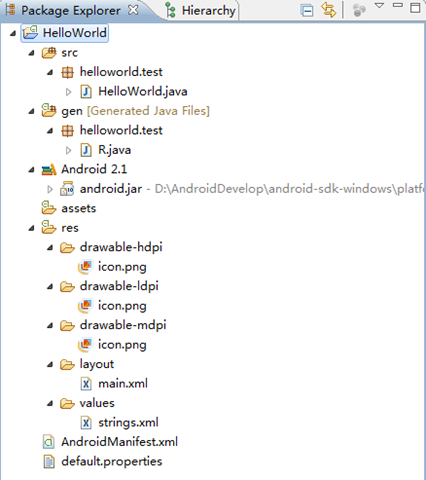 Android 專案結構入門:以 HelloWorld 為例逐層拆解每個檔案的作用
環境裝好、HelloWorld 也跑起來之後,很多初學者的第一個疑問是:Eclipse 左側那一長串資料夾和檔案,到底各自負責什麼?本文就以一個最簡單的 HelloWor
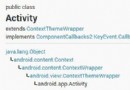 深入剖析 Android 中的 Context 機制
前言 Context 在 Android 中的地位不言而喻。當我們要存取當前應用的資源、啟動一個新的 Activity 時,都必須提供 Context。那麼 Contex
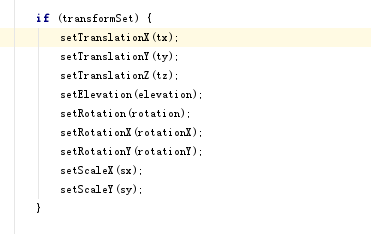 屬性動畫與補間動畫總結
Android 動畫體系中,常見的兩大類別是補間動畫與屬性動畫。補間動畫出現較早,主要用於 View 的視覺變換;屬性動畫則在 Android 3.0 之後推出,能更真實
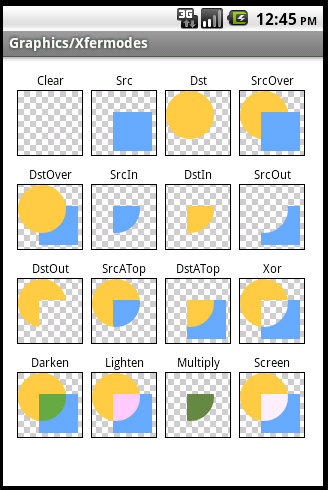 Android 中使用 PorterDuff 實現圖片遮罩
關鍵方法 paint.setXfermode(new PorterDuffXfermode(PorterDuff.Mode.SRC_IN)); 說明 canvas 上原