

編輯:關於 Android 程式設計
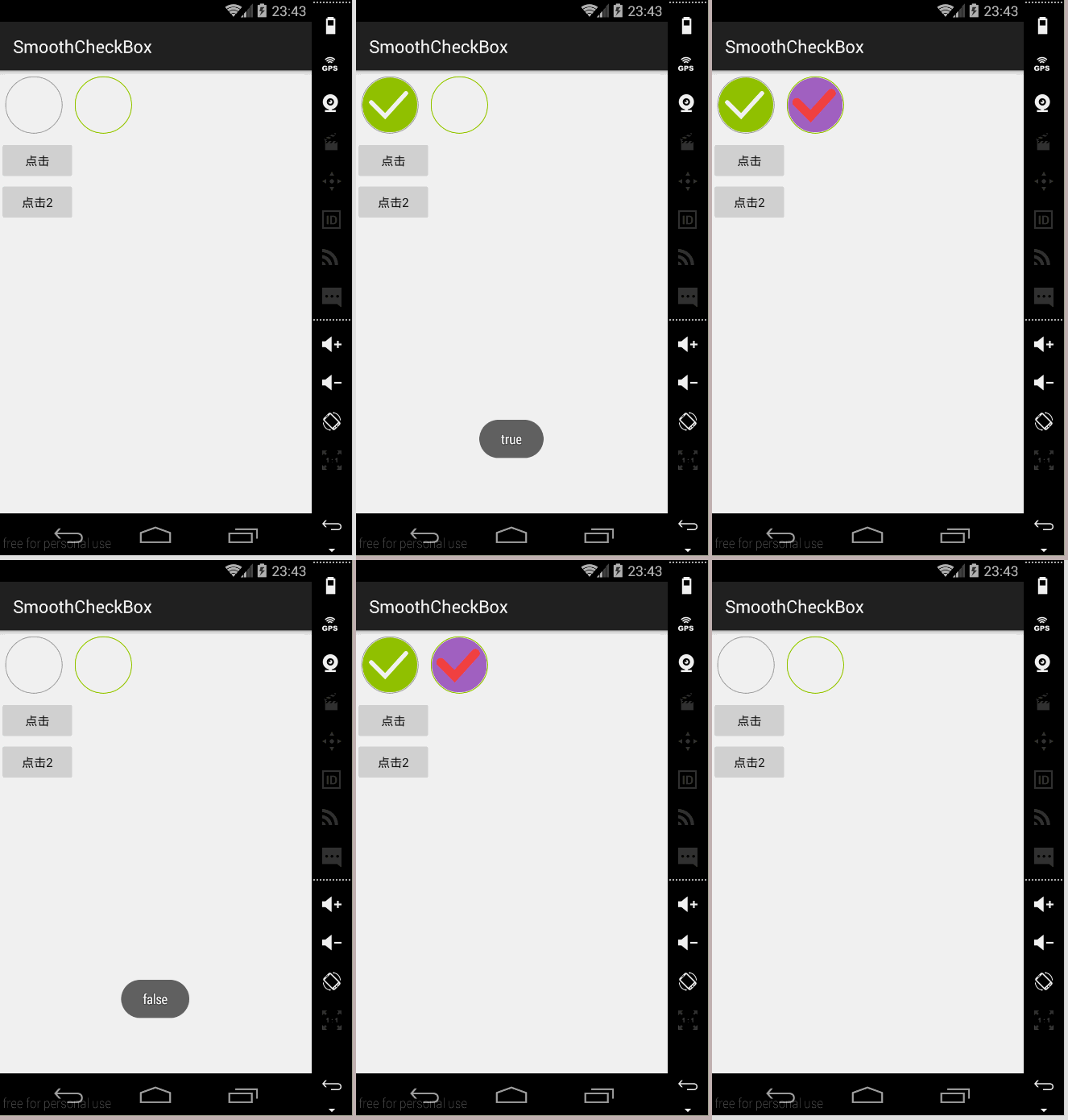
GIF 的幀率有限,真機上看會更順。核心思路是用屬性動畫驅動「底色填充」和「對勾繪製」兩個過程,讓勾一筆一筆畫出來。
<?xml version="1.0" encoding="utf-8"?>
<resources>
    <declare-styleable name="SmoothCheckBox">
        <!-- 動畫持續時間 -->
        <attr name="duration" format="integer"></attr>
        <!-- 邊框寬度 -->
        <attr name="strikeWidth" format="dimension|reference"></attr>
        <!-- 邊框顏色 -->
        <attr name="borderColor" format="color|reference"></attr>
        <!-- 選中狀態的顏色 -->
        <attr name="trimColor" format="color|reference"></attr>
        <!-- 對勾顏色 -->
        <attr name="tickColor" format="color|reference"></attr>
        <!-- 對勾寬度 -->
        <attr name="tickWidth" format="dimension|reference"></attr>
    </declare-styleable>
</resources>
@Override
protected void onMeasure(int widthMeasureSpec, int heightMeasureSpec) {
    super.onMeasure(widthMeasureSpec, heightMeasureSpec);
    int widthSize = MeasureSpec.getSize(widthMeasureSpec);
    int widthMode = MeasureSpec.getMode(widthMeasureSpec);
    mWidth = (widthMode == MeasureSpec.EXACTLY) ? widthSize : 40;

    int heightSize = MeasureSpec.getSize(heightMeasureSpec);
    int heightMode = MeasureSpec.getMode(heightMeasureSpec);
    mHeight = (heightMode == MeasureSpec.EXACTLY) ? heightSize : 40;

    setMeasuredDimension(mWidth, mHeight);

    int size = Math.min(mWidth, mHeight);
    center = size / 2;
    mRadius = (int) ((size - mStrokeWidth) / 2 / 1.2f);

    startPoint.set(center * 14 / 30, center * 28 / 30);
    breakPoint.set(center * 26 / 30, center * 40 / 30);
    endPoint.set(center * 44 / 30, center * 20 / 30);

    downLength = (float) Math.sqrt(Math.pow(startPoint.x - breakPoint.x, 2f)
            + Math.pow(startPoint.y - breakPoint.y, 2f));
    upLength = (float) Math.sqrt(Math.pow(endPoint.x - breakPoint.x, 2f)
            + Math.pow(endPoint.y - breakPoint.y, 2f));
    totalLength = downLength + upLength;
}
先測出寬高(未指定時給個默認值),再算出圓心、半徑,最後確立對勾的三個關鍵點。這幾個分數(14/30、26/30、44/30 等)是反覆調出來的經驗值。
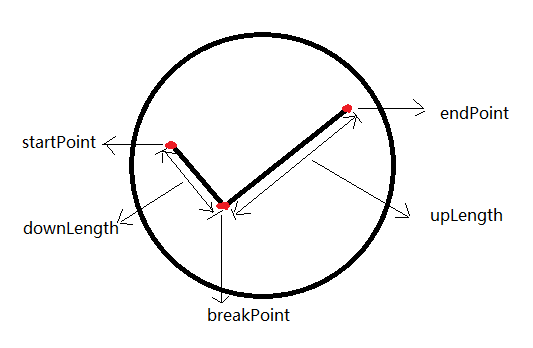
downLength 是 startPoint 到 breakPoint 的距離,upLength 是 breakPoint 到 endPoint 的距離,兩者相加即對勾總長。後面就靠這個總長度做「進度 → 路徑」的映射。
// 未選中 → 選中
private void checkedAnimation() {
    animatedValue = 0f;
    tickValue = 0f;

    // 底色填充,佔總時長的 2/5
    mValueAnimator = ValueAnimator.ofFloat(0f, 1.2f, 1f).setDuration(2 * duration / 5);
    mValueAnimator.setInterpolator(new AccelerateDecelerateInterpolator());

    // 對勾繪製,佔總時長的 3/5
    mTickValueAnimator = ValueAnimator.ofFloat(0f, 1f).setDuration(3 * duration / 5);
    mTickValueAnimator.setInterpolator(new LinearInterpolator());
    mTickValueAnimator.addUpdateListener(new ValueAnimator.AnimatorUpdateListener() {
        @Override
        public void onAnimationUpdate(ValueAnimator valueAnimator) {
            tickValue = (float) valueAnimator.getAnimatedValue();
            postInvalidate();
        }
    });
    mValueAnimator.addUpdateListener(new ValueAnimator.AnimatorUpdateListener() {
        @Override
        public void onAnimationUpdate(ValueAnimator valueAnimator) {
            animatedValue = (float) valueAnimator.getAnimatedValue();
            postInvalidate();
        }
    });
    mValueAnimator.addListener(new AnimatorListenerAdapter() {
        @Override
        public void onAnimationEnd(Animator animation) {
            // 底色鋪完之後再開始畫勾
            mTickValueAnimator.start();
        }
    });
    mValueAnimator.start();
}

// 選中 → 未選中
private void uncheckedAnimation() {
    animatedValue = 0f;
    mValueAnimator = ValueAnimator.ofFloat(1f, 0f).setDuration(2 * duration / 5);
    mValueAnimator.setInterpolator(new AccelerateInterpolator());
    mValueAnimator.addUpdateListener(new ValueAnimator.AnimatorUpdateListener() {
        @Override
        public void onAnimationUpdate(ValueAnimator valueAnimator) {
            animatedValue = (float) valueAnimator.getAnimatedValue();
            postInvalidate();
        }
    });
    mValueAnimator.start();
}
注意 ofFloat(0f, 1.2f, 1f) 的設計:先衝到 1.2 再回落,形成一個輕微的 overshoot,點擊手感會更有彈性。取消選中時則不做畫勾動畫,只讓底色淡出。
@Override
protected void onDraw(Canvas canvas) {
    super.onDraw(canvas);
    canvas.save();
    drawBorder(canvas);
    drawTrim(canvas);
    if (isChecked) {
        drawTick(canvas);
    }
    canvas.restore();
}

// 畫對勾
private void drawTick(Canvas canvas) {
    float temp = tickValue * totalLength;   // 當前已畫的路徑長度

    if (Float.compare(tickValue, 0f) == 0) {
        path.reset();
        path.moveTo(startPoint.x, startPoint.y);
    }

    if (temp > downLength) {
        // 進度已過拐點:先畫完第一段,再按比例補第二段
        path.moveTo(startPoint.x, startPoint.y);
        path.lineTo(breakPoint.x, breakPoint.y);
        path.lineTo(
                (endPoint.x - breakPoint.x) * (temp - downLength) / upLength + breakPoint.x,
                (endPoint.y - breakPoint.y) * (temp - downLength) / upLength + breakPoint.y);
    } else {
        // 進度仍在第一段上
        path.lineTo(
                (breakPoint.x - startPoint.x) * temp / downLength + startPoint.x,
                (breakPoint.y - startPoint.y) * temp / downLength + startPoint.y);
    }
    canvas.drawPath(path, tickPaint);
}

// 畫邊框
private void drawBorder(Canvas canvas) {
    float temp = (animatedValue > 1f) ? animatedValue * mRadius : mRadius;
    canvas.drawCircle(center, center, temp, borderPaint);
}

// 畫內部填充
private void drawTrim(Canvas canvas) {
    canvas.drawCircle(center, center, (mRadius - mStrokeWidth) * animatedValue, trimPaint);
}
原理不難:把動畫進度換算成「已行走的路徑長度」,再判斷這個長度落在哪一段線上,用比例插值算出當前筆尖坐標。邊框則借 animatedValue > 1 的區間做放大回彈。
public class SmoothCheckBox extends View implements View.OnClickListener {

    private long duration;              // 動畫持續時間
    private float mStrokeWidth;         // 邊框寬度
    private float mTickWidth;           // 對勾寬度
    private Paint trimPaint;            // 內飾畫筆
    private Paint borderPaint;          // 邊框畫筆
    private Paint tickPaint;            // 對勾畫筆
    private float defaultStrikeWidth;
    private float defaultTickWidth;
    private int mWidth;
    private int mHeight;
    private int borderColor;
    private int trimColor;
    private int tickColor;
    private int mRadius;
    private int center;
    private boolean isChecked;
    private float downLength;           // 對勾向下的長度
    private float upLength;             // 對勾向上的長度
    private float totalLength;          // 對勾總長度
    private OnCheckedChangeListener listener;
    private ValueAnimator mValueAnimator;
    private ValueAnimator mTickValueAnimator;
    private float animatedValue;
    private float tickValue;
    private Point startPoint = new Point();     // 起點
    private Point breakPoint = new Point();     // 拐點
    private Point endPoint = new Point();       // 終點
    private static final String TAG = "SmoothCheckBox";
    private static final String KEY_INSTANCE_STATE = "InstanceState";
    private Path path = new Path();

    public void setOnCheckedChangeListener(OnCheckedChangeListener listener) {
        this.listener = listener;
    }

    public SmoothCheckBox(Context context) { this(context, null); }
    public SmoothCheckBox(Context context, AttributeSet attrs) { this(context, attrs, 0); }

    public SmoothCheckBox(Context context, AttributeSet attrs, int defStyleAttr) {
        super(context, attrs, defStyleAttr);
        TypedArray a = getContext().obtainStyledAttributes(attrs, R.styleable.SmoothCheckBox);
        duration = a.getInt(R.styleable.SmoothCheckBox_duration, 600);

        defaultStrikeWidth = TypedValue.applyDimension(
                TypedValue.COMPLEX_UNIT_DIP, 1, getResources().getDisplayMetrics());
        mStrokeWidth = a.getDimension(R.styleable.SmoothCheckBox_strikeWidth, defaultStrikeWidth);

        defaultTickWidth = TypedValue.applyDimension(
                TypedValue.COMPLEX_UNIT_DIP, 2, getResources().getDisplayMetrics());
        mTickWidth = a.getDimension(R.styleable.SmoothCheckBox_tickWidth, defaultTickWidth);

        borderColor = a.getColor(R.styleable.SmoothCheckBox_borderColor,
                getResources().getColor(android.R.color.darker_gray));
        trimColor = a.getColor(R.styleable.SmoothCheckBox_trimColor,
                getResources().getColor(android.R.color.holo_green_light));
        tickColor = a.getColor(R.styleable.SmoothCheckBox_tickColor,
                getResources().getColor(android.R.color.white));
        a.recycle();

        trimPaint = new Paint(Paint.ANTI_ALIAS_FLAG);
        trimPaint.setStyle(Paint.Style.FILL);
        trimPaint.setColor(trimColor);

        borderPaint = new Paint(Paint.ANTI_ALIAS_FLAG);
        borderPaint.setStrokeWidth(mStrokeWidth);
        borderPaint.setColor(borderColor);
        borderPaint.setStyle(Paint.Style.STROKE);

        tickPaint = new Paint(Paint.ANTI_ALIAS_FLAG);
        tickPaint.setColor(tickColor);
        tickPaint.setStyle(Paint.Style.STROKE);
        tickPaint.setStrokeCap(Paint.Cap.ROUND);   // 圓頭線帽,勾的端點更柔和
        tickPaint.setStrokeWidth(mTickWidth);

        setOnClickListener(this);
    }

    @Override
    protected void onMeasure(int widthMeasureSpec, int heightMeasureSpec) {
        super.onMeasure(widthMeasureSpec, heightMeasureSpec);
        int widthSize = MeasureSpec.getSize(widthMeasureSpec);
        int widthMode = MeasureSpec.getMode(widthMeasureSpec);
        mWidth = (widthMode == MeasureSpec.EXACTLY) ? widthSize : 40;

        int heightSize = MeasureSpec.getSize(heightMeasureSpec);
        int heightMode = MeasureSpec.getMode(heightMeasureSpec);
        mHeight = (heightMode == MeasureSpec.EXACTLY) ? heightSize : 40;

        setMeasuredDimension(mWidth, mHeight);

        int size = Math.min(mWidth, mHeight);
        center = size / 2;
        mRadius = (int) ((size - mStrokeWidth) / 2 / 1.2f);
        startPoint.set(center * 14 / 30, center * 28 / 30);
        breakPoint.set(center * 26 / 30, center * 40 / 30);
        endPoint.set(center * 44 / 30, center * 20 / 30);
        downLength = (float) Math.sqrt(Math.pow(startPoint.x - breakPoint.x, 2f)
                + Math.pow(startPoint.y - breakPoint.y, 2f));
        upLength = (float) Math.sqrt(Math.pow(endPoint.x - breakPoint.x, 2f)
                + Math.pow(endPoint.y - breakPoint.y, 2f));
        totalLength = downLength + upLength;
    }

    @Override
    protected void onDraw(Canvas canvas) {
        super.onDraw(canvas);
        canvas.save();
        drawBorder(canvas);
        drawTrim(canvas);
        if (isChecked) {
            drawTick(canvas);
        }
        canvas.restore();
    }

    @Override
    protected Parcelable onSaveInstanceState() {
        Bundle bundle = new Bundle();
        bundle.putParcelable(KEY_INSTANCE_STATE, super.onSaveInstanceState());
        bundle.putBoolean(KEY_INSTANCE_STATE, isChecked);
        return bundle;
    }

    @Override
    protected void onRestoreInstanceState(Parcelable state) {
        if (state instanceof Bundle) {
            Bundle bundle = (Bundle) state;
            boolean isChecked = bundle.getBoolean(KEY_INSTANCE_STATE);
            setChecked(isChecked);
            super.onRestoreInstanceState(bundle.getParcelable(KEY_INSTANCE_STATE));
            return;
        }
        super.onRestoreInstanceState(state);
    }

    private void toggle() {
        isChecked = !isChecked;
        if (listener != null) {
            listener.onCheckedChanged(this, isChecked);
        }
        if (isChecked) {
            checkedAnimation();
        } else {
            uncheckedAnimation();
        }
    }

    private void checkedAnimation() {
        animatedValue = 0f;
        tickValue = 0f;
        mValueAnimator = ValueAnimator.ofFloat(0f, 1.2f, 1f).setDuration(2 * duration / 5);
        mValueAnimator.setInterpolator(new AccelerateDecelerateInterpolator());
        mTickValueAnimator = ValueAnimator.ofFloat(0f, 1f).setDuration(3 * duration / 5);
        mTickValueAnimator.setInterpolator(new LinearInterpolator());
        mTickValueAnimator.addUpdateListener(new ValueAnimator.AnimatorUpdateListener() {
            @Override
            public void onAnimationUpdate(ValueAnimator valueAnimator) {
                tickValue = (float) valueAnimator.getAnimatedValue();
                postInvalidate();
            }
        });
        mValueAnimator.addUpdateListener(new ValueAnimator.AnimatorUpdateListener() {
            @Override
            public void onAnimationUpdate(ValueAnimator valueAnimator) {
                animatedValue = (float) valueAnimator.getAnimatedValue();
                postInvalidate();
            }
        });
        mValueAnimator.addListener(new AnimatorListenerAdapter() {
            @Override
            public void onAnimationEnd(Animator animation) {
                mTickValueAnimator.start();
            }
        });
        mValueAnimator.start();
    }

    private void uncheckedAnimation() {
        animatedValue = 0f;
        mValueAnimator = ValueAnimator.ofFloat(1f, 0f).setDuration(2 * duration / 5);
        mValueAnimator.setInterpolator(new AccelerateInterpolator());
        mValueAnimator.addUpdateListener(new ValueAnimator.AnimatorUpdateListener() {
            @Override
            public void onAnimationUpdate(ValueAnimator valueAnimator) {
                animatedValue = (float) valueAnimator.getAnimatedValue();
                postInvalidate();
            }
        });
        mValueAnimator.start();
    }

    private void drawTick(Canvas canvas) {
        float temp = tickValue * totalLength;
        if (Float.compare(tickValue, 0f) == 0) {
            path.reset();
            path.moveTo(startPoint.x, startPoint.y);
        }
        if (temp > downLength) {
            path.moveTo(startPoint.x, startPoint.y);
            path.lineTo(breakPoint.x, breakPoint.y);
            path.lineTo(
                    (endPoint.x - breakPoint.x) * (temp - downLength) / upLength + breakPoint.x,
                    (endPoint.y - breakPoint.y) * (temp - downLength) / upLength + breakPoint.y);
        } else {
            path.lineTo(
                    (breakPoint.x - startPoint.x) * temp / downLength + startPoint.x,
                    (breakPoint.y - startPoint.y) * temp / downLength + startPoint.y);
        }
        canvas.drawPath(path, tickPaint);
    }

    private void drawBorder(Canvas canvas) {
        float temp = (animatedValue > 1f) ? animatedValue * mRadius : mRadius;
        canvas.drawCircle(center, center, temp, borderPaint);
    }

    private void drawTrim(Canvas canvas) {
        canvas.drawCircle(center, center, (mRadius - mStrokeWidth) * animatedValue, trimPaint);
    }

    @Override
    public void onClick(View view) {
        toggle();
    }

    public boolean isChecked() {
        return isChecked;
    }

    public void setChecked(boolean isChecked) {
        this.setChecked(isChecked, false);
    }

    /**
     * @param isChecked   是否選中
     * @param isAnimation 切換時是否播放動畫
     */
    public void setChecked(boolean isChecked, boolean isAnimation) {
        this.isChecked = isChecked;
        if (isAnimation) {
            if (isChecked) {
                checkedAnimation();
            } else {
                uncheckedAnimation();
            }
        } else {
            animatedValue = isChecked ? 1f : 0f;
            tickValue = 1f;
            invalidate();
        }
        if (listener != null) {
            listener.onCheckedChanged(this, isChecked);
        }
    }

    public interface OnCheckedChangeListener {
        void onCheckedChanged(SmoothCheckBox smoothCheckBox, boolean isChecked);
    }
}
幾處值得留意:重寫了 onSaveInstanceState / onRestoreInstanceState,避免旋轉屏幕後勾選狀態丟失;setChecked() 提供了一個帶 isAnimation 參數的重載,方便在列表初次綁定數據時直接定位到最終狀態而不播動畫——這一點在 ListView 場景裡尤其重要,否則每次滾動都會「重播」一遍。
 Android View 事件體系與滑動衝突處理
在 Android 開發中,View 的滑動與事件分發是常見但容易出錯的知識點。本文整理六種常見滑動方式,並說明同方向與不同方向滑動衝突的处理思路。 六種滑動方式 一、透
 Android Studio 常用快捷鍵與除錯技巧整理
熟練使用 Android Studio 的快捷鍵,可以明顯提升開發效率。以下整理日常開發中較常使用的快捷操作,涵蓋程式碼編輯、搜尋、重構、導航與除錯等情境。 程式碼編輯
 Android 自定義控件應用篇:打造圓形進度條
一、概述 上一篇我們介紹了 Android 自定義控件的基礎知識。本篇將在此基礎上進一步實戰,通過重寫 onDraw() 方法並結合自定義屬性,實現一個可靈活配置的圓形進
 Android XML 解析實務:SAX、DOM 與 Pull 三種方式完整比較
XML 常用於資料交換與設定檔。Android 常見的解析方式有 SAX、DOM 與 Pull,三者都能讀取與產生 XML,但特性與適用情境不同。 SAX SAX 是事