

編輯:關於 Android 程式設計
ChangeMode
專案地址:ChangeMode
為 Android 實現夜間模式。
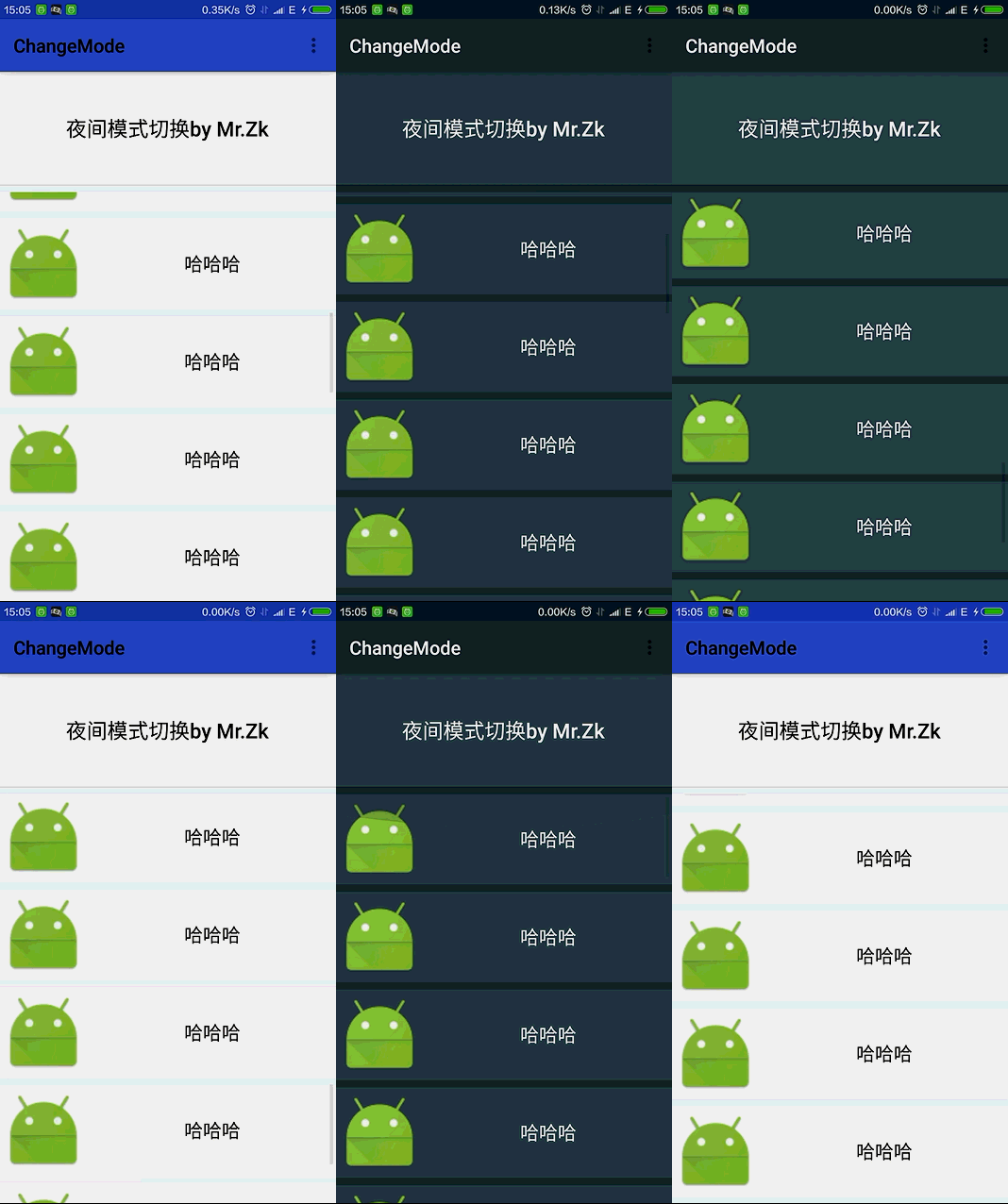
用最簡單的方式實現夜間模式,支援 ListView、RecyclerView。
Preview
Usage xml
android:background="?attr/zzbackground" app:backgroundAttr="zzbackground"//如果當前頁面要立即刷新,這裡傳入屬性名稱 比如 R.attr.zzbackground 傳 zzbackground 即可 android:textColor="?attr/zztextColor" app:textColorAttr="zztextColor"//如需立即刷新頁面效果 同上
java
@Override protected void onCreate(Bundle savedInstanceState) { //1. 在要立即切換效果的頁面調用此方法 ChangeModeController.getInstance().init(this,R.attr.class).setTheme(this, R.style.DayTheme, R.style.NightTheme); //在其他頁面調用此方法 //ChangeModeController.setTheme(this, R.style.DayTheme, R.style.NightTheme); super.onCreate(savedInstanceState); setContentView(R.layout.activity_main); //添加額外 view 至夜間管理 // ChangeModeController.getInstance().addBackgroundColor(toolbar, R.attr.colorPrimary); //ChangeModeController.getInstance().addBackgroundDrawable(view,R.attr.colorAccent); // ChangeModeController.getInstance().addTextColor(view,R.attr.colorAccent); //2. 設置切換 //ChangeModeController.changeDay(this, R.style.DayTheme); //ChangeModeController.changeNight(this, R.style.NightTheme); } @Override protected void onDestroy() { super.onDestroy(); //3. 在 onDestroy 調用 ChangeModeController.onDestory(); }
詳細操作描述
第一步:自定義屬性
<?xml version="1.0" encoding="utf-8"?> <resources> <attr name="zzbackground" format="color|reference"/> <attr name="zzbackgroundDrawable" format="reference"/> <attr name="zztextColor" format="color"/> <attr name="zzItemBackground" format="color"/> </resources>
第二步:配置夜間 style 檔案
<resources> <!-- Base application theme. --> <style name="AppTheme" parent="Theme.AppCompat.Light.DarkActionBar"> <item name="colorPrimary">@color/colorPrimary</item> <item name="colorPrimaryDark">@color/colorPrimaryDark</item> <item name="colorAccent">@color/colorAccent</item> <item name="windowActionBar">false</item> <item name="android:windowNoTitle">true</item> <item name="windowNoTitle">true</item> </style> <!--日間模式 --> <style name="DayTheme" parent="AppTheme"> <item name="zzbackground">@color/dayBackground</item> <item name="zzbackgroundDrawable">@drawable/ic_launcher</item> <item name="zztextColor">@color/dayTextColor</item> <item name="zzItemBackground">@color/dayItemBackground</item> </style> <!--夜間模式 --> <style name="NightTheme" parent="AppTheme"> <item name="zzbackground">@color/nightBackground</item> <item name="zzbackgroundDrawable">@color/nightBackground</item> <item name="zztextColor">@color/nightTextColor</item> <item name="zzItemBackground">@color/nightItemBackground</item> <item name="colorPrimary">@color/colorPrimaryNight</item> <item name="colorPrimaryDark">@color/colorPrimaryDarkNight</item> <item name="colorAccent">@color/colorAccentNight</item> </style> <style name="AppTheme.AppBarOverlay" parent="ThemeOverlay.AppCompat.Dark.ActionBar" /> <style name="AppTheme.PopupOverlay" parent="ThemeOverlay.AppCompat.Light" /> </resources>
為相關屬性設定對應模式的屬性值:
<?xml version="1.0" encoding="utf-8"?> <resources> <color name="dayBackground">#F2F4F7</color> <color name="dayTextColor">#000</color> <color name="dayItemBackground">#fff</color> <color name="nightItemBackground">#37474F</color> <color name="nightBackground">#263238</color> <color name="nightTextColor">#fff</color> </resources>
第三步:在佈局檔案中配置使用對應屬性
<?xml version="1.0" encoding="utf-8"?> <LinearLayout xmlns:android="https://schemas.android.com/apk/res/android" xmlns:tools="https://schemas.android.com/tools" android:layout_width="match_parent" android:layout_height="match_parent" xmlns:app="https://schemas.android.com/apk/res-auto" android:orientation="vertical" android:background="?attr/zzbackground" app:backgroundAttr="zzbackground" tools:context="com.thinkfreely.changemode.MainActivity"> <android.support.design.widget.AppBarLayout android:layout_width="match_parent" android:layout_height="wrap_content" app:theme="@style/AppTheme.AppBarOverlay"> <android.support.v7.widget.Toolbar android:id="@+id/toolbar" android:layout_width="match_parent" android:layout_height="?attr/actionBarSize" android:background="?attr/colorPrimary" app:backgroundAttr="colorPrimary" app:titleTextColor="?attr/zztextColor" app:popupTheme="@style/AppTheme.PopupOverlay" /> </android.support.design.widget.AppBarLayout> <Button android:layout_width="match_parent" android:layout_height="120dp" android:gravity="center" android:textColor="?attr/zztextColor" app:textColorAttr="zztextColor" android:background="?attr/zzItemBackground" app:backgroundAttr="zzItemBackground" android:padding="10dp" android:layout_marginBottom="8dp" android:textSize="22sp" android:textAllCaps="false" android:text="夜間模式切換 by Mr.Zk" /> <android.support.v7.widget.RecyclerView android:id="@+id/recyclerView" android:layout_width="match_parent" android:layout_height="match_parent" android:scrollbars="vertical"/> </LinearLayout>
請特別留意 textColorAttr、backgroundAttr、backgroundDrawableAttr 這三個屬性。若需當前頁面立即刷新,須加上相應屬性。
屬性 說明
textColorAttr:修改字體顏色時設定。如 R.attr.zztextColor 傳 zztextColor 即可,例如 app:textColorAttr="zztextColor"。
backgroundAttr:修改背景顏色/背景圖片時設定,同上,例如 app:backgroundAttr="zzbackground"。
backgroundDrawableAttr:修改背景顏色/背景圖片時設定,同上,例如 app:backgroundDrawableAttr="zzbackground"。
第四步:頁面呼叫 java 程式碼
@Override protected void onCreate(Bundle savedInstanceState) { //1. 在要立即切換效果的頁面調用此方法 ChangeModeController.getInstance().init(this,R.attr.class).setTheme(this, R.style.DayTheme, R.style.NightTheme); //在其他頁面調用此方法 //ChangeModeController.setTheme(this, R.style.DayTheme, R.style.NightTheme); super.onCreate(savedInstanceState); setContentView(R.layout.activity_main); //2.設置切換夜間活日間模式 //ChangeModeController.changeDay(this, R.style.DayTheme);//切換日間模式 //ChangeModeController.changeNight(this, R.style.NightTheme);//切換夜間模式 } @Override protected void onDestroy() { super.onDestroy(); //3. 在 onDestroy 調用 ChangeModeController.onDestory(); }
程式碼呼叫三步,即可開啟夜間模式之旅。若頁面有新建立的視圖要加入夜間模式控制,程式碼呼叫:
//添加額外 view 至夜間管理 // ChangeModeController.getInstance().addBackgroundColor(toolbar, R.attr.colorPrimary); //ChangeModeController.getInstance().addBackgroundDrawable(view,R.attr.colorAccent); // ChangeModeController.getInstance().addTextColor(view,R.attr.colorAccent);
若在切換夜間模式時還有其他非標準定義的屬性,可在 ChangeModeController.changeDay 或 ChangeModeController.changeNight 之後呼叫以下程式碼為相關屬性賦值:
TypedValue attrTypedValue = ChangeModeController.getAttrTypedValue(this, R.attr.zztextColor);
toolbar.setTitleTextColor(getResources().getColor(attrTypedValue.resourceId));
About me:An Android Developer in ZhengZhou.
License:Copyright 2016 zhangke,Licensed under the Apache License, Version 2.0。
以上所述就是小編為大家介紹的 Android 實現夜間模式的快速簡單方法實例詳解,希望對大家有所幫助,如有任何疑問歡迎留言。
 在 Android 中使用 Java 8 Lambda 表達式:Retrolambda 實戰配置
寫 Java 的開發者大概都遇過這種苦惱:想傳一段行為進去,卻得先 new 一個匿名內部類,動輒五六行只為了呼叫一個方法。Java 8 引進的 Lambda 表達式正是為
 Android 自定義雙向滑動 SeekBar 實作
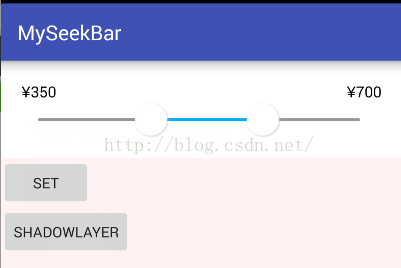
本文示範如何自定義一個雙向滑動的 SeekBar,一些需要選擇價格區間的 App 可能會用到。 1. 自定義 MySeekBar 繼承自 View,先看效果圖: 2.
 Android 各類 Adapter 的用法全解析
一、Adapter 是什麼 Adapter 是連接後端數據與前端顯示的適配器接口,是數據與 UI(View)之間的重要紐帶。在 ListView、GridView 等常見
 Android 開發(五):桌面小部件 App Widgets 的完整實作(附 Demo)
前言 這次的主要目標是打造一個 Android 應用,實作靜態廣播與動態廣播兩種更新 widget 內容的方式。由於是在上一篇博文的基礎上修改,所以本次實驗的重點落在 A