

編輯:關於 Android 程式設計
在做 Android 與單片機(MCU)通信的項目時,經常會遇到各種數據格式的相互轉換,比如十六進制、GB2312 中文字符、字節數組之間的互轉。本文把這些高頻用到的轉換方法整理出來,方便大家查閱使用。
例如把 BAFAC2DCB2B7 還原成「胡蘿卜」,即兩個字節合成一個漢字:
public static String stringToGbk(String string) throws Exception { byte[] bytes = new byte[string.length() / 2]; for (int j = 0; j < bytes.length; j++) { byte high = Byte.parseByte(string.substring(j * 2, j * 2 + 1), 16); byte low = Byte.parseByte(string.substring(j * 2 + 1, j * 2 + 2), 16); bytes[j] = (byte) (high << 4 | low); } String result = new String(bytes, "GBK"); return result; }
例如把「胡蘿卜」轉成 new byte[]{BA FA C2 DC B2 B7},一個漢字被拆成兩個字節:
public static byte[] gbkToString(String str) throws Exception { return new String(str.getBytes("GBK"), "gb2312").getBytes("gb2312"); }
例如 byte[]{0x7e, 0x80, 0x11, 0x20} 轉成 7e801120,常用於 log 打印:
public static String bytesToHexString(byte[] src) { StringBuilder stringBuilder = new StringBuilder(""); if (src == null || src.length <= 0) { return null; } for (int i = 0; i < src.length; i++) { int v = src[i] & 0xFF; String hv = Integer.toHexString(v); if (hv.length() < 2) { stringBuilder.append(0); } stringBuilder.append(hv); } return stringBuilder.toString(); }
與上例類似,只是每個字節之間用空格隔開,例如 byte[]{0x7e, 0x80, 0x11, 0x20} 轉成 7e 80 11 20,同樣適合 log 打印:
public static StringBuilder byte2HexStr(byte[] data) { if (data != null && data.length > 0) { StringBuilder stringBuilder = new StringBuilder(data.length); for (byte byteChar : data) { stringBuilder.append(String.format("%02X ", byteChar)); } return stringBuilder; } return null; }
可轉為 8、10、16 等任意進制,例如 byte[]{0x11, 0x20} 轉成 4384(10 進制),其中 radix 代表進制:
public static String bytesToAllHex(byte[] bytes, int radix) { return new BigInteger(1, bytes).toString(radix);// 這裡的1代表正數 }
例如把 7e20 轉成 new byte[]{0x7e, 0x20}:
public static byte[] HexString2Bytes(String src) { byte[] ret = new byte[src.length() / 2]; byte[] tmp = src.getBytes(); for (int i = 0; i < tmp.length / 2; i++) { ret[i] = uniteBytes(tmp[i * 2], tmp[i * 2 + 1]); } return ret; }
public static byte uniteBytes(byte src0, byte src1) { byte _b0 = Byte.decode("0x" + new String(new byte[] { src0 })) .byteValue(); _b0 = (byte) (_b0 << 4); byte _b1 = Byte.decode("0x" + new String(new byte[] { src1 })) .byteValue(); byte ret = (byte) (_b0 ^ _b1); return ret; }
以上就是 Android 與單片機通信中常用的數據轉換方法整理,後續會繼續補充相關內容。
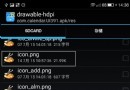 告別制式圖標!手機端自訂APP圖標教學
想自訂APP圖標,需Root後用RE檔案管理器、X-plore與Photoshop手機版。先從APK的res/drawable-hdpi取出icon.png,編輯後存成P
 Android 自訂 View 入門整理:從 onMeasure 到自訂屬性
為什麼要自訂 View 開發時難免遇到這種狀況:系統提供的控制項怎麼調都貼不上設計稿的細節。這時候就該自己動手做一個 View 了。 自訂 View 大體分成兩類:一類是
 Android MediaPlayer 完全指南:音頻源、控制方法與實戰 Demo
Android 提供了常見的音頻、視頻編碼解碼機制。借助多媒體類 MediaPlayer,開發人員可以很方便地在應用中播放音頻與視頻。本篇聚焦「如何播放一個音頻文件」,內
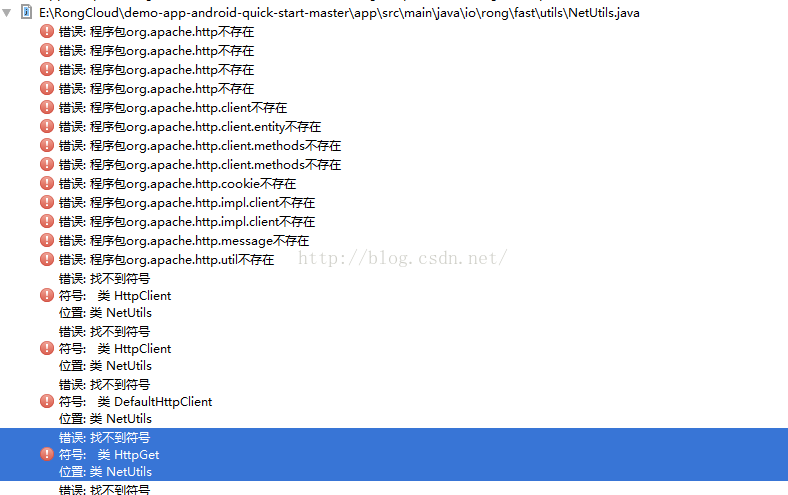 Android 6.0 找不到 org.apache.http 套件?一行設定解決
在 Android Studio 2.1 搭配 Android SDK 6.0(API 23)載入融雲 Demo 時,編譯直接失敗,錯誤訊息是找不到 org.apache