

編輯:關於 Android 程式設計
做換膚功能時碰到的一個具體問題:手上已經有 Button 對象,能調 getBackground() 拿到 Drawable,卻沒有現成 API 反查它對應的資源 ID,於是也就無法通過資源名稱去皮膚包中找對應文件。
網上流傳的方案大同小異:從外部皮膚包中讀取資源。前提是兩邊的資源名稱一致——本應用里叫 R.drawable.background,皮膚包里也必須叫 background。有了名稱,就能換算成皮膚包內部的具體 ID:
// 先取得本地資源的類型名與條目名
// 例如 R.drawable.background → type 為 "drawable",entry 為 "background"
String resTypeName = getContext().getResources().getResourceTypeName(id);
String resEntryName = getContext().getResources().getResourceEntryName(id);

// 創建皮膚包對應的 Context
Context apk = getContext().createPackageContext(
        packageName, Context.CONTEXT_IGNORE_SECURITY);

// 換算皮膚包中的資源 ID
int drawableId = apk.getResources()
        .getIdentifier(resEntryName, resTypeName, apk.getPackageName());
配套的做法是:Activity 切換皮膚時遍歷整個佈局樹,凡是 id 中包含約定標記(比如 skin)的控件就收集起來,後續統一處理。
private List<Integer> skinViewList = new ArrayList<Integer>();

private void scanViewGroup(ViewGroup group, List<Integer> skinViewList,
                           Resources res) {
    // 先檢查容器自身
    if (group.getId() != View.NO_ID
            && res.getResourceEntryName(group.getId()).contains(SKIN_PATTERN)
            && !skinViewList.contains(group)) {
        skinViewList.add(group.getId());
    }
    // 再遍歷子 View
    View child;
    for (int i = 0; i < group.getChildCount(); i++) {
        child = group.getChildAt(i);
        if (child instanceof ViewGroup) {
            scanViewGroup((ViewGroup) child, skinViewList, res);
        } else if (child.getId() == View.NO_ID) {
            return;
        } else {
            String entryName = res.getResourceEntryName(child.getId());
            if (entryName.contains(SKIN_PATTERN)
                    && !skinViewList.contains(child)) {
                skinViewList.add(child.getId());
            }
        }
    }
}
Button 的 id 可以靠 getId() 拿到,背景卻只能拿到 Drawable 對象,拿不到它的資源引用名,也就推不出 ID。這條路走不通。
最後想到的解法是在 Activity 初始化階段就地把屬性存下來。重寫 onCreateView(String name, Context context, AttributeSet attrs),這個方法會在 Activity 中每個控件(LinearLayout、TextView、Button 等)被創建之前調用,傳入的 attrs 正是該控件的屬性集合——埋點日誌驗證過,確實如此。
// skinViewList 非空說明有控件需要換膚
if (skinViewList != null && skinViewList.size() > 0) {
    int viewId = -1, backgroundId = -1;
    for (int i = 0; i < attrs.getAttributeCount(); i++) {
        if (attrs.getAttributeName(i).equals("id")) {
            viewId = attrs.getAttributeResourceValue(i, -1);
        }
        if (attrs.getAttributeName(i).equals("background")) {
            backgroundId = attrs.getAttributeResourceValue(i, -1);
        }
    }
    // 記錄 viewId 與 backgroundId 的映射
    if (viewId != -1 && backgroundId != -1
            && drawableIdList != null
            && !drawableIdList.containsKey(viewId)) {
        drawableIdList.put(viewId, backgroundId);
    }
}
拿到 backgroundId 之後,就能反查出資源引用名,再憑名字去皮膚包取對應資源,換膚動作自然成立。更關鍵的是,這個入口不只適用於圖片:字符串(R.string.title)、顏色(R.color.red)、尺寸(R.dimen.text_size_small)等屬性都能用同樣的方式收集,換膚的覆蓋面因此大大拓寬。
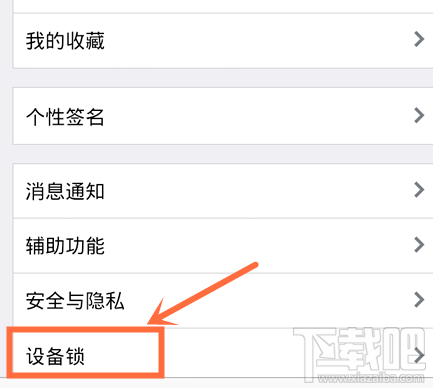 手機QQ設備鎖怎麼設置 讓帳號更安全
想預防QQ被盜、讓帳號多一層防護?那就來試試設備鎖。小編下面帶來設置教學,此功能需手機QQ 4.62或以上版本。 開啟設備鎖後,只有在通過認證的手機、平板或電腦上才能登入
 Android EditText 詳解及示例代碼
EditText 在 API 中的結構 java.lang.Object → android.view.View → android.widget.TextView →
 三星Root不想失去保固?Towelroot與SuperSU組合教學
三星KNOX會記錄Root與刷機,可能影響保固。若想降低風險,可用Towelroot搭配SuperSU。先執行Towelroot的make it ra1n,重啟後安裝Su
 Android JNI 中的 JNIEnv 解析
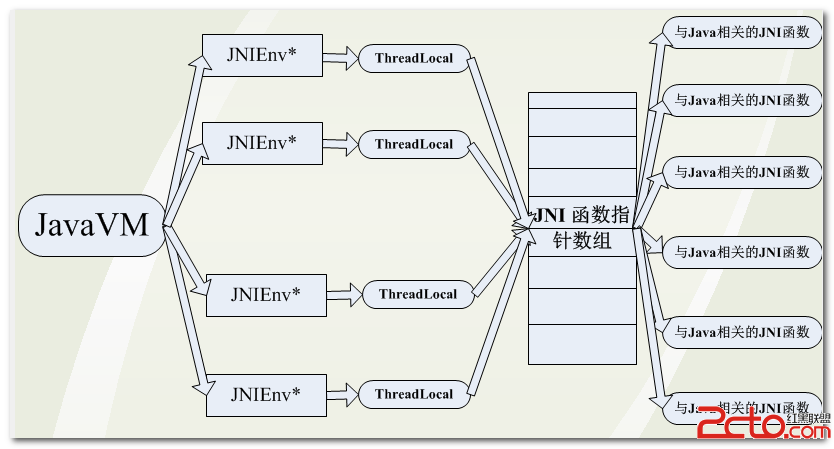
JNIEnv 是 JNI 開發中非常關鍵的概念。它代表目前執行緒的 Java 執行環境,也是 C 或 C++ 程式呼叫 Java 方法、操作 Java 物件時必須依靠的入