

編輯:關於 Android 程式設計
本文示範如何以 LocationManager 搭配 Criteria 取得裝置目前的經緯度。
public void getLoc() {
    // 位置
    LocationManager locationManager;
    LocationListener locationListener;
    Location location;
    String contextService = Context.LOCATION_SERVICE;
    String provider;
    double lat;
    double lon;

    locationManager = (LocationManager) getSystemService(contextService);

    Criteria criteria = new Criteria();
    criteria.setAccuracy(Criteria.ACCURACY_FINE);       // 高精度
    criteria.setAltitudeRequired(false);              // 不要求海拔
    criteria.setBearingRequired(false);               // 不要求方位
    criteria.setCostAllowed(true);                    // 允許有花費
    criteria.setPowerRequirement(Criteria.POWER_LOW); // 低功耗

    // 從可用的位置提供者中挑出最符合以上條件的
    provider = locationManager.getBestProvider(criteria, true);

    // 取得最後一次已知的位置
    location = locationManager.getLastKnownLocation(provider);

    locationListener = new LocationListener() {
        public void onStatusChanged(String provider, int status, Bundle extras) {
        }

        public void onProviderEnabled(String provider) {
        }

        public void onProviderDisabled(String provider) {
        }

        public void onLocationChanged(Location location) {
            lat = location.getLatitude();
            lon = location.getLongitude();
            Log.e("android_lat", String.valueOf(lat));
            Log.e("android_lon", String.valueOf(lon));
        }
    };

    // 監聽位置變化:每 2 秒、且移動超過 10 公尺才回報
    locationManager.requestLocationUpdates(provider, 2000, 10, locationListener);
}
權限。要在 Manifest 中宣告 ACCESS_FINE_LOCATION(或 ACCESS_COARSE_LOCATION),Android 6.0 以上還必須在執行期動態申請,否則 getLastKnownLocation() 會直接拿到 null。
provider 可能為 null。getBestProvider() 在沒有符合條件的提供者時會回傳 null,而 getLastKnownLocation(null) 會拋出例外,正式環境請務必加上判斷。
更新頻率是一組權衡。第二與第三個參數分別是時間間隔(毫秒)與距離間隔(公尺)。設得太小會讓定位晶片持續高負載、明顯耗電;若只是粗略展示所在城市,把 ACCURACY_FINE 換成 ACCURACY_COARSE 並放寬間隔會更合適。
記得取消訂閱。在 Activity 的 onPause() 或 onDestroy() 中呼叫 locationManager.removeUpdates(locationListener),避免記憶體洩漏與背景持續耗電。
以上就是取得經緯度的基本做法,希望對你的 Android 開發有所幫助。
 小米手環如何接入微信?訊息通知設定教學
小米手環可接入微信,方便查看訊息通知與相關資訊。1. 開啟小米手環 App,點擊右上角「更多」。2. 選擇「服務」。3. 點擊「微信接入」。4. 跟隨指示關注小米手環微信
 Android Doze 模式深度解析:從 DeviceIdleController 到狀態流轉
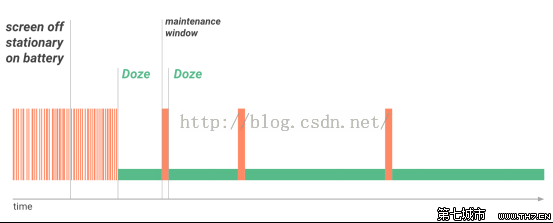
Doze 模式是 Android 6.0 引入的一種全新低功耗狀態。在後台,僅有部分任務被允許運行,其餘一律強制停止。當用戶長時間未使用手機時,Doze 模式透過延後 A
 Android 使用 GET / POST 存取 HTTP 伺服器完整實作
曾經我覺得 Android 的網路通訊有點神奇,直到把網路基礎補起來,才發現一切都很有條理。這篇就透過一個小 Demo,把 GET 與 POST 兩種提交方式講清楚。De
 ES 檔案瀏覽器遠端管理功能怎麼用
ES 檔案瀏覽器是 Android 上常見的檔案管理器。除了基本的檔案操作,它還能讓其他裝置透過 WiFi 遠端連進手機的檔案系統——不用拉線,電腦就能直接讀寫手機裡的東