

編輯:關於 Android 程式設計
專案裡反覆出現的那些小功能——MD5、讀串流、解析 XML/JSON、SharedPreferences 讀寫、圓角背景、動畫、雙擊退出——整理成一份可以隨取隨用的清單。
public class drawView extends View {

    private Paint paint1;

    public drawView(Context context, AttributeSet set) {
        super(context, set);
    }

    public void onDraw(Canvas canvas) {
        super.onDraw(canvas);
        paint1 = new Paint();               // 建立畫筆物件
        canvas.drawColor(Color.TRANSPARENT);

        paint1.setAntiAlias(true);          // 設定畫筆屬性
        paint1.setColor(Color.GRAY);
        paint1.setStyle(Paint.Style.FILL);
        paint1.setStrokeWidth(3);

        canvas.drawCircle(10, 10, 5, paint1); // 畫一個圓
    }
}
/*
 * 重點整理:
 * 1. 預設開啟的執行緒數為 128,超過會進入佇列排隊
 * 2. 繼承時的三個泛型參數分別是:傳入參數型別、進度型別、回傳結果型別
 * 3. 呼叫 execute() 後先執行 onPreExecute,再啟動執行緒池執行 doInBackground
 * 4. doInBackground 完成後,AsyncTask 內部以 Handler 把結果送回 UI 執行緒的 onPostExecute
 */
private void asyncImageLoad(ImageView imageView, String path) {
    AsyncImageTask asyncImageTask = new AsyncImageTask(imageView);
    asyncImageTask.execute(path);
}

private final class AsyncImageTask extends AsyncTask<String, Integer, Uri> {

    private ImageView imageView;

    public AsyncImageTask(ImageView imageView) {
        this.imageView = imageView;
    }

    protected Uri doInBackground(String... params) {   // 子執行緒中執行
        try {
            Uri uu = ContactService.getImage(params[0], cache);
            return uu;
        } catch (Exception e) {
            e.printStackTrace();
        }
        return null;
    }

    protected void onPostExecute(Uri result) {          // 執行在主執行緒
        Log.i("Test", result + "");
        if (result != null && imageView != null) {
            imageView.setImageURI(result);   // setImageURI 會依路徑載入圖片
        }
    }
}
// 從 0 擷取到第一個 "/" 之前
String name = result.substring(0, result.indexOf("/"));

// 從第一個 "/" 之後擷取到最後一個 "/" 之前
String name = result.substring(result.indexOf("/") + 1, result.lastIndexOf("/"));
import java.security.MessageDigest;
import java.security.NoSuchAlgorithmException;

public class MD5 {

    public static String getMD5(String content) {
        try {
            MessageDigest digest = MessageDigest.getInstance("MD5");
            digest.update(content.getBytes());
            return getHashString(digest);
        } catch (NoSuchAlgorithmException e) {
            e.printStackTrace();
        }
        return null;
    }

    private static String getHashString(MessageDigest digest) {
        StringBuilder builder = new StringBuilder();
        for (byte b : digest.digest()) {
            builder.append(Integer.toHexString((b >> 4) & 0xf));
            builder.append(Integer.toHexString(b & 0xf));
        }
        return builder.toString();
    }
}
提醒:MD5 已不適合當作安全用途的雜湊(碰撞已被實際構造出來),密碼請改用加鹽的 bcrypt/PBKDF2/scrypt。若只用於檢查檔案完整性或產生快取鍵,則仍然夠用。
import java.io.ByteArrayOutputStream;
import java.io.InputStream;

public class StreamTool {

    /**
     * 讀取串流中的資料
     */
    public static byte[] read(InputStream inStream) throws Exception {
        ByteArrayOutputStream outStream = new ByteArrayOutputStream();
        byte[] buffer = new byte[1024];
        int len = 0;
        while ((len = inStream.read(buffer)) != -1) {
            outStream.write(buffer, 0, len);
        }
        inStream.close();
        return outStream.toByteArray();
    }
}
public static List<Contact> getContacts() throws Exception {
    String path = StringTools.getURL_list_xml;
    URL url = new URL(path);

    // URLConnection 與 HttpURLConnection 都是抽象類,需透過 URL 的 openConnection 取得實例
    HttpURLConnection con = (HttpURLConnection) url.openConnection();
    con.setReadTimeout(5000);
    con.setRequestMethod("GET");

    if (con.getResponseCode() == 200) {
        return parseXML(con.getInputStream());
    }
    return null;
}

/** 解析 XML */
private static List<Contact> parseXML(InputStream xml) throws Exception {
    List<Contact> contacts = new ArrayList<Contact>();
    Contact contact = null;

    XmlPullParser pullParser = Xml.newPullParser();
    pullParser.setInput(xml, "UTF-8");

    int event = pullParser.getEventType();
    while (event != XmlPullParser.END_DOCUMENT) {
        switch (event) {
            case XmlPullParser.START_TAG:
                if ("contact".equals(pullParser.getName())) {
                    contact = new Contact();
                    contact.id = new Integer(pullParser.getAttributeValue(0));
                } else if ("name".equals(pullParser.getName())) {
                    contact.name = pullParser.nextText();   // 注意是 nextText 而非 getText
                } else if ("image".equals(pullParser.getName())) {
                    contact.imageUrl = pullParser.getAttributeValue(0);
                }
                break;
            case XmlPullParser.END_TAG:
                if ("contact".equals(pullParser.getName())) {
                    contacts.add(contact);
                    contact = null;
                }
                break;
        }
        event = pullParser.next();
    }
    return contacts;
}
private static List<SecondActivity_Goods_Bean> parseJson(InputStream inputStream) throws Exception {
    List<SecondActivity_Goods_Bean> beans = new ArrayList<SecondActivity_Goods_Bean>();

    byte[] data = StreamTool.read(inputStream);
    String json = new String(data);
    JSONArray array = new JSONArray(json);

    for (int i = 0; i < array.length(); i++) {
        JSONObject jsonObject = array.getJSONObject(i);
        jsonObject.getString("imageUrl");
        jsonObject.getString("imageContent");
        jsonObject.getString("goodsPrice");

        SecondActivity_Goods_Bean goodBean = new SecondActivity_Goods_Bean(
                jsonObject.getString("imageUrl"),
                jsonObject.getString("imageContent"),
                jsonObject.getString("goodsPrice"));
        beans.add(goodBean);
    }
    return beans;
}
private static String sendPostRequest(String path, Map<String, String> parame,
                                      String encoding) throws Exception {
    // 組出 telephone_number=xxx&password=xxx 這樣的表單資料
    StringBuilder data = new StringBuilder();
    if (parame != null && !parame.isEmpty()) {
        for (Map.Entry<String, String> entry : parame.entrySet()) {
            data.append(entry.getKey()).append("=");
            data.append(URLEncoder.encode(entry.getValue(), encoding));
            data.append("&");
        }
        data.deleteCharAt(data.length() - 1);   // 移除最後多出的 "&"
    }

    byte[] entity = data.toString().getBytes();  // 預設 UTF-8 位元碼
    HttpURLConnection conn = (HttpURLConnection) new URL(path).openConnection();
    conn.setConnectTimeout(5000);
    conn.setRequestMethod("POST");
    conn.setRequestProperty("Content-Type", "application/x-www-form-urlencoded");
    conn.setRequestProperty("Content-Length", String.valueOf(entity.length));

    OutputStream outStream = conn.getOutputStream();
    outStream.write(entity);

    if (conn.getResponseCode() == 200) {
        // 讀回伺服器回應,用以判斷是否上傳成功
        byte[] stringData = StreamTool.read(conn.getInputStream());
        return new String(stringData, "UTF-8");
    }
    return "Submit_Fail";
}
public class SharedPreferences_Service {

    private Context context;
    private SharedPreferences sp;

    public SharedPreferences_Service(Context applicationCon) {
        this.context = applicationCon;
    }

    /**
     * 存入資料,檔案位於 data/data/ package /Rsgistered_form.xml
     */
    public void SetParament(String name, String telephone_number, String password) {
        sp = context.getSharedPreferences("Rsgistered_form", context.MODE_APPEND);
        Editor et = sp.edit();
        et.putString("name", name);
        et.putString("telephone_number", telephone_number);
        et.putString("password", password);
        et.commit();
    }

    /**
     * 取出資料
     */
    public Map<String, String> GetParament() {
        Map<String, String> parmes = new HashMap<String, String>();
        sp = context.getSharedPreferences("Rsgistered_form", context.MODE_APPEND);
        parmes.put("name", sp.getString("name", ""));   // 無值時回傳空字串
        parmes.put("telephone_number", sp.getString("telephone_number", ""));
        parmes.put("password", sp.getString("password", ""));
        return parmes;
    }
}
順手提醒:SharedPreferences 是明文儲存,密碼之類的敏感資訊不該直接寫進去;MODE_APPEND 在多行程情境下也不是安全選擇,正式專案建議改用 MODE_PRIVATE 並注意 commit 與 apply 的差異(apply 為非同步、不阻塞主執行緒)。
<?xml version="1.0" encoding="utf-8"?>
<shape xmlns:android="https://schemas.android.com/apk/res/android"
    android:shape="rectangle" >

    <!-- 圓角 -->
    <corners android:radius="9dp"
        android:topLeftRadius="2dp"
        android:topRightRadius="2dp"
        android:bottomLeftRadius="2dp"
        android:bottomRightRadius="2dp" />

    <!-- 漸層 -->
    <gradient android:startColor="@android:color/white"
        android:centerColor="@android:color/black"
        android:endColor="@android:color/black"
        android:useLevel="true"
        android:angle="45"
        android:type="radial"
        android:centerX="0"
        android:centerY="0"
        android:gradientRadius="90" />

    <!-- 間隔 -->
    <padding android:left="2dp" android:top="2dp"
        android:right="2dp" android:bottom="2dp" />

    <!-- 大小 -->
    <size android:width="50dp" android:height="50dp" />

    <!-- 填充 -->
    <solid android:color="@android:color/white" />

    <!-- 描邊 -->
    <stroke android:width="2dp" android:color="@android:color/black"
        android:dashWidth="1dp" android:dashGap="2dp" />
</shape>
<?xml version="1.0" encoding="utf-8"?>
<selector xmlns:android="https://schemas.android.com/apk/res/android">
    <item android:drawable="@drawable/button_pressed_bg"
          android:state_pressed="true"></item>
    <item android:drawable="@drawable/shape_image"></item>
</selector>
<?xml version="1.0" encoding="utf-8"?>
<shape xmlns:android="https://schemas.android.com/apk/res/android"
    android:shape="rectangle" >
    <corners android:topLeftRadius="2px"
        android:topRightRadius="2px"
        android:bottomLeftRadius="2px"
        android:bottomRightRadius="2px" />
    <solid android:color="#FFFFFF" />
    <stroke android:width="0.5dp" android:color="#7A7A7A" />
</shape>
<?xml version="1.0" encoding="utf-8"?>
<set xmlns:android="https://schemas.android.com/apk/res/android"
    android:shareInterpolator="false">

    <!-- 100%p 的 p 指相對於父 View 的位置,0 為起始、100% 為終點 -->
    <!-- 位移 -->
    <translate android:fromXDelta="0%p" android:toXDelta="100%p"
        android:duration="1000" />

    <!-- 透明度 -->
    <alpha android:fromAlpha="1.0" android:toAlpha="0.5"
        android:duration="500" />
</set>
private SQLiteDatabase openDatabase(String dbfile) {
    try {
        if (!(new File(dbfile).exists())) {
            // 判斷資料庫檔是否存在,不存在則匯入,否則直接開啟
            InputStream is = this.context.getResources().openRawResource(R.raw.china_city);
            FileOutputStream fos = new FileOutputStream(dbfile);

            byte[] buffer = new byte[BUFFER_SIZE];
            int count = 0;
            while ((count = is.read(buffer)) > 0) {
                fos.write(buffer, 0, count);
            }
            fos.close();
            is.close();
        }
        return SQLiteDatabase.openOrCreateDatabase(dbfile, null);
    } catch (FileNotFoundException e) {
        PLog.e("File not found");
        e.printStackTrace();
    } catch (IOException e) {
        PLog.e("IO exception");
        e.printStackTrace();
    }
    return null;
}
public class DoubleClickExit {

    /** 雙擊退出檢測,閾值 2000ms */
    public static long lastClick = 0L;
    private static final int THRESHOLD = 2000;

    public static boolean check() {
        long now = System.currentTimeMillis();
        boolean b = now - lastClick < THRESHOLD;
        lastClick = now;
        return b;
    }
}

@Override
public void onBackPressed() {
    if (!DoubleClickExit.check()) {
        ToastUtil.showShort(getString(R.string.double_exit));
    } else {
        finish();
    }
}
// 設定點擊後軟鍵盤的顯示類型,numberDecimal 為帶小數點的數字
android:inputType="numberDecimal"

// 讓 AlertDialog 中的 editView 自動彈出軟鍵盤
editView.setOnFocusChangeListener(new View.OnFocusChangeListener() {
    @Override
    public void onFocusChange(View v, boolean hasFocus) {
        if (hasFocus) {
            alertDialog.getWindow()
                    .setSoftInputMode(WindowManager.LayoutParams.SOFT_INPUT_STATE_ALWAYS_VISIBLE);
        }
    }
});

// Calendar 取得當前日期
mCalendar = Calendar.getInstance();
int _YEAR    = mCalendar.get(Calendar.YEAR);
int _MONTH   = mCalendar.get(Calendar.MONTH);          // 注意從 0 開始
int _DAT     = mCalendar.get(Calendar.DAY_OF_MONTH);
int _lastday = mCalendar.getActualMaximum(Calendar.DAY_OF_MONTH);
int _week    = mCalendar.get(Calendar.DAY_OF_WEEK);
DialogFragment 是官方推薦的做法,它能在旋轉螢幕後自動重建,不像 Dialog 那樣容易洩漏 Activity。寫法上定義一個與宿主通訊的介面,並用 newInstance 傳遞參數:
public class YourDialogFragment extends DialogFragment {

    // 定義與 Activity 通訊的介面,使用此 DialogFragment 的 Activity 須實作
    public interface DialogFragmentDataImp {
        void showMessage(String message);
    }

    // 建立帶參數的 Fragment 實例
    public static YourDialogFragment newInstance(String message) {
        YourDialogFragment fragment = new YourDialogFragment();
        Bundle bundle = new Bundle();
        bundle.putString("message", message);
        fragment.setArguments(bundle);
        return fragment;
    }

    @Override
    public Dialog onCreateDialog(Bundle savedInstanceState) {
        View customView = LayoutInflater.from(getActivity())
                .inflate(R.layout.fragment_edit_bill_dialog, null);
        mContext = getActivity();
        initView();
        return new AlertDialog.Builder(getActivity()).setView(customView).create();
    }
}
呼叫方式:
YourDialogFragment dialog = new YourDialogFragment();
dialog.show(getFragmentManager(), "loginDialog");
這份清單裡的片段多半偏向直接呼叫平台 API 的寫法。若要在新專案中使用,網路請求建議換成 OkHttp/Retrofit,JSON 解析換成 Gson/Moshi,圖片載入換成 Glide 或 Fresco——上述程式碼的價值在於把底層流程攤開,理解之後再用函式庫會更清楚它在幫你省掉哪些細節。
 Android Handler 入門:第一個訊息傳遞範例
這是一個最簡單的 Handler 範例,目的只是讓初學者對 Handler 有個初步的認識。範例在布局上放了一個按鈕,點擊後透過 Handler 傳送資料並列印出來(全部
 Android 學習小 Demo(19):用 Loader 即時接收新短信
先前寫過一篇《Android 學習小 Demo(13)Android 中關於 ContentObserver 的使用》,當時是用 ContentObserver 去監聽短
 QQ厘米秀表情怎麼才有聲音?音效標示與靜音排查
文字聊久了會不夠用,於是有表情包;到了厘米秀,表情不只會動,還自帶音效——有些動作會配音,點下去就有反應。但很多人發現一個情況:別人的厘米秀有聲音,自己的卻安靜如也。先確
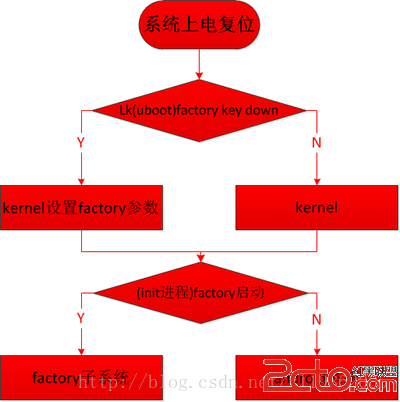 Android 啟動流程中的子系統切換:Recovery、Factory 與關機充電
Android 裝置除了主系統,還可能包含 recovery、factory、關機充電等子系統。這些模式如何在開機時被選取,是理解裝置啟動流程的重要一環。本文以 MTK