

編輯:關於 Android 程式設計
很多 App 會提供語言切換選項,讓使用者不必改動整個系統語言。要留意的是,這類需求的重點在於「只影響這個 App」,不會連手機其他部分一起變。以下拆解完整實作。
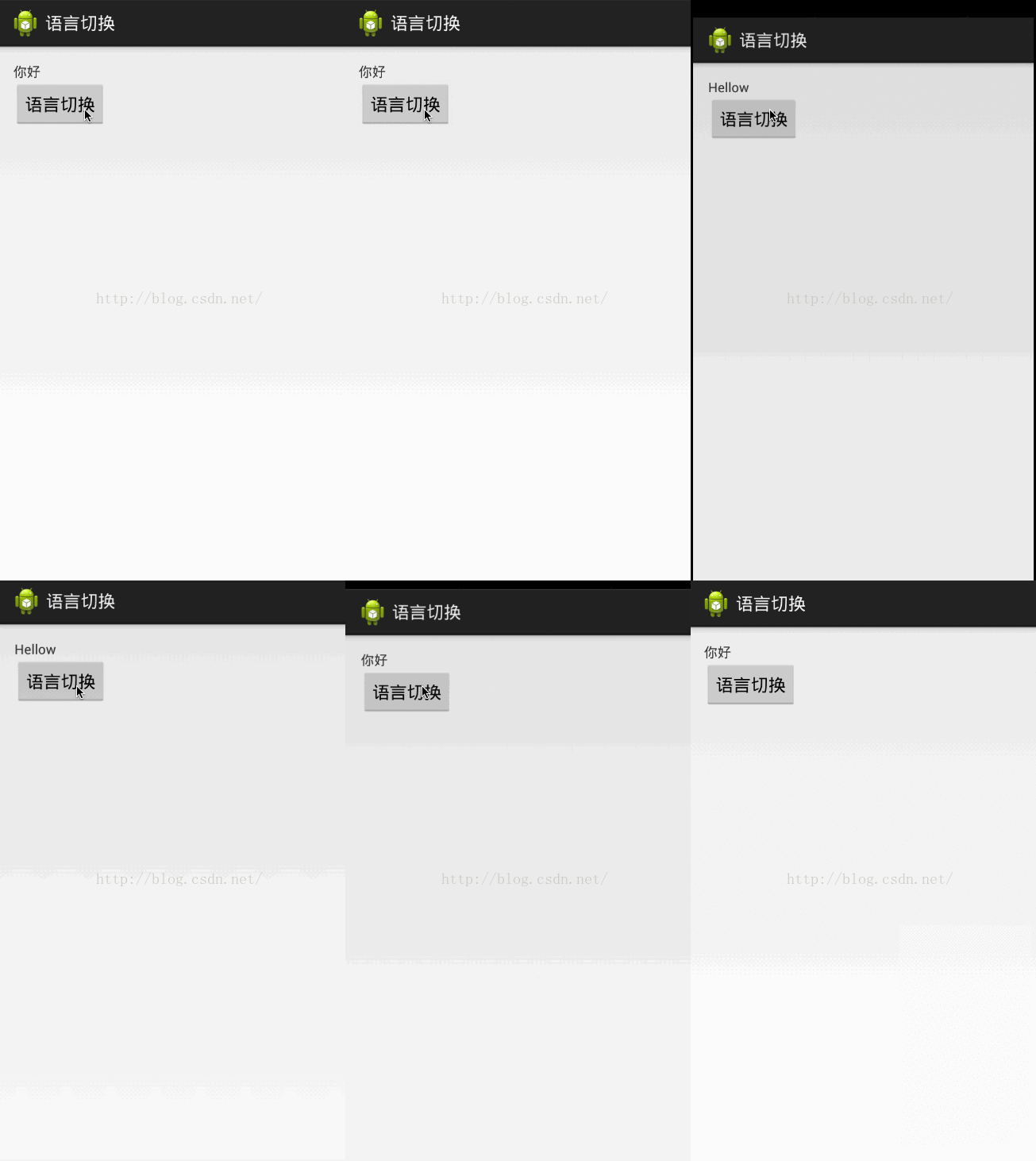
一個文字與一顆切換鈕,按鈕透過 android:onClick 直接綁定方法。
<LinearLayout xmlns:android="https://schemas.android.com/apk/res/android"
    xmlns:tools="https://schemas.android.com/tools"
    android:layout_width="match_parent"
    android:layout_height="match_parent"
    android:orientation="vertical"
    android:padding="20dp" >
    <TextView
        android:layout_width="wrap_content"
        android:layout_height="wrap_content"
        android:text="@string/hellow" />
    <Button
        android:layout_width="wrap_content"
        android:layout_height="wrap_content"
        android:onClick="changeLanguage"
        android:text="語言切換" />
</LinearLayout>
核心邏輯是取得 Resources 的 Configuration,改寫其中的 locale,再用 updateConfiguration() 套用回去。改完之後必須重建 Activity,因為文字已經在 setContentView() 時就從資源取值填進去了,不重建畫面不會更新。
package com.example.chinesepage;

import java.util.Locale;
import android.app.Activity;
import android.content.Intent;
import android.content.res.Configuration;
import android.content.res.Resources;
import android.os.Bundle;
import android.util.DisplayMetrics;
import android.view.View;
import android.widget.Toast;

public class MainActivity extends Activity {

    @Override
    protected void onCreate(Bundle savedInstanceState) {
        super.onCreate(savedInstanceState);
        setContentView(R.layout.activity_main);
    }

    /**
     * 點擊按鈕切換語言
     */
    public void changeLanguage(View view) {
        Resources resources = getResources();
        Configuration configuration = resources.getConfiguration(); // 取得資源配置

        if (configuration.locale.equals(Locale.CHINA)) {
            // 目前是中文,切換為英文
            configuration.locale = Locale.ENGLISH;
        } else {
            // 否則切回中文
            configuration.locale = Locale.CHINA;
        }

        DisplayMetrics metrics = new DisplayMetrics();
        resources.updateConfiguration(configuration, metrics); // 套用新的設定

        sendBroadcast(new Intent("language")); // 發送廣播,接收後重建 Activity 以套用新語言

        // 也可以直接跳轉自己:
        // Intent intent = new Intent(MainActivity.this, MainActivity.class);
        // intent.setFlags(Intent.FLAG_ACTIVITY_NO_ANIMATION); // 去掉轉場動畫,看起來像原地刷新
        // startActivity(intent);
        finish();
    }
}
收到自訂的 language 廣播後,重新啟動 MainActivity。加上 FLAG_ACTIVITY_NEW_TASK 是因為它從非 Activity 的 context 啟動頁面時必須具備這個旗標。
package com.example.chinesepage;

import android.content.BroadcastReceiver;
import android.content.Context;
import android.content.Intent;

/**
 * 自訂廣播類別:語言變更後重啟 Activity
 */
public class ChangeReceiver extends BroadcastReceiver {

    private Intent mIntent;

    @Override
    public void onReceive(Context context, Intent intent) {
        mIntent = new Intent(context, MainActivity.class);
        mIntent.addFlags(Intent.FLAG_ACTIVITY_NEW_TASK);
        context.startActivity(mIntent);
    }
}
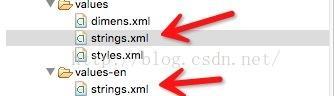
在 res 底下新增 values-en 資料夾,把 strings.xml 複製一份進去,將內容改成英文即可。Android 會依目前的 locale 自動挑選對應目錄的資源。
values/strings.xml
<resources>
    <string name="app_name">語言切換</string>
    <string name="hello_world">你好,World!</string>
    <string name="action_settings">設置</string>
    <string name="hellow">你好</string>
</resources>
values-en/strings.xml
<resources>
    <string name="app_name">ChinesePage</string>
    <string name="hello_world">Hello world!</string>
    <string name="action_settings">Settings</string>
    <string name="hellow">Hellow</string>
</resources>
<receiver android:name="com.example.chinesepage.ChangeReceiver" >
    <intent-filter>
        <action android:name="language" />
    </intent-filter>
</receiver>
updateConfiguration() 已不建議使用。 這個方法在 API 25 之後被標記為 deprecated,官方建議改用 AndroidX 的 AppCompatDelegate.setApplicationLocales()(搭配 res/xml/locales_config.xml),它會自動處理重建與語系套用,也能與 Android 13 的系統級語言設定整合。若你的專案已採用 AndroidX,優先走這條路。
廣播在 Android 8.0 之後需要動態註冊。 靜態註冊的 receiver 已無法接收自訂的隱式廣播,得改用 registerReceiver(receiver, filter) 在執行期註冊,並在 Activity 銷毀時 unregisterReceiver(),否則會造成記憶體洩漏。
掌握了「改 locale → 套用 Configuration → 重建頁面」這條主線,再依專案使用的 Android 版本補上對應的 API,App 內的多國語系切換就能穩定運作。
 Android SweepGradient 詳解:用掃描漸層畫出雷達光波效果
什麼是「掃描渲染」?想想安全軟體裡雷達掃描的那圈光波——顏色繞著一個中心點旋轉漸變,就是 SweepGradient 最典型的應用。 兩種建構方式 以顏色陣列建構
 Android DataBinding 詳解:打造更優雅的 MVVM 開發方式
為什麼需要 DataBinding 傳統 Android 開發中,布局與邏輯往往需要透過 findViewById、setText、setOnClickListener
 Android 平台架構概覽
Android 平台架構通常分為五層:Linux Kernel、C/C++ 函式庫、Android Runtime、應用程式框架與應用程式層。核心分層Linux Kern
 Android 自定義 View:動態繪製 N 階貝茲曲線
前陣子公司的專案用到了貝茲曲線,把原理與實作方式摸熟之後,我興起了一個念頭:不如在 Android 上把貝茲曲線的「建構過程」動畫化。於是有了 BezierMaker 這