

編輯:關於 Android 程式設計
在介面上我們經常會用到 Button 按鈕,但通常點擊後看不到任何回饋效果。如果使用者連續點擊兩次,就可能觸發 ANR 錯誤,互動體驗較差。若能自訂點擊效果,讓使用者清楚知道自己確實點了按鈕,就能有效避免重複點擊的問題。
自訂點擊效果有兩種方式:一種是在 XML 中定義,另一種是在程式碼中定義。
先看看如何在 XML 中定義:在 drawable 下新增 selector.xml 檔:
<?xml version="1.0" encoding="utf-8"?> <selector xmlns:android="https://schemas.android.com/apk/res/android"> <item android:drawable="@drawable/button_press" android:state_pressed="true"/> <item android:drawable="@drawable/button_nomal" android:state_focused="false" android:state_pressed="false"/> <item android:drawable="@drawable/button_focus" android:state_focused="true"/> <item android:drawable="@drawable/button_nomal" android:state_focused="false"/> </selector>
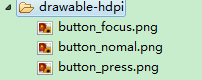
這裡定義了兩種狀態:一種是按下,一種是獲得焦點。drawable 分別引用了這三張圖片:
接著在 main.xml 中添加 button 按鈕:
<Button android:id="@+id/button1" android:layout_width="wrap_content" android:layout_height="wrap_content" android:text="button效果演示" android:background="@drawable/selector" />
在 MainActivity 中取得 button:
Button button1=(Button) this.findViewById(R.id.button1); button1.setOnClickListener(new View.OnClickListener() { @Override public void onClick(View v) { // TODO Auto-generated method stub Toast.makeText(getApplicationContext(), "你點擊了button按鈕", Toast.LENGTH_SHORT).show(); } });
下面看看點擊效果。
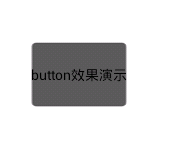
點擊 button 前:
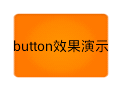
按下 button 按鈕時:
接著看第二種實作方式,在程式碼中實現:
首先在 main.xml 中添加:
<Button android:id="@+id/button2" android:layout_width="wrap_content" android:layout_height="wrap_content" android:text="button效果演示" android:background="@drawable/button_nomal"/>
接著在 MainActivity 中實現:
Button button2=(Button) this.findViewById(R.id.button2); button2.setOnTouchListener(new OnTouchListener() { @Override public boolean onTouch(View v, MotionEvent event) { // TODO Auto-generated method stub if(event.getAction()==MotionEvent.ACTION_DOWN){ v.setBackgroundResource(R.drawable.button_press); }else if(event.getAction()==MotionEvent.ACTION_UP){ v.setBackgroundResource(R.drawable.button_nomal); } return false; } });
在這裡綁定了 button 的 OnTouchListener 監聽,因為 OnClickListener 繼承了 OnTouchListener。運行效果與上面一樣,這裡就不再贅述。
以上就是 Android 自訂 button 點擊效果實作方式的全部內容,希望對大家有所幫助,也歡迎多多支持本站。
 Android 學習筆記:應用單元測試實例分析
本文結合學習筆記的形式,梳理 Android 應用中單元測試的完整實現步驟,供大家參考。 第一步:配置 AndroidManifest.xml 在清單文件中加入以下兩段
 Android 開發者頭條實戰(一):引導啟動頁的實現
廢話不多說,本文直接帶你動手實現「開發者頭條」APP 的引導啟動頁。 一、效果預覽 從效果圖可以看出,整個滑動界面由 ViewPager 實現,再監聽滑動事件來切換底部
 Android 學習筆記:自訂樣式 Toast 提示框
系統預設的 Toast 只能顯示一行純文字,樣子單調。如果想放圖示、換底色或做更複雜的排版,就得自己指定版面。以下示範完整做法。 1. 準備 Toast 專用的版面檔
 Android 來電黑名單實作:以 PhoneStateListener 監聽並自動掛斷
這個實例要達成兩件事:讓使用者動態把號碼加入黑名單,並在黑名單號碼來電時自動掛斷。監聽的部分不難,難的是「掛斷」——因為 Android 並不把結束通話的 API 公開給