

編輯:關於 Android 程式設計
讀寫外部儲存空間是 Android 開發中最常見的操作之一,無論是快取圖片、匯出檔案還是備份資料都會用到。以下把常用的幾個動作整理成可直接取用的工具方法。
String sdCardRoot = Environment.getExternalStorageDirectory().getAbsolutePath();
 /**
  * 在 SD 卡上建立目錄
  */
 public File createDirOnSDCard(String dir) {
     File dirFile = new File(sdCardRoot + File.separator + dir + File.separator);
     Log.v("createDirOnSDCard", sdCardRoot + File.separator + dir + File.separator);
     dirFile.mkdirs();
     return dirFile;
 }
這裡用 mkdirs() 而非 mkdir(),因為前者會連同不存在的上層目錄一起建立。
 /**
  * 在 SD 卡上建立檔案
  */
 public File createFileOnSDCard(String fileName, String dir) throws IOException {
     File file = new File(sdCardRoot + File.separator + dir + File.separator + fileName);
     Log.v("createFileOnSDCard", sdCardRoot + File.separator + dir + File.separator + fileName);
     file.createNewFile();
     return file;
 }
 /**
  * 判斷 SD 卡上的檔案是否存在
  */
 public boolean isFileExist(String fileName, String path) {
     File file = new File(sdCardRoot + path + File.separator + fileName);
     return file.exists();
 }
 /* 寫入資料到 SD 卡 */
 public File writeData2SDCard(String path, String fileName, InputStream data) {
     File file = null;
     OutputStream output = null;
     try {
         createDirOnSDCard(path);                    // 建立目錄
         file = createFileOnSDCard(fileName, path);  // 建立檔案
         output = new FileOutputStream(file);
         byte buffer[] = new byte[2 * 1024];         // 每次寫 2K
         int temp;
         while ((temp = data.read(buffer)) != -1) {
             output.write(buffer, 0, temp);
         }
         output.flush();
     } catch (Exception e) {
         e.printStackTrace();
     } finally {
         try {
             output.close();
         } catch (Exception e2) {
             e2.printStackTrace();
         }
     }
     return file;
 }
這裡刻意不直接一次讀進記憶體,而是用固定大小的緩衝區分段讀寫。這樣做是為了避免大檔案把整個記憶體吃滿而引發 OOM——這也是處理檔案 IO 時的基本原則。
操作外部儲存必須在 manifest 中申請權限:
<uses-permission android:name="android.permission.WRITE_EXTERNAL_STORAGE"/>
若 targetSdkVersion 為 23 以上,除了宣告權限,還必須在執行期動態向使用者請求授權,否則寫入會直接失敗。
 public String readFile(String fileName) throws Exception {
     FileInputStream fis = context.openFileInput(fileName);
     byte[] bytes = new byte[fis.available()];
     fis.read(bytes);
     fis.close();
     return new String(bytes, "utf-8");
 }
這種寫法簡潔,但當檔案很大時,byte[] 會佔用可觀的記憶體,因此不建議用在大型檔案上。
以下是一個完整的外部儲存服務類:
 package cn.itcast.fileio.service;

 import java.io.ByteArrayOutputStream;
 import java.io.File;
 import java.io.FileInputStream;
 import java.io.FileOutputStream;
 import java.io.IOException;
 import java.io.InputStream;
 import java.io.OutputStream;
 import android.content.Context;
 import android.os.Environment;

 public class SdCardService {
     private Context ctx;

     public SdCardService(Context ctx) {
         this.ctx = ctx;
     }

     /** 寫檔案到 SD 卡 */
     public void writeToSdCard(String fileName, String cont) {
         try {
             // 先確認 SD 卡是否已掛載
             if (Environment.getExternalStorageState().equals(Environment.MEDIA_MOUNTED)) {
                 File dir = Environment.getExternalStorageDirectory();
                 File file = new File(dir, "itcast.txt");
                 FileOutputStream fos = new FileOutputStream(file);
                 fos.write(cont.getBytes());
                 fos.close();
             }
         } catch (Exception e) {
             e.printStackTrace();
         }
     }

     /** 讀取 SD 卡中的檔案 */
     public String readSdCard(String fileName) {
         try {
             if (Environment.getExternalStorageState().equals(Environment.MEDIA_MOUNTED)) {
                 File dir = Environment.getExternalStorageDirectory();
                 File file = new File(dir, "itcast.txt");
                 FileInputStream fis = new FileInputStream(file);
                 return readIs2String(fis);
             }
         } catch (Exception e) {
             e.printStackTrace();
         }
         return null;
     }

     /** 把輸入流的資料導向輸出流 */
     private OutputStream readIs2Os(InputStream is, OutputStream os) {
         try {
             byte[] bytes = new byte[1024];
             int length = 0;
             while ((length = is.read(bytes)) != -1) {
                 os.write(bytes, 0, length);
             }
             is.close();
             os.close();
         } catch (IOException e) {
             e.printStackTrace();
         }
         return os;
     }

     /** 把輸入流的資料讀成位元組陣列 */
     public byte[] readIs2Bytes(InputStream is) {
         ByteArrayOutputStream baos = new ByteArrayOutputStream();
         readIs2Os(is, baos);
         return baos.toByteArray();
     }

     /** 把輸入流的資料讀成字串 */
     public String readIs2String(InputStream is) {
         try {
             return new String(readIs2Bytes(is), "utf-8");
         } catch (Exception e) {
             e.printStackTrace();
         }
         return null;
     }

     /** 依檔名直接從 SD 卡讀成字串 */
     public String readIs2String(String fileName) {
         try {
             if (Environment.getExternalStorageState().equals(Environment.MEDIA_MOUNTED)) {
                 File dir = Environment.getExternalStorageDirectory();
                 File file = new File(dir, fileName);
                 FileInputStream is = new FileInputStream(file);
                 return readIs2String(is);
             }
         } catch (Exception e) {
             e.printStackTrace();
         }
         return null;
     }
 }
最後補充兩點實務提醒。第一,每次操作外部儲存前都應該先檢查掛載狀態(Environment.getExternalStorageState()),使用者可能沒插卡或卡處於唯讀狀態。第二,若要讀寫的是 App 私有目錄而非公共空間,應改用 context.getExternalFilesDir(),這在 Android 4.4 之後免權限、且 App 移除時會一併清除,是更合適的選擇。
 WebP 圖片格式原理與 Android 支援現況深度解析
1. 背景 在網路傳輸中,圖片仍然是佔用流量較大的一部分,行動裝置上更是如此。因此,如何在保證視覺不失真的前提下縮小圖片體積,對於節省頻寬與電池電量都非常重要。 然而 J
 Android Activity 生命週期全解讀:每個回呼該做什麼、不該做什麼
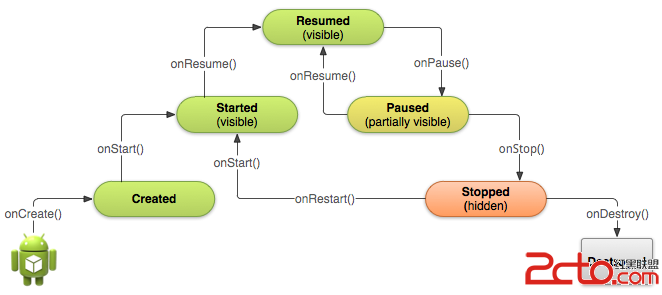
Android 系統會依生命週期的不同階段觸發對應的回呼函數來執行你的代碼。啟動與銷毀一個 Activity,背後是一整套有順序的回呼。搞清楚每個環節該做什麼、不該做什麼
 Android 內建 emoji 表情的使用方式整理
emoji 表情已成為現代 App 常見的表達方式。它本質上是一組 Unicode 編碼,不同平台會依相同編碼呈現各自的圖形風格。因此在 Android 中,只要能正確取
 RecyclerView 完全指南:LayoutManager、分割線、動畫與點擊事件
RecyclerView 問世已經有一段時間,透過 support-v7 即可使用。官方對它的定位是「在有限視窗中呈現大量資料集」,而這件事 ListView、GridV