

編輯:關於 Android 程式設計
本文透過兩個實例,為大家分享如何在 Android 中實現單項選擇與多項選擇操作,具體內容如下。
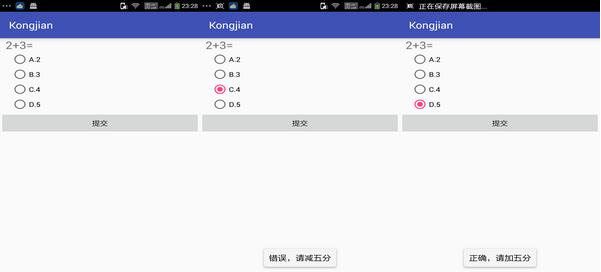
1. 布局:使用 RadioGroup 容納多個 RadioButton,實現互斥的單選效果,並附一個提交按鈕。
<?xml version="1.0" encoding="utf-8"?> <LinearLayout xmlns:android="https://schemas.android.com/apk/res/android" xmlns:tools="https://schemas.android.com/tools" android:layout_width="match_parent" android:layout_height="match_parent" android:orientation="vertical" tools:context="com.rj141.sb.kongjian.DateActivity"> <TextView android:layout_marginLeft="10dp" android:layout_width="wrap_content" android:layout_height="wrap_content" android:text="2+3=" android:textSize="22dp" /> <RadioGroup android:layout_marginLeft="20dp" android:layout_width="wrap_content" android:layout_height="wrap_content"> <RadioButton android:layout_width="wrap_content" android:layout_height="wrap_content" android:text="A.2" android:id="@+id/rb1" /> <RadioButton android:layout_width="wrap_content" android:layout_height="wrap_content" android:text="B.3" android:id="@+id/rb2" /> <RadioButton android:layout_width="wrap_content" android:layout_height="wrap_content" android:text="C.4" android:id="@+id/rb3" /> <RadioButton android:layout_width="wrap_content" android:layout_height="wrap_content" android:text="D.5" android:id="@+id/rb4" /> </RadioGroup> <Button android:id="@+id/submit" android:layout_width="match_parent" android:layout_height="wrap_content" android:text="提交"/> </LinearLayout>
2. Java 檔:點擊提交按鈕時判斷哪個選項被選中並給出反饋。
public class SingChoose extends AppCompatActivity { private Button btn; private RadioButton rbD; @Override protected void onCreate(Bundle savedInstanceState) { super.onCreate(savedInstanceState); setContentView(R.layout.sing_choose); rbD= (RadioButton) this.findViewById(R.id.rb4); btn= (Button) this.findViewById(R.id.submit); btn.setOnClickListener(new View.OnClickListener() { @Override public void onClick(View v) { if(rbD.isChecked()){ Toast.makeText(SingChoose.this,"正確,請加五分",Toast.LENGTH_SHORT).show(); } else { Toast.makeText(SingChoose.this,"錯誤,請減五分",Toast.LENGTH_SHORT).show(); } } }); } }
效果圖:
1. 布局:使用多個 CheckBox 實現可多選的效果。
<?xml version="1.0" encoding="utf-8"?> <LinearLayout xmlns:android="https://schemas.android.com/apk/res/android" xmlns:tools="https://schemas.android.com/tools" android:layout_width="match_parent" android:layout_height="match_parent" android:orientation="vertical" tools:context="com.rj141.sb.kongjian.CheckChoose"> <TextView android:layout_width="wrap_content" android:layout_height="wrap_content" android:textSize="20dp" android:text="你喜歡下列哪些物品?" /> <CheckBox android:layout_width="wrap_content" android:layout_height="wrap_content" android:text="巧克力" android:id="@+id/cb1" /> <CheckBox android:layout_width="wrap_content" android:layout_height="wrap_content" android:text="冰淇淋" android:id="@+id/cb2" /> <CheckBox android:layout_width="wrap_content" android:layout_height="wrap_content" android:text="蛋糕" android:id="@+id/cb3" /> <CheckBox android:layout_width="wrap_content" android:layout_height="wrap_content" android:text="啤酒" android:id="@+id/cb4" /> <CheckBox android:layout_width="wrap_content" android:layout_height="wrap_content" android:text="肉" android:id="@+id/cb5" /> <TextView android:layout_width="wrap_content" android:layout_height="wrap_content" android:textSize="18dp" android:id="@+id/tv" /> </LinearLayout>
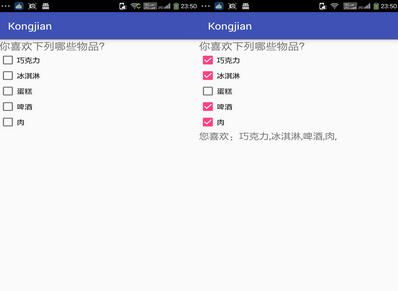
2. Java 檔:讓 Activity 實作 OnCheckedChangeListener,任何一個 CheckBox 狀態變化時都重新彙整已勾選的項目並顯示。
public class CheckChoose extends AppCompatActivity implements CompoundButton.OnCheckedChangeListener { private CheckBox cb1,cb2,cb3,cb4,cb5; private TextView tv; @Override protected void onCreate(Bundle savedInstanceState) { super.onCreate(savedInstanceState); setContentView(R.layout.check_choose); tv= (TextView) this.findViewById(R.id.tv); cb1= (CheckBox) this.findViewById(R.id.cb1); cb2= (CheckBox) this.findViewById(R.id.cb2); cb3= (CheckBox) this.findViewById(R.id.cb3); cb4= (CheckBox) this.findViewById(R.id.cb4); cb5= (CheckBox) this.findViewById(R.id.cb5); cb1.setOnCheckedChangeListener(this); cb2.setOnCheckedChangeListener(this); cb3.setOnCheckedChangeListener(this); cb4.setOnCheckedChangeListener(this); cb5.setOnCheckedChangeListener(this); } @Override public void onCheckedChanged(CompoundButton buttonView, boolean isChecked) { String str="您喜歡:"; if(cb1.isChecked()){ str+=cb1.getText()+","; } if(cb2.isChecked()){ str+=cb2.getText()+","; } if(cb3.isChecked()){ str+=cb3.getText()+","; } if(cb4.isChecked()){ str+=cb4.getText()+","; } if(cb5.isChecked()){ str+=cb5.getText()+","; } tv.setText(str); } }
效果圖:
以上就是本文的全部內容,涵蓋了 RadioGroup 單選與 CheckBox 多選兩種常見交互的實現,希望對大家學習 Android 軟體編程有所幫助。
 微信怎麼投訴微商賣家?微信怎麼投訴好友
微信投訴微商與不良好友的方法 若微信好友發送廣告、垃圾信息或詐騙內容,可在刪除前先進行投訴舉報。 進入對方資料頁,在頁面底部找到投訴入口。 根據實際情況選擇投訴原因,
 Android App 性能優化實務:UI 流暢度與內存治理
高性能是每個開發者的追求,也是用戶最基本的期待。這篇文章把 App 優化拆成兩條主線來談:UI 繪製效率與內存管理。 一、UI 優化 UI 優化的核心是提高繪製效率——減
 Android 開發架構 MVP 模式的思考與實踐
什麼是 MVP? View 層:負責展示數據並對用戶行為做出反饋。在 Android 平台上,它可以對應 Activity、Fragment、View 或對話框。 Mo
 Unity 靜態 Cubemap 教學:建立、渲染與在 Shader 中使用
前言 在 Unity 中,反射效果常使用 Cubemap 立方體貼圖來實作。Cubemap 由六張貼圖組成,可模擬環境反射。靜態 Cubemap 是提前生成好的環境貼圖,